
Flux.2 Klein 9B UPDATE - SEE VERSION DETAILS
QWEN IMAGE EDIT v2511 UPDATE - SEE VERSION DETAILS
Firstly, this is a concept that Qwen Image Edit (and Flux.2 Klein 9B) can do already, kind of. It's pretty good at Outpainting by using the prompt Remove the white parts. You can even add a context image, but for Qwen Image Edit it's not great/doesn't work the best. Look at the examples for ideas of what it can help with. This was trained exclusively on photos, but seems to work for anime as well. Trained using Runpod with help from the Ostris Tutorial Here.
Suggested prompt for all uses: Remove the white parts, use the image for context.
For Uncropping/Outpainting: The intended purpose is to take a cropped image, expand the canvas size higher than the actual image and fill it with white. Use that as Image 1.
Use the image of the persons head as Image 2. I suggest an image of a head that cropped to a square. Maybe rotate it so it makes sense if it were transferred onto Image 1 directly.
If the image quality or even backgrounds are too different between the two images you may need to add additional context like hair color, location, etc, but less details is better in my experience. If you'd like a more unified quality, I had success using this with this Upscale LoRa. You could try other colors but I have not tested with/trained on anything but white.
For Inpainting: You can use photoshop or the white paint from the built in Comfyui Mask Editor, see the below example: 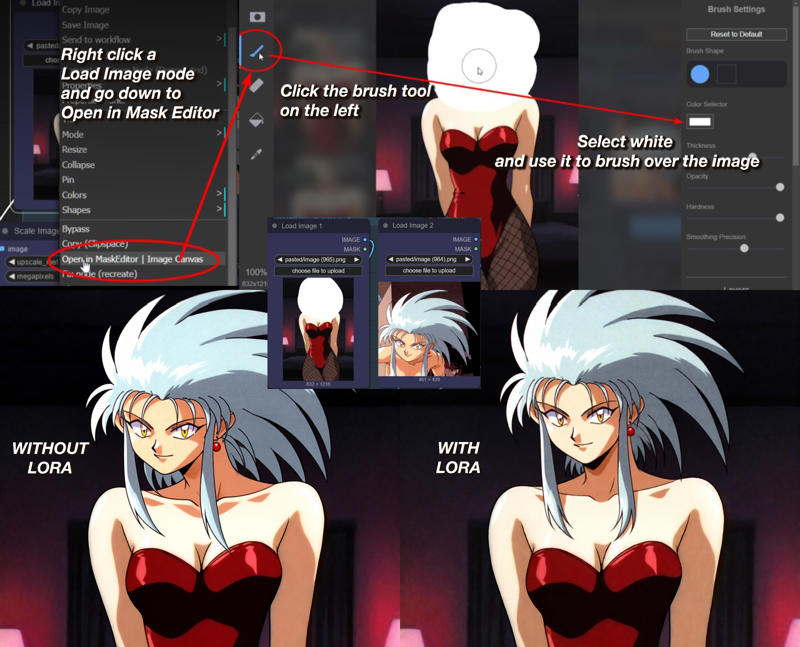
Description
v2511 UPDATE!
Trained using Runpod with mostly same dataset as before. This version works quite well, it even removes the weird high contrastyness that 2511 seems to be doing for some reason? You can see in the examples. I'm using the official Comfyui 2511 Workflow however I did merge most of the example images with my workflow (you're welcome) that uses the 2511 fp8 lightning model.
Suggested tags: Remove the white parts, use the image for context. - seems to be more nitpicky about this - with 2511 if I say "use the image on the right" it tries to add the person in 2nd image into the right side of the 1st image, also may have to mention the location to prevent the 2nd images background being blended in.
Suggested Sampler: I'm torn between er_sde and sa_solver for samplers, if one doesn't work the way I like it, the other will in my experience.
FAQ
Comments (15)
damn, this is unbelievably good
It works fine, but there's image degradation. This doesn't happen when I bypass Lora in the same workflow. Is there anything else I can try?
Yeah, I am on same boat. Original image's quality degrades too much but interestingly added image is fine and you you have high res head with low res body.
I notice more image degradation when I use multiple LoRAs, or at higher LoRA strength. If you're noticing it at base strength with suggested prompt, could try lowering the lora strength or CFG.
Loved the first version, I hope 2511 is even better! Thanks for your efforts!
I works better if you prompt like “replace the full head in image1 with image2” , it gives very good results.
I like it! After some testing, this prompt works even better with my LoRA enabled, so telling people not to use my LoRA in my comments section isn't the nicest thing to do, but your prompt is actually quite nice, especially in tandem with my LoRA!
@cranpeach I'm apologize, I didn't mean that. I'll edit my comment to clear things up
是否应该包含 LORA 提示?
@ranting6383 虽然不使用 LORA 提示词也能完成任务,但我建议尝试几种不同的方法。例如:“remove the white parts, replace the full head in image1 with image2”
I am getting second character spawning along changing head.
I've seen this happen as well. I mentioned it in the version details. 2511 has its quirks. There's a head swap prompt in the comments here that may work better.
Which scheduler should I use?
I used Beta
Thanks, your LoRA works very well.