
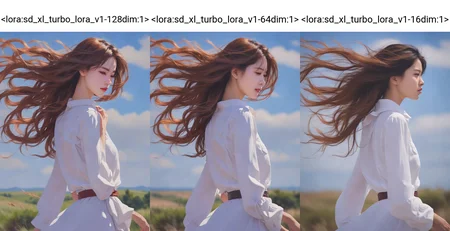
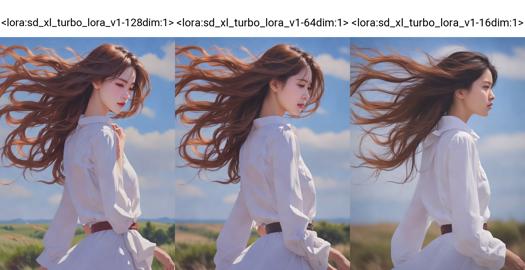
v1: 128 dim
v1-64dim: half dimension, similar quality
v1-16dim: 94MB, similar quality(but different results in some prompts... I suggest the 128 dim or 64 dim version, but if you have a gpu with 6 GB vram try this version)
LoRA based on sdxl turbo, you can use the TURBO with any stable diffusion xl checkpoint, few seconds = 1 image(3 seconds with a nvidia rtx 3060 12 GB with 1024x768 resolution)
---
If you want to support me, check out my Patreon: https://www.patreon.com/Shiroppo
Follow Me on Twitter/X: https://x.com/ShiroppoTwit
Pixiv: https://www.pixiv.net/users/96490888
---
Tested on webui 1111 v1.6.0
Tested on ComfyUI v1754 [777f6b15]: workflow --download here--
(new version of workflow November 30, 2023 remove strange violet fog, keep sgm_uniform as scheduler and you can use every sampler)
1-Select your favourite stable diffusion xl checkpoint
2-Download this LoRA, use my workflow for ComfyUI or any workflow with LoRA loader
For webui 1111 write in the prompt <lora:sd_xl_turbo_lora_v1:1>
3-Sampling method on webui 1111: LCM(install animatediff extension if you don't see it in sampling list)
Sampling method on ComfyUI: all, with the workflow of November 30, 2023
4-CFG Scale: from 1 to 2.5
5-Sampling steps: 4+
Hugginface page: https://huggingface.co/shiroppo/sd_xl_turbo_lora
Description
94MB, similar quality(but different results in some prompts)
FAQ
Comments (28)
Can you make lora from sd 2.1 turbo model, please. https://huggingface.co/stabilityai/sd-turbo
Thanks for alerting me, but I think it will take many hours, it keeps giving me error.... @_@
Can we have similar thing with sd 1.5 from this model?
https://huggingface.co/XCLiu/2_rectified_flow_from_sd_1_5
May I ask how to train turbo's Lora? Can we use kohya-ss to train sdxl-lora by selecting the base membrane as sdxl-turbo, or do we need other separate methods?
I haven't tried it yet.
Another method(that I have tried successfully) is to create a normal sd xl LoRA and then merge it with the turbo LoRA with the "Merge Lora" tab of kohya-ss
You must select:
SDXL model: checked
SD Model: empty
LoRA model "A": your sdxl LoRA
LoRA model "B": this turbo LoRA
Model A merge ratio: 0.5
Model B merge ratio: 0.5
Merge precision: fp16
Save precision: fp16
Save to: YOUR_SAVE_PATH.safetensors
Great work. Would you mind adding a paragraph how you trained this lora based on sdxl turbo? I did not quite get it even after going through all the comments.
You have to go to Koyha_ss, Utilities, LoRA, Extract LoRA and:
Optimized model: YOUR_PATH/sd_xl_turbo_1.0.safetensors
Stable Diffusion base model: YOUR_PATH/sd_xl_base_1.0.safetensors
Save to: YOUR_PATH/Lora/sd_xl_turbo_lora_v1.safetensors
Clamp Quantile: 1
Minimum Difference: 0.01
SDXL: checked
Device: CUDA
Network Dimension (Rank): and Conv Dimension (Rank):
You have to go by trial and error, "rank 128 with conv 128" and "rank 128 with conv 64" have a higher MB weight but the quality of the final product is definitely higher.
Click on Extract LoRA model and wait about 1 minute.
"SDXL Turbo" is trained in 512x512 and if you generate 1024x1024 images they come out deformed. My question is:
If i use this "Lora Turbo" with a "SDXL Base" model, can i generate images in 1024x1024 or only in 512x512?
I made some try in the past weeks 512x512 and similars(512x768, 768x512) are the best images dim for this LoRA.
I hope in a future turbo checkpoint trained on 1024x1024.
what does "keep sgm_uniform as scheduler" mean? That must be a ComfyUI setting. Can anyone translate that into A1111 webui speak? :D
In ComfyUI there are six schedulers: normal, karras, exponential, sgm_uniform, simple and ddim_uniform... In webui 1111(latest version 1.7.0) sgm_uniform is not present... I hope for a future update.
ah, ok, thanks. well, at least we get polyexponential and you don't. na-na ;)
the 16 dim is being listed as SD 1.5, not XL turbo, is that right?
It SHOULD be listed as SDXL.
Guys i use A1111, but i have a doubt about this, when i use hires fix the creation take a lot of time.
What i'm doing wrong to have this fast generation?
With hi-res fix you increase the occupied vram... if your gpu have 8 gb or less vram you easily risk filling it up completely and thus slowing down image creation by a lot
Also, if your Hires.fix steps are set at 0, it will do as many steps as the normal generation, which you don't need. Set the steps to anything between 10 and 20, it should look fine and be faster.
@shiroppo Slowing it down is the positive outcome, Generally for me if the Vram tops out, it just crashes out of the creation..
Using the Lora with 0.8 weight works really well with:
Steps: 5, Sampler: DPM++ SDE Karras, CFG scale: 3
Thanks very much for making this.
⭐⭐⭐⭐⭐
Hello! Impressive work! May I know how do you train lora on sdxl turbo? Is it the same as training lora on SDXL? Thanks!
I haven't tried it yet.
Another method(that I have tried successfully) is to create a normal sd xl LoRA and then merge it with this turbo LoRA with the "Merge Lora" tab of kohya-ss
You must select:
SDXL model: checked
SD Model: empty
LoRA model "A": your sdxl LoRA
LoRA model "B": this turbo LoRA
Model A merge ratio: 0.5
Model B merge ratio: 0.5
Merge precision: fp16
Save precision: fp16
Save to: YOUR_SAVE_PATH.safetensors
Results example, my turbo model(shiny_style_xl_turbo): https://civitai.com/models/230587/shinystylexlturbo
What is meant by 128, 64, and 16 dim?
From: https://education.civitai.com/lora-training-glossary/
Dim: This setting affects the “power” of the model in displaying the concepts trained within. Higher values result in a larger LoRA and more training time, but may capture the element to be trained with better fidelity.
"So higher dim = better quality but larger file size"
Today, an NSFW License Restriction Notice suddenly appeared, and images with an R rating or higher using this model were rejected. Please check if this is a simple error or if you have set this yourself.
The cause was discovered to be a new user policy update, which also applies to the LCM model.
Civitai fault, the 3 LoRAs are marked as sfw in the options
kill0825 This isn't "the LCM lora"
this is:
https://civitai.com/models/195519/lcm-lora-weights-stable-diffusion-acceleration-module
Will it generate faster even with Illustrious?