










Z-Image – Easy Text-to-Image Workflow (With optional LoRA support)
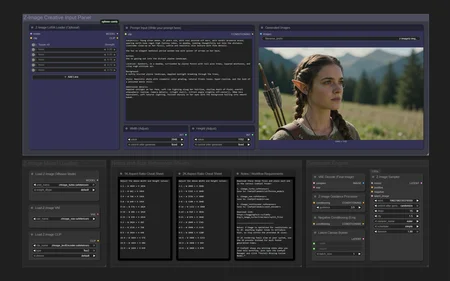
This workflow is built to be clean, simple, and extremely easy to use while still giving you everything you need for high-quality Z-Image generations. The layout is organized so clearly that you can see the entire process at a glance — prompt → settings → generate. No clutter, no wandering around the canvas.
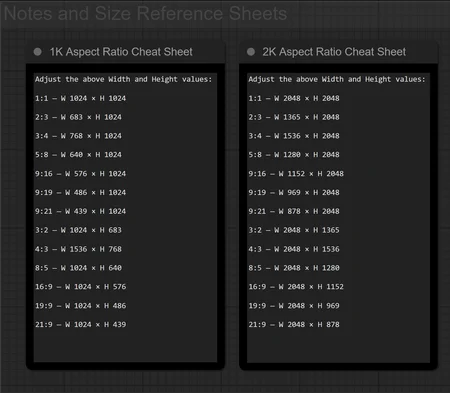
It also includes an optional LoRA loader for character consistency or style variations, along with a built-in 1K and 2K aspect-ratio reference sheet so you can quickly type in the exact resolution you want without hunting for numbers.
Z-Image is optimized for resolutions up to 2K. Anything higher tends to soften, so the workflow includes a full list of recommended 2K and 1K sizes for easy copy-over.
On an RTX 4090 (24GB VRAM), it performs extremely fast:
• 1K images: typically under 30 seconds
• 2K images: usually under 1 minute
If you want a clean, no-nonsense Z-Image setup that has everything laid out clearly and compactly, this workflow keeps generation simple, predictable, and fast.
Workflow Requirements
zImage_turbo.safetensors
Save to: ComfyUI\models\diffusion_modelszImage_vae.safetensors
Save to: ComfyUI\models\vaezImage_textEncoder.safetensors
Save to: ComfyUI\models\text_encoders
Download link:
https://huggingface.co/Comfy-Org/z_image_turbo/tree/main/split_files
Note:
If ComfyUI shows missing nodes, open the ComfyUI Manager and click “Install Missing Custom Nodes.”
Description
Version 1.0 – Primary Release
Fully cleaned and organized Z-Image text-to-image workflow
Extremely easy-to-read layout with clear left-to-right flow
Added 1K and 2K aspect-ratio reference sheets directly in the workflow
Includes optional LoRA loader for character consistency or style control
Optimized sampler + settings for fast runtime
Includes complete model loader stack (UNET, VAE, CLIP) with folder placement instructions
Clean, stable, beginner-friendly starting point for Z-Image generation
FAQ
Comments (6)
Just says tuple index out of range for me
That error almost always means ComfyUI or one of the custom nodes is out of date. It happens when a dropdown or model list in the workflow points to an index your setup doesn’t have. Just update ComfyUI and all your custom nodes and it should run fine.
Great, only problem is that I'm struggling to generate images more visually pleasing than the workflow arrangement
I don't know if it makes any difference, but as far as I understand, ZIMAGE's clip should be set to Lumina2, but in this workflow it's set to Flux2.
I think he was supposed to have it default to qwen_image. But I saw no difference either way.
Great layout. Very easy to set up. That LORA loader is going to save me a lot of time. My only complaint is that this doesn't have an upscaler, but I was able to add my own.