


 ⚡ QWEN3-VL Image 2 Prompt Workflow ⚡
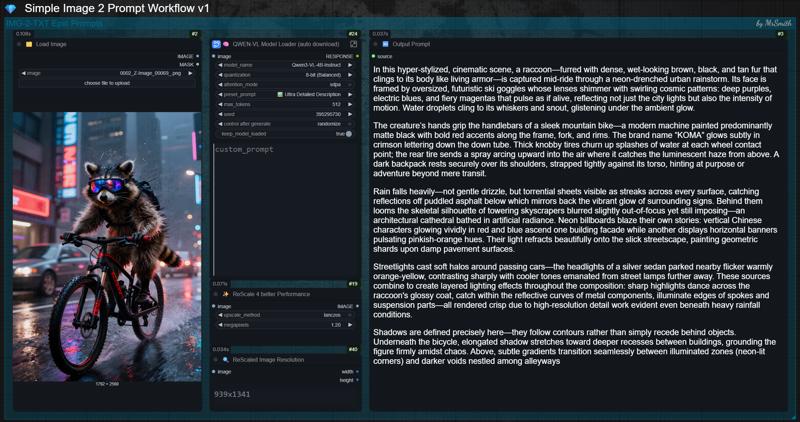
Simple IMG-2-TXT WF for epic prompts in natuaral language for Flux, Qwen, Z-Image and many more models.
This workflow solves the frustrating problem of lost or hidden prompts. 👌
✨ What is it good for? (Use Cases)
You find an image on the web that inspires you, and want to recreate it, either partially or completely.
You see an appealing image right here on CivitAI, and are interested in the prompt, but the Creator decided to hide it.
You want to regenerate one of your older creations, but no longer have the original prompt.
In all these cases, simply drag the image into the workflow, and it will spit out a detailed, high-quality prompt that, in most cases, leads to an identical result. Depending on the image and prompt complexity, the results are often even better.
🚀 What do you need to get started right away?
This Workflow - just download it, unzip the file and load the *.json into ComfyUI
No manual model download required. The selected model will be downloaded automatically.
❓ Do I need some special nodes to run this workflow?
All nodes used in this workflow are common nodes that should already be installed in your ComfyUI setup. If ComfyUI reports a missing node, simply install it via ComfyUI Manager and restart.
Custom nodes used in this workflow:
💡 Usage:
Drop or load your desired image into the workflow.
Select your Qwen3VL model from the drop down menu. It will be automatically downloaded on the first run. Because of this the initial run will take a little longer. You can check the download progress in the console.
Choose the QwenVL model depending on your GPU (VRAM size). Iam using the Qwen3-VL-4B-Instruct model on my 16GB Card and it just works fine and provides really great prompts.
Do not use the 32B models unless you enjoy watching your GPU try to escape through the nearest window. 😉
Choose your desired "preset_prompt". Ultra Detailed or Cinematic works very well in most cases.
Quantization? Just use 8-bit. 16-bit only slows down processing without improving results. You can also try 4-bit. For some setups, this can be faster.
Ready to go! Just hit "RUN"!
⬇️ Manual Download Model Files:
If you prefer to download the model manually you can find the different versions on Huggingface. Just place them in the /models/LLM/Qwen-VL/ directory.
❓ Why the ReScale Image Node?
Larger images take longer to process. To improve performance, the node automatically downsizes large images to 1.2 MP. You can reduce the resolution further if the results remain acceptable, which will speed up processing even more.
With low-resolution images, the situation is reversed. They process quickly, but depending on the resolution, there may not be enough image information available. In such cases, the image is upscaled to 1.2 MP to ensure sufficient pixels for proper analysis.
❓ Why Qwen3-VL instead of Florence2?
I have extensively tested and compared both models. In my opinion, Qwen-VL delivers superior results. It provides more versatile options and generates prompts that I find to be significantly closer to the source image's composition than those produced by Florence2.
Qwen3-VL is highly regarded for its strong understanding of artistic styles, photorealism, lighting and complex compositions. This results in production-ready prompts that can be used immediately with advanced natural language models such as Flux, Z-Image, Qwen and similar models.
If you have ideas for optimization / new feature requests or just wanna say "thanks" feel free to leave a post in the comment section. If you have questions about this workflow, feel free to reach out to me on Discord anytime!
💕 Don't forget to spread some love - hit the like button and follow me (also on Ko-Fi) to not miss any new updates and more workflows like this one! 👍
If you like these workflows you can also buy me a coffee! ☕
Have fun and feel free to post your generated images in the gallery below! I would like to see what you do with this workflow!😊
Description
Prompt Hunter v1 🔥
Simple Image 2 Text Workflow for your Epic Prompts 🚀
This workflow solves the frustrating problem of lost or hidden prompts ✨
🔍 Detailed instructions in workflow description!
FAQ
Comments (10)
"You can also try out 4-bit. Maybe this is enough for you. 4-bit is faster."
The note on Github explains why it's actually slower.
@GlowingGuardianGirl Yes, i've also read that. But they wrote "on some systems". For me it's a bit faster. Iam using a RTX 5070TI. But i prefer to use the 8-bit version. This is the perfect compromise. But i've edited the note to "...can be faster". 🙂
Thank you for this workflow, it's very useful.
@Annamae Thanks! Glad you like it. Wish ya a happy new year. 🙂
qwenvl is not working nor it is autodownloading
You are the first one (after 600 downloads) who is complaining that its not auto downloading. For sure it is! Check your console log.
And if not - where is the problem to download it manually? 😉
我是第二个:ValueError: Cannot use apply_chat_template because this processor does not have a chat template.
File "D:\ComfyUI_portable\ComfyUI\execution.py", line 534, in execute
output_data, output_ui, has_subgraph, has_pending_tasks = await get_output_data(prompt_id, unique_id, obj, input_data_all, execution_block_cb=execution_block_cb, pre_execute_cb=pre_execute_cb, v3_data=v3_data)
^^^^^^^^^^^^^^^^^^^^^^^^^^^^^^^^^^^^^^^^^^^^^^^^^^^^^^^^^^^^^^^^^^^^^^^^^^^^^^^^^^^^^^^^^^^^^^^^^^^^^^^^^^^^^^^^^^^^^^^^^^^^^^^^^^^^^^^^^^^^^^^^^^^^^^^
File "D:\ComfyUI_portable\ComfyUI\execution.py", line 334, in get_output_data
return_values = await asyncmap_node_over_list(prompt_id, unique_id, obj, input_data_all, obj.FUNCTION, allow_interrupt=True, execution_block_cb=execution_block_cb, pre_execute_cb=pre_execute_cb, v3_data=v3_data)
^^^^^^^^^^^^^^^^^^^^^^^^^^^^^^^^^^^^^^^^^^^^^^^^^^^^^^^^^^^^^^^^^^^^^^^^^^^^^^^^^^^^^^^^^^^^^^^^^^^^^^^^^^^^^^^^^^^^^^^^^^^^^^^^^^^^^^^^^^^^^^^^^^^^^^^^^^^^^^^^^^^^^^^^^^^^^^^^^^^^^^^^^^^^^^^^^^^^^
File "D:\ComfyUI_portable\ComfyUI\custom_nodes\comfyui-lora-manager\py\metadata_collector\metadata_hook.py", line 171, in async_map_node_over_list_with_metadata
results = await original_map_node_over_list(
^^^^^^^^^^^^^^^^^^^^^^^^^^^^^^^^^^
...<2 lines>...
)
^
File "D:\ComfyUI_portable\ComfyUI\execution.py", line 308, in asyncmap_node_over_list
await process_inputs(input_dict, i)
File "D:\ComfyUI_portable\ComfyUI\execution.py", line 296, in process_inputs
result = f(**inputs)
File "D:\ComfyUI_portable\ComfyUI\custom_nodes\ComfyUI-QwenVL\AILab_QwenVL.py", line 890, in process
return self.run(model_name, quantization, preset_prompt, custom_prompt, image, video, 16, max_tokens, 0.6, 0.9, 1, 1.2, seed, keep_model_loaded, attention_mode, False, "auto")
~~~~~~~~^^^^^^^^^^^^^^^^^^^^^^^^^^^^^^^^^^^^^^^^^^^^^^^^^^^^^^^^^^^^^^^^^^^^^^^^^^^^^^^^^^^^^^^^^^^^^^^^^^^^^^^^^^^^^^^^^^^^^^^^^^^^^^^^^^^^^^^^^^^^^^^^^^^^^^^^^^^^^^^^
File "D:\ComfyUI_portable\ComfyUI\custom_nodes\ComfyUI-QwenVL\AILab_QwenVL.py", line 840, in run
text = self.generate(
prompt,
...<7 lines>...
repetition_penalty,
)
File "D:\ComfyUI_portable\python_embeded\Lib\site-packages\torch\utils\_contextlib.py", line 124, in decorate_context
return func(*args, **kwargs)
File "D:\ComfyUI_portable\ComfyUI\custom_nodes\ComfyUI-QwenVL\AILab_QwenVL.py", line 786, in generate
chat = self.processor.apply_chat_template(conversation, tokenize=False, add_generation_prompt=True)
File "D:\ComfyUI_portable\python_embeded\Lib\site-packages\transformers\processing_utils.py", line 1718, in apply_chat_template
raise ValueError(
"Cannot use apply_chat_template because this processor does not have a chat template."
)
手动下载的还是报错:setup plugin alembic.autogenerate.schemas
setup plugin alembic.autogenerate.tables
setup plugin alembic.autogenerate.types
setup plugin alembic.autogenerate.constraints
setup plugin alembic.autogenerate.defaults
setup plugin alembic.autogenerate.comments
[START] Security scan
[DONE] Security scan
## ComfyUI-Manager: installing dependencies done.
** ComfyUI startup time: 2026-07-02 19:34:01.761
** Platform: Windows
** Python version: 3.13.12 (tags/v3.13.12:1cbe481, Feb 3 2026, 18:22:25) [MSC v.1944 64 bit (AMD64)]
** Python executable: D:\ComfyUI_portable\python_embeded\python.exe
** ComfyUI Path: D:\ComfyUI_portable\ComfyUI
** ComfyUI Base Folder Path: D:\ComfyUI_portable\ComfyUI
** User directory: D:\ComfyUI_portable\ComfyUI\user
** ComfyUI-Manager config path: D:\ComfyUI_portable\ComfyUI\user\__manager\config.ini
** Log path: D:\ComfyUI_portable\ComfyUI\user\comfyui.log
Prestartup times for custom nodes:
0.0 seconds: D:\ComfyUI_portable\ComfyUI\custom_nodes\rgthree-comfy
0.0 seconds: D:\ComfyUI_portable\ComfyUI\custom_nodes\ComfyUI-Easy-Use
4.5 seconds: D:\ComfyUI_portable\ComfyUI\custom_nodes\ComfyUI-Manager
D:\ComfyUI_portable\python_embeded\Lib\site-packages\torch\cuda\__init__.py:61: FutureWarning: The pynvml package is deprecated. Please install nvidia-ml-py instead. If you did not install pynvml directly, please report this to the maintainers of the package that installed pynvml for you.
import pynvml # type: ignore[import]
Found comfy_kitchen backend triton: {'available': False, 'disabled': True, 'unavailable_reason': "ImportError: No module named 'triton'", 'capabilities': []}
Found comfy_kitchen backend eager: {'available': True, 'disabled': False, 'unavailable_reason': None, 'capabilities': ['apply_rope', 'apply_rope1', 'dequantize_mxfp8', 'dequantize_nvfp4', 'dequantize_per_tensor_fp8', 'quantize_mxfp8', 'quantize_nvfp4', 'quantize_per_tensor_fp8', 'scaled_mm_mxfp8', 'scaled_mm_nvfp4']}
Found comfy_kitchen backend cuda: {'available': True, 'disabled': False, 'unavailable_reason': None, 'capabilities': ['apply_rope', 'apply_rope1', 'dequantize_nvfp4', 'dequantize_per_tensor_fp8', 'quantize_mxfp8', 'quantize_nvfp4', 'quantize_per_tensor_fp8', 'scaled_mm_nvfp4']}
Checkpoint files will always be loaded safely.
Total VRAM 16380 MB, total RAM 65455 MB
pytorch version: 2.11.0+cu130
Enabled fp16 accumulation.
Set vram state to: NORMAL_VRAM
Device: cuda:0 NVIDIA GeForce RTX 4060 Ti : native
Using async weight offloading with 2 streams
Enabled pinned memory 26182.0
Using pytorch attention
DynamicVRAM support detected and enabled
Python version: 3.13.12 (tags/v3.13.12:1cbe481, Feb 3 2026, 18:22:25) [MSC v.1944 64 bit (AMD64)]
ComfyUI version: 0.20.1
comfy-aimdo version: 0.2.14
comfy-kitchen version: 0.2.8
ComfyUI frontend version: 1.42.15
[Prompt Server] web root: D:\ComfyUI_portable\python_embeded\Lib\site-packages\comfyui_frontend_package\static
Asset seeder disabled
[Crystools INFO] Crystools version: 1.27.4
[Crystools INFO] Platform release: 10
[Crystools INFO] JETSON: Not detected.
[Crystools INFO] CPU: Intel(R) Xeon(R) CPU E5-2680 v2 @ 2.80GHz - Arch: AMD64 - OS: Windows 10
[Crystools INFO] pynvml (NVIDIA) initialized.
[Crystools INFO] GPU/s:
[Crystools INFO] 0) NVIDIA GeForce GTX 1080 Ti
[Crystools INFO] 1) NVIDIA GeForce RTX 4060 Ti
[Crystools INFO] NVIDIA Driver: 581.57
W0702 19:34:18.266000 11484 Lib\site-packages\torch\utils\flop_counter.py:29] triton not found; flop counting will not work for triton kernels
[ComfyUI-Easy-Use] server: v1.3.7 Loaded
[ComfyUI-Easy-Use] web root: D:\ComfyUI_portable\ComfyUI\custom_nodes\ComfyUI-Easy-Use\web_version/v2 Loaded
Registered blueprint: gpu_usage_bp
[CCTech Suite]: 🤖🤖🤖 Clickity-clackity! 🤖🤖🤖
[CCTech Suite]: Activated 1 server nodes.
ComfyUI-GGUF: Allowing full torch compile
[LoRA-Manager] Added path mapping: E:/models/loras -> D:/ComfyUI_portable/ComfyUI/models/loras
[LoRA-Manager] Found LoRA roots:
- D:/ComfyUI_portable/ComfyUI/models/loras
[LoRA-Manager] Added path mapping: E:/models/checkpoints -> D:/ComfyUI_portable/ComfyUI/models/checkpoints
[LoRA-Manager] Added path mapping: E:/models/diffusion_models -> D:/ComfyUI_portable/ComfyUI/models/diffusion_models
[LoRA-Manager] Added path mapping: E:/models/unet -> D:/ComfyUI_portable/ComfyUI/models/unet
[LoRA-Manager] Found checkpoint roots:
- D:/ComfyUI_portable/ComfyUI/models/checkpoints
- D:/ComfyUI_portable/ComfyUI/models/diffusion_models
- D:/ComfyUI_portable/ComfyUI/models/unet
[LoRA-Manager] Added path mapping: E:/models/embeddings -> D:/ComfyUI_portable/ComfyUI/models/embeddings
[LoRA-Manager] Found embedding roots:
- D:/ComfyUI_portable/ComfyUI/models/embeddings
[LoRA-Manager] Symlink cache loaded with 0 mappings
[LoRA-Manager] Symlink mappings restored from cache in 1.90 ms
[LoRA-Manager] Updated 'comfyui' library with current folder paths
[LoRA-Manager] Detected async ComfyUI execution, installing async metadata hooks
[LoRA-Manager] Metadata collection hooks installed for runtime values
[LoRA-Manager] ComfyUI Metadata Collector initialized
[LoRA-Manager] Example images path:
[LoRA-Manager] Added static route for locales: /locales -> D:\ComfyUI_portable\ComfyUI\custom_nodes\comfyui-lora-manager\locales
### Loading: ComfyUI-Manager (V3.40)
[ComfyUI-Manager] network_mode: public
[ComfyUI-Manager] ComfyUI per-queue preview override detected (PR #11261). Manager's preview method feature is disabled. Use ComfyUI's --preview-method CLI option or 'Settings > Execution > Live preview method'.
### ComfyUI Revision: 150 [64b8457f] *DETACHED | Released on '2026-04-27'
* Serving Flask app 'Elegant Resource Monitor'
* Debug mode: off
[ComfyUI-Manager] default cache updated: https://raw.githubusercontent.com/ltdrdata/ComfyUI-Manager/main/alter-list.json
[ComfyUI-Manager] default cache updated: https://raw.githubusercontent.com/ltdrdata/ComfyUI-Manager/main/model-list.json
Error loading module AILab_QwenVL_GGUF_PromptEnhancer: No module named 'llama_cpp'
[ComfyUI-Manager] default cache updated: https://raw.githubusercontent.com/ltdrdata/ComfyUI-Manager/main/github-stats.json
[ComfyUI-Manager] default cache updated: https://raw.githubusercontent.com/ltdrdata/ComfyUI-Manager/main/extension-node-map.json
[ComfyUI-Manager] default cache updated: https://raw.githubusercontent.com/ltdrdata/ComfyUI-Manager/main/custom-node-list.json
------------------------------------------
Comfyroll Studio v1.76 : 175 Nodes Loaded
------------------------------------------
** For changes, please see patch notes at https://github.com/Suzie1/ComfyUI_Comfyroll_CustomNodes/blob/main/Patch_Notes.md
** For help, please see the wiki at https://github.com/Suzie1/ComfyUI_Comfyroll_CustomNodes/wiki
------------------------------------------
USDU batch patches applied successfully.
USDU batch patches applied successfully.
[rgthree-comfy] Loaded 48 exciting nodes. 🎉
[rgthree-comfy] ComfyUI's new Node 2.0 rendering may be incompatible with some rgthree-comfy nodes and features, breaking some rendering as well as losing the ability to access a node's properties (a vital part of many nodes). It also appears to run MUCH more slowly spiking CPU usage and causing jankiness and unresponsiveness, especially with large workflows. Personally I am not planning to use the new Nodes 2.0 and, unfortunately, am not able to invest the time to investigate and overhaul rgthree-comfy where needed. If you have issues when Nodes 2.0 is enabled, I'd urge you to switch it off as well and join me in hoping ComfyUI is not planning to deprecate the existing, stable canvas rendering all together.
Import times for custom nodes:
0.0 seconds: D:\ComfyUI_portable\ComfyUI\custom_nodes\websocket_image_save.py
0.0 seconds: D:\ComfyUI_portable\ComfyUI\custom_nodes\ComfyUI-Wan-TimeToMove
0.0 seconds: D:\ComfyUI_portable\ComfyUI\custom_nodes\ComfyUI-TiledDiffusion
0.0 seconds: D:\ComfyUI_portable\ComfyUI\custom_nodes\ComfyUI-GGUF
0.0 seconds: D:\ComfyUI_portable\ComfyUI\custom_nodes\ComfyUI-Wan22FMLF
0.0 seconds: D:\ComfyUI_portable\ComfyUI\custom_nodes\ComfyUI-VFI
0.0 seconds: D:\ComfyUI_portable\ComfyUI\custom_nodes\ComfyUI-Custom-Scripts
0.0 seconds: D:\ComfyUI_portable\ComfyUI\custom_nodes\comfyui-image-saver
0.0 seconds: D:\ComfyUI_portable\ComfyUI\custom_nodes\ComfyUI-Frame-Interpolation
0.0 seconds: D:\ComfyUI_portable\ComfyUI\custom_nodes\ComfyUI-QwenVL
0.0 seconds: D:\ComfyUI_portable\ComfyUI\custom_nodes\comfyui_ultimatesdupscale
0.0 seconds: D:\ComfyUI_portable\ComfyUI\custom_nodes\rgthree-comfy
0.0 seconds: D:\ComfyUI_portable\ComfyUI\custom_nodes\ComfyUI-KJNodes
0.1 seconds: D:\ComfyUI_portable\ComfyUI\custom_nodes\ComfyUI-VideoHelperSuite
0.1 seconds: D:\ComfyUI_portable\ComfyUI\custom_nodes\ComfyUI-Crystools
0.2 seconds: D:\ComfyUI_portable\ComfyUI\custom_nodes\ComfyUI-Manager
0.2 seconds: D:\ComfyUI_portable\ComfyUI\custom_nodes\ComfyUI-S3-IO
0.3 seconds: D:\ComfyUI_portable\ComfyUI\custom_nodes\ComfyUI_StarNodes
0.3 seconds: D:\ComfyUI_portable\ComfyUI\custom_nodes\comfyui-lora-manager
0.6 seconds: D:\ComfyUI_portable\ComfyUI\custom_nodes\comfyui-elegant-resource-monitor
1.0 seconds: D:\ComfyUI_portable\ComfyUI\custom_nodes\comfyui-mmaudio
1.5 seconds: D:\ComfyUI_portable\ComfyUI\custom_nodes\ComfyUI_Comfyroll_CustomNodes
5.0 seconds: D:\ComfyUI_portable\ComfyUI\custom_nodes\ComfyUI-Easy-Use
Context impl SQLiteImpl.
Will assume non-transactional DDL.
Starting server
To see the GUI go to: http://127.0.0.1:8166
[LoRA-Manager] Lora cache hydrated from persisted snapshot with 64 models
[LoRA-Manager] Checkpoint cache hydrated from persisted snapshot with 18 models
[LoRA-Manager] Recipe cache miss: performing full directory scan
[LoRA-Manager] Recipe cache initialized in 0.01 seconds. Found 0 recipes
[LoRA-Manager] Embedding cache initialized in 0.00 seconds. Found 0 models
[LoRA-Manager] FTS index validated, reusing existing index with 0 recipes
FETCH ComfyRegistry Data: 5/158
FETCH ComfyRegistry Data: 10/158
FETCH ComfyRegistry Data: 15/158
FETCH ComfyRegistry Data: 20/158
FETCH ComfyRegistry Data: 25/158
FETCH ComfyRegistry Data: 30/158
FETCH ComfyRegistry Data: 35/158
FETCH ComfyRegistry Data: 40/158
FETCH ComfyRegistry Data: 45/158
FETCH ComfyRegistry Data: 50/158
FETCH ComfyRegistry Data: 55/158
FETCH ComfyRegistry Data: 60/158
FETCH ComfyRegistry Data: 65/158
FETCH ComfyRegistry Data: 70/158
FETCH ComfyRegistry Data: 75/158
FETCH ComfyRegistry Data: 80/158
FETCH ComfyRegistry Data: 85/158
FETCH ComfyRegistry Data: 90/158
FETCH ComfyRegistry Data: 95/158
FETCH ComfyRegistry Data: 100/158
FETCH ComfyRegistry Data: 105/158
FETCH ComfyRegistry Data: 110/158
FETCH ComfyRegistry Data: 115/158
FETCH ComfyRegistry Data: 120/158
FETCH ComfyRegistry Data: 125/158
FETCH ComfyRegistry Data: 130/158
FETCH ComfyRegistry Data: 135/158
FETCH ComfyRegistry Data: 140/158
FETCH ComfyRegistry Data: 145/158
FETCH ComfyRegistry Data: 150/158
FETCH ComfyRegistry Data: 155/158
FETCH ComfyRegistry Data [DONE]
[ComfyUI-Manager] default cache updated: https://api.comfy.org/nodes
FETCH DATA from: https://raw.githubusercontent.com/ltdrdata/ComfyUI-Manager/main/custom-node-list.json [DONE]
[ComfyUI-Manager] All startup tasks have been completed.
got prompt
[QwenVL] Node on nvidia_gpu
[QwenVL] Attention backend selected: sdpa
[QwenVL] Loading Qwen3-VL-4B-Instruct (8-bit (Balanced), attn=sdpa)
Loading weights: 35%|██████████████████████▏ Loading weights: 100%|███████████████████████████████████████████████████████████████| 713/713 [00:27<00:00, 25.64it/s]
!!! Exception during processing !!! Cannot use apply_chat_template because this processor does not have a chat template.
Traceback (most recent call last):
File "D:\ComfyUI_portable\ComfyUI\execution.py", line 534, in execute
output_data, output_ui, has_subgraph, has_pending_tasks = await get_output_data(prompt_id, unique_id, obj, input_data_all, execution_block_cb=execution_block_cb, pre_execute_cb=pre_execute_cb, v3_data=v3_data)
^^^^^^^^^^^^^^^^^^^^^^^^^^^^^^^^^^^^^^^^^^^^^^^^^^^^^^^^^^^^^^^^^^^^^^^^^^^^^^^^^^^^^^^^^^^^^^^^^^^^^^^^^^^^^^^^^^^^^^^^^^^^^^^^^^^^^^^^^^^^^^^^^^^^^^^
File "D:\ComfyUI_portable\ComfyUI\execution.py", line 334, in get_output_data
return_values = await asyncmap_node_over_list(prompt_id, unique_id, obj, input_data_all, obj.FUNCTION, allow_interrupt=True, execution_block_cb=execution_block_cb, pre_execute_cb=pre_execute_cb, v3_data=v3_data)
^^^^^^^^^^^^^^^^^^^^^^^^^^^^^^^^^^^^^^^^^^^^^^^^^^^^^^^^^^^^^^^^^^^^^^^^^^^^^^^^^^^^^^^^^^^^^^^^^^^^^^^^^^^^^^^^^^^^^^^^^^^^^^^^^^^^^^^^^^^^^^^^^^^^^^^^^^^^^^^^^^^^^^^^^^^^^^^^^^^^^^^^^^^^^^^^^^^^^
File "D:\ComfyUI_portable\ComfyUI\custom_nodes\comfyui-lora-manager\py\metadata_collector\metadata_hook.py", line 171, in async_map_node_over_list_with_metadata
results = await original_map_node_over_list(
^^^^^^^^^^^^^^^^^^^^^^^^^^^^^^^^^^
...<2 lines>...
)
^
File "D:\ComfyUI_portable\ComfyUI\execution.py", line 308, in asyncmap_node_over_list
await process_inputs(input_dict, i)
File "D:\ComfyUI_portable\ComfyUI\execution.py", line 296, in process_inputs
result = f(**inputs)
File "D:\ComfyUI_portable\ComfyUI\custom_nodes\ComfyUI-QwenVL\AILab_QwenVL.py", line 890, in process
return self.run(model_name, quantization, preset_prompt, custom_prompt, image, video, 16, max_tokens, 0.6, 0.9, 1, 1.2, seed, keep_model_loaded, attention_mode, False, "auto")
~~~~~~~~^^^^^^^^^^^^^^^^^^^^^^^^^^^^^^^^^^^^^^^^^^^^^^^^^^^^^^^^^^^^^^^^^^^^^^^^^^^^^^^^^^^^^^^^^^^^^^^^^^^^^^^^^^^^^^^^^^^^^^^^^^^^^^^^^^^^^^^^^^^^^^^^^^^^^^^^^^^^^^^^
File "D:\ComfyUI_portable\ComfyUI\custom_nodes\ComfyUI-QwenVL\AILab_QwenVL.py", line 840, in run
text = self.generate(
prompt,
...<7 lines>...
repetition_penalty,
)
File "D:\ComfyUI_portable\python_embeded\Lib\site-packages\torch\utils\_contextlib.py", line 124, in decorate_context
return func(*args, **kwargs)
File "D:\ComfyUI_portable\ComfyUI\custom_nodes\ComfyUI-QwenVL\AILab_QwenVL.py", line 786, in generate
chat = self.processor.apply_chat_template(conversation, tokenize=False, add_generation_prompt=True)
File "D:\ComfyUI_portable\python_embeded\Lib\site-packages\transformers\processing_utils.py", line 1718, in apply_chat_template
raise ValueError(
"Cannot use apply_chat_template because this processor does not have a chat template."
)
ValueError: Cannot use apply_chat_template because this processor does not have a chat template.
Prompt executed in 31.07 seconds
Works wonders, though shy of NSFW images. Still amazing piece of work. Thank you.
NICE workflow,easy2use