


A workflow for Z-Image-Turbo focused on high-quality photographic styles and ease of use.
Style Selector: Choose from eighteen customizable image styles.
Refiner: Add more photographic details by performing a second pass.
Upscaler: Increases the resolution of any generated image by 50%.
Speed Options:
7 Steps Switch: Uses fewer steps while maintaining the quality.
Smaller Image Switch: Generates images faster using a lower resolution.
Extra Options:
Sampler Switch: Easily test generation with an alternative sampler.
Landscape Switch: Change to horizontal image generation with a single click.
Spicy Impact Booster: Adds a subtle spicy condiment to the prompt.
Preconfigured workflows for each checkpoint format (GGUF / SAFETENSORS).
Includes the "Power Lora Loader" node for loading multiple LoRAs.
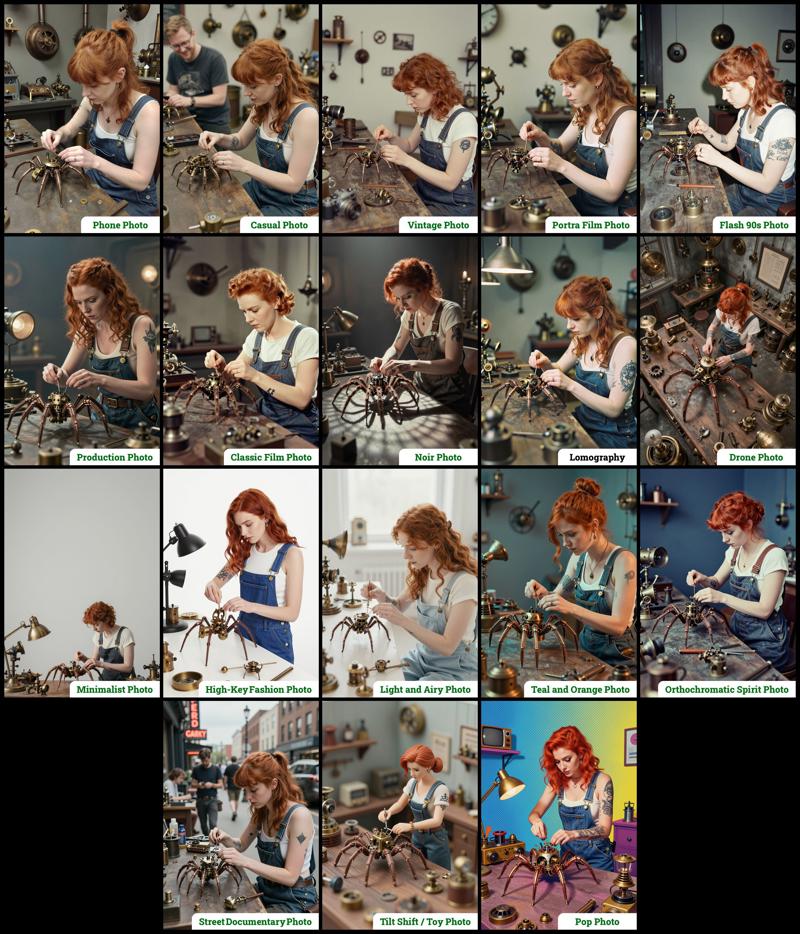 The zip contains two workflow files:
amazing-z-photo_GGUF: Recommended for GPUs with 12GB or less.
amazing-z-photo_SAFETENSORS: Based directly on the ComfyUI example.
When using ComfyUI, you may encounter debates about the best checkpoint format. From my experience, GGUF quantized models provide a better balance between size and prompt response quality compared to SafeTensors versions. However, it's worth noting that ComfyUI includes optimizations that work more efficiently with SafeTensors files, which might make them preferable for some users despite their larger size. The optimal choice depends on factors like your ComfyUI version, PyTorch setup, CUDA configuration, GPU model, and available VRAM and RAM. To help you find the best fit for your system, I've included links to various checkpoint versions below.
Required Checkpoints Files
: for "amazing-z-photo_GGUF"
z_image_turbo-Q5_K_S.gguf [5.19 GB]
local directory:ComfyUI/models/diffusion_models/Qwen3-4B.i1-Q5_K_S.gguf [2.82 GB]
local directory:ComfyUI/models/text_encoders/ae.safetensors [335 MB]
local directory:ComfyUI/models/vae/4x_foolhardy_Remacri.safetensors (for illustration refining) [66.9 MB]
local directory:ComfyUI/models/upscale_models/
: for "amazing-z-photo_SAFETENSORS"
z_image_turbo_bf16.safetensors [12.3 GB]
local directory:ComfyUI/models/diffusion_models/qwen_3_4b.safetensors [8.04 GB]
local directory:ComfyUI/models/text_encoders/ae.safetensors [335 MB]
local directory:ComfyUI/models/vae/4x_foolhardy_Remacri.safetensors (for illustration refining) [66.9 MB]
local directory:ComfyUI/models/upscale_models/
: for Version 3.x
If, for some reason, you need to use the older version 3.x, you will also require the following additional file:
4x_Nickelback_70000G.safetensors [66.9 MB]
Local Directory:ComfyUI/models/upscale_models/
Required Custom Nodes
The workflows require the following custom nodes:
(which can be installed via ComfyUI-Manager or downloaded from their repositories)
rgthree-comfy: https://github.com/rgthree/rgthree-comfy
ComfyUI-GGUF: https://github.com/city96/ComfyUI-GGUF
License
This project is licensed under the Unlicense license.
More info:
Description
This update includes the following new features and improvements:
Increased Style Options: Configurable styles have been expanded, now offering 18 options per workflow.
Refiner: Add more details to images by applying a second processing pass.
Upscaler: Enhance image resolution by up to +50% in just a few seconds.
Mode Selector: This option allows for optimizing the refiner and upscaler specifically for either Photography or Illustration.
Speed Panel: A pair of options dedicated to accelerating image generation without significant quality degradation.
Power LoRA Loader: This node is now included and connected, facilitating the loading of multiple LoRAs.
FAQ
Comments (14)
Is there a way to change the output dimensions? Amazing workflow regardless!
There's a node group that allows you to preconfigure both default and small image sizes. Here's a link to an image showing those nodes:

This is from version 4 (the nodes have evolved with each update), but in this version they're located near the center/top area.
The top two nodes set the default image size, while the bottom ones define the small size when "smaller image generation" is enabled. Just remember that the first value is for the shorter side, and the second value is for the longer side, so that the "landscape orientation" option works properly.
Thank you for your amazing words!
Doesn't work on my Macbook. I tried the GGFU workflow.
It took like 3 times longer than the normal safetensors workflow I usually use, and the result was literally just a wall of big pixels. I used the default settings, didn't change anything.
Also tried with 7 steps and smaller image, exactly the same pixelated output.
Any ideas?
Sorry to hear you're having trouble with the workflow. Just to be sure, have you tried the safetensors version, which is also included in the zip file? If not, please give that a try first.
If you've already tried the safetensors version, could you tell me what the results were like? Was it also pixelated, or did it run faster but still have issues? Knowing what happened could help me understand the problem.
I am getting grainy images with this workflow, how can I fix this? I tried changing the settings in REFINER, but I didn't have any success with that. If I turn Upscaler ON, it increases the grain even more and the image becomes rubbish. I'm using the safetensors version, are there any ways to remove the grain?
The workflow is amazing!
Well named, truly an amazing workflow. I assume you're also seeing the message: "[rgthree-comfy][Reroute] You are using rgthree-comfy reroutes with a ComfyUI Primitive node. Unfortunately, ComfyUI has removed support for this. While rgthree-comfy has a best-effort support fallback for now, it may no longer work as expected and is strongly recommended you either replace the Reroute node using ComfyUI's reroute node, or refrain from using the Primitive node (you can always use the rgthree-comfy "Power Primitive" for non-combo primitives)."
Have you looked into alternatives?
This may or not be related to this message: I find that after a few runs, it seems to go into a temporary CPU lock during Save Image (Even though it has saved the image to disk). So images that were taking 20-30 seconds (no upscaling) now take 60-120 seconds.
I'm using Comfy v0.11.0 on Ubuntu with AMD ROCm 7.2, 16Gb Vram (9070xt). I'm using the safetensors version which works fine on my rig.
I don't experience this with any other workflow, so I'm guessing it has something to do with the RGThree notice that keeps showing up in my logs.
whats the alternative sampler for?
I usually don't like these "super complex" workflows with lots of buttons because I feel it takes off a bit of my own control over the result, but the quality of the outputs is so much better that I feel ashamed of my previous tests with Z-image.
This s#it is TOP TIER. Absolutely love it. Only downside is that crashes when setting seed for randomize but at least increment works fine to add a bit of diversity to the shots though. 9/10
This is a great workflow and I'm a huge fan, thank you for this!
I did have a question for anyone who is in the know and might be able to assist.
As many of you are aware, it is possible to add some randomness/choice into zimageturbo prompts by using a prompt like, "She has {blue|yellow|purple} hair", and the colour of the person's hair will be randomly chosen between the three provided options (and differs with seed), which I thought was super cool.
I have noticed that this does NOT work with this workflow, and I was wondering if anyone knew why, or had an alternative solution to add a bit of choice/random to prompts. I'm not sure if it's due to custom samplers or something different, but if anyone has any insight or ideas, it would be greatly appreciated!
Working perfectly on my 4060, images are of great quality and they are generated quickly.
Tho, I had to change the spicy prompt because it turned men into women. Easily solved changing "woman" to "person".