


A workflow for Z-Image-Turbo focused on high-quality photographic styles and ease of use.
Style Selector: Choose from eighteen customizable image styles.
Refiner: Add more photographic details by performing a second pass.
Upscaler: Increases the resolution of any generated image by 50%.
Speed Options:
7 Steps Switch: Uses fewer steps while maintaining the quality.
Smaller Image Switch: Generates images faster using a lower resolution.
Extra Options:
Sampler Switch: Easily test generation with an alternative sampler.
Landscape Switch: Change to horizontal image generation with a single click.
Spicy Impact Booster: Adds a subtle spicy condiment to the prompt.
Preconfigured workflows for each checkpoint format (GGUF / SAFETENSORS).
Includes the "Power Lora Loader" node for loading multiple LoRAs.
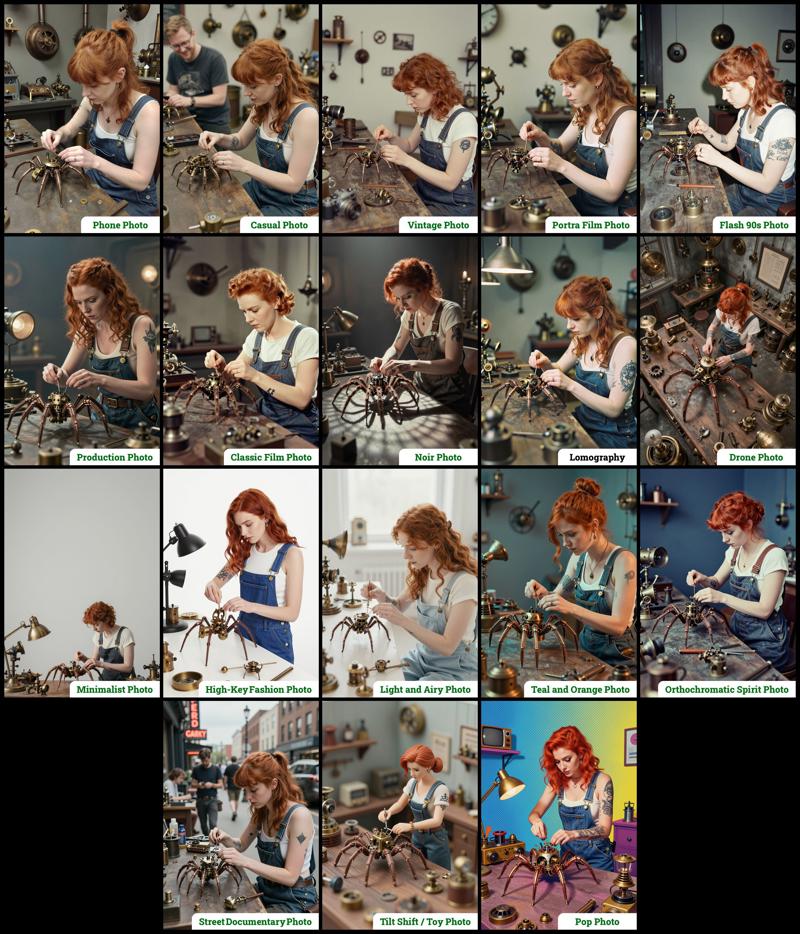 The zip contains two workflow files:
amazing-z-photo_GGUF: Recommended for GPUs with 12GB or less.
amazing-z-photo_SAFETENSORS: Based directly on the ComfyUI example.
When using ComfyUI, you may encounter debates about the best checkpoint format. From my experience, GGUF quantized models provide a better balance between size and prompt response quality compared to SafeTensors versions. However, it's worth noting that ComfyUI includes optimizations that work more efficiently with SafeTensors files, which might make them preferable for some users despite their larger size. The optimal choice depends on factors like your ComfyUI version, PyTorch setup, CUDA configuration, GPU model, and available VRAM and RAM. To help you find the best fit for your system, I've included links to various checkpoint versions below.
Required Checkpoints Files
: for "amazing-z-photo_GGUF"
z_image_turbo-Q5_K_S.gguf [5.19 GB]
local directory:ComfyUI/models/diffusion_models/Qwen3-4B.i1-Q5_K_S.gguf [2.82 GB]
local directory:ComfyUI/models/text_encoders/ae.safetensors [335 MB]
local directory:ComfyUI/models/vae/4x_foolhardy_Remacri.safetensors (for illustration refining) [66.9 MB]
local directory:ComfyUI/models/upscale_models/
: for "amazing-z-photo_SAFETENSORS"
z_image_turbo_bf16.safetensors [12.3 GB]
local directory:ComfyUI/models/diffusion_models/qwen_3_4b.safetensors [8.04 GB]
local directory:ComfyUI/models/text_encoders/ae.safetensors [335 MB]
local directory:ComfyUI/models/vae/4x_foolhardy_Remacri.safetensors (for illustration refining) [66.9 MB]
local directory:ComfyUI/models/upscale_models/
: for Version 3.x
If, for some reason, you need to use the older version 3.x, you will also require the following additional file:
4x_Nickelback_70000G.safetensors [66.9 MB]
Local Directory:ComfyUI/models/upscale_models/
Required Custom Nodes
The workflows require the following custom nodes:
(which can be installed via ComfyUI-Manager or downloaded from their repositories)
rgthree-comfy: https://github.com/rgthree/rgthree-comfy
ComfyUI-GGUF: https://github.com/city96/ComfyUI-GGUF
License
This project is licensed under the Unlicense license.
More info:
Description
This update includes the following new features and improvements:
New "Z-Image Enhancer"
experimental process performing a second quick pass to try to improve quality. Includes 4 options:none: the original untouched image
Base: performs two extra steps with z-image. (general use)
Natural: uses the first upscaler + two extra steps with z-image. (photography oriented)
Illustration: uses the second upscaler + two extra steps with z-image. (illustration oriented)
New "Spicy Impact Booster"
experimental addition of a subtle spicy condiment to the prompt.New "Smaller Image" switch.
Many of the styles in the 3 workflows were revamped to use the new "YOUR CONTEXT/YOUR PHOTO" formatting.
FAQ
Comments (14)
Looking forward to trying this out. I like how you explain what the things you used are and what they do.
Nice and clean workflow.
Is it possible to use my LORA character here?
Ho can we change the prompt?! Every time I try to change the "Prompt" box, and click 'Run' nothing happens. Is it locked or something?
Do you have any tips if we want to add our own styles to this and following "YOUR CONTEXT/YOUR PHOTO" formatting?
When using the Noir preset, the phrase "gobo‑crafted patterns" was giving me random patterned dots like a hard light source was being shot through a doily. I had to remove it. :p I am loving these presets.
its possible add power loras ?
The switches (styles and others) do not work. Some users are complaining about similar issues on Reddit. The author on github has not yet commented. I use the desktop version of windows ComfyUI with all updates. There are no errors in workflow, there are just no switches, not at all!
Hi, sorry for the slow response. That switch issue is really frustrating! Several users have reported it, and it seems to be a problem with the custom nodes themselves.
Please try the latest version of the workflow to see if that helps. If it doesn't, some users have had success by disabling "nodes 2.0" in comfyui. As a last thing to try, if you're using Edge, could you test with Chrome? It might be a visual compatibility issue with the browser.
Hopefully one of those suggestions works for you! I'd love to hear what you think of the new features in v4.0 if you get a chance to try them out.
@Photographer Hi. I checked workflow 4.0, nothing has changed, there are no switches. I do not use nodes 2.0. I have the ComfyUI version for windows 10 installed, it opens through its shell, not through the browser. I do not know what the problem is, the main thing is that I am not the only one with it.
Any quick way to include the selected style in the output filename? I looked around a bit, but didn't see an easy way yet.
Hmm, that's a tricky one! I haven't come across a simple way to do that without a bunch of 'Save Image' nodes toggling on and off with each style. Honestly, the easiest path (and by 'easy' I mean avoiding a total spaghetti mess!) would probably be a custom node, but even then it'd need to automatically read the title of the selected style... and I'm still not sure it's straightforward. If a relatively easy solution pops into my head during a sleepless night, I'll definitely let you know here. And I'd be super happy if you figure something out, please share if you do!
What incredible work! Congratulations! I downloaded your workflows and the designs are fantastic, something done with so much care, resulting in something very practical and functional. I can only imagine the immense amount of work that went into building them. I can only thank you for this incredible work.
Thank you so much for your kind appreciation. Developing the four versions of the workflow took about a month of dedicated work, which I initially thought would only take a week during my vacation 😅. Your encouraging message really motivates me to continue creating new projects whenever I have free time.