

Jib Mix Zit is an upgrade for realistic images, sharper and prettier faces.
Jib Miz Zit V2:
Better fine small details (especially in backgrounds)
More variation in image and Style (Doesn't always produce photo realism but can be a nice surprise)
Less Zit mottled Skin.
More Varied faces and poses.
- A bit less photo-realistic.
I recommend the FP16 model for 12GB of Vram and up
But a smaller FP8 model is available.
For Best Image Quality try:
I recommend using 80% of the UltraFlux VAE merged on the fly with 20% of the Normal Zit/Flux VAE for sharper images
UltraFlux VAE: https://huggingface.co/Owen777/UltraFlux-v1/tree/main/vae
This custom nod: https://civarchive.com/models/2231351?modelVersionId=2638152 does a merge of the 2 VAE on the fly as the UltraFlux- VAE can be a little too sharp-looking on its own and definitely is if you use it for upscales.
V1 model can benefit from a small amount more of my Zit lora (around 0.15): https://civarchive.com/models/2194714/jib-mix-realistic-z-image-lora
I recommend ClownSharkSampler and Linear/ralston_2s for detail.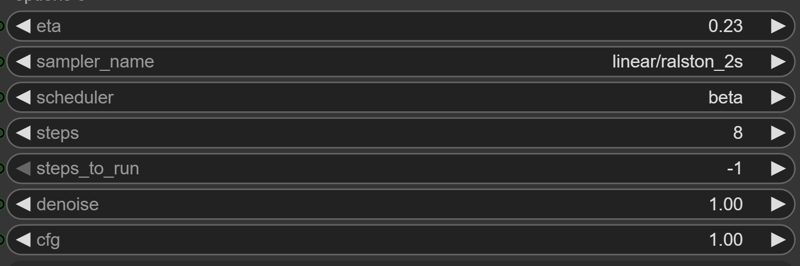 with some added noise option nodes.
It has been tuned against my workflow (I have a version posted here: https://civarchive.com/models/2194714?modelVersionId=2481800)
Description
Jibs Spaghetti Workflow with Control net
28/01/2026 - V4
Added VAE Merge Node.
Added 2nd Stage FlowMatch as an alternative to ClownShark-Linear/Ralston_2s
Adjusted some denoise settings
FAQ
Comments (24)
About UltraFlux VAE, did anyone notice an image shift while using it?
My workflow is pretty basic, with mentioned VAE resulted image is shifted about 1-2 px up and left, creating visible grey border at right and bottom sides. Interesting if this specific to my workflow, or UltraFlux in general. Otherwise it works like unsharp mask in Photoshop and could be really useful.
With UltraFlux it is much sharper but in my opinion, it's not better. For example, you can see the pixels and the "stepped" effect in the hair. If you use the standard VAE, it has more of an anti-aliasing effect.
@Gorean yes, guess in some cases depending on a prompt it could emphasize sharpness too much. Anyway it is unusable for me because of described issue with grey borders.
@Gorean The best way to tune images to the look you want is to use a merge VAE node between the two different VAE's but it is no longer publicly downloadable (I might upload it if that is legal) and also seems to be a bit buggy.
But I haven't noticed what you are talking about on my output images with 100% using the UltraFlux VAE at higher resolutions and steps: https://civitai.com/images/115154583 I have sometimes noticed it on other zit images with loras.
@J1B Your image looks good, but I don't think you generated it out of the box. so i mean only your checkpoint, nothing else. I'm wrong? I try to generate, only one checkpoint, only 8 Steps, only one ksampler and NORMALY without LoRas ;) but that dosen't work for me at the moment.
@Gorean No it is not a just a basic workflow, it has a few more advanced features that improve the image qualityhttps://civitai.com/models/2231351?modelVersionId=2530937
@J1B that is what i mean, i like it simple ;) i can fake many Pictures if i like to get the one result but here, i like to post only generations they are "simple" out of the box, fast
I like it that your example pictures are not porn
@qek Scandalous! Na, this image is better porno: (NSFW) https://civitai.com/images/117143253
yo jib! nice checkpoint as usual, good results, i look forward to the zbase version!
Does this work well with other LORAa? I've noticed when using more than one lora you need to increase the steps and I put the Aura flow setting to 7.... Well done man literally all your work is incredible and detailed.
I have used it with lots of loras, seems to be pretty compatible. I usually keep the weights for loras very low, under 0.25 but they seem to perform fine.
The Aura Flow node seems to have zero effect in my workflow at least so I stopped using it completely.
I haven't noticed having to increase steps for loras but I usually run with a 16 step first stage and a 12 step 2nd stage refiner for quality so that is probably why.
@J1B I have been using the patch Lora recently https://civitai.com/models/2233614/z-image-turbo-distill-patch-for-comfyui?modelVersionId=2514475 and it also works mixing LORA's for CIVITAI Online generation to add more LORA's and not/or less deformed results or even lose effect of the Lora. So you can put strength back in the LORA. However when mixing multiple, you still need to lower it a little between 0.7-0.8 and keep de patcher on 1.0 strength. But its far better than without patching because lowering the LORA's so much it loses effect is annoying. Wonder if it works to add the patcher into a merged checkpoint so this whole distilled issue is fixed. Something I havent tried as I don't like creating checkpoints myself.
hm... it's crazy... i like to find a new ZIT checkpoint and i test all checkpoints they are new... some are good, most are not good... BUT... not ONE is better then your V1 fp16 ;) of course, i have to use the both loras i always use but its ok
Using all default setting in your workflow, why does it always look washed out like an old photo from 20 years ago
hmm, I don't know, I just tested it and it came out ok for me: https://civitai.com/posts/26080405
You are not changing the number of step?
If you upload an example image with the workflow I can take look at it.
@J1B , https://civitai.com/posts/26091949 , tried both v2 and v3 workflow, they both look like got that old 'yellow' filter on them
@obsidiancloud Hmm I cannot see too much wrong with them. Are you using this Ultra Flux VAE?: https://huggingface.co/Owen777/UltraFlux-v1/tree/main/vae
Maybe try switching back to the stand Flux/ZIT VAE and see if you prefer the look of that: https://civitai.com/models/2168935?modelVersionId=2442479
But it is more the texture than the colour that changes.
Actually it might be the Brownian SharkOptions on the left of the sampler try disabling or changing them see it it improves.
@obsidiancloud Have you tired using the 2nd "Two Stage ClownSharkSampler" the colours often come out of that one better.
irretating...look here..look there...
Hmm not really sure what you mean? Have you heard of the attention economy?
I mean there are so many links to another versions. Is it on this site usable or have I download the other things too?! Attention economy?? Thank you.
@Papahoy Oh they are just helpful links to things that can improve image quailty if running it in ComfyUI, but they are optional.