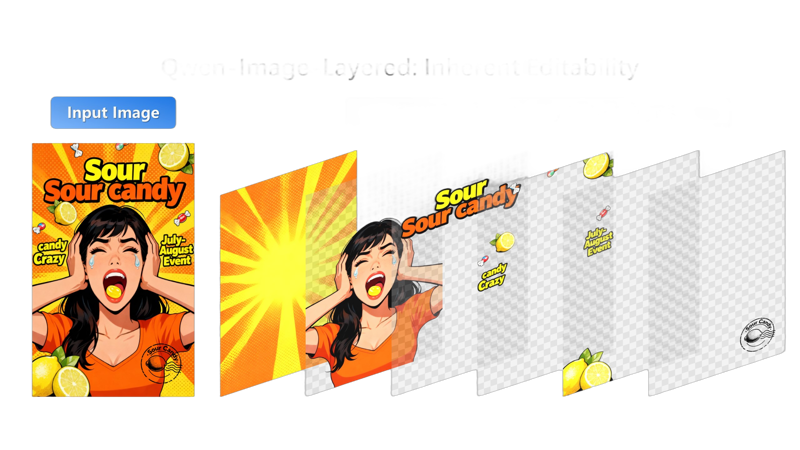
Qwen-Image-Layered takes a regular flat image and smartly breaks it down into separate, transparent layers (like in Photoshop).
Key capabilities: infinite decomposition, recolor, replace, revise, remove, resize, reposition
Each layer represents different parts of the picture or example: one layer might be a person, another a background object, and so on, with their own transparency. This makes it super easy to edit just one thing without messing up the rest.
You can even choose how many layers to split into (like 3, 8, or more) and go deeper by decomposing a layer further.
More info: HF
Apache 2.0 license
The model is mirrored here for convenience.
Description
FAQ
Comments (11)
what is the "Latent cut to batch" node? What can it be replaced with?
it is part of the model's requirements. as of now, there aren't any other nodes based on basic skeleton nodes. If it is missing, you need to update your ComfyUI to the latest version
@sweetmax797 what node pack is it in?
@lonecatone23 no node pack, it is a comfyui core node
@lonecatone23 it was added to Comfy Core: https://github.com/comfyanonymous/ComfyUI/pull/11411
@atroxdude it has either not made it to the desktop or they haven't added it yet. The fork was added two days ago. the latest update is from a week ago. I can't get it to load
Due to "Latent cut to batch" node I was forced to update to ComfyUI 0.5.1 and this version makes some user to have ComfyUI manger button gone. This kind of practice makes people sick!
I am missing the real usage information for this model in like given examples.
It separates an given image into layers, which it does quite well—I’ve tried it myself.
However, I don’t currently see any clear official explanation of how these results are meant to be used in practice.
For example, it mentions
Key capabilities: infinite decomposition, recolor, replace, revise, remove, resize, reposition
, but how is that supposed to work?
Are the outputs intended to be imported into Photoshop and edited there in adding these outputted layers to create a new artwork with it to do all that:
infinite decomposition, recolor, replace, revise, remove, resize, reposition
?
I tried it in 640x640 and it has been unsharp and grainy like unexpected.
In 1024x1024 the layer outputs looked very sharp and with a local GPU (RTX 5090) it took like 5 minutes to split a picture into all workflow set layers.
The GPU though has been on max usage incl it's fans spinng like a jet engine using such a resolution.
as of now it's not all-in-one model, and yes u need other tools to do the editing and recompose it. it just has specific use cases. for most of the users qwe-image-edit can do the editing job without decomposing the image to layers. (i personally use wan2.2 to photoshop ppl in and out change or add stuff, screenshot and etc)
But for animation and After Effects users for instance, it’s a great free tool with Apache 2.0 license (I pay for adobe creative cloud). You can decompose any image without spending time on the internet going from one PNG sharing website to another to find a PSD version of a similar image you have in mind (or get busy in adobe illustrator,or fix or do small changes in website, company logos, etc.) It directly decompose it and all u need to do is add key frames and done, u could remake Rick and Morty all over again with your own story line. I might not be fully correct about this model but that's how i think about it right now :)
Thank you very much for your background information on the effective use of the model.
I have also used QWEN Image Edit so far and am an absolute fan of the Image Edit model.
I have only tested the qwen-image-layered model for a short time so far and
was glad that I got everything installed at all ;D
@LVNDSCAPE you're welcome :)