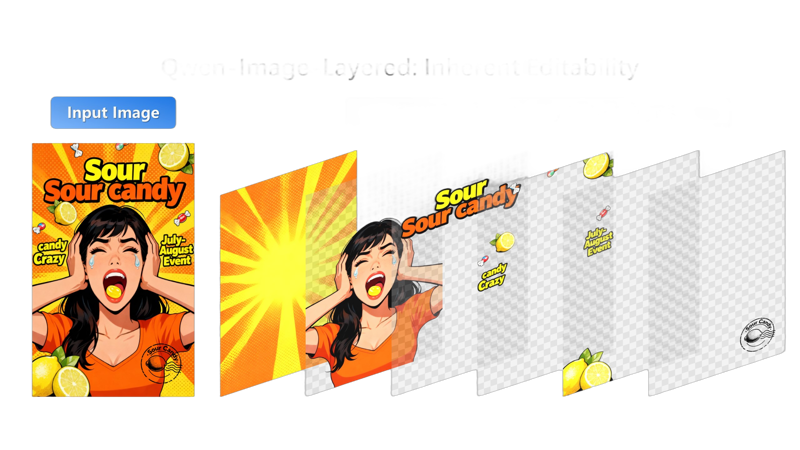
Qwen-Image-Layered takes a regular flat image and smartly breaks it down into separate, transparent layers (like in Photoshop).
Key capabilities: infinite decomposition, recolor, replace, revise, remove, resize, reposition
Each layer represents different parts of the picture or example: one layer might be a person, another a background object, and so on, with their own transparency. This makes it super easy to edit just one thing without messing up the rest.
You can even choose how many layers to split into (like 3, 8, or more) and go deeper by decomposing a layer further.
More info: HF
Apache 2.0 license
The model is mirrored here for convenience.
Description
A fast, lightweight, single-file design tool for compositing PNG and text layers without the need for heavy design software. Built with Vanilla JS and HTML5 Canvas.
Create, reorder, and manage multiple Image and Text layers.
Drag, rotate, and resize functionality
Support for Custom Local Fonts (TTF, OTF, WOFF)
Independent Stroke/Outline control (Color, Width, Opacity).
Separate Opacity for Text Fill and Stroke.
Full suite of filters (Hue, Saturation, Brightness, Contrast).
Access to standard Canvas blending (Multiply, Screen, Overlay, etc.).
FAQ
Comments (10)
quick question before I spend time downloading this - should I be typing in the given text box, what I'd like separated into layers, or is it an automatic process based on its general knowledge base? I'd like to layer specific things such as hair, face, clothing pieces, or accessories.
It happens automatically based on the number of layers you specify, however, if you want the model to pay extra attention to something in the image, you can prompt it
@sweetmax797 ok I've tested constantly and have had zero luck for my use case. It just doesn't understand layering the things I'm after.
@rivdemon1221554 let me guess, you are after decomposing a 2D character into layers for animation :) yeah ... it doesnt work...
@rivdemon1221554 share the image and tell us what you are trying to do, we might be able to figure something out.
@korneliyo it works on 2D images too https://civitai.com/images/115321563
@korneliyo No, I'm trying to separate pieces of a 2d character as mentioned in my OP. QIL's system isn't suited for my needs of separating hair, face, clothing etc.. I'm trying to find a good paper doll method, but so far it seems the only way is to painstakingly cut pieces out in GIMP, because even SAM3 or Florence isn't accurate enough.
does this work with forge neo?