Hello, This is my Steerable Motion workflow I upload here to share with reddit friends. I will be coming up with more modifications soon as right now, this is almost the original workflow with small changes. Today I will add a proper description here.
🅿🅻🅴🅰🆂🅴 🆂🅷🅰🆁🅴 🆈🅾🆄🆁 🆆🅾🆁🅺 🅷🅴🆁🅴
New Version V2 has no links(noodles), You will need to downloads KJnodes to get this workflow working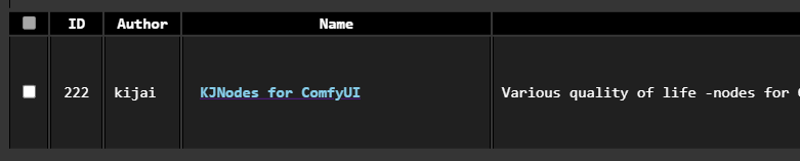
Input your images here which you like to manipulate or blend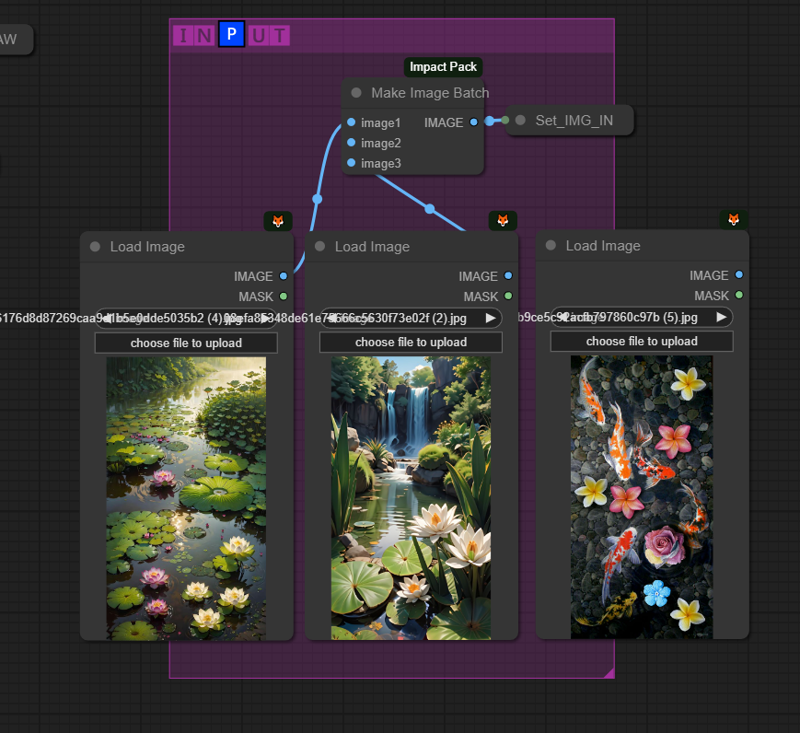
Below you can change settings, change the length of the animation and size and others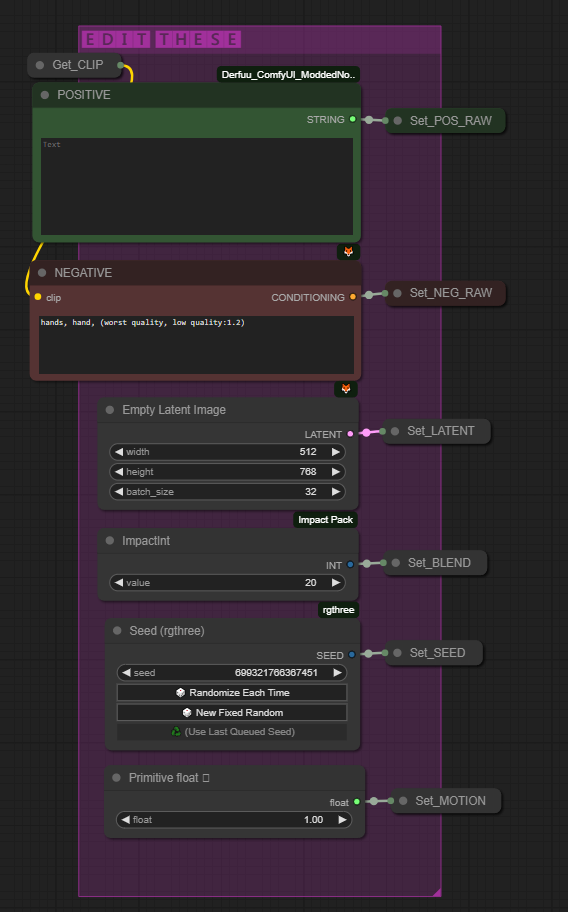
You can plug below highres node get the high res version of the results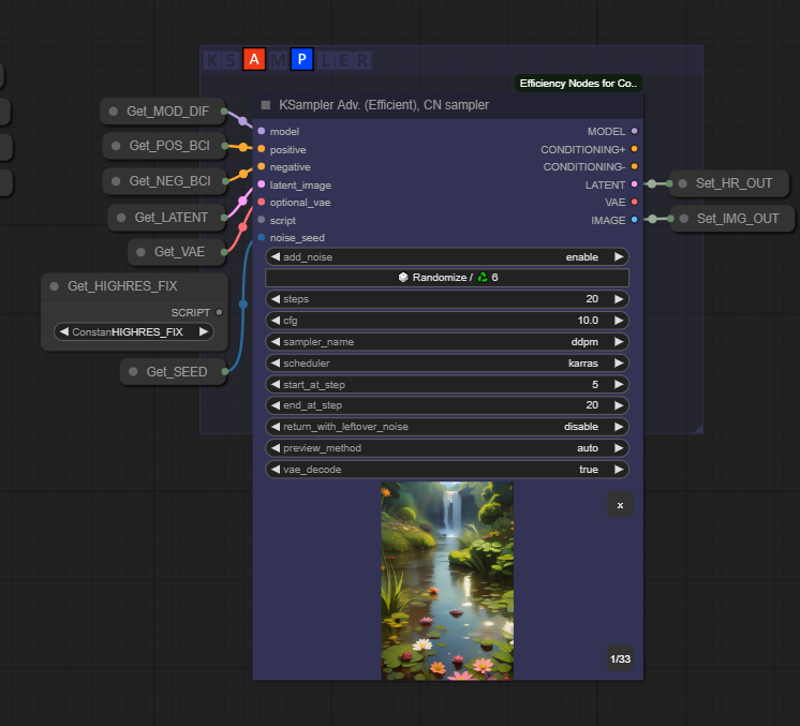
More info coming soon!!! Sorry very busy
SHARE YOUR WORKS HERE.. THANKS!
Github: https://github.com/banodoco/Steerable-Motion/tree/main
NOTE: Thank those who created these nodes :
https://github.com/peteromallet
https://github.com/Kosinkadink
Description
FAQ
Comments (56)
I want to be your reddit friend and learn how to use this! Regular motion is soooooo janky.
Hello, its very easy and I am also learning how to use this for advance smooth animations.. Just load this and try with different images.. you will get fast, smooth and high quality results..
@amilakumara Risking the obvious comeback... where do I stick it?
@Inland389 Hello, did you manage to make this work and generate smooth animations...? Thanks
i installed all dependencies, but got this error in batch creative node: AttributeError: 'ControlNet' object has no attribute 'load_device'
Hello..? Did you update comfyui and all other required nodes to the latest..? Do you have the latest advanced control net installed..? Kosinkadink/ComfyUI-Advanced-ControlNet: ControlNet scheduling and masking nodes with sliding context support (github.com)
@amilakumara hi amila. i use cu118 version of comfui, since some custom_nodes not work on cu121 version on my machine. advanced controlnet is up to date. the error exactly came from it:
\custom_nodes\steerable-motion\imports\AdvancedControlNet\control.py", line 630, in from_vanilla
global_average_pooling=v.global_average_pooling, device=v.device, load_device=v.load_device, manual_cast_dtype=v.manual_cast_dtype)
AttributeError: 'ControlNet' object has no attribute 'load_device'
i also tried redownloading controlnet tile model f16 and replaced it. not worked
@kk00324 Hello, Even I had issues last evening after comfyui update, then the creator of Steerable Motion fix the issue so it works with the latest version of comfyui. I am not good with these technical stuff unfortunately but i can promise you that i have this workflow running on two computers with the latest comfyui and it all works well..
@udappkuma thx, yes i found its not about your workflow as i faced same error on steerable motion demo too. fortunly someone opened an issue about this error on their github repo. hope they suggest a solution. thank u for workflow. i will update here when succeed
@kk00324 Sure, This is an amazing tool by the developers to make high quality smooth animations, post your work once you manage to solve the issue. Thanks!!!
Hello did it work..?
@udappkuma hi. there was 2 problems:
1. i had corrupted pip cache (solved after deleting cache manually, then update pip itself)
2. for some reason, comfui manager didnt update animatediff node correctly (so i pulled repo with git)
now workflow works! still not reach "smooth animation", but playing with settings to understand how it works. thank you
@kk00324 Yeah happened to me aswell, I had to gitpul everything.. if you share one of your non smooth video, i will be able to look at it and figure out how you can improve the smoothness.. Thanks!
@udappkuma not near your samples at all. im on low hardware and use 40-60 frames, and set prompts to 4 keyframe. tested with 1 to 4 image inputs. tested different weights and influences, but all vids generated with extensive flickering and sudden changes. can you share one of your sample`s input images and prompts? i think im doing wrong in prompt or something
@kk00324 I actually don't do much, I feed one simple prompt such as "beautiful young girl, colorful, young woman, fireflies, nightlight, ambient, gorgeous girl, curlyhair" try my best to stick to 2-3 images and max 60 frames which finish in 5min or less.. I will share few original photos with you.. Thanks!
Hi. Are you sure you uploaded a working "workflow"? Please check it.
Hello, this is a working workflow if your comfyui is upto date and you are using advance control net.. I use this workflow daily. Thanks!
Hello Pam, Did you manage to make the workflow work..? I am posting a comment hoping it might help you.
@udappkuma hi. there was 2 problems:
1. i had corrupted pip cache (solved after deleting cache manually, then update pip itself)
2. for some reason, comfui manager didnt update animatediff node correctly (so i pulled repo with git)
now workflow works! still not reach "smooth animation", but playing with settings to understand how it works. thank you
Feel free to ask any help.. Thanks!
@udappkuma Hi. I'm having a different problem, but it doesn't seem to be related to your workflow.
@udappkuma Hi. How long does it take you per animation? And what kind of video card do you have?
@PamLe Hello, it takes me 5 minutes for 60 frames (4sec) animation, I use a RTX 3090 (512X768) then upscale by 4X. whole process take 5-6minutes.
@udappkuma Thanks for the reply. On my 3070, the process suggests waiting an hour and a half. And what value of denoising do you put on Hi.res?
@PamLe Sorry, I am unable to attach a screen capture of the highres fix here but its just UPSCALE IMAGE USING MODEL NODE with 4K ULTRASHARP upscaler as the model.. cause its fast. 90 minutes is a very long time for this, i suggest you to ignore this workflow and go with a LCM workflow, you can get good results just by using animateDIFF loader and ipadapter in 6-10 minutes..
@udappkuma Yeah, I know about that, thank you.
Hello please have a look at this for a deep dive https://github.com/banodoco/Steerable-Motion
Just got tons of error
Error occurred when executing KSampler Adv. (Efficient): list index out of range File "H:\SDAI\ComfyUI\execution.py", line 153, in recursive_execute output_data, output_ui = get_output_data(obj, input_data_all) ^^^^^^^^^^^^^^^^^^^^^^^^^^^^^^^^^^^^ File "H:\SDAI\ComfyUI\execution.py", line 83, in get_output_data return_values = map_node_over_list(obj, input_data_all, obj.FUNCTION, allow_interrupt=True) ^^^^^^^^^^^^^^^^^^^^^^^^^^^^^^^^^^^^^^^^^^^^^^^^^^^^^^^^^^^^^^^^^^^^^^^^^^^ File "H:\SDAI\ComfyUI\execution.py", line 76, in map_node_over_list results.append(getattr(obj, func)(**slice_dict(input_data_all, i))) ^^^^^^^^^^^^^^^^^^^^^^^^^^^^^^^^^^^^^^^^^^^^^^^^^^^ File "H:\SDAI\ComfyUI\custom_nodes\efficiency-nodes-comfyui\efficiency_nodes.py", line 2175, in sample_adv return super().sample(model, noise_seed, steps, cfg, sampler_name, scheduler, positive, negative, ^^^^^^^^^^^^^^^^^^^^^^^^^^^^^^^^^^^^^^^^^^^^^^^^^^^^^^^^^^^^^^^^^^^^^^^^^^^^^^^^^^^^^^^^^^ File "H:\SDAI\ComfyUI\custom_nodes\efficiency-nodes-comfyui\efficiency_nodes.py", line 700, in sample samples, images, gifs, preview = process_latent_image(model, seed, steps, cfg, sampler_name, scheduler, ^^^^^^^^^^^^^^^^^^^^^^^^^^^^^^^^^^^^^^^^^^^^^^^^^^^^^^^^^^^^^^^^^^^^^^ File "H:\SDAI\ComfyUI\custom_nodes\efficiency-nodes-comfyui\efficiency_nodes.py", line 537, in process_latent_image samples = KSamplerAdvanced().sample(model, add_noise, seed, steps, cfg, sampler_name, scheduler, ^^^^^^^^^^^^^^^^^^^^^^^^^^^^^^^^^^^^^^^^^^^^^^^^^^^^^^^^^^^^^^^^^^^^^^^^^^^^^^^^^^^^^^ File "H:\SDAI\ComfyUI\nodes.py", line 1333, in sample return common_ksampler(model, noise_seed, steps, cfg, sampler_name, scheduler, positive, negative, latent_image, denoise=denoise, disable_noise=disable_noise, start_step=start_at_step, last_step=end_at_step, force_full_denoise=force_full_denoise) ^^^^^^^^^^^^^^^^^^^^^^^^^^^^^^^^^^^^^^^^^^^^^^^^^^^^^^^^^^^^^^^^^^^^^^^^^^^^^^^^^^^^^^^^^^^^^^^^^^^^^^^^^^^^^^^^^^^^^^^^^^^^^^^^^^^^^^^^^^^^^^^^^^^^^^^^^^^^^^^^^^^^^^^^^^^^^^^^^^^^^^^^^^^^^^^^^^^^^^^^^^^^^^^^^^^^^^^^^^^^^^^^^^^^^^^^^^^^^^^ File "H:\SDAI\ComfyUI\nodes.py", line 1269, in common_ksampler samples = comfy.sample.sample(model, noise, steps, cfg, sampler_name, scheduler, positive, negative, latent_image, ^^^^^^^^^^^^^^^^^^^^^^^^^^^^^^^^^^^^^^^^^^^^^^^^^^^^^^^^^^^^^^^^^^^^^^^^^^^^^^^^^^^^^^^^^^^^^^^^^^^^^^^^ File "H:\SDAI\ComfyUI\custom_nodes\ComfyUI-Impact-Pack\modules\impact\sample_error_enhancer.py", line 9, in informative_sample return original_sample(*args, **kwargs) # This code helps interpret error messages that occur within exceptions but does not have any impact on other operations. ^^^^^^^^^^^^^^^^^^^^^^^^^^^^^^^^ File "H:\SDAI\ComfyUI\custom_nodes\ComfyUI-AnimateDiff-Evolved\animatediff\sampling.py", line 284, in motion_sample return wrap_function_to_inject_xformers_bug_info(orig_comfy_sample)(model, noise, args, *kwargs) ^^^^^^^^^^^^^^^^^^^^^^^^^^^^^^^^^^^^^^^^^^^^^^^^^^^^^^^^^^^^^^^^^^^^^^^^^^^^^^^^^^^^^^^^^^^ File "H:\SDAI\ComfyUI\custom_nodes\ComfyUI-AnimateDiff-Evolved\animatediff\model_utils.py", line 205, in wrapped_function return function_to_wrap(*args, kwargs) ^^^^^^^^^^^^^^^^^^^^^^^^^^^^^^^^^ File "H:\SDAI\ComfyUI\comfy\sample.py", line 101, in sample samples = sampler.sample(noise, positive_copy, negative_copy, cfg=cfg, latent_image=latent_image, start_step=start_step, last_step=last_step, force_full_denoise=force_full_denoise, denoise_mask=noise_mask, sigmas=sigmas, callback=callback, disable_pbar=disable_pbar, seed=seed) ^^^^^^^^^^^^^^^^^^^^^^^^^^^^^^^^^^^^^^^^^^^^^^^^^^^^^^^^^^^^^^^^^^^^^^^^^^^^^^^^^^^^^^^^^^^^^^^^^^^^^^^^^^^^^^^^^^^^^^^^^^^^^^^^^^^^^^^^^^^^^^^^^^^^^^^^^^^^^^^^^^^^^^^^^^^^^^^^^^^^^^^^^^^^^^^^^^^^^^^^^^^^^^^^^^^^^^^^^^^^^^^^^^^^^^^^^^^^^^^^^^^^^^^^^^^^^^^^^^^^^^^^^^^ File "H:\SDAI\ComfyUI\comfy\samplers.py", line 716, in sample return sample(self.model, noise, positive, negative, cfg, self.device, sampler, sigmas, self.model_options, latent_image=latent_image, denoise_mask=denoise_mask, callback=callback, disable_pbar=disable_pbar, seed=seed) ^^^^^^^^^^^^^^^^^^^^^^^^^^^^^^^^^^^^^^^^^^^^^^^^^^^^^^^^^^^^^^^^^^^^^^^^^^^^^^^^^^^^^^^^^^^^^^^^^^^^^^^^^^^^^^^^^^^^^^^^^^^^^^^^^^^^^^^^^^^^^^^^^^^^^^^^^^^^^^^^^^^^^^^^^^^^^^^^^^^^^^^^^^^^^^^^^^^^^^^^^^^^^^^^^^^ File "H:\SDAI\ComfyUI\comfy\samplers.py", line 622, in sample samples = sampler.sample(model_wrap, sigmas, extra_args, callback, noise, latent_image, denoise_mask, disable_pbar) ^^^^^^^^^^^^^^^^^^^^^^^^^^^^^^^^^^^^^^^^^^^^^^^^^^^^^^^^^^^^^^^^^^^^^^^^^^^^^^^^^^^^^^^^^^^^^^^^^^^^^^^^^ File "H:\SDAI\ComfyUI\comfy\samplers.py", line 561, in sample samples = self.sampler_function(model_k, noise, sigmas, extra_args=extra_args, callback=k_callback, disable=disable_pbar, self.extra_options) ^^^^^^^^^^^^^^^^^^^^^^^^^^^^^^^^^^^^^^^^^^^^^^^^^^^^^^^^^^^^^^^^^^^^^^^^^^^^^^^^^^^^^^^^^^^^^^^^^^^^^^^^^^^^^^^^^^^^^^^^^^^^^^^^^^^^^ File "H:\SDAI\ComfyUI\.ext\Lib\site-packages\torch\utils\_contextlib.py", line 115, in decorate_context return func(*args, **kwargs) ^^^^^^^^^^^^^^^^^^^^^ File "H:\SDAI\ComfyUI\comfy\k_diffusion\sampling.py", line 737, in sample_ddpm return generic_step_sampler(model, x, sigmas, extra_args, callback, disable, noise_sampler, DDPMSampler_step) ^^^^^^^^^^^^^^^^^^^^^^^^^^^^^^^^^^^^^^^^^^^^^^^^^^^^^^^^^^^^^^^^^^^^^^^^^^^^^^^^^^^^^^^^^^^^^^^^^^^^^^ File "H:\SDAI\ComfyUI\comfy\k_diffusion\sampling.py", line 726, in generic_step_sampler denoised = model(x, sigmas[i] s_in, *extra_args) ^^^^^^^^^^^^^^^^^^^^^^^^^^^^^^^^^^^^^^^^ File "H:\SDAI\ComfyUI\.ext\Lib\site-packages\torch\nn\modules\module.py", line 1518, in wrappedcall_impl return self._call_impl(*args, **kwargs) ^^^^^^^^^^^^^^^^^^^^^^^^^^^^^^^^ File "H:\SDAI\ComfyUI\.ext\Lib\site-packages\torch\nn\modules\module.py", line 1527, in callimpl return forward_call(*args, **kwargs) ^^^^^^^^^^^^^^^^^^^^^^^^^^^^^ File "H:\SDAI\ComfyUI\comfy\samplers.py", line 285, in forward out = self.inner_model(x, sigma, cond=cond, uncond=uncond, cond_scale=cond_scale, model_options=model_options, seed=seed) ^^^^^^^^^^^^^^^^^^^^^^^^^^^^^^^^^^^^^^^^^^^^^^^^^^^^^^^^^^^^^^^^^^^^^^^^^^^^^^^^^^^^^^^^^^^^^^^^^^^^^^^^^^^^^^^^^^^ File "H:\SDAI\ComfyUI\.ext\Lib\site-packages\torch\nn\modules\module.py", line 1518, in wrappedcall_impl return self._call_impl(*args, **kwargs) ^^^^^^^^^^^^^^^^^^^^^^^^^^^^^^^^ File "H:\SDAI\ComfyUI\.ext\Lib\site-packages\torch\nn\modules\module.py", line 1527, in callimpl return forward_call(*args, **kwargs) ^^^^^^^^^^^^^^^^^^^^^^^^^^^^^ File "H:\SDAI\ComfyUI\comfy\samplers.py", line 275, in forward return self.apply_model(*args, **kwargs) ^^^^^^^^^^^^^^^^^^^^^^^^^^^^^^^^^ File "H:\SDAI\ComfyUI\comfy\samplers.py", line 272, in apply_model out = sampling_function(self.inner_model, x, timestep, uncond, cond, cond_scale, model_options=model_options, seed=seed) ^^^^^^^^^^^^^^^^^^^^^^^^^^^^^^^^^^^^^^^^^^^^^^^^^^^^^^^^^^^^^^^^^^^^^^^^^^^^^^^^^^^^^^^^^^^^^^^^^^^^^^^^^^^^^^^^^^ File "H:\SDAI\ComfyUI\custom_nodes\ComfyUI-AnimateDiff-Evolved\animatediff\sampling.py", line 634, in sliding_sampling_function cond, uncond = sliding_calc_cond_uncond_batch(model, cond, uncond, x, timestep, model_options) ^^^^^^^^^^^^^^^^^^^^^^^^^^^^^^^^^^^^^^^^^^^^^^^^^^^^^^^^^^^^^^^^^^^^^^^^^^^^^^^ File "H:\SDAI\ComfyUI\custom_nodes\ComfyUI-AnimateDiff-Evolved\animatediff\sampling.py", line 615, in sliding_calc_cond_uncond_batch sub_cond_out, sub_uncond_out = calc_cond_uncond_batch(model, sub_cond, sub_uncond, sub_x, sub_timestep, model_options) ^^^^^^^^^^^^^^^^^^^^^^^^^^^^^^^^^^^^^^^^^^^^^^^^^^^^^^^^^^^^^^^^^^^^^^^^^^^^^^^^^^^^^^^ File "H:\SDAI\ComfyUI\custom_nodes\ComfyUI-AnimateDiff-Evolved\animatediff\sampling.py", line 488, in calc_cond_uncond_batch c['control'] = control.get_control(input_x, timestep_, c, len(cond_or_uncond)) ^^^^^^^^^^^^^^^^^^^^^^^^^^^^^^^^^^^^^^^^^^^^^^^^^^^^^^^^^^^^^^^ File "H:\SDAI\ComfyUI\custom_nodes\Steerable-Motion\imports\AdvancedControlNet\control.py", line 368, in get_control_inject return self.get_control_advanced(x_noisy, t, cond, batched_number) ^^^^^^^^^^^^^^^^^^^^^^^^^^^^^^^^^^^^^^^^^^^^^^^^^^^^^^^^^^^ File "H:\SDAI\ComfyUI\custom_nodes\Steerable-Motion\imports\AdvancedControlNet\control.py", line 572, in get_control_advanced return self.sliding_get_control(x_noisy, t, cond, batched_number) ^^^^^^^^^^^^^^^^^^^^^^^^^^^^^^^^^^^^^^^^^^^^^^^^^^^^^^^^^^ File "H:\SDAI\ComfyUI\custom_nodes\Steerable-Motion\imports\AdvancedControlNet\control.py", line 577, in sliding_get_control control_prev = self.previous_controlnet.get_control(x_noisy, t, cond, batched_number) ^^^^^^^^^^^^^^^^^^^^^^^^^^^^^^^^^^^^^^^^^^^^^^^^^^^^^^^^^^^^^^^^^^^^^^ File "H:\SDAI\ComfyUI\custom_nodes\Steerable-Motion\imports\AdvancedControlNet\control.py", line 368, in get_control_inject return self.get_control_advanced(x_noisy, t, cond, batched_number) ^^^^^^^^^^^^^^^^^^^^^^^^^^^^^^^^^^^^^^^^^^^^^^^^^^^^^^^^^^^ File "H:\SDAI\ComfyUI\custom_nodes\Steerable-Motion\imports\AdvancedControlNet\control.py", line 572, in get_control_advanced return self.sliding_get_control(x_noisy, t, cond, batched_number) ^^^^^^^^^^^^^^^^^^^^^^^^^^^^^^^^^^^^^^^^^^^^^^^^^^^^^^^^^^ File "H:\SDAI\ComfyUI\custom_nodes\Steerable-Motion\imports\AdvancedControlNet\control.py", line 577, in sliding_get_control control_prev = self.previous_controlnet.get_control(x_noisy, t, cond, batched_number) ^^^^^^^^^^^^^^^^^^^^^^^^^^^^^^^^^^^^^^^^^^^^^^^^^^^^^^^^^^^^^^^^^^^^^^ File "H:\SDAI\ComfyUI\custom_nodes\Steerable-Motion\imports\AdvancedControlNet\control.py", line 368, in get_control_inject return self.get_control_advanced(x_noisy, t, cond, batched_number) ^^^^^^^^^^^^^^^^^^^^^^^^^^^^^^^^^^^^^^^^^^^^^^^^^^^^^^^^^^^ File "H:\SDAI\ComfyUI\custom_nodes\Steerable-Motion\imports\AdvancedControlNet\control.py", line 572, in get_control_advanced return self.sliding_get_control(x_noisy, t, cond, batched_number) ^^^^^^^^^^^^^^^^^^^^^^^^^^^^^^^^^^^^^^^^^^^^^^^^^^^^^^^^^^ File "H:\SDAI\ComfyUI\custom_nodes\Steerable-Motion\imports\AdvancedControlNet\control.py", line 577, in sliding_get_control control_prev = self.previous_controlnet.get_control(x_noisy, t, cond, batched_number) ^^^^^^^^^^^^^^^^^^^^^^^^^^^^^^^^^^^^^^^^^^^^^^^^^^^^^^^^^^^^^^^^^^^^^^ File "H:\SDAI\ComfyUI\custom_nodes\Steerable-Motion\imports\AdvancedControlNet\control.py", line 368, in get_control_inject return self.get_control_advanced(x_noisy, t, cond, batched_number) ^^^^^^^^^^^^^^^^^^^^^^^^^^^^^^^^^^^^^^^^^^^^^^^^^^^^^^^^^^^ File "H:\SDAI\ComfyUI\custom_nodes\Steerable-Motion\imports\AdvancedControlNet\control.py", line 572, in get_control_advanced return self.sliding_get_control(x_noisy, t, cond, batched_number) ^^^^^^^^^^^^^^^^^^^^^^^^^^^^^^^^^^^^^^^^^^^^^^^^^^^^^^^^^^ File "H:\SDAI\ComfyUI\custom_nodes\Steerable-Motion\imports\AdvancedControlNet\control.py", line 577, in sliding_get_control control_prev = self.previous_controlnet.get_control(x_noisy, t, cond, batched_number) ^^^^^^^^^^^^^^^^^^^^^^^^^^^^^^^^^^^^^^^^^^^^^^^^^^^^^^^^^^^^^^^^^^^^^^ File "H:\SDAI\ComfyUI\custom_nodes\Steerable-Motion\imports\AdvancedControlNet\control.py", line 368, in get_control_inject return self.get_control_advanced(x_noisy, t, cond, batched_number) ^^^^^^^^^^^^^^^^^^^^^^^^^^^^^^^^^^^^^^^^^^^^^^^^^^^^^^^^^^^ File "H:\SDAI\ComfyUI\custom_nodes\Steerable-Motion\imports\AdvancedControlNet\control.py", line 572, in get_control_advanced return self.sliding_get_control(x_noisy, t, cond, batched_number) ^^^^^^^^^^^^^^^^^^^^^^^^^^^^^^^^^^^^^^^^^^^^^^^^^^^^^^^^^^ File "H:\SDAI\ComfyUI\custom_nodes\Steerable-Motion\imports\AdvancedControlNet\control.py", line 619, in sliding_get_control return self.control_merge(None, control, control_prev, output_dtype) ^^^^^^^^^^^^^^^^^^^^^^^^^^^^^^^^^^^^^^^^^^^^^^^^^^^^^^^^^^^^^ File "H:\SDAI\ComfyUI\custom_nodes\Steerable-Motion\imports\AdvancedControlNet\control.py", line 467, in control_merge_inject x = self.strength self.calc_weight(i, x, len(control_output)) ^^^^^^^^^^^^^^^^^^^^^^^^^^^^^^^^^^^^^^^^^^^ File "H:\SDAI\ComfyUI\custom_nodes\Steerable-Motion\imports\AdvancedControlNet\control.py", line 379, in calc_weight return self.weights.get(idx=idx) ^^^^^^^^^^^^^^^^^^^^^^^^^ File "H:\SDAI\ComfyUI\custom_nodes\Steerable-Motion\imports\AdvancedControlNet\control.py", line 41, in get return self.weights[idx] ~~~~~~~~~~~~^^^^^
This mean your comfyui or controlnet advance is outdated, you need all the latest versions of required nodes to get this work.. This happened to me as well after recent comfyui + controlnet update.. I had to git pull everything manually but i think you can use comfyui manager to update everything.. Thanks
@udappkuma
I update ControlNet modes then problem solved.
THX
@fgod999 You are welcome! 😘
Hi, the video I get using this workflow is very flickering. Which controlnet model should I use?Could you please assist me?
Hello, You need contro_v11f1e_sd15_tile_fp16.safetensors for this, I am uploading a new workflow in couple of days.. but this workflow works perfect without any flickers, Try a good model such as Helloyoung25 or something(sorry can't remember the name)
@udappkuma Hello, I posted it below, can you see it? Is the light flashing normal?
@Cyborg3 That is a very good quality output, are you using a upscaler..? cause this normally happens to me when i use a upscaler... I see flickering in face and some part of cloth but not in sky and hands which indicate that they might cause by the model or upscaling. I think the workflow is perfectly fine and you are doing it right..
@Cyborg3 Cause this is an Efficient Ksampler, You can plug premade upscalers (highres fix and tile upscaler scripts) Those works like wonders. Thanks
@udappkuma Yes, used the upscaler. Thanks a bunch for your help! Excited for your next workflow. Thanks!
@Cyborg3 My video to video workflow https://civitai.com/models/253723/my-simple-animatediff-workflow is also not bad.. you can make full length videos with constant character movements taken from actual videos as input.. Try it out!
@Cyborg3 Example: if you want this character you posted to run around instead of standing in same place, you can use that workflow but it can be a HIT and MISS.. Thanks...
@udappkuma Hello, Why I loaded 5 images and only extracted the actions of two images?
@Cyborg3 Hello, it is bit complicated, you have to understand how it works.. you have to check the graph and see which frame the photo go from one to another, does the length of your video have enough room for all the image to go from one to another and many other factors, you will have to go through batch creative interpolation node and study all and come up with something go with your needs.
Example: if your frame length is 32 and your and your linear distribution value is 20, it will only show the results of 2 images, you will need around 100 frames to show all 5 of your images in action..
@udappkuma thank you, I know now
@Cyborg3 I edited my comment above please read it, it has some more info.. Thanks!
Really cool workflow. Where are you getting your Batch Creative Interpolation node from though? It is different from the one I get from Steerable Motion. The one in this workflow gives me errors, attempting to load the controlnet model into the 'type_of_frame_distribution" field. As well as having the positive/negative terminals which I don't get in BCI.
I updated comfyui and encountered the same problem.
This is quite interesting, workflows normally don't have any node attached which mean we both use the same Batch Creative Interpolation which we download either manually or through comyi ui manager.. I just ran this workflow and it works well.. some people had issues with the workflow due to not updating their comfyui and nodes such as advance control net, other than that, this workflow works fine but the next workflow i will be adding tomorrow which is V2 of the same, has no strings(noodles) it a fully featured portable workflow which can give errors as it uses lots of new and interesting nodes...
@Cyborg3 Are you sure you are using the proper controlnet model which is control_v11u_sd15_tile_fp16.safetensors and you are installed and updated ComfyUI-Advanced-ControlNet..?
I was able to get it working by adding the controlnet nodes separately and rewiring some things. I was just curious on why our BCI nodes are so different. Here is what our nodes look like side by side https://imgur.com/a/mGmuspR
@Selmo Hello, sending a screen shot from of the BCI with values https://i.imgur.com/MnfewUa.png your attachment has 2 BCI and one will never work as it has no values (NaN) you have to change NaN to proper values.. Thanks!

@Cyborg3 I just remembered, your workflow worked. actually it happened to me too, couple of weeks ago i updated the comfyui and got the same error, I manually(gitt pull) updated all my nodes to get all working specially advanced control net, steerable motion nodes.
@udappkuma Hey! Sorry for the confusion. I just pulled in my BCI and the one that loads with your import to screenshot them together to compare the two. I was just wondering why the connections and values are so different. It wasn't from a workflow just a comparison picture.
@Selmo Now I understood what you meant, when you build a workflow, it can be so large and it takes time to zoom in and out and also go though nodes to make changes therefor you can right click on nodes and extract different sections from a node and place to somewhere easy to access. I try my best to keep my workflows as efficient as possible so i keep my most used settings next to final result to save time so I only need to focus on one section of the workflow.. https://i.imgur.com/8b9EeKp.png In that Batch CI, i extracted batch size and keyframe positions next to output image so I don't need to come to BCI every time i wanna change the length of the video and adjust the blend..

@Selmo but then again, i am absolutely confused here cause I didnt do that to this workflow and I just downloaded this workflow and opened just to make sure that we both talking about the same workflow cause the settings on my BCI workflow is nowhere close to the settings of the BCI you posted here https://imgur.com/a/mGmuspR I feel like you are either loading something else.. Please download and load the workflow to make sure your BCI is = https://imgur.com/MnfewUa
@Cyborg3 @Selmo Please have a look at the V2 My Steerable Motion workflow - v2.0 | Stable Diffusion Workflows | Civitai and let me know your thoughts.. Thanks!