Hello, This is my Steerable Motion workflow I upload here to share with reddit friends. I will be coming up with more modifications soon as right now, this is almost the original workflow with small changes. Today I will add a proper description here.
🅿🅻🅴🅰🆂🅴 🆂🅷🅰🆁🅴 🆈🅾🆄🆁 🆆🅾🆁🅺 🅷🅴🆁🅴
New Version V2 has no links(noodles), You will need to downloads KJnodes to get this workflow working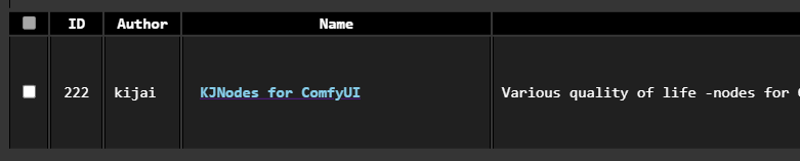
Input your images here which you like to manipulate or blend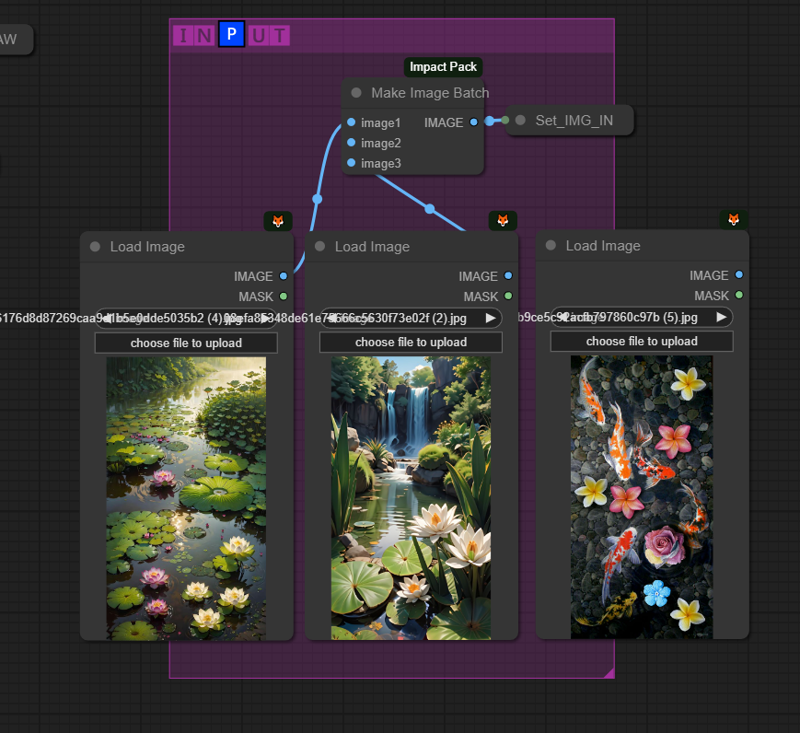
Below you can change settings, change the length of the animation and size and others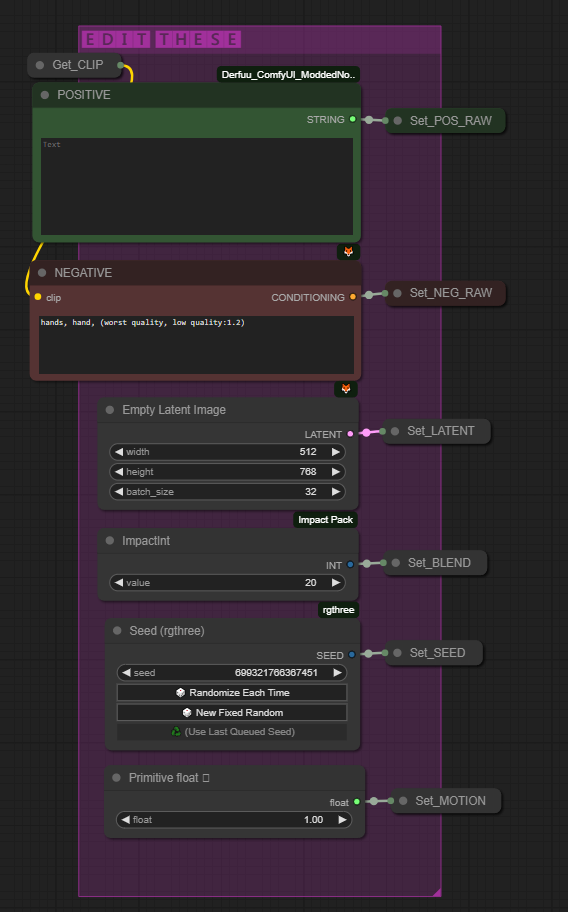
You can plug below highres node get the high res version of the results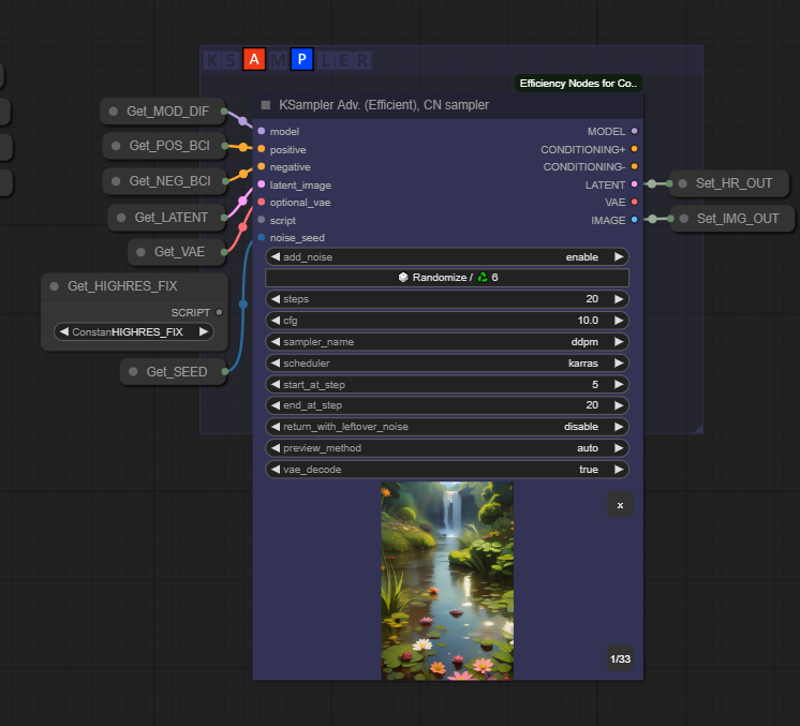
More info coming soon!!! Sorry very busy
SHARE YOUR WORKS HERE.. THANKS!
Github: https://github.com/banodoco/Steerable-Motion/tree/main
NOTE: Thank those who created these nodes :
https://github.com/peteromallet
https://github.com/Kosinkadink
Description
FAQ
Comments (50)
Set node input undefined. Most likely you're missing custom nodes
Hello, you need KJNodes as mentioned in the description. Thanks
Can you please tell me which nodes to install? For version 2
For people who can't find it You can find get node and set node here https://github.com/crystian/ComfyUI-Crystools and install KJNODES recherche install nodes comfyui
no get node 和 set node where down
someone know how to solve this? Thanks!
Error occurred when executing BatchCreativeInterpolation: BatchCreativeInterpolationNode.combined_function() got an unexpected keyword argument 'cn_start_at' File "D:\ComfyUI\ComfyUI\execution.py", line 155, in recursive_execute output_data, output_ui = get_output_data(obj, input_data_all) ^^^^^^^^^^^^^^^^^^^^^^^^^^^^^^^^^^^^ File "D:\ComfyUI\ComfyUI\execution.py", line 85, in get_output_data return_values = map_node_over_list(obj, input_data_all, obj.FUNCTION, allow_interrupt=True) ^^^^^^^^^^^^^^^^^^^^^^^^^^^^^^^^^^^^^^^^^^^^^^^^^^^^^^^^^^^^^^^^^^^^^^^^^^^ File "D:\ComfyUI\ComfyUI\execution.py", line 78, in map_node_over_list results.append(getattr(obj, func)(**slice_dict(input_data_all, i))) ^^^^^^^^^^^^^^^^^^^^^^^^^^^^^^^^^^^^^^^^^^^^^^^^^^^
Hello, i have the same problem, did you find a solution by chance?
Hello, Most of the errors go away once you update evrything (compfyui and all nodes) even i get these BatchCreativeInterpolation errors time to time and UPDATE ALL from comfyui manager fixes everything. Thanks!
@udappkuma Thanks for answering, unfortunatly even after UPDATE ALL and checking all nodes update one by one i still have the error :/
it went away I have no idea how it got fixed?
@lolsilent996 May be it got updated and got fixed.. Im glad everything is fine.. Thanks!
no get node 和 set node where down
Hello, ComfyUI Manager -> KJNODES(1st image of the description) Thx
An error occurred yesterday and I searched all day but couldn't solve it. I entered the correct model. The update to the latest version has also been completed. I don't know why this error occurs.
Error occurred when executing BatchCreativeInterpolation:
Error(s) in loading state_dict for ResamplerImport:
size mismatch for proj_in.weight: copying a param with shape torch.Size([768, 1280]) from checkpoint, the shape in current model is torch.Size([768, 1024]).
File "H:\ComfyUI_windows_portable\ComfyUI\execution.py", line 152, in recursive_execute
output_data, output_ui = get_output_data(obj, input_data_all)
^^^^^^^^^^^^^^^^^^^^^^^^^^^^^^^^^^^^
File "H:\ComfyUI_windows_portable\ComfyUI\execution.py", line 82, in get_output_data
return_values = map_node_over_list(obj, input_data_all, obj.FUNCTION, allow_interrupt=True)
^^^^^^^^^^^^^^^^^^^^^^^^^^^^^^^^^^^^^^^^^^^^^^^^^^^ ^^^^^^^^^^^^^^^^^^^^^^^^^^
File "H:\ComfyUI_windows_portable\ComfyUI\execution.py", line 75, in map_node_over_list
results.append(getattr(obj, func)(**slice_dict(input_data_all, i)))
^^^^^^^^^^^^^^^^^^^^^^^^^^^^^^^^^^^^^^^^^^^^^^^^^^^ ^
File "H:\ComfyUI_windows_portable\ComfyUI\custom_nodes\steerable-motion\SteerableMotion.py", line 430, in combined_function
model, = ipadapter_application.apply_ipadapter(ipadapter=ipadapter, model=model, weight=1.0, image=None, weight_type="original",
^^^^^^^^^^^^^^^^^^^^^^^^^^^^^^^^^^^^^^^^^^^^^^^^^^^ ^^^^^^^^^^^^^^^^^^^^^^^^^^^^^^^^^^^^^^^^^^^^^^^^^^^ ^^^^^^^^^^^^^^^^^^^^
File "H:\ComfyUI_windows_portable\ComfyUI\custom_nodes\steerable-motion\imports\IPAdapterPlus.py", line 501, in apply_ipadapter
self.ipadapter = IPAdapterImport(
^^^^^^^^^^^^^^^^
File "H:\ComfyUI_windows_portable\ComfyUI\custom_nodes\steerable-motion\imports\IPAdapterPlus.py", line 241, in init
self.image_proj_model.load_state_dict(ipadapter_model["image_proj"])
File "H:\ComfyUI_windows_portable\python_embeded\Lib\site-packages\torch\nn\modules\module.py", line 2152, in load_state_dict
raise RuntimeError('Error(s) in loading state_dict for {}:\n\t{}'.format(
Hello, Let me look for a solution and let you know. Thanks!
@udappkuma Yes, thank you very much. And I really appreciate your efforts. I think this node is almost at its final stage as an AI video. It's really good.
Hello! Cool work flow, but when I try to run it I get this error? Can you tell me what could be the matter please?
Error occurred when executing BatchCreativeInterpolation: Can't find a usable init.tcl in the following directories: C:/ML/StabilityMatrix/Assets/lib/tcl8.6 C:/ML/StabilityMatrix/Packages/ComfyUI/venv/lib/tcl8.6 C:/ML/StabilityMatrix/Packages/ComfyUI/lib/tcl8.6 C:/ML/StabilityMatrix/Packages/ComfyUI/venv/library C:/ML/StabilityMatrix/Packages/ComfyUI/library C:/ML/StabilityMatrix/Packages/ComfyUI/tcl8.6.12/library C:/ML/StabilityMatrix/Packages/tcl8.6.12/library This probably means that Tcl wasn't installed properly.
Hello, I have never seen an error like this, I am not a technical person and I actually don't know what TCL means. This folder structure seems completely different from any of i have seen.. 😿
how to plug below highres node get the high res version of the results?
Hello, In the description in the last image you can see the highres-fix script and the empty script slot in the ksampler, Just connect those and it should work if you have a good GPU.. or else it will fail.. Thanks!
Hi, I'm having what seems to be a common problem layely. Any tips on what I could be doing wrong?
Error occurred when executing BatchCreativeInterpolation: Error(s) in loading state_dict for ResamplerImport: size mismatch for proj_in.weight: copying a param with shape torch.Size([768, 1280]) from checkpoint, the shape in current model is torch.Size([768, 1024]). File "E:\AI\COMFYUI\ComfyUI_windows_portable\ComfyUI\execution.py", line 152, in recursive_execute output_data, output_ui = get_output_data(obj, input_data_all) ^^^^^^^^^^^^^^^^^^^^^^^^^^^^^^^^^^^^ File "E:\AI\COMFYUI\ComfyUI_windows_portable\ComfyUI\execution.py", line 82, in get_output_data return_values = map_node_over_list(obj, input_data_all, obj.FUNCTION, allow_interrupt=True) ^^^^^^^^^^^^^^^^^^^^^^^^^^^^^^^^^^^^^^^^^^^^^^^^^^^^^^^^^^^^^^^^^^^^^^^^^^^ File "E:\AI\COMFYUI\ComfyUI_windows_portable\ComfyUI\execution.py", line 75, in map_node_over_list results.append(getattr(obj, func)(**slice_dict(input_data_all, i))) ^^^^^^^^^^^^^^^^^^^^^^^^^^^^^^^^^^^^^^^^^^^^^^^^^^^ File "E:\AI\COMFYUI\ComfyUI_windows_portable\ComfyUI\custom_nodes\steerable-motion\SteerableMotion.py", line 430, in combined_function model, = ipadapter_application.apply_ipadapter(ipadapter=ipadapter, model=model, weight=1.0, image=None, weight_type="original", ^^^^^^^^^^^^^^^^^^^^^^^^^^^^^^^^^^^^^^^^^^^^^^^^^^^^^^^^^^^^^^^^^^^^^^^^^^^^^^^^^^^^^^^^^^^^^^^^^^^^^^^^^^^^^^^^^^^^^^^^ File "E:\AI\COMFYUI\ComfyUI_windows_portable\ComfyUI\custom_nodes\steerable-motion\imports\IPAdapterPlus.py", line 501, in apply_ipadapter self.ipadapter = IPAdapterImport( ^^^^^^^^^^^^^^^^ File "E:\AI\COMFYUI\ComfyUI_windows_portable\ComfyUI\custom_nodes\steerable-motion\imports\IPAdapterPlus.py", line 241, in init self.image_proj_model.load_state_dict(ipadapter_model["image_proj"]) File "E:\AI\COMFYUI\ComfyUI_windows_portable\python_embeded\Lib\site-packages\torch\nn\modules\module.py", line 2153, in load_state_dict raise RuntimeError('Error(s) in loading state_dict for {}:\n\t{}'.format(
Hello, are you using the same workflow without any modifications..? If yes, can you check you are using the correct motion model which is mm_sd_v15_v2.. also please check this thread as well https://github.com/banodoco/Steerable-Motion/issues/24
"ModuleNotFoundError: No Module named 'comfy.options' ? how do I fix this? I'm thinking the MagicAnimate changed something drastic. Now ComfyUI won't open. Thank You
Hello, I don't think you will get that kind of error by installing any of the nodes required for this workflow but I something like this happened to me recently after installing "Gemini in ComfyUI" it complete;y broke my comfyui, I went to comfyui folde -> update -> update_comfyui_and_python_dependencies.bat and comfyui started to work, but before that I made sure I deleted the suspected node manually.. Hope this helps.. Thankz!
@udappkuma thank you for your reply. I'm happy you were able to fix your problem. It didn't work for me. I'm considering a fresh install now. I can't think of anything left to try.
@Rasthish Fresh install can be a hustle, why don't you delete all recently installed custom nodes and update comfyui manually and also UPDATE ALL from comfyui manager(of couse only if you manage to get comfyui to work) I try almost every new node and i get into trouble always but i never re-install comfyui cause comfyui update always fix my issues..
@udappkuma Thank you for the reply. ComfyUI flat out won't open. I don't know how to do updates when it won't open. Sorry, I'm a novice. / I did a fresh install and then dropped in your Steerable motion. When it did all of the installations it failed again. Not saying there's something wrong with your workflow, clearly I'm doing something wrong...I just don't know what. / My computer is pretty powerful, it isn't a bottleneck (rtx 4090, etc.).
@Rasthish Can you run the workflow and send me a screenshot of the workflow once it stop..? (assuming that the workflow loads) Thanks
@udappkuma I:\Comfyui3 - Copy\ComfyUI_windows_portable>.\python_embeded\python.exe -s ComfyUI\main.py --windows-standalone-build
Traceback (most recent call last):
File "I:\Comfyui3 - Copy\ComfyUI_windows_portable\ComfyUI\main.py", line 1, in <module>
import comfy.options
ModuleNotFoundError: No module named 'comfy.options'
I:\Comfyui3 - Copy\ComfyUI_windows_portable>pause
Press any key to continue . . .
-- This is what I get. / There's a reddit thread that talks about this same issue occurring. I've tried everything in that thread. Nothing works.
@udappkuma https://paste.pics/212491590aa214e8a066178d1432e4f3 This is before I run bulk installs. I just realized that I'm probably installing more than I need to. I'm thinking things go haywire after installing magic animate (but it could be anything). I went to manager to install the missing ones that you can see in the screenshot, but I can't find them there to install. Thank You udappkuma!
@Rasthish Of Couse you are missing 2 important nodes, in the description i added to this workflow, there is a picture of the node which you are missing. you can download missing nodes by going to comfyui manager -> install missing custom nodes. you are missing KJ nodes and the crytools(which is one of the best comfyui nodes)
@udappkuma Thank You
Hello @Rasthish, Did you manage to get the workflow working..? or still stuck on erriors..?
I just did a fresh install cause this workflow would not work with my old one. I am stuck at 0%
Loading 6 new models
loading in lowvram mode 301.94736766815186
loading in lowvram mode 70.07347106933594
loading in lowvram mode 64.0
0%| | 0/15 [00:00<?, ?it/s]
Hello, most issues can't be fixed without a screen shot of the workflow.. If you can send me a screenshot of the workflow after you get the error, I might be able to give you a solution. Thanks
Hello!
With the update recently, this workflow no longer works. When could we expect a fix?
Thank you!
Hello, I was away and didn't have time but I am working on updating these days.. Thank You!
Hi! Great work! Witch folder I put the control_v11f1e_sd15_tile_fp16.safetensors that is used in "linear_frame_distribution"?
I have encountered the same problem as you. But I don't know how to solve it.
Hello, @dretz @OIOCC Sorry for late reply.. This node has changed by the author and I actually didn't open the workflow in months but control_v11f1e_sd15_tile_fp16.safetensors normally should go with other controlnet models which should be inside comfyUI -> models -> controlNet (let me know if it didn't work)
@OIOCC control_v11f1e_sd15_tile_fp16.safetensors normally should go with other controlnet models which should be inside comfyUI -> models -> controlNet (let me know if it didn't work)
Hi!
I also have Derfuu_ComfyUI_ModdedNodes installed, why isn't the Positiveprompt part loading?
When loading the graph, the following node types were not found:
Text box
Nodes that have failed to load will show as red on the graph.
Same problem
smae...
I'm getting the following error message. Any ideas on what is going on?
Prompt outputs failed validation BatchCreativeInterpolation: - Value not in list: type_of_frame_distribution: 'control_v11f1e_sd15_tile_fp16.safetensors' not in ['linear', 'dynamic'] - Value not in list: type_of_key_frame_influence: '0,20,36,52' not in ['linear', 'dynamic'] - Value not in list: type_of_strength_distribution: '1.0,1.9,1.0' not in ['linear', 'dynamic'] - Failed to convert an input value to a INT value: buffer, (0.2,0.4),(0.0,0.25),(0.2,0.4), invalid literal for int() with base 10: '(0.2,0.4),(0.0,0.25),(0.2,0.4)'
It is all red for the "Batch Creative Interpolation" node.
If I set the "type of frame distribution" to something such as linear it doesn't work.
And it looks like clip vision has changed since then. Would you recommend clip-vit-h-14-laion2b-s32b-b79k or clip-vit-bigG-14-laion2b?
It seems that "Batch Creative Interpolation" node is updated and you will have to create a new node and replace the one in the downloaded workflow
Hi
My error message :
When loading the graph, the following node types were not found:
Text box
Nodes that have failed to load will show as red on the graph.
Please check for me.
thank you for your workflow!!
there was the same mistake. Double-click the left button in an empty place. In the search, find the "text box", you can see how it looks on the screenshot and replace it, after deleting the one marked in red as unavailable, connect it as it was (also on the screenshot in the description)
translated