

Update (2026-02-13)
Added a Diffusion Model version for ZIT and similar non AIO models for testing.
AIO version is for models with the Clip/VAE baked in.
Diff version is for ZIT/UNET/Diffusion Model based checkpoints with split Clip/VAE nodes.
Both workflows function essentially identically, set your image output settings accordingly after setting your singular AIO model, or Diff Model + Clip + VAE. Hit run. Viola.
Additionally linked the AIO model to Illustrious for more visibility at the suggestion of a comment, it will work with essentially any AIO model that doesn't require special nodes (Illustrious, SDXL, Pony, AIO ZIT, Merges, etc.) with your image settings set appropriately, including AIO ZIT models, but I needed an internal test for diffusion versions and wanted to update these to let other people use it if needed.
Multiple LoRA Tester (Single Flow)
Use Case One
Primary driver behind creating this was to test multiple output steps of AI-Toolkit to find the best level of bake for specific LoRAs I have been working on.
Use Case Two
Added benefit is the ability to put the same LoRA in each start point and test against multiple strengths to compare image output on the same seed (for your LoRA creation testing or testing the best output of a specific LoRA/set of LoRAs for the image you're going for).
For either use case, runs the same set of image settings on the same model with the same seed and prompts for four simultaneous outputs and a review all in one image.
Use Case Three
Added a multiple checkpoint/model loader version at the request of a comment. Settings are applied the same across each, but can be edited as needed (KSamplers can be opened and put in their own section if specific step/CFG/sampler requirements are there). Still allows for loading LoRAs across each model loaded. This will take a bit longer depending on the models, but in testing with my hardware it jumped from ~20 seconds for a run to ~40 so not bad for four images across four models with easy comparison.
Outputs
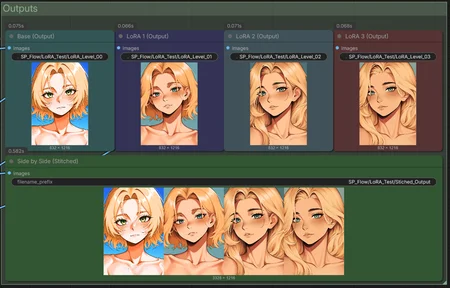
Outputs an image for each level of the LoRA as well as a baseline/no LoRA applied image to see what the model spits out for your given prompt without adjustment.
Additionally stitches all four output images together for a single view comparison of each LoRA you have applied, or each strength level you have applied.


Usage
Pick your model (current version is designed for full checkpoints/AIOs, working on a second version for UNET / Diffusion Model based checkpoints that require a separate CLIP/VAE)
Set each LoRA in the LoRA selector list. Using rgthree nodes here so that you can also test impact on other LoRAs (outfit/body/object/etc.) you want to test against to see if a specific bake level pulls to hard on a secondary LoRA.
Multiple LoRAs can be applied per level
Strength is set individually/not mapped automatically so that you can test the same LoRA at multiple strengths in one click against the same prompt/seed
Set your image settings (output size, steps, CFG, seed, Clip Skip, sampler, and scheduler) as needed for your output
Enter your Positive/Negative prompts
Hit Run
Each item above will pass to each corresponding KSampler to produce four images off a single set of baseline data
Base Output (no LoRA applied)
LoRA One / LoRA Strength Level One Applied
LoRA Two / LoRA Strength Level Two Applied
LoRA Three / LoRA Strength Level Three Applied
Each image is saved and labeled individually
A final stitched image is generated of all four outputs in one row for easy visual comparison, also saved and labeled as an output
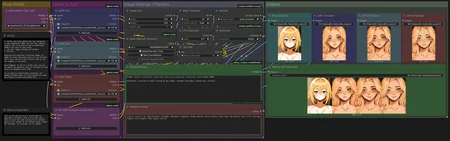
Workflow


Notes
Baseline includes a LoRA node so you can test things outside the general scope without having to wire up additional items, or even test a fourth level if you choose. Stays wired, just passes nothing by default
Every worker node is stacked behind the Prompts to clean up the spaghetti/reduce the size of the overall workflow, if you need to access anything to edit it is tucked under there
Sometimes it runs out of order, because ComfyUI, but the stitched image should always be in the correct "Base / One / Two / Three" order for review
Description
Initial Release (Checkpoint/AIO Version)
FAQ
Comments (8)
How should someone make a workflow similar to this but for checkpoint/model instead of lora?
You could do a lot of similar setup, but essentially rewire the LORA paths to Load Checkpoint paths (or upstream a layer from each LORA add a load checkpoint).
You'd lose a lot of the speed this maintains because instead of putting out 4 images in 20-25 seconds because the model is already loaded it's just applying a different lightweight LoRA to each you'd have to load a new model, clip, and potentially VAE, but you'd still have it essentially set for one click.
TL:DR, pop a load checkpoint in above each LoRA, have each checkpoint feed that same line. I'd probably unhide the KSamplers if you did that since each model will want different tweaks to stuff.
Thought the idea was neat so wired this up before work this morning, now it has a specific model based version: https://civitai.com/models/2338405?modelVersionId=2632206
@sp573 thank you
Brief hint: You indexed this with SD1.5 (on purpose?)
Just saying: It might get weeded out if someone filters by model on civit. Great work, again, thanks for sharing.
It was one of the first things I uploaded so I didn't have a full understanding of how that matching worked yet (which still kind of annoys me to this day on things that are cross compatible). I figured by picking the "most base" it would apply forward compatibility, but was not, and I agree with you.
A better idea might be to pair to to Illustrious, or I just just duplicate and version match for each (even though they'll be identical until I clean up and release my UNET version for Z-Image and others).
Updated, and finally got around to adding my UNET/Diff Model version to public release. Thanks for the nudge :)
@sp573 sooo many virtual hugs sent *hug*