



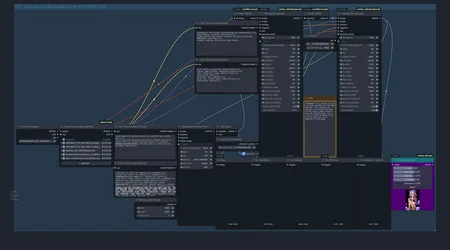
Seamless 2X Refiner & Upscale Workflow
The "Zero Artifact" Breakthrough
After extensive troubleshooting with the Ultimate SD Upscale node, I’ve developed a logic flow that eliminates tiling seams and artifacts. The secret sauce is the Two-Prompt System: separation of powers between your base generation and the final refinement.
⚠️ IMPORTANT: By default, only the final 2x Upscaled Image is set to auto-save. Intermediate steps are preview-only. Pick your favorite and save it manually!
How It Works: The Two-Prompt System
This workflow uses a specific dual-conditioning setup to ensure the refiner doesn't "hallucinate" new details into your seams:
Base Prompt (The Generalist): This handles your primary composition, character details (including NSFW traits), and lighting. It sets the stage.
Refiner Prompt (The Specialist): This is tied directly into the Ultimate SD Upscale node.
Pro-Tip: Keep this prompt focused strictly on skin texture, facial clarity, and general refinement.
The Golden Rule: Adding too much "environmental info" or scene context to this second prompt causes artifacts every time. Less is more for the refiner!
Why use this?
No Tiling: Optimized for clean 2x increases without the grid patterns common in high-res fixes.
Face Correction: Built-in logic to prevent "Face-Melting" during the upscale pass.
NSFW Optimized: Specifically tuned to handle skin textures and anatomy without losing fidelity during the resolution jump.
Quick Setup Guide
Input: Your standard T2I parameters.
Refiner Pass: Ensure your second prompt is a "distilled" version of the first (textures and clarity only).
Denoising: Keep your denoising in the 0.3 - 0.4 range for the best balance between "new detail" and "original composition."