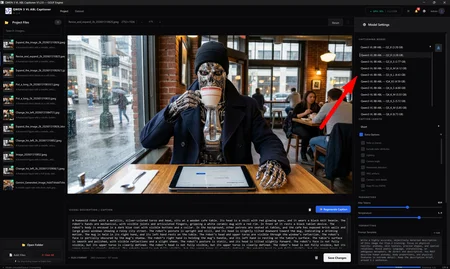
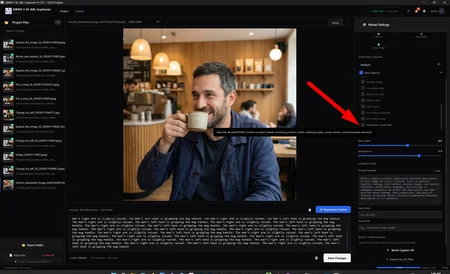
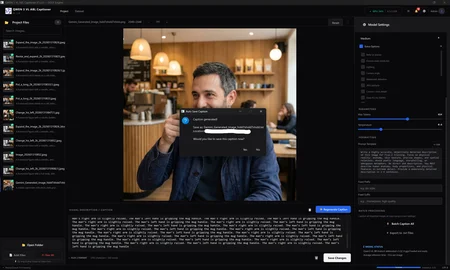
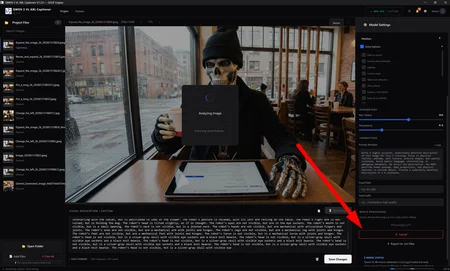
A fully offline, portable desktop application for generating high-quality image captions using the UNCENSORED Qwen3-VL 8B vision-language model. Built with a professional PyQt6 dark-themed GUI, GGUF quantized model inference via llama-cpp-python, and full CUDA GPU acceleration.
Designed for AI artists, dataset curators, CHROMA, PONY, QWEN, ZIT, ZIB, Stable Diffusion / Flux trainers who need accurate, customizable captions for their image datasets.
Up-to-date, highly accurate, less hallucinations, better visual encoder, FASTER THAN JoyCaption Beta One & ANY OTHER JoyCaption PORTABLE VERSION.
THIS IS BUILT BY A REAL TECHNICAL ENGINEER w/ 16 YRS OF EXP.
Download link below for complete details and application.
https://github.com/GitDonkeyHubbed/qwen3vl-captioner
🚀 What's New in V1.2.0
This release brings a major overhaul to how captions are generated, focusing on accuracy, anatomy, and detail over "storytelling" fluff.
🏥 Clinical Precision Mode
We've completely rewritten the prompts for all models (Flux, Stable Diffusion, Pony, etc.). Instead of "cinematic" or "moody" descriptions, the engine now focuses on:
Physical Reality: Exact shapes, textures, and spatial relations.
Accurate Anatomy: Detailed descriptions of bodies and poses without euphemisms.
Objective Detail: "Horses through" the image content, listing exactly what is there.
🔞 Uncensored / Adult Detail Option
A new "Uncensored / Adult Detail" checkbox in the settings. When enabled, this injects explicit instructions to describe all content (including nudity and adult themes) with full anatomical accuracy, bypassing standard safety refusals. Essential for high-quality dataset training.
📦 Portable Release
This version is fully portable. Models are now detected in the application folder, making it easier to share and install.
✨ Key Features
Clinical Precision: Using anatomically accurate, objective language instead of "creative writing" style. Designed for training, not storytelling.
Universal "Edit" Mode: Full control via the Edit button to handle any prompt format (JSON, XML, Booru) without needing complex hardcoded "modes".
Lean Architecture: Focused on speed and simplicity. No bloat, just tools that work.
Multi-Model Presets: Pre-configured formats for Flux 1 & 2, Stable Diffusion, Pony (SDXL), Z-Image, and more.
Drag & Drop: Drop images or entire folders directly into the app.
Batch Processing: Caption thousands of images automatically.
Smart Model Handling: Native GGUF support with auto-downloading.
Hardware Monitoring: Real-time GPU VRAM usage display.
Safety Controls: Toggle between "PG" and fully "Uncensored" XXX modes.
Auto-save & Cancel operation anytime
Drag & Drop Enabled
Description
🚀 What's New in V1.2.0
This release brings a major overhaul to how captions are generated, focusing on accuracy, anatomy, and detail over "storytelling" fluff.
🏥 Clinical Precision Mode
We've completely rewritten the prompts for all models (Flux, Stable Diffusion, Pony, etc.). Instead of "cinematic" or "moody" descriptions, the engine now focuses on:
Physical Reality: Exact shapes, textures, and spatial relations.
Accurate Anatomy: Detailed descriptions of bodies and poses without euphemisms.
Objective Detail: "Horses through" the image content, listing exactly what is there.
🔞 Uncensored / Adult Detail Option
A new "Uncensored / Adult Detail" checkbox in the settings. When enabled, this injects explicit instructions to describe all content (including nudity and adult themes) with full anatomical accuracy, bypassing standard safety refusals. Essential for high-quality dataset training.
📦 Portable Release
This version is fully portable. Models are now detected in the application folder, making it easier to share and install.
✨ Key Features
Clinical Precision: Using anatomically accurate, objective language instead of "creative writing" style. Designed for training, not storytelling.
Universal "Edit" Mode: Full control via the Edit button to handle any prompt format (JSON, XML, Booru) without needing complex hardcoded "modes".
Lean Architecture: Focused on speed and simplicity. No bloat, just tools that work.
Multi-Model Presets: Pre-configured formats for Flux 1 & 2, Stable Diffusion, Pony (SDXL), Z-Image, and more.
Drag & Drop: Drop images or entire folders directly into the app.
Batch Processing: Caption thousands of images automatically.
Smart Model Handling: Native GGUF support with auto-downloading.
Hardware Monitoring: Real-time GPU VRAM usage display.
Safety Controls: Toggle between "PG" and fully "Uncensored" XXX modes.
Auto-save & Cancel operation anytime
Drag & Drop Enabled
FAQ
Comments (7)
Hello. Why did you post your LoRAs twice, each of them? 😅 Thanks 🙌
Because the categorization of how things are organized and listed isn't really designated properly for this application. It can either be part of your work flow (which is a tool) or it could be a tool by itself that's added to your work flow. Why not have both sections so more people can have their eyes on it and use something that's fast, efficient, accurate, clean, simple, easy to use, easy to install. Just sharing something that is a little bit more efficient and tweaked, refined at the same time. That's why. No problem. I hope that answers your question. 😊
how to install?
Go to my github Repo and use the link. Then read the Quick Start section, its easy to install and run. I promise : https://github.com/GitDonkeyHubbed/qwen3vl-captioner
Your work is amazing! Thank you for creating such a great tool.
I have a few small suggestions for future updates:
Saving Options: It would be useful to have settings for caption saving behavior: Auto-save, Ask every time, or Do not save.
Font Size / UI Scaling: Since I am using a 4K monitor, the text appears very small and is hard to read. Could you please add an option to adjust the font size?
thank you, sure thing. I can tweak the gui to adjust those things.
thanks!
I would like to see wan video architecture added as well. https://wan2-1.com/blogs/prompt-guide