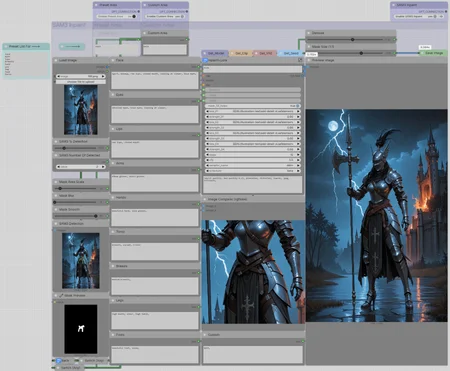
This workflow functions similarly to FaceDetailer or ADetailer.
SAM3 identifies the target area, and the Inpaint node regenerates it.

1. A Single Unified Model
- Instead of using SAM2 combined with multiple bounding box (bbox) and segmentation models (segm), this process uses just one model for all body parts and clothing.
- You can select almost anything: from hands, legs, and feet to nails, earrings, and more.
- Simple Implementation: Most basic body parts have dedicated prompt nodes. Simply select a tag from the "Preset List For --->" and paste it into "Preset Area" (Ctrl+C / Ctrl+V).
- Customization: If you need something not included in the presets, disable "Preset Area" and enable "Custom Area", then enter your prompt in the field at the bottom of the group.
- Note: Only one mode should be active at a time: either "Preset Area" or "Custom Area."
2. Detection Control
- You can adjust the detection confidence threshold using the "SAM3 % Detection" slider.
- For paired features (such as eyes, hands, or legs), you can specify the number of areas to find using the "SAM3 Number Of Detected" node.
- Nuance: When selecting multiple objects, sequential generation (processing one hand and then the other) is not supported. It will either regenerate both hands simultaneously or a single hand (depending on the "SAM3 % Detection" setting).
3. Mask Refinement
- You have full control over the mask: you can change its size, add blur, and smooth out the edges for better blending.
4. Integrated LoRAs and Prompts
- The Inpaint node features four dedicated LoRA slots. It also includes a universal negative prompt field that remains consistent regardless of the specific body part or clothing being processed.
Compatibility:
The workflow is optimized for SDXL. However, you can easily adapt it for other models by connecting the outputs of the new nodes to the corresponding "Get nodes."
SAM3 model path:
ComfyUI\models\sam3\sam3.pt
https://huggingface.co/facebook/sam3
https://modelscope.cn/models/facebook/sam3
Nodes used:
[SAM3](https://github.com/PozzettiAndrea/ComfyUI-SAM3)
[ComfyUI Impact Pack](https://github.com/ltdrdata/ComfyUI-Impact-Pack)
[ComfyUI-Custom-Scripts](https://github.com/pythongosssss/ComfyUI-Custom-Scripts)
[rgthree-comfy](https://github.com/rgthree/rgthree-comfy)
[ComfyUI-Easy-Use](https://github.com/yolain/ComfyUI-Easy-Use)
[ComfyUI_essentials](https://github.com/cubiq/ComfyUI_essentials)
[ComfyUI-Inpaint-CropAndStitch](https://github.com/lquesada/ComfyUI-Inpaint-CropAndStitch)
[Save Image with Generation Metadata](https://github.com/giriss/comfy-image-saver)
[ComfyUI-mxToolkit](https://github.com/Smirnov75/ComfyUI-mxToolkit)
[WAS Node Suite (Revised)](https://github.com/ltdrdata/was-node-suite-comfyui)
[ComfyUI-Jjk-Nodes](https://github.com/jjkramhoeft/ComfyUI-Jjk-Nodes)
[Basic data handling](https://github.com/StableLlama/ComfyUI-basic_data_handling)
[Comfy-WaveSpeed](https://github.com/chengzeyi/Comfy-WaveSpeed) - optional
Description
FAQ
Comments (2)
Nice idea,
but am I the only one or SAM3 doesn't support NSFW stuff ?
Try to ask it to identify genitals, it will give just black screen, the maximum thing it worked with was "breasts", not more, I got an official standard version of SAM3.
Yes, but you can use, for example, “hips”, “torso”, “legs”, etc, and expand the mask to the desired areas.