


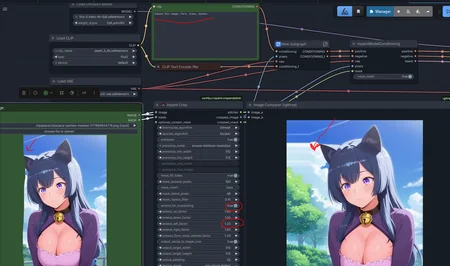
Basic inpaint workflow with nodes for cropping the input image. Instead of pushing the entire image into the VRAM, it only puts 512x512 there (or more if the mask is large). Klein 4b does this in seconds, instead of tens of seconds. On the 9b model the speed increase is also noticeable.
If desired, it can be used on any other model (Qwen, ZiT).
Description
FAQ
Comments (2)
this is great sub 7 sec per edit is amazing ... could you also make a outpaint workflow please
Hi!
The main node (✂️ Inpaint Crop) has an "Extend_for_outpainting" switch. Turn it on, mask one (or more) side of image, set the additional values under this switch—and everything will work.
upd. Added another picture to post with an explanation of the outpaint.