




Changelog:
v1.0 – initial release
v1.1 – Added Regional Prompting support (see bottom)
v1.1(hotfix1) – Fixed an issue where workflow fails to run if the hand detailer is disabled
v1.6 – Brought to feature parity with my Anima workflow
• Changed first SDSU run for refinement without upscaler
• NSFW detailers
• ControlNet
• Prompt Crafter sections
• Inpaint via ControlNet
• Reworked Img2Img using standard Ksampler
• Swapped base model for LoRA patched model for detailers to maintain consistency
• LLM assisted Prompt Generator using Gemma4
• SeedVR2 Support
• Larger possible image size (67 mega pixels)
• Nodes rearranged to fit smaller monitors
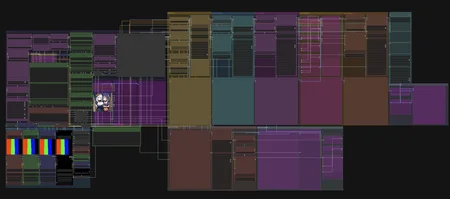
This workflow supports TXT2IMG and IMG2IMG, easy LoRA integration, easy wildcards, all kinds of detailers (hands, face, eyes, body, and nsfw), multiple SDSU runs for refinement and upscaling, and some post processing for color corrections.
Please take a look at the following article for a full guide on how to use this workflow effectively:
https://civarchive.com/articles/26742/succupon-all-in-one-workflow-t2i-i2i-detailing-upscale
Below you will find a quick overview, but I encourage you to take a look at the full guide.
So what makes this workflow special? It is specifically how your detailers work.
A common annoyance I have is if you are generating large batches of images with a generic prompt for your detailers, they will tend to “normalize” the area they are detailing. Example: An image of a character with an angry expression gets sent to a face detailer with “face, beautiful face,” it will slowly morph the face into a neutral of smiling expression with multiple passes.
To combat this problem, this workflow will feed your face and eye detailer prompts into your body prompt, and all three will feed into your base prompt. Here is a quick visualization of what is happening.

Essentially, you input your detailer text and wildcards on one central location. Eye detailer text will feed into your face detailer, your face detailer will feed into your body detailer. And all detailers will feed into your global prompt.

At the bottom, you will have a preview of your completed prompt
IMG2IMG
Enable the IMG2IMG mode

Load an image and specify a Denoise level. The closer the Denoise is to 1, the more the image will change.

The image will follow the same detailer pipeline and logic as the TXT2IMG one. Detailer prompts will be sent to your initial image prompt, and face/eye detailers will be sent to your body prompt. The results are very consistent and give high prompt adherence.

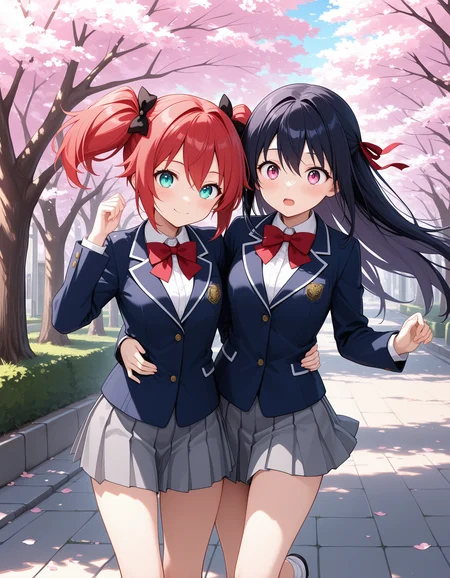
masterpiece,best quality,amazing quality, very aesthetic, high resolution, ultra-detailed, absurdres, newest, dynamic angle, park, moonlight, night, 2girls, multiple girls, hugging, devil wings, devil tail, devil horns, succubus, succubus outfit, cleavage, clothing cutout, standing, hand on hip, blonde hair, black hair, narrow waist, large teardrop breasts, chartreuse, succubus outfit,, slit pupils, glowing eyes, detailed eyes, eye highlights, vibrant, perfect face, face, smug.
There was definitely some deviation on the left characters eye color and hairstyle. The denoise was set very high so this is expected. We were looking to do quite a bit of transformation on this image so that can happen. You can always lower your denoise to something like 0.6-0.7
I recommend always starting small and working your way up if you aren’t getting the result you want. The workflow ships at 0.7 but I recommend trying lower levels first.
Regional Prompting:
Here we can apply prompts to specific sections of the image. This is very effective in mixing different characters in the same image and preventing their traits from “bleeding together.”
Here is an example of what Regional Prompting can do. Below are two images. The first is without Regional Prompting. The next is using Regional Prompting.
Our example prompt is: 4girls, standing, bedroom, side by side, red hair, red bikini, red eyes, green hair, green bikini, green eyes, blue hair, blue bikini, blue eyes, black hair, brown eyes, black bikini
Without Regional Prompting

Here you will notice that the prompt was not followed very well. The green girl is wearing a blue bikini. There is technically no blue girl as she has been replaced with a red girl wearing a green bikini. Now lets take a look at the same prompt with Regional Prompting
With Regional Prompting

Here you see the prompt was handled much better. The red girl has red eyes and a red bikini, the green girl has green eyes and a green bikini, etc etc.
This isn’t limited to colors though. You can put anything in your regions. Expressions, hair styles, full character names (very useful when using Danbooru recognized characters)
Here is an example combining all types prompt guidance in Regional Prompting. (fun test cause I love Xenoblade)
Base Prompt = 3girls, 3girls sitting at a table, from above, multiple girls, sitting at a table, cafe, coffee, cake, pov, cleavage, casual clothes, core crystal, xenoblade
Red = grin, mythra \(xenoblade\), short hair, core crystal, blonde hair,
Green = smug, nia \(xenoblade\), core crystal, cat ears,
Blue = loving smile, pyra \(xenoblade\), long hair, core crystal, red eyes

For all models used in this workflow, as well as in-depth examples on regional prompting, check out the guide article:
https://civarchive.com/articles/26742/succupon-all-in-one-workflow-t2i-i2i-detailing-upscale
Description
Added Regional Prompting support. See https://civitai.com/articles/26742/succupon-all-in-one-workflow-t2i-i2i-detailing-upscale for more details
FAQ
Comments (4)
Easy and fast, this is absolutely perfect!
Question for anyone who knows... what's the best way to use a lora in the detailers? I'm used to reforge, and you can just add it yourself in the detailer, but in this workflow, from what I can tell, you have to add the lora at the beginning (which I don't necessarily want), then, you add the activation in the detailer. If I want to use 3 or 4 loras for the prompt, I feel like quality might suffer by adding another 3 or 4 on top of that. Or am I doing it wrong... do you just put the activation text in the detailer prompt, then add the lora in the detailer pipe? (Doing that appears to add the lora but doesn't allow me to change the strength)
You aren't able to edit the strength of LoRA's in the detailer since its text is being populated by the text aggregators which are being fed by the nodes in the Detailer Prompts Group.
The simplest way to accomplish what you are trying to do (at least in my opinion) is to unlink the text input of the detailer (Right click the input text box on the "ToDetailerPipe" and select "Disconnect Links")
Be aware that this will break the aggregation functionality of the workflow for that specific detailer since that is done in the Detailer Prompts section of the workflow and you are effectively stopping that from reaching the ToDetailerPipe node.
Alternatively, you could just put your LoRA activation in the Detailer Prompt section. You wouldn't have the "easy drop down" list but it should still work and you should be able to edit the weight of the LoRA. This will also not break the prompt aggregation functionality.
@Succupon Thanks! I have so little free time lately because of work, but I will give it a try