


Anima is a 2 billion parameter text-to-image model created via a collaboration between CircleStone Labs and Comfy Org. It is focused mainly on anime concepts, characters, and styles, but is also capable of generating a wide variety of other non-photorealistic content. The model is designed for making illustrations and artistic images, and will not work well at realism.
It is trained on several million anime images and about 800k non-anime artistic images. No synthetic data was used for training. The knowledge cut-off date for the anime training data is September 2025.
Versions
Anima-Base
The pretrained, unrefined base model. Maximum flexibility, diversity, and style adherence.
LoRAs should be trained using this version.
Anima-Aesthetic
Fine-tuned for better consistency and a higher quality default art style.
Anima-Turbo
Distilled version for fast generations.
Use at CFG 1 and 8-12 steps.
The distillation process also increases stability and gives the model a strong default style, but reduces diversity.
I recommend starting with Anima-Turbo. On average, it is only slightly worse than Anima-Aesthetic, while being very fast to generate (and much cheaper if you use it on an online platform that scales the cost with step count). This makes it very convenient for quickly iterating on prompts. The increased stability can even make it better than Aesthetic in some cases.
Installing and running
Get the text encoder and VAE from the HuggingFage page.
The model is natively supported in ComfyUI. The model files go in their respective folders inside your model directory:
anima-base-v1.0.safetensors goes in ComfyUI/models/diffusion_models
qwen_3_06b_base.safetensors goes in ComfyUI/models/text_encoders
qwen_image_vae.safetensors goes in ComfyUI/models/vae (this is the Qwen-Image VAE, you might already have it)
Generation settings
Works at resolutions between 512^2 and 1536^2 pixels.
30-50 steps, CFG 4-6.
The Aesthetic version can tolerate lower CFGs such as 3, and often looks better with them.
A variety of samplers work. Some of my favorites:
er_sde: neutral style, flat colors, sharp lines. I use this as a reasonable default.
euler_a: Softer, thinner lines. Can sometimes tend towards a 2.5D look. CFG can be pushed a bit higher than other samplers without burning the image.
dpmpp_2m_sde_gpu: similar in style to er_sde but can produce more variety and be more "creative". Depending on the prompt it can get too wild sometimes.
euler: a basic sampler that is a bit more creative than er_sde. Good with the Turbo and Aesthetic versions, since those are naturally more stable.
If going for a more realistic / painterly look, the beta57 scheduler (ComfyUI RES4LYF custom node pack) can help make better textures, since it puts more emphasis on low-noise timesteps.
Prompting
The model is trained on Danbooru-style tags, natural language captions, and combinations of tags and captions.
Use lowercase for tags, and spaces instead of underscores. Score tags are the only tags that use underscores.
Recommended positive prefix: "masterpiece, best quality, score_7, safe, "
Recommended negative: "worst quality, low quality, score_1, score_2, score_3, artist name, blurry, jpeg artifacts, chromatic aberration"
When using a tag that is different between Danbooru and Gelbooru, prefer the Gelbooru version.
Prompt weighting works, but needs a weight higher than typically used for SDXL. Example: "(chibi:2)"
Aesthetic Version Prompting
Anima-Aesthetic is fine-tuned only on high quality images, with all of the quality tags stripped out from the captions. You don't need to use quality tags in the positive at all, but "masterpiece, best quality, " is safe to leave in. I recommend not using score_* tags in both the positive and negative prompt. It is already high quality enough and the score tags can push it too hard into slop territory.
Tag order
[quality/meta/year/safety tags] [1girl/1boy/1other etc] [character] [series] [artist] [general tags]
Within each tag section, the tags can be in arbitrary order.
Quality tags
Human score based: masterpiece, best quality, good quality, normal quality, low quality, worst quality
PonyV7 aesthetic model based: score_9, score_8, ..., score_1
You can use either the human score quality tags, the aesthetic model tags, both together, or neither. All combinations work.
Time period tags
Specific year: year 2025, year 2024, ...
Period: newest, recent, mid, early, old
Meta tags
highres, absurdres, anime screenshot, jpeg artifacts, official art, etc
Safety tags
safe, sensitive, nsfw, explicit
Artist tags
Prefix artist with @. E.g. "@big chungus". You must put @ in front of the artist. The effect will be very weak if you don't.
Full tag example
year 2025, newest, normal quality, score_5, highres, safe, 1girl, oomuro sakurako, yuru yuri, @nnn yryr, smile, brown hair, hat, solo, fur-trimmed gloves, open mouth, long hair, gift box, fang, skirt, red gloves, blunt bangs, gloves, one eye closed, shirt, brown eyes, santa costume, red hat, skin fang, twitter username, white background, holding bag, fur trim, simple background, brown skirt, bag, gift bag, looking at viewer, santa hat, ;d, red shirt, box, gift, fur-trimmed headwear, holding, red capelet, holding box, capelet
Tag dropout
The model was trained with random tag dropout. You don't need to include every single relevant tag for the image.
Dataset tags
To improve style and content diversity, the model was additionally trained on two non-anime datasets: LAION-POP (specifically the ye-pop version) and DeviantArt. Both were filtered to exclude photos. Because these datasets are qualitatively different from anime datasets, captions from them have been labeled with a "dataset tag". This occurs at the very beginning of a prompt followed by a newline. Optionally, the second line can contain either the image alt-text (ye-pop) or the title of the work (DeviantArt). Examples:
ye-pop
For Sale: Others by Arun Prem
Abstract, oil painting of three faceless, blue-skinned figures. Left: white, draped figure; center: yellow-shirted, dark-haired figure; right: red-veiled, dark-haired figure carrying another. Bold, textured colors, minimalist style.
deviantart
Flame
Digital painting of a fiery dragon with glowing yellow eyes, black horns, and a long, sinuous tail, perched on a glowing, molten rock formation. The background is a gradient of dark purple to orange.Natural language prompting tips
Follow standard English capitalization rules for character and series names.
If using pure natural language, more descriptive is better. Aim for at least 2 sentences. Extremely short prompts can give unexpected results.
You can mix tags and natural language in arbitrary order.
You can put quality / artist tags at the beginning of a natural language prompt.
"masterpiece, best quality, @big chungus. An anime girl with medium-length blonde hair is..."
Name a character, then describe their basic appearance.
"Digital artwork of Fern from Sousou no Frieren, with long purple hair and purple eyes, wearing a black coat over a white dress with puffy sleeves..."
This is extra important when prompting for multiple characters. If you just list off character names with no description of appearance, the model can get confused.
Limitations
The model doesn't do realism well. This is intended. It is an anime / illustration / art focused model.
The model may generate undesired content, especially if the prompt is short or lacking details.
Avoid this by using the appropriate safety tags in the positive and negative prompts, and by writing sufficiently detailed prompts.
The model isn't great at text rendering. It can generally do single words and sometimes short phrases, but lengthy text rendering won't work well.
The base version is a true base model. It hasn't been aesthetic tuned on a curated dataset. The default style is very plain and neutral, which is especially apparent if you don't use artist or quality tags.
Finetuning tips
Don't train the LLM adapter. My own training script, diffusion-pipe, lets you set llm_adapter_lr=0 to completely disable training it, and the example config has this as a default.
Other trainers like sd-scripts have similar options that should be used.
The LLM adapter processes the text embeddings before they get to the diffusion model, and therefore has an outsized influence on the generated images. The adapter itself contains a surprising amount of knowledge and is easy to degrade by training it.
Use a low learning rate. For a rank 32 LoRA, start with 2e-5 and adjust up or down from there.
As a base model, there is no aggressive aesthetic tuning or RLHF you need to overcome when finetuning.
The model has an extremely large and diverse amount of visual concepts baked in already. A light touch is all you need.
Example of a style LoRA, with dataset and configs shared.
Online platforms
In addition to CivitAI, the following platforms also officially support Anima for hosted image generation.
License
This model is licensed under the CircleStone Labs Non-Commercial License. The model and derivatives are only usable for non-commercial purposes. Additionally, this model constitutes a "Derivative Model" of Cosmos-Predict2-2B-Text2Image, and therefore is subject to the NVIDIA Open Model License Agreement insofar as it applies to Derivative Models.
If you would like a commercial license, please email [email protected]
Built on NVIDIA Cosmos.
Description
Fine-tuned version for higher quality. Designed to have a slightly flat, more traditional anime aesthetic, while still having good details and preserving artist styles.
FAQ
Comments (143)
Crazy Model
I also include high-resolution images when doing aesthetic fine-tuning, but did you use high-res images for the Anima-Aesthetic version? Could you give me more details?
Thanks for the new releases. Does this mean the aesthetic finetune is recommended above Base now?
I'm going to guess anima base is still the base version unless they make a base 1.5-2.0 like illustrious. the aesthetic is like other anima finetunes like wai anima. you can use them as your training model but dont expect the output to work on other finetunes of anima unlike the base which would work regardless of the finetune.
Probably depends on what you're doing but in my experience so far I don't really like the aesthetic finetune. A lot of the style Loras I have (both my own and several downloaded off Civitai) simply look worse on the aesthetic tune, and even without Loras, images seem to be kinda noisy especially in linework which looks jagged. In some cases this actually results in more accurate artists (off the top of my head, ciloranko looks more accurate on the aesthetic finetune than base) but a lot of artists just look worse as a result. This doesn't really seem to change regardless of prompt or CFG either. I will say backgrounds overall do look better though.
Personally I'm just going to stick to base with style Loras, I don't feel like the aesthetic finetune is even that aesthetic anyways
Aesthetic should have been called Slop version.
Gotta say, the Aesthetic version looks very undercooked. The edges especially are all jagged and noisy in a way they aren't on either the Base or even the Turbo version, like I'm using an incompatible sampler/scheduler (even though it's just ordinary Euler a/Simple), haven't given it enough steps (even though it's still 30), or have paired it with the wrong TE (I have double checked it's the same Qwen 3 0.6B it has always been).
Maybe, but I think it work with different promts. I had some good genrations, but not with old promts. I am not sure yet. in addition it can combine with 0.2-turbo lora
nice to see one of the best image gen model family's available today getting more versions.
TURBO RELEASED HOURS BEFORE MY BDAY??????? THANKS!!! <3
Happy birthday man 🎉 enjoy this legendary open source anime model
@AnimaXx haha thank you!!! I will enjoy it <3
HAPPY BIRTHDAY!
@Big_Soda thx!!! :D
Happy BDAY
Incredible work. Keep it up
Turbo Looks really good!
I literally just fired up my browser, and the first thing that caught my eye was that page with the Anima Turbo tab. I admit, I held my breath for a few seconds.
I don't know what happened in Anima Turbo V1.0, but it completely destroys the artists styles. Images generated with artist styles look appalling now. I'll stick to base + turbo lora. This one is a disaster.
It's the same here: the underrepresented styles are completely eliminated, while only those with significant representation remain, more or less.
It is expected that Turbo (or any finetune, really) will be worse at pure style adherence compared to Base. It that is your #1 requirement, Base is better. The turbo-lora-v0.2 has an interesting "feature" where it is quite noisy, and this actually helps with styles that have fine details, jagged lines, textures etc. So it is better at that, but worse than the full Turbo checkpoint at just about anything else.
Ngl this is true but for me at least I prefer turbo over base, whatever it's done to my style I love it lol,
The Turbo 1.0 model is truly excellent and seems to be highly compatible with existing LoRAs. It looks like it can finally fully replace the LoRAs previously used to speed up inference, while offering much better detail and prompt adherence than earlier Turbo-style models.
In my experience so far the Aesthetic finetune is excellent. A bit better than base. Most the artists tags I use seem to be better represented than base.
What’s really cool to me is that, unlike other turbo models I’ve tried, this one has a crazy amount of seed variety even with the exact same prompt. The compositions and art styles can come out completely different each time. I’m honestly really impressed by that.
Although I do get the feeling that the more detailed the prompt is, the less variety you get in the art styles across different generations, even if you don’t specify any particular art style in the prompt.
What is the difference between the Aesthetic version 1.0 and Aesthetic version 1.0b? Thanks :)
About this version (1.0b):
"Alternate version of Anima-Aesthetic. This one consists only of an aesthetic finetune on 10k images, with none of the additional style adjustment and stabilization loras merged in like 1.0. I personally like it less, and think it tends toward a 2.5D, shiny, plastic, AI-slop look. But maybe some people prefer it."
@RisingV Thank you so much for such a quick response! I see and makes sense, looks like I will just go with the version 1 then. Thanks again!
No problem, just copied the text under the "about this version" tab beneath the model card.
@RisingV Oh my gosh I feel silly, I usually don't click on that lol. Well I learned something new today :)
Are there any future update plans for anima base?
Maybe, in several months, but it will entirely depend on how much revenue I'm making, since large-scale training runs are very expensive especially with current cloud GPU prices.
@circlestone_labs Where are you making your revenue and how do a regular dude like me increase it?
Which of the Anima-based models is best for me right now to train Lora models based on characters, styles, and concepts? The base model, the aesthetic model, or the turbo model?
Always train on Base. Training Turbo won't work at all, training Aesthetic will "work" but the result will only be properly usable on Aesthetic and might not even be as good then as if you had just trained on Base.
I tested it. It's better to train on Base even if you use it on Aesthetic tune. There's probably some breaking point where finetune differs so much from the base when it's better to train on it as well.
Aesthetic 1b was okay for me, but the turbo worked a lot worse than a base model with the 0.2 tubo lora at 0.2 negpip to get rid of the sweat
It's the contrary for me, it work better, especially for facial expression, hair colors, hair texture. Also, no sweaty skin so far unlike with the lora.
@Lorim what kind of content were you making? For me it was NSFW where it fell apart, id just get body horror from having two characters in scene.
@btuline274 I did test on a lot of things : SFW, abstratct, light and shadow, anime coloring, realistic, NSFW, hardcore NSFW.
And everything was fine ^^
@Lorim huh, what settings did you use like sampler and scheduler? Was it complex prompts with multiple characters or more of a single character scene? Quality tags? Any Loras or artist tags?
Really just trying to figure out if I was doing something wrong. Right now it's like night and day difference for me
@btuline274 Euler_a/Normal for sampler/scheduler. I did go up to 3 girls + 1boy, and a gangbang with 6+boy. for the quality tag i only use "masterpiece, best quality, score_7".... Now i will say something that i'm saying since SD1.5 : never use "res" tags (highres, absurdres, lowres etc...). While it bump details it also create déformation, multiple instance of the same item and others errors.
@Lorim okay, I'll try it again when I have time. I was definitely not using Euler a for one, just Euler. My quality tags sound about the same though, I just copied what was in the example pics and added 'explicit' for the safety tag
@Lorim so I definitely got better results with Euler a. I still wasn't super into it if I'm being honest, but that was more a preference thing with the style Loras I was using before not having quite the same effect. I can see it being it really good with a fine tune or the right Loras though
Are LoRAs trained on Anima-Base v1 compatible with Anima-Aesthetic (both versions)?
most likely yeah
They are compatible with the turbo, so it will most likely work on the aesthetic.
yes, i tested with some of my own lora and both versions adopt lora styles almost as well as base (so close that you cant tell at a glance). I personally like the b version better tough, the other one have more style bias and worse hands.
Aesthetic with Turbo by n_Arno better than Turbo model. In my quick tests, the Turbo model didn't quite follow the prompts, but the Aesthetic did everything perfectly. Aesthetic is better than Base if you want a little more uniqueness with each generation. In general, in my opinion, it is better to use Aesthetic.
nice to know someone thinks like me. I started using aesthetic with turbo and it really does work wonders.
Which versions of Turbo by n_Arno and Anima Aesthetic work the best in your opinion?
@orcenjoyer It's too early to talk about the best option. I'll try to run more tests and then publish them.
@orcenjoyer I am currently using Turbo v1.5 and Aesthetic v1.0.
@neponum Okay, thanks man!
I did several test and.... No, Aesthetic + turbo (3 different) produce "worst" result.
1) Prompt adherence is about identique overal with some difference (see 2)
2) facial expression are less expressive, hair color and hair texture have a lot of problems
3) lightning is worse.
4) Less detailed
5) Produce often sweaty and shinny skin for no reason.
@Lorim Maybe I jumped to conclusions, but I'm glad it sparked at least some discussion.
@neponum Well, i was curious about what you said so, i did run test. the turbo is quite well done and fix problems of the Lora in a lot of department.
To my surprise, there is very good variability and not bad compatibility with the lorа
How is the image quality produced by the second-pass sampling of Aesthetic v1.0?
Anima makes the worst eyes
I don't get it, maybe the problem is on my end, but the aesthetic models don't look very good. 1.0b is more or less tolerable, but 1.0 looks rly bad, with lots of noise and artifacts, even if you follow all the points listed in the readme, like lowering the cfg.
Just a couple of comparisons, with and without the artist tag (wf included): https://files.catbox.moe/w18103.png https://files.catbox.moe/l8fh4k.png
I like Anima, and the idea to refine the base style is very sound, because the base model indeed had some nuances regarding stability, especially without specific artist prompts. But it feels like the aesthetic versions were released a bit raw, and personally, I don't see any advantage over the base model at all.
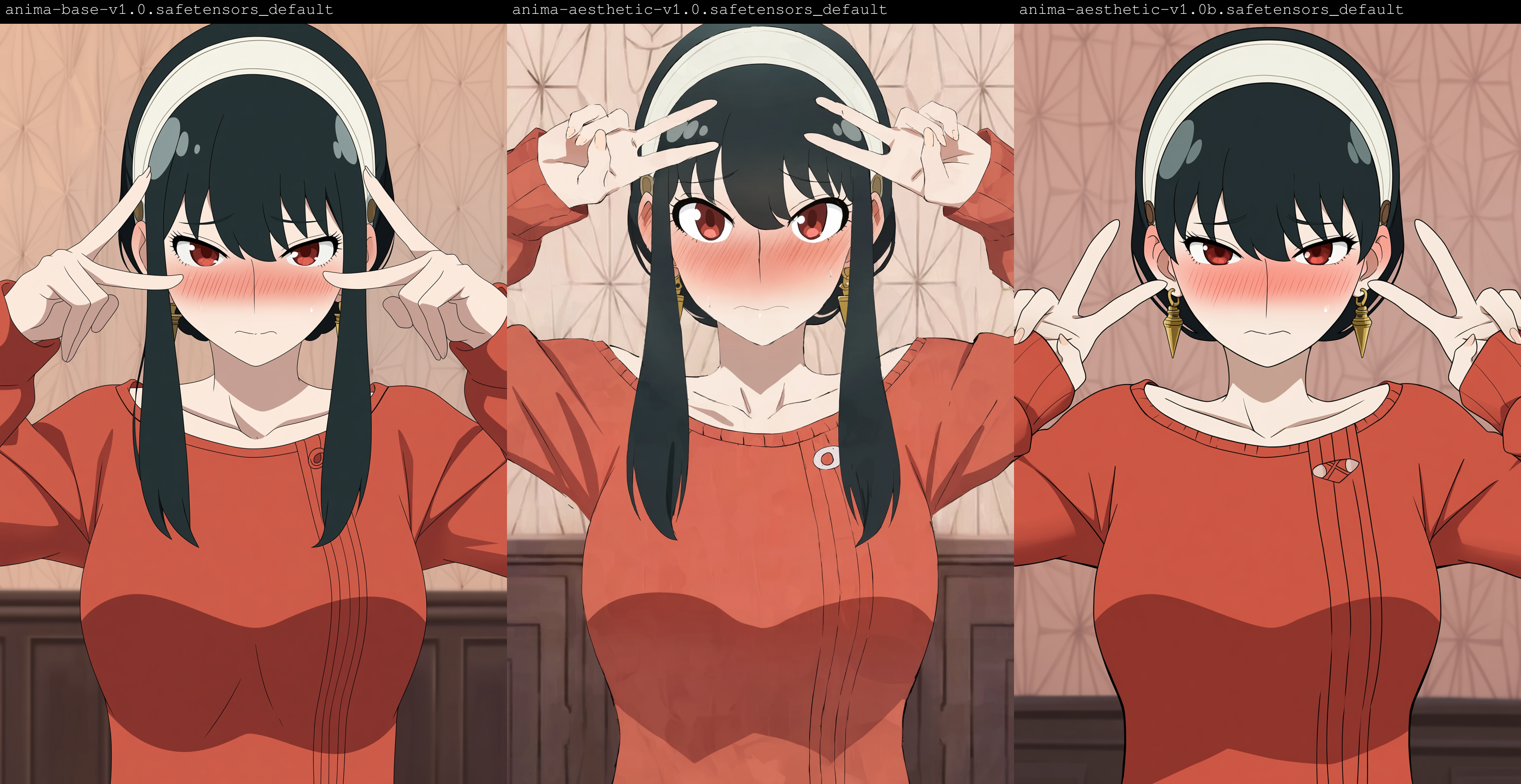
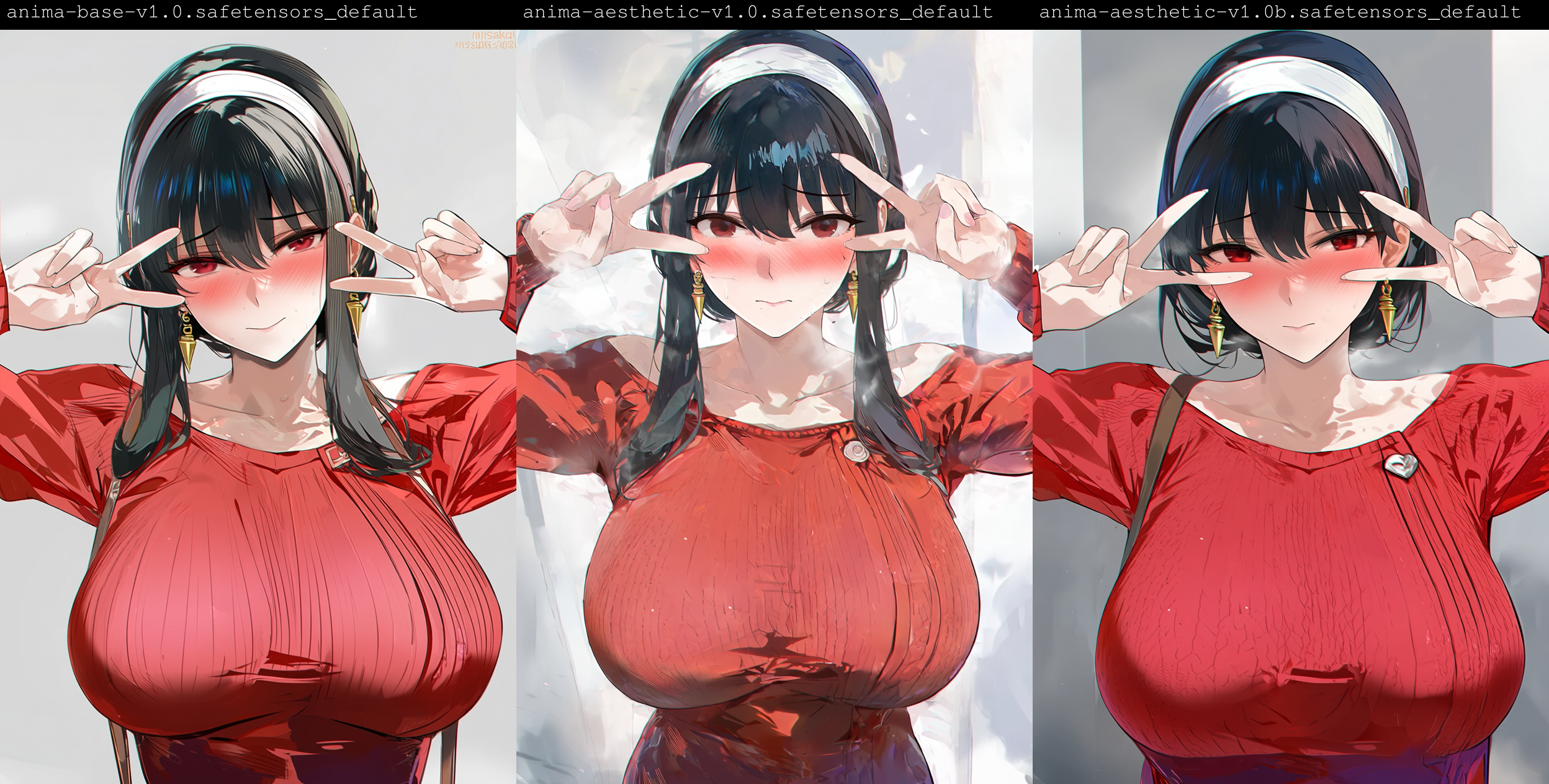
Maybe the problem is on my end and someone can tell me what I'm doing wrong 🤔
The Turbo models are fantastic for their subdued tones and lower color saturation. However, they sometimes completely ignore background tags, defaulting to a simple white background. I also feel it's quite difficult to achieve highly detailed backgrounds. As a trade-off for that flat and sharp anime style, the overall detail and texture are lacking, and it feels like this is hard to fix even with a LoRA.
i found that Euler_a/Normal fix a lot of this problems. Euler/Normal produce a bit too much noise and the other are too flat and slick.
Thanks for the info!
Yes! I feel this as well. While it's more or less possible to tag the details in the foreground next to the character, background still reverts to the simple plain white most of the times.
@alexvola Just put either "indoors" or "outdoors" at the end of the prompt.
If my comments are relevant, I also encountered this problem when using my trained Lora, adding Pony Score helped fix it, specifically in positive Score_9, Score_8, Score_7, and in negative Score_1, Score_2, Score_3, I also recommend using (((simple background:1.5))) in negative
all of them are worse than the base model
turbo? yes. The aesthetic one? Not at all
@atomicblastoid69922 When generating images of specific environments with the aesthetic version, the output appears to be very low-resolution visually, even though the actual resolution is not low at all. Also, the artist tag string I frequently use has stopped working.
@atomicblastoid69922 However, the aesthetic version does indeed result in higher quality for some of the environmental images.
One the best models I've come across.
How much faster is the Turbo model compared to the normal one at 1mp generations ? Anima takes so long on my 3070, and using the Turbo lora produces bad results
speed boost mainly comes from the fact that you can do the following without completely destroying image quality:
- you can use much fewer steps (8-12 quoting the "About this version" section, vs. what you normally use)
- you can set CFG to 1, which disables negative prompts and doubles the generation speed
@shoes22 If i am reading this well, you did a rank 1 extract of the LoRA (at least on the diffusion block, the llm adapter was done at rank 32). I am curious at what lead you to do it this way and if it yield good results (i did an extract at rank 128 which is most probably too much ha ha)
Do the CLIP strength and LoRA strength need to be kept the same when using a LoRA? Thanks.
You can check it yourself, but as far as I know, since the model is not clipped, this does not affect anything, but theoretically, yes, it is the same.
@happyhen Assuming this is referring to Comfy (which for some reason still calls TE's clip...), it would do something if the TE was trained on the Lora, but almost no Loras for Anima do that because it'd look pretty bad and would use a lot of VRAM for no good reason.
Though to be fair, I guess there's the chance a Lora could train the LLM adapter directly, which I have no idea what that would count as. But it would also similarly look terrible, and sd-scripts disables that by default anyways
@Articom123 It will only train if you enable it manually, and it's not a given that it will look terrible, although indeed in most cases there is really little point in this
@Articom123 Comfy isn't my primary platform, but the Krea 2 test, which definitely involved training with TE, yielded no results. I trained models with TE Anima and the results were decent, but it's not worth it and carries a lot of risks. Although it might be useful for concepts.
I don't know why, but the finger and toe stability of Anima Turbo v1.0 is much worse than that of Anima base + Turbo LoRA, especially when the sampler is set to er_sde.
I've found that too. I don't think it's that good tbh
anima > krea2 > anima turbo
SD1.5 > everything
...
checkmate 😎
/s
@jessalyn4800 IllustriousXL is truly better, I'll state it as a fact — this model is ahead of its time.
illustrious XL > anima > krea2 > anima turbo
Breathing > everything. So keep breathing. If you stop breathing, you won't even be able to use any of these models.
From my (less than 30 mins) testing, turbo model is better than base model + turbo LoRA. Turbo model has no more "sweat" issue. It also keeps the variety of art styles unprompted. This means you will need to use any style LoRA to keep it consistent, same as the base model. Edit: Apparently, you can upscale by image up to 2048px without getting noisy output. I haven't tested with higher resolution since it'll be so slow on my GPU.
Today I used Aesthetic and Turbo for about 4-5 hours in combat missions, and I can say that they work fine when upscaled to 2048 (upscale x1.75), as before, but when crossing this line, like the base, zenith, blurring, and loss of edge clarity begin, and you have to separately generate versions using a separate upscaler to the required resolution with the loss of some details or their change
I'd like to add a bit of my opinion on the versions (sorry if I offend anyone):
1. Aesthetic V1B - This version was relatively successful and continues the trend of the Anima base. The styling is decent, but overall, it's a good version and worth testing for your own purposes.
2. Aesthetic V1 - This version, in my opinion, was one of the least successful. Out of 20+ generations, 12 of them have extra fingers and 2-3 of them have extra limbs. It's also worth noting that this version performs extremely poorly with resolution upscaling above 1.5 (sometimes even with 1.5), with broken outlines and a blurry style (though I'd like to remind you that the developers didn't guarantee stability with upscaling above 1.5, so there are no complaints here; just a quick summary for those deciding what to work with).
3. Turbo Anima - this version is really suitable for those who want to quickly throw together a simple piece of art just to see how it works. I can't comment on the rest of this version; it's essentially the same Anima Base, but works quickly and with simplified backgrounds. Summarizing the versions, I can recommend trying either the base version or the Vi1B version. Again, I emphasize this is IMHO!!! I'm not criticizing or judging, I'm just sharing information about the versions.
Overall, I want to thank the developers for their work. I hope that Anima will become even better over time and will continue to develop.
Yeah I agree with this opinion. Aesthetic V1 is simply too noisy, and this doesn't change if you lower your CFG or remove score tags (Not that you should ever use the score tags anyways...). Unsurprisingly the Lora merges are very likely the reason for the noisiness as the model can't even do pure black anymore compared to base, turbo, or V1B. Some artists do benefit from the noisiness but it's very little and the majority just look bad, style Loras especially do not look good on V1. Not to mention V1's colors just seem a little worse/gray in general.
V1B is pretty nice though. I do think it's on par with if not better than the base model most of the time, but it's hardly an "aesthetic" model which is probably why V1 had Loras merged into it. It's very similar to how base looks
I'm willing to accept that both of these are probably just skill issues on my part but I've noticed two things while using the Aesthetic V1 version
- Latent Upscale is giving my consistent blurry results with a 0.35 denoise on a second pass regardless of KSampler (I've messed with just about everything in my workflow and can't seem to resolve this)
- I'm getting a lot of same looking generations, even with low CFG score (again I'm sure this is a skill issue but not sure if maybe others are noticing this)
Overall these are both incredibly minor issues and I'm really liking what I'm seeing from the aesthetic version. I'm excited to hopefully resolve my skill issue soon
Try upscaling the pixels instead of the latent, maybe even with something like realESRGAN_x4_+, which will clean up part of the noise before the second ksampler pass. Or just switch to tiled upscale...
On the other hand, aesthetic v1.0, compared to 1.0b, generates a ton of noise by itself regardless of the settings, so maybe that's where the problem lies.
I don't really see any use cases for 1.0 at all, except maybe for very rare cases when you need to render a specific, heavily detailed artistic style
When I try to run a workflow with it I get this error, any idea why?
AttributeError: 'NoneType' object has no attribute 'clone'
me too
@sunqiyueu235402 I was able to fix it using a different workflow from the one I was using before, if you make one like this image, you can make it work.
https://preview.redd.it/help-me-with-the-anima-checkpoint-error-v0-k2d2o7x8ebch1.jpeg?width=1086&format=pjpg&auto=webp&s=37de9e3876005a39ed0b1e6fd7fe3924c4268d2a

@blendernsfwmethods534 thank you
@blendernsfwmethods534 I used the sd webui and i was unable to use this model
So much creative freedom with this one. It doesn't trap you into one single look.
TypeError: join() argument must be str, bytes, or os.PathLike object, not 'NoneType'
could not use this model in stable diffusion
sry i forget to install the vae and the encoder
@sunqiyueu235402 happens to all of us xd
This is a fantastic version of Anima! I was already a big fan of the base version, but this one is excellent. From my experience, it handles LoRAs even better, some art styles actually come through more efficiently here than they do on the base model. Thanks for your hard work!
imagine if we got Anima Edit, that would be perfect
Is there any info about what artist styles are working good in this model?
Most artists with over ~100 images on Gelbooru are recognizable. Generally the more images there are, and the more consistent their style is, the stronger the effect.
so far i think only noob creators only base creators to share this info --- meaning source with answer, in this case an answer from circle labs of a txt file with all the artist they trained the model on.
https://animadex.net --is built using the noob database not an official anima database
Why are there 2 versions of the aesthetic model? What are the differences? The current description on this page has no mention or description of it.
quoting "About this version" tab under model card for aesthetic-v1.0b:
"Alternate version of Anima-Aesthetic. This one consists only of an aesthetic finetune on 10k images, with none of the additional style adjustment and stabilization loras merged in like 1.0. I personally like it less, and think it tends toward a 2.5D, shiny, plastic, AI-slop look. But maybe some people prefer it."
@RisingV should've checked that. Thanks
No problem. Actually there was someone asking the same question the other day.
What a fantastic model, I can now run Anima in good quality at fairly fast speed. This is wonderful!
you already could by using the turbo lora
@nogo I had terrible results with it
@SomeAIGuy you was just need to place weigh ~0.75 and clip to 0 thats it
I've been using the turbo checkpoint for a day now and comparing.
Results are generally worse, less detailed vs. when I am using normal anima with turbo lora at about 0.75 weight.
And the speed is of course the same.
It works well usually, but with some style loras turbo puts extremely persistent white outlines around every character that ignore your negative prompts completely.
doesn't work on forge.
It does work,I just used it
you need forge neo to run it
@Digons tells me it doesn't recognize model and fails immediately.
use forge NEO
So guys, some people say this model is good, while others say it's bad. Do you think it's good enough to be your main model? Is it better than Illustrious?
Personally yes, I've pretty much transitioned onto Anima exclusively, posing's easier, OC making is easier (I made REALLY detailed tattoo's on one OC I made), is flexible with concepts and if you give enough info from tagging (or natural language), tends to be more detailed on the surroundings/background without sacrificing much if any on the character themselves. Not to mention you can do small scale and somewhat simple sentences or signs. I managed to push that feature to 6 words at max though that took a couple dozen gens to look only slightly sketchy rather then misshapen/mismatched letters.
Also from my experience, Lora Training is better because you can usual Natural Language to better describe some details with confusing the checkpoint when training.
There's a ton of perspectives on actually using Anima and how good (or bad) it is, so I'll give my perspective on Lora training for Anima instead. Maybe this will help anyone curious about how easy or hard it is to train Anima, idk.
Styles on Anima are considerably easier to train than NoobAI or Illustrious for sure, there's really no contest. NoobAI EPS and Illustrious require annoying settings like Multires Noise/Min SNR to get good colors, and NoobAI V-Pred is basically a tossup if the model wants to learn the style or not (the best you can do is EDM2 weighting which is an obscure feature on only one trainer that has almost no documentation, Min SNR, or debiased estimation which will all affect colors in some way). Anima requires none of these things, you simply set your LR a little lower than you would for SDXL and train for 750-1000 steps at batch 4 and you're done. Even super constrained setups that are forced to train at batch 1 train decently fast too, around ~2K steps most of the time.
However, there is one somewhat sneaky issue when doing style Loras on Anima, which is that you can introduce noise into the model. This is the most obvious when it comes to doing pure black backgrounds; base Anima can do this easily, but style Loras can ruin this and introduce a lot of noise (similar to the noisy blacks on NoobAI V-Pred). There honestly isn't much you can do, I've seen this on several optimizers and LRs. Even the Aesthetic 1.0 model has this issue from whatever Loras were merged into it, so sometimes you kind of just have to compromise and ignore the issue. If the Lora is too fried it can become visible though, which does probably warrant retraining.
As for training characters, it's also relatively simple. It's a little difficult to get Anima to learn finer details, but it's mostly the same as training SDXL. I do recommend NL though, it does help for describing character traits. Unfortunately, I cannot speak on concepts that much as I haven't really tried training any. From what I've seen it's not too difficult though, it just incurs a small style bias.
It is objectively superior to illustrious by quite a lot. It's just that some of it's cons are very contentious, particularly if you don't want to put in any effort and just slop out whatever.
Anima is definitely stronger than IL at multiple characters because of less bleeding. It also do riding/driving images better too. IL is easier to use and have larger library if you only want 1girl. For online lora training, IL is better because anima require license fee
int8 version of turbo must be crazy
Do I use aesthetic if I use style loras? or should I stick to the base
Keep using base
Also, on the topic if Training, Do I just use the default settings? Or make custom ones?
After some tests:
- Prompts: "tiger bikini" and got tiger-girls (a classic error made by many models).
- prompts: "holding a spear" and got spears that were twisted or incorrectly positioned (something also seen in many other models).
It would be great to have a model that doesn't have these errors out of the box, without needing to use LoRAs.
tiger bikini is not a booru tag, use: tiger print, tiger print bikini add fur bikini if is needed, for the spear use: holding polearm, spear,
@rerolls26 Better yet, a link to Danbooru’s wiki :D https://danbooru.donmai.us/wiki_pages/tiger_print
Any holding weapon stuff is unstable af. It's bane of all previous major models too. It would be great to impove but doubt they would fix it.
we r all looking forward to the 2.0!😜
Let's hope the community contributes financially to the next version.
If you have time please can you refine the turbo version as it doesn't seem to be as stable, polished and high quality compared to the great high quality turbo Lora.
wasn't it already stated that the model (the turbo checkpoint) was a different branch of anima? with your turbo lora, you can adjust the turbo's strength
Details
Files
anima_aestheticV10.safetensors
Mirrors
anima-aesthetic-v1.0.safetensors
anima-aesthetic-v1.0.safetensors
anima_aestheticV10.safetensors
anima-aesthetic-v1.0.safetensors
anima-aesthetic-v1.0.safetensors
anima-aesthetic-v1.0.safetensors
anima-aesthetic-v1.0.safetensors
anima-aesthetic-v1.0.safetensors
anima-aesthetic-v1.0.safetensors
anima-aesthetic-v1.0.safetensors
anima-aesthetic-v1.0.safetensors
anima-aesthetic-v1.0.safetensors
anima-aesthetic-v1.0.safetensors
anima-aesthetic-v1.0.safetensors
anima_aestheticV10.safetensors
anima-aesthetic-v1.0.safetensors
Available On (2 platforms)
Same model published on other platforms. May have additional downloads or version variants.