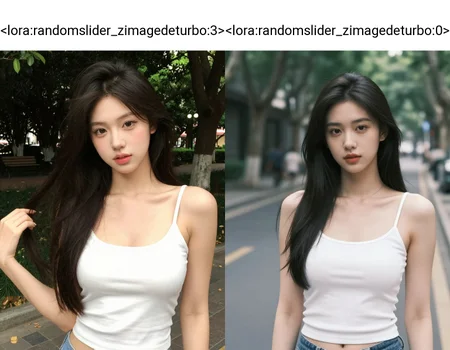


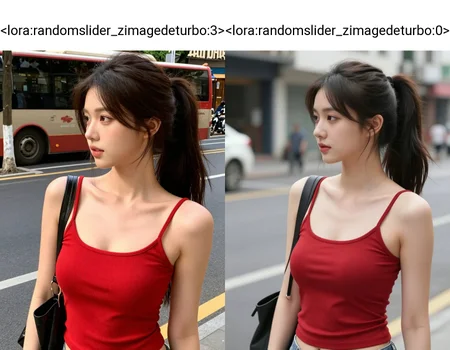


Try size: 768 x 1024 or 768 x 1280
Weights: -1.0~ 1.0 (krea2)
Weights: 0.7~1.0 (ZIDT v3 and ZIDT v2)
Weights: 2.0~3.0 (ZIDT v1)

Note: It could be better or worse; the effect is uncertain. / 可能更好或更糟,效果是不一定的。(Krea2)
Note: The visual effect is close to that of GPT Image 2, so it can sometimes look dirty and the noise has not converged. Because "Sigmoid (Timestep Type)" and "High Noise (Timestep Bias)" are used during training, the randomness of the composition may be enhanced. Of course, it also has a sharp focus effect on street scenes. Increasing the lora weights will increase the frequency of the black shoulder bag, just like the realistic model in SD1.5, so it will have a messy and unpredictable visual feel, similar to the MajicMix Realistic model. Why do this? Because turbo's soft focus is particularly prevalent, and secondly, there is very little variation between different seeds. When generating images on the platform, please use both alpha and beta ver. Shift is a parameter that can adjust "High Noise"; a value of 9 is recommended. / 視覺效果是接近GPT Image 2的,所以有時會看起來髒兮兮的,噪點收斂不乾淨。因為訓練時採用"Sigmoid(Timestep Type)"跟"High Noise(Timestep Bias)",所以可能加強了構圖的隨機性,當然它也對街景有銳焦的效果。當提高lora權重時,會增加黑色側背包出現的次數,就跟SD1.5的寫實模型情況是一樣的,所以會有點麥橘那種雜亂、不按理出牌的既視感。為何做這個?因為turbo的柔焦特別氾濫,其次是不同種子間的變化很少。Shift是能調整"High Noise"的參數,建議採用9。

Description
I recommend using v2.0. / 建議用v2.0。
FAQ
Comments (15)
Someone have complained to me that lora's not effective, but a weight of 2.0 is the official limit that can be set, not something I can decide. / 有人跟我抱怨說lora沒有效果,但權重2.0是官方可以設定的極限值,不是我能決定的。
Could probably rescale the slider by multiplying all weights by a factor, no?
Also, imo, diversity or "seed strength" slider might be clearer on the purpose. Till seeing the infographic I just got the impression it was a slider without any specified purpose, that's what random usually means ("Having no specific pattern, purpose, or objective: synonym: chance."). Even randomNESS would be an improvement.
@firemanbrakeneck The correct definition is "random high noise," the goal being to remove noise like normal SD1.5 and SDXL, not to stare blankly at the camera like during a job interview. I can easily increase the weight strength in kohya_ss, making 1.0 equivalent to 2.0. But AI-toolkit can't do that, I've tried.
@firemanbrakeneck Perhaps it's to increase the "intensity of the random seed"? But what I see more is the feeling that the subject is constantly twisting and turning with the high noise when generating the image...
@firemanbrakeneck Also, there were too few random hand gestures... it was almost all just letting her arms hang naturally, so it didn't look very natural...
@ghostpaint I see, so it specifically eliminates zit's rigid posing, rather than simply introduce more variance to the seed?
I wouldn't really focus on the technical correctness in your place, civ users are mostly laymen who understand english, prompting to various extents, and maybe some high level tidbits about how gen models work.
Here are some possible options that come to mind:
Action slider - Probably too subtle for that.
Amateur photo slider - If it affects composition to an extent as well.
Natural pose slider.
Movement slider.
Spontaneity, candid slider - Probably the best term from a photography perspective.
The opposite may be easier to name, "stiffness slider".
About the scaling - I think it should be possible for a chatterbot to write a simple script to read the safetensors directly, modify the weights and resave it. I haven't messed with weights specifically, but layer renaming went without a hitch, and if kohya can handle resizing generically in models it never even heard of, how bad can it be.
Oh, could also do that directly from comfy, assuming you're using that. I'm not familiar with all the node options, but there's this lora optimiser node, it's basically built for merging groups of models in a way that reduces interference, but it can be used with a single lora, increase the weight and it has a save node. https://github.com/ethanfel/ComfyUI-LoRA-Optimizer
@firemanbrakeneck I can't easily change the name because some platforms only import it once and then ignore it, without syncing information and files. Therefore, the usual approach is to use a subtitle, which serves to supplement the concept and also facilitates searching. As for Comfy, I haven't used it in a long time…However, the information you provided is helpful to everyone.
@ghostpaint As long the source is clear, that's the most important part and the best you can do on your end. Thanks.
@ghostpaint Here, this code will scale your model, takes all of 15 seconds to run.
```
import safetensors.torch
from safetensors import safe_open
# ===== CONFIGURATION =====
INPUT_FILE = "your-input-file.safetensors"
OUTPUT_FILE = "name-to-save.safetensors"
FACTOR = 2.0
# ========================
print(f"Loading {INPUT_FILE}...")
tensors = safetensors.torch.load_file(INPUT_FILE)
with safe_open(INPUT_FILE, framework="pt") as f:
metadata = f.metadata()
print(f"Loaded {len(tensors)} tensors")
print(f"Multiplying all weights by {FACTOR}...")
multiplied = {k: v * FACTOR for k, v in tensors.items()}
print(f"Saving to {OUTPUT_FILE}...")
safetensors.torch.save_file(multiplied, OUTPUT_FILE, metadata=metadata)
print("Done!")
```
@firemanbrakeneck Yes! The "metadata" has been preserved. Gemini also doesn't recommend using kohya_ss because it usually can't be preserved. As for x2, I feel it's not exactly twice the original... more like 3.x times (Gemini explained why), but it works fine. Thanks! 👍
@ghostpaint Yeah, for little mods like that, bare metal scripts typically beat any of the big name tools in simplicity, speed and correctness. If I can figure out how, I always prefer to write my own.
Haven't tested the model's output, only checked that it loads correctly. I have no idea what the correct scale is, 2 is just a placeholder. Feel free to upload the scale that feels right to you as v1.1 or something.
@firemanbrakeneck Setting it to 2 or 1.875 is usually sufficient, because slider lora often require a very high weight. 3.0 / 0.75 = 4 times or 3.0 / 0.8 = 3.75 times 👍
The alpha version is a bit bright, and the beta version is a bit dark, but both have a higher perturbation effect than version 1.0 when the weight is 2.0. Version 1.0 has very stable brightness, but the effect is not as obvious as the former. / alpha版本有點亮,beta版本有點暗,但兩者在權重2.0時,擾動效果都高過1.0版本。1.0是亮度很穩定的版本,但效果沒有前者明顯。
@wyxzddsjj919 你用v1.0跟Beta版本吧?增加太多版本,會把大家搞混的。而且Alpha版本可以調和其他兩個版本晚上太暗的問題,所以我還是保留了。
@wyxzddsjj919 試試v3.0