MMaudio Adapter for ComfyUI
A local notebook for learning:https://civarchive.com/models/2487771/mmaudio-adapter-trainer
0. Download the release ZIP from Civitai and extract it.
You should get the custom node folder, workflow JSON, and repo patch files from the extracted archive.
1. Place custom_nodes/ComfyUI-MMAudio-LoRA/ under your ComfyUI installation.
2. Install the custom node requirements in the same Python environment used by ComfyUI:
python -m pip install -r .\custom_nodes\ComfyUI-MMAudio-LoRA\requirements.txt
3. Place the workflow JSON and load it from the ComfyUI UI.
4. Clone the official MMAudio repository inside the ComfyUI folder:
cd ComfyUI
git clone https://github.com/hkchengrex/MMAudio.git
cd MMAudio
python -m pip install -e .
5. Apply the repo patch files from the extracted ZIP:
- eval_utils.py -> ComfyUI\MMAudio\mmaudio\eval_utils.py
- lora.py -> ComfyUI\MMAudio\mmaudio\model\lora.py
- networks.py -> ComfyUI\MMAudio\mmaudio\model\networks.py
- precision.py -> ComfyUI\MMAudio\mmaudio\utils\precision.py
6. Restart ComfyUI completely.
7. Load the workflow and test base generation first without LoRA.
- num_steps must be >= 1
- repo_root can usually be left blank
- if auto-detection fails, set it to ComfyUI\MMAudio
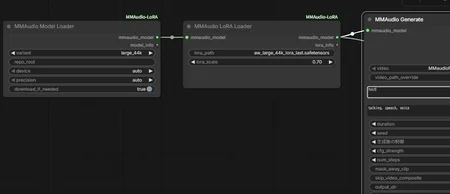
8. To use a LoRA, place the LoRA file in ComfyUI\input\ and set the file name in MMAudio LoRA Loader -> lora_path.
Example:
- file: ComfyUI\input\aw_large_44k_lora_last.safetensors
- lora_path: aw_large_44k_lora_last.safetensors
Trainer:https://civarchive.com/models/2487771/mmaudio-adapter-trainer