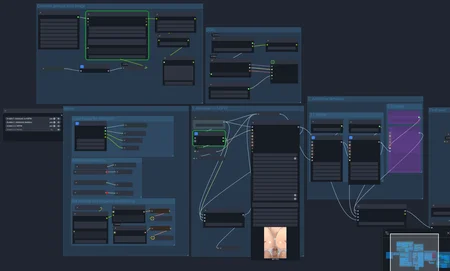
Manga/Anime Image De-Censoring Pipeline
This workflow is an automated batch image de-censoring pipeline for manga/anime images. It loads censored (mosaic-pixelated) images from a directory, detects mosaic regions using dual detection strategies, generates AI prompts from the image content itself, performs diffusion-based inpainting to remove mosaics, optionally removes backgrounds, and saves the results with structured filenames.
How to Use
1. Setup Input
- Set the Path (PrimitiveString) to your input image folder
- Images are loaded one-at-a-time via Load Image Batch with incremental indexing
2. Select Checkpoint
- Use CheckpointNameSelector to pick your SDXL anime model
- The current default is JANKUTrainedChenkinNoobai_v69.safetensors
3. Ensure LM Studio is Running
- The workflow uses a local LLM nemotron3-nano-4b-uncensored-hauhaucs-aggressive) via LM Studio for prompt generation
- Start LM Studio and load the model before running
4. Run the Workflow
- The pipeline processes automatically: detect mosaic → generate prompt → inpaint → save
5. Output
- Results are saved to a subfolder named after the checkpoint: <save_dir>/<checkpoint_name>/<filename>_<idx>
Workflow Pipeline
Load Image Batch
→ Split Image (RGB + Alpha)
→ Get Mosaic Mask (subgraph with dual detection)
→ Shrink & Blur Mask
→ Is Mosaic Detected?
→ YES: Generate Prompt (WD14 Tagger + LLM)
→ DetailerForEach (1st pass inpainting)
→ ColorMatch (harmonize with original)
→ [Optional: Background Removal (RMBG)]
→ Save Image
Features
Dual Mosaic Detection (Subgraph)
- Primary: ML-based detection using mosaicDetectionAllIn_v40.pt (Ultralytics) + SAM for precise mask refinement (kudos for wildcats Creator Profile | Civitai )
- Fallback: CV-based MosaicDetectionNode with gradient/histogram analysis in HYBRID mode
- Automatically switches between methods based on detection results
Automatic Prompt Generation
- WD14 Tagger wd-v1-4-moat-tagger-v2) tags the input image
- LLM (via LM Studio) cleans tags into diffusion-friendly prompts, removing censorship references
- No manual prompting required — the workflow prompts itself from image content
Smart Inpainting
- First-pass inpainting with DetailerForEach: 1024px guide size, 12 steps, CFG 7, euler_ancestral scheduler, denoise 0.6
- Mask shrink (16px) + gaussian blur (7px) for tight inpaint regions
- INPAINT_ColorMatch ensures seamless blending with the original image
Negative Prompt Anti-Censorship
- Explicitly targets censorship artifacts: censored, mosaic censor, blur, censorship...
- Steers the model away from generating new censorship
NSFW Detailing
- Second-pass refinement using separate detectors for genitals
- 15 steps, CFG 5, denoise 0.4
- Enable via Fast Groups Bypasser if needed
Optional Background Removal
- RMBG-2.0 model removes backgrounds with alpha transparency output
- Controlled via is_alpha_bg variable
Batch Processing
- Processes entire directories sequentially
- Structured output naming with checkpoint and timestamp
Group Bypassing
- Fast Groups Bypasser (rgthree) widget to quickly enable/disable workflow sections
Required Models
| Model | Type | Purpose |
|-------|------|----------|
| JANKUTrainedChenkinNoobai_v69.safetensors | Checkpoint | SDXL anime inpainting |
| sam_vit_b_01ec64.pth | SAM | Precise mask refinement |
| mosaic detection(All-in-one) - v4.0 | Other Detection | Civitai | Ultralytics | ML mosaic detection |
| Anime NSFW Detection / ADetailer All-in-One - v5.0-variant1 | Other Detection | Civitai| Ultralytics | NSFW segmentation (group 2) |
| wd-v1-4-moat-tagger-v2 | Tagger | Anime image tagging |
| HauhauCS/Nemotron3-Nano-4B-Uncensored-HauhauCS-Aggressive · Hugging Face (LM Studio) | LLM | Prompt cleaning |
| 1038lab/ComfyUI-RMBG: A ComfyUI custom node designed for advanced image background removal and object, face, clothes, and fashion segmentation, utilizing multiple models including RMBG-2.0, INSPYRENET, BEN, BEN2, BiRefNet, SDMatte, SAM, SAM2, SAM3 and GroundingDINO. | RMBG | Background removal |
## Groups
1. SDXL — Checkpoint loading & global model broadcasting
2. Inputs — Image batch loading, path/filename setup, seed
3. 1. demosaic to NSFW — Mosaic detection, mask generation, first-pass inpainting
4. 2. NSFW detailing — Second-pass body-part refinement (bypassed by default)
5. Generate prompt from image — WD14 tagging + LLM prompt cleaning
6. Final save — Optional background removal & image saving
Description
Initial version. May have issues and mistakes
Looks like we don't have an active mirror for this file right now.
CivArchive is a community-maintained index — we catalog mirrors that volunteers upload to HuggingFace, torrents, and other public hosts. Looks like no one has uploaded a copy of this file yet.
Some files do get recovered over time through contributions. If you're looking for this one, feel free to ask in Discord, or help preserve it if you have a copy.