


Photanima is an experimental finetune of Anima Base v1.0 to see whether it is a viable architecture for photography. Spoiler alert: it totally is.
Turbo LoRA baked in. If you're on a 30-series GPU, I recommend converting this on the fly with Quantization Toolkit + Lazy Torch Compile node for wicked fast gen times. All demo images generated with that combo. These are raw outputs; no upscaling or post-processing.
Most demo images contain workflows with custom sigma curve and ODE sampler. These both help significantly with realism. Standalone workflows provided further down this post.
❤️ If you enjoy Photanima, you can help offset the cost of training:
🤓 Technical details
v2 is trained on ~2000 images for 45,000 steps. This is an expansion of my Snakebite 2.3 dataset with around 700 new images and captions reworked for Anima. Training took approximately 48 hours on a Geforce 3090.
Pros:
Extremely fast.
Extremely good prompt adherence.
Anatomy is pretty stable. If it screws something up, changing your steps by +1/-1 usually fixes it.
Supports up to nearly 2MP with little-to-no distortions.
At first, I noticed that Photanima's style was inconsistent - it had a tendency to regress toward a cartoony/CGI look as my prompts became more complex. I was able to mostly overcome this by splitting Photanima into constituent content, style-early, and style-late blocks, then boosted the style blocks well past a strength of 1.
"Style-late" maps to blocks 7, 8, and 9 - these do alter composition to a degree, so we can't boost them as hard as "style-early."
Images are pretty consistent now, but there are some notable drawbacks.
Cons in v2:
It loses a little knowledge of certain artistic terms like
silhouette.Microdetail quality is somewhere between SDXL and ZIT. Honestly, it's really good for a 2B model. Two-step upscaling with Anima doesn't help much, but I'm sure the results would be amazing if you sent a Photanima image to a different model for refinement. Or if that's too much work: just add a little film grain. It does wonders and requires no extra VRAM.
Text capabilities are not as good as those of base Anima. Anything beyond 3 or 4 words is likely going to require numerous re-rolls. This is at least partly due to the Turbo LoRA.
Excessive fluff tags like
masterpiece, absurdres, hyperrealtend to fry the image. The model is photographic and highly aesthetic by default, so there's no need to drive it harder in that direction.
🛠️ Recommended Settings
v2.3 Turbo:
8-9 steps.
er_sde sampler on "ODE" mode.
CFG exactly 1.
Preferred resolution: 1040x1520 or 832x1216.
For maximum realism, begin your prompt with
real life photo. If that's not enough, addphoto \(medium\)and increase its strength until satisfied. You can usually go up to a crazy strength value like 5 or 6 without breaking the image.You can remove NegPip fluff to improve anatomy (e.g. fingers) at the cost of some photographic texture.
Workflow optimized for realism (recommended): Download
Workflow with zero custom nodes (sacrifices realism and speed): Download
v2.3 Base/Non-Turbo:
15-20 steps.
er_sde sampler on "ODE" mode.
CFG between 1-2. Raising CFG brightens the image.
beta or bong_tangent scheduler.
Workflow optimized for realism: Download
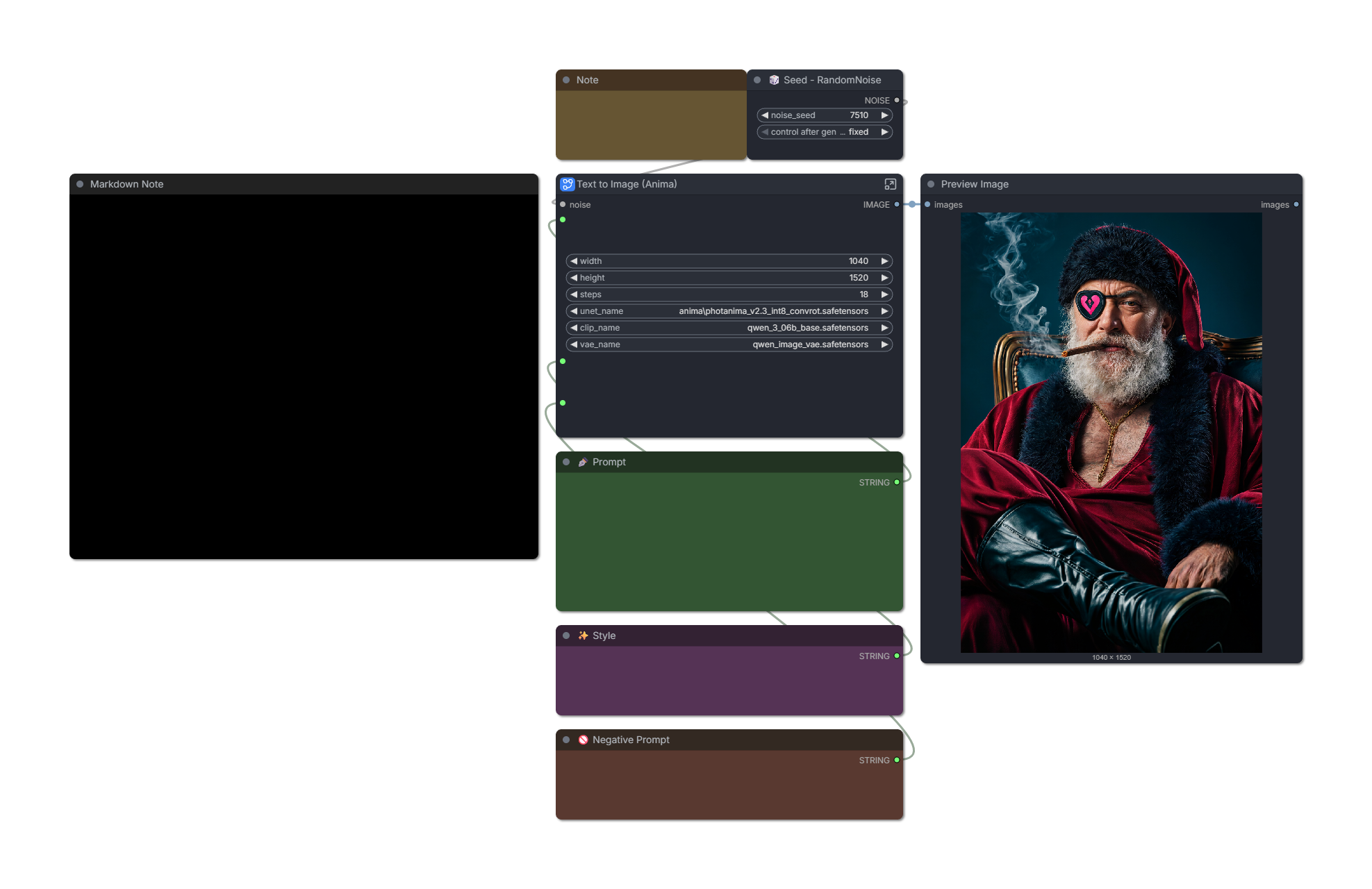
v2.2 Turbo:
6-8 steps. Images often look best at 6, but anatomy is more stable at 8-10, especially with complex prompts.
Custom sigma curve or simple scheduler: "1, 0.94, 0.9, 0.825, 0.6, 0.5, 0.3, 0.29, 0.2, 0.0"
You can reduce the first number on the sigma curve to 0.95-0.99 to improve realism. This reduces saturation and adds a little noise, but makes the model less stable.
Workflow optimized for realism (recommended): Download
Simple workflow with fewer custom nodes: Download
v2.2 Base/Non-Turbo:
You can get a good image in 25 steps, but 40 is often better.
er_sde sampler on "ODE" mode.
Custom sigma curve or simple scheduler: "1, 0.94, 0.9, 0.825, 0.6, 0.5, 0.3, 0.29, 0.2, 0.0"
CFG between 3.5 to 4.
Recommended fluff: "(photo \(medium\):1), real life, score_9, aesthetic"
Recommended negative prompt: "toon \(style\), anime coloring, painting \(medium\), airbrushed, mutation, distortion, ai-assisted, glossy, shiny, shiny skin, worst quality, score_3, score_4"
I have found it's helpful to decay conditioning strength from 2 to 1 over the first ~40% of steps. The stock workflow does this.
Workflow optimized for realism: Download
🗺️ Roadmap
I'm pretty excited about the potential of Anima, but let's be clear: I'm not claiming that this checkpoint is a "ZIT killer." The correct model to compare this against is SDXL/IL - and I'm confident that Anima can dethrone it with enough community effort.
Directions I'd like to explore next:
(✅ Done in v2) There are a handful of Anima "detailer" LoRAs on Civitai. These are not intended for photography, but with enough block pruning, you never know. The right mix could go a long way.
I suspect further increasing the dataset to ~3k images would help resolve remaining issues related to certain textures or model biases.
(✅ Done in v2) I'm eagerly awaiting the release of Anima Turbo 1.0. The current Turbo solution is based on Preview3 and I think it's holding back this model's potential a little.
I'm also looking forward to Anima support in OneTrainer. It will make trying experimental configs a lot less of a hassle compared to kohya-ss. For this v1 run, I stuck with safe values (prodigy, 1.0 LR, no fancy flags.)
Thank you. As always, I look forward to your feedback. Please share the model and upload some images to help it gain traction.
Description
Improves photographic texture by incorporating style blocks from the RealCosplay checkpoint. It's a neat model that aims to enhance both realism and illustrative generations - check it out here.
I also made meaningful improvements to the stock workflow:
Optimized custom sigma curve.
Introduces NegPip with a "pseudo negative prompt" that works at 1 CFG.
Uses the Conditioning Multiply Advanced node to drop conditioning strength to 0 after a certain number of steps, improving texture.
As a result: v2.1 is the most realistic version of Photanima to date, but anatomy is a little less stable than v2.0. I view it as a worthwhile tradeoff.
FAQ
Comments (23)
Please continue to release non turbo version so we can train Lora for your model
Sure thing. Non-Turbo edition will arrive in the next day or two.
For what it's worth, I have tested a couple LoRAs trained on v2.0 and they are just about fully compatible with v2.1 Turbo. 🙂
Not a fan of Turbo, very little variation, liking the non turbo version much more😈
Maybe I´m missing the obvious here, but how are the 2 workflows you posted actually different?
The differences are mostly in the subgraph. Optimized variant has the following:
- CLIP NegPip node to enable negative prompting at 1 CFG.
- Two copies of Conditioning Multiply Advanced to improve photographic detail in later steps.
- Slightly improved custom sigma curve.
It also has a "Fluff" box outside of the subgraph for easier concatenation of prompt + fluff tags.
I liked how Snakebite delved into flow SDXL, and I like how this model adds proper photo-realism capabilities to Anima. But you gotta stop baking turbo Loras int your models. If you are going to make a "2.1" version of a model, also publish a version that's the same minus the turbo Lora.
Not everyone relies on the generation speed boost that a turbo Lora provides, so it should be optional for the user to decide if or not they want to implement it.
I just realized he saved his merge recipe into the model metadata this time, so its easy to just remove the turbo Lora.
Been getting OK results using the stock Anima workflow. The photorealism is alright, but I wouldn't rely on it. However, It gets interesting when you add Danbooru artist styles. You get some pretty cool 2.5D effects like you'd see in some popular loras. That alone makes this a fun model.
2.1 has great realism but prompt adherence and anatomy are negatively affected by turbo lora.
Can you please post regular non turbo version?
Thanks for your amazing work!
v2.1 Non-Turbo edition is available now. 🙂
Check the main post for details on use. Key finding: decaying conditioning strength from 2 to 1 over the first ~40% of steps seems to help a lot. Workflow provided.
Many thanks.
For every refinement you make on this, I'll try to be a better person
Aw yeah, let's go 💪
Thank you for all your words of encouragement on here and on Reddit!
I am preparing an experimental v2.2 update with some new training ideas (new for Anima, anyway.) I expect it will land in a week or so. My feeling is that we're only scratching the surface of what this architecture is capable of, and that it has an exciting future ahead, much like SDXL had.
ZIT, Flux, Ideogram are all great models, but Anima is uniquely positioned in that its hardware requirements are super low for both inference and training. Anyone with a modest GPU can create a valuable LoRA for Anima, and it isn't stubborn at all about learning new concepts and artistic styles.
That's not even the main draw to me. It's about the actual knowledge of the dark arts. The current mainstream heavy models, when not actively censored, aren't trained on them. The only one that does is Chroma, and I couldn't get its stability to reasonable levels. While ZIT and Flux had to be actively taught what's between your legs, Anima is a scholar of the Booru Bible. If you could make it learn the photo look while retaining its knowledge, there's no pores and lighting in the world that is going to make up for this difference for those interested in this particular field of cultural habits and customs.
Why does the turbo version of your checkpoint look SO much more realistic than the normal version? Also, not everyone uses ComfyUI to generate content. While ComfyUI certainly has many advantages, it also has some major drawbacks (it breakes A LOT, has poor 1:1 image reproduction capability, etc...). Forge Neo seems much more reliable to me insofar as it does not suffer from these problems, but it also offers far fewer fine-tuning options. So, for as far as i don't use turbo LoRAs and don't plan to use one, the non turbo version is far too low quality compared to the turbo one for the moment.
Two main reasons why Turbo generally looks better:
1. Few-step distillation methods are more stylistically consistent by design. I couldn't find exact details of Anima Turbo's training methodology, but the model page states "[quality tags] aren't needed as much since a negative prompt is built in via the distillation." This is one way of reinforcing an aesthetic direction. Plus, if they used something like DMDR or DPO, the Z-Image Turbo paper explains that the student model can surpass baseline for human preferences.
2. My merge recipe is made with Turbo in mind. I test helper LoRA strengths and block combinations with Turbo enabled.
The advantage of Base is that it's less stubborn aesthetically, and it can outperform Turbo if you spend a long time optimizing your prompt and happen to get a good roll.
The advantage of Turbo is that it's way more consistent and it tries to make any prompt you throw at it "look good."
Unknown pack (1)
ConditioningMultiplyAdvanced
how to fix? there is no comfyui manager node for this
You can install it manually from here:
SparknightLLC/ComfyUI-ConditioningMultiplyAdvanced: Node for scheduling conditioning strength while preserving non-floating tensors such as token ids.
Node was just added to Comfy Registry 2 days ago, so it's possible Comfy Manager lists haven't updated yet:
A bit of hit-and-miss, some issues with hands and sometimes faces distorted. After all, it's a 2B, but it's FAST. I don't recommend more than 6 stepts, textures begin to look strange; with 6, things are much more natural. Works better with simple subjects; complex scenes suffer seriously.
It's a good model, trying the Flowmatch Euler Discrete Scheduler node from ErosDiffusion makes it better, I think.
Do you happen to know which model blocks are mainly responsible for hand anatomy?
Hands are affected by numerous blocks, unfortunately. I would start by looking at blocks 8 through 12.