


📦 Dataset Forge

A complete, offline, privacy‑first workspace for preparing image datasets for Stable Diffusion, Flux, LoRA training, and more.
Built with Streamlit · 100% free · No cloud uploads · No API keys required
-- Code on github --
✨ Features at a Glance
| 🖥️ Soho Workspace | Browse images, edit captions (Save & Next/Prev), zoom, search/filter by caption text, sort by quality or orientation, export filtered subsets as ZIP |
| 📊 Phrase Analytics | Sentence‑level n‑grams, comma‑separated chunks, word frequency charts |
| 📷 Image Quality | Full quality metrics (sharpness, noise, JPEG artifacts, resolution, aspect ratio), duplicate detection with smart cleanup, re‑scan on demand |
| 📋 Dataset Statistics | Concept pie/bar charts, caption length histogram, word cloud, quality‑concept crossover, dataset completeness, AI bias report prompt |
| 📝 Caption Tools | Batch append quality ratings, caption validation & auto‑fix |
| 🧠 AI Assistance | CLIP‑based hallucination checker with progress bar, flagged pairs with edit/ignore/delete buttons |
| 💾 Captioner | Single or batch image captioning using JoyCaption (default) + multiple models, comparison view |
| ✂️ Image Cropper | Interactive drag‑to‑crop with aspect‑ratio lock, instant download |
| 🔄 Image Converter | Convert any image (AVIF, WEBP, JPG, PNG, BMP, TIFF) to PNG – single or batch |
| 📐 Smart Resize & Crop | Downscale and center‑crop to exact training resolutions (1024², 832×1248, 1344×768) |
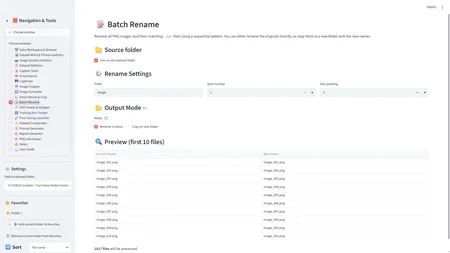
| 📝 Batch Rename | Rename or copy files to a sequential pattern (image_001.png, …) |
| 📸 EXIF Viewer & Stripper | View hidden camera metadata, strip EXIF from single images or entire folders |
| 📋 Training Run Tracker | Log LoRA / model runs with hyperparameters, dataset paths, and notes |
| 🚀 Fine‑Tuning Launcher | Generate ready‑to‑run training commands for Diffusers or Kohya scripts |
| ✨ Dataset Comparator | Compare two dataset folders side‑by‑side: unique images, duplicates, caption diffs, quality metrics |
| 📜 Prompt Generator | Assemble rich, varied prompts from concept keywords with random descriptive details |
| 📰 Report Generator | Download a self‑contained HTML report with dataset overview, top tags, and sample images |
| 🎨 PNG Info Viewer | Read embedded generation parameters from AI‑generated PNG files (ComfyUI, Forge Neo, Civitai) |
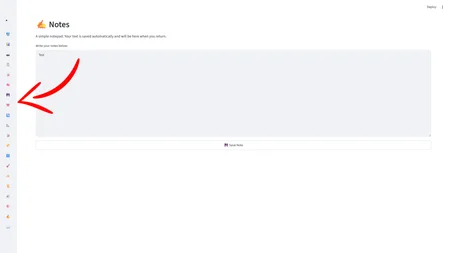
| ✍️ Notes | A simple notepad that saves your notes automatically |
| 📖 User Guide | Built‑in walkthrough of every tab with tips & shortcuts |
Plus:
- Compact icon‑only sidebar to save screen space
- Favorites folders with custom nicknames
- Batch tag library (add/remove/replace tags across the whole dataset)
- One‑click dataset backup to ZIP
- Sort by file name, caption length, or image quality
- Orientation filter (square/portrait/landscape)
- Collapsible navigation and compact settings
🚀 Quick Start
Prerequisites
- Miniconda (Python 3.10) – [download here]
- At least 3 GB free disk space (15 GB if using the Captioner)
Installation
Open a terminal and run:
# Create environment

conda create -n dataset_tools python=3.10 -y

conda activate dataset_tools

# Install core packages

pip install streamlit pillow numpy pandas plotly open_clip_torch imagehash opencv-python

# Install PyTorch (CPU version – for GPU, remove --index-url)

pip install transformers accelerate torch --index-url https://download.pytorch.org/whl/cpu

# Install additional tools

pip install scikit-learn wordcloud streamlit-cropper pillow-avif piexif
Launch
streamlit run app.pyThe app will open in your browser automatically.
A bat file is provided, which activates the environment first and runs the app afterwards.
💾 First‑time use
Enter a dataset folder path in the sidebar (or drag & drop it), then click Load.
All features work immediately – the quality scanner and AI models download their data automatically the first time you use them.
CLIP model: ~350 MB (downloaded when you first open AI Assistance)
JoyCaption model: ~13 GB (downloaded when you first use the Captioner)
🎮 Usage Tips
Use the compact sidebar (◀ button) to reclaim screen space.
Pin your most‑used folders as Favorites for instant loading.
The Batch Tag Library lets you add/remove/replace tags across the entire dataset.
All AI features run completely offline – no API keys, no internet required.
🧠 Models Used
FeatureModelSizeAI Assistance (hallucination check)CLIP ViT‑B‑32~350 MBCaptioner (default)JoyCaption (LLaVA‑based)~13 GB
Both are downloaded automatically on first use.
📂 Project Structure
.
├── app.py                  # Main application
├── favorites.json          # Saved favorite folders
├── notes.json              # Saved notes
├── training_runs.json      # Training run logs
├── tag_library.json        # Batch tag library
└── README.md               # This file
🎁 Sharing & Credits
This tool was built collaboratively, piece by piece, with the goal of making dataset curation fast, local, and completely free.
If you find it useful, share it with your friends, use it in your projects, and let us know what you create with it!
Built with ❤️ by a human + AI teamwork.
📜 License
Feel free to use, modify, and share this tool. Attribution is appreciated but not required.