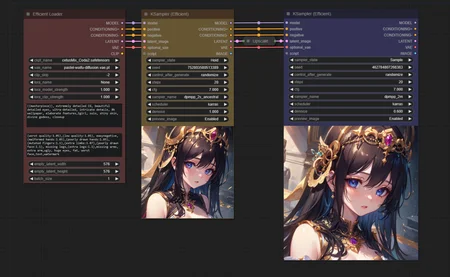
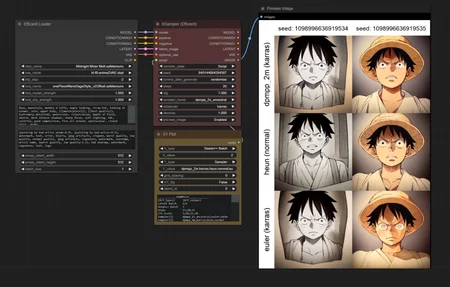
A collection of ComfyUI custom nodes to help streamline workflows and reduce total node count.
Github Repo: https://github.com/LucianoCirino/efficiency-nodes-comfyui
Currently Available Nodes:
Ksampler (Efficient)
A modded KSampler with the ability to preview/output images and run scripts.
Efficient Loader
A combination of common initialization nodes.
XY Plotter Nodes
A collection of nodes that allows users to specify parameters for the KSampler (Efficient) to plot on a grid.
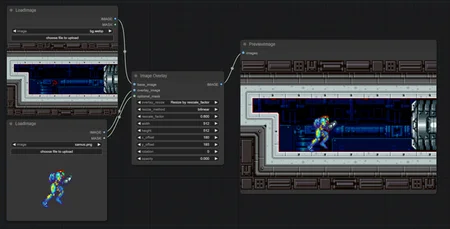
Image Overlay
Node that allows for flexible image overlaying.
SimpleEval Nodes
A collection of nodes that allows users to write simple Python expressions for a variety of data types using the "simpleeval" library.
Description
Efficiency Nodes v1.35 Changes
Bug fixes:
- The Efficient Loader no longer endlessly loads checkpoints/VAEs into RAM.
- Fixed an issue with the XY Plot calling for a potentially non-existant font.
- Fixed a bug where the XY Plot image results were being cropped at bottom.
Changes:
- The KSampler Efficient's "my_unique_id" has been removed.
- Script results now preview regardless of the "preview_image" setting.
- Efficient Loader node now supports LoRA.
- Added 'Scheduler' as an option type for the XY Plot node.
Structural changes have been made to the KSampler (Efficient) and Efficient Loader nodes, so please load a new set of these nodes if you encounter any errors!
FAQ
Comments (8)
i got this error.
how to fix it?
E:\AI\ComfyUI_windows_portable\python_embeded\lib\site-packages\safetensors\torch.py:99: UserWarning: TypedStorage is deprecated. It will be removed in the future and UntypedStorage will be the only storage class. This should only matter to you if you are using storages directly. To access UntypedStorage directly, use tensor.untyped_storage() instead of tensor.storage()
Can you send me your workflow on Discord or Github that got you this message?
These nodes are great. Pretty much my default.
Would be nice to be able to add more than 1 LORA.
You can if you convert the Lora to be a Input
@moikapy What do you mean? Are u able to show screenshot of that setup?
How can you add more than 1 LoRA?
model and clip from checkpoin attach to a lora. model and clip from that lora attach to another lora. continue this until you have as many loras as you want. With the final lora, attach the model to the sampler and the clip to the positive prompt.
would be nice if you added a "install" note. I have the same question do i put the folder into "custom_nodes" or do I drag the "efficiency_nodes.py" file up a directory into the "custom nodes" folder?
Oh yea if it work this is SOO GOOOD! I don't don't have to play tetris with nodes and actually can just compile my project lol.