


Thanks for your attention.
contact me if you want, discord with "ttplanet", Civitai with "ttplanet"
you can also join the group discussion with QQ group number: 294060503
update for rank256 version, please notice it will save the VRAM, but it will decrease the Quality!!!
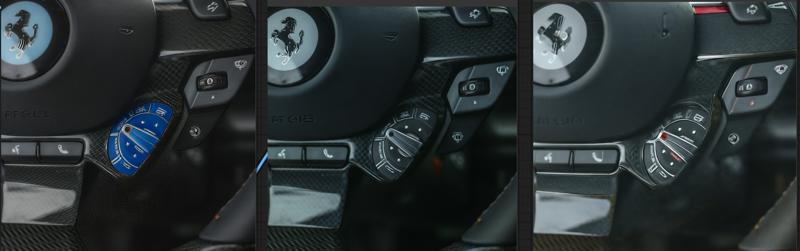
please refer to the following pic to decide which version you will use:
the logo of Farai, V2>V1>rank256
the material of carbon fiber. V2=V1>rank256
update Preprocessor for comfyui
you can find it here:https://civarchive.com/models/426501/60sec-process-for-4k-resolution-t2i-with-rtx4090-and-tile-model
in the workflow package
Latest Update 2024/4/13:
Here's a refined version of the update notes for the Tile V2:
-Introducing the new Tile V2, enhanced with a vastly improved training dataset and more extensive training steps.
-The Tile V2 now automatically recognizes a wider range of objects without needing explicit prompts.
-Strong text reorganization, can keep the most clear text with style transfer process.
-I've made significant improvements to the color offset issue. if you are still seeing the significant offset, it's normal, just adding the prompt or use a color fix node.
-The control strength is more robust, allowing it to replace canny+openpose in some conditions.
If you encounter the edge halo issue with t2i or i2i, particularly with i2i, ensure that the preprocessing provides the controlnet image with sufficient blurring. If the output is too sharp, it may result in a 'halo'—a pronounced shape around the edges with high contrast. In such cases, apply some blur before sending it to the controlnet. If the output is too blurry, this could be due to excessive blurring during preprocessing, or the original picture may be too small.
Enjoy the enhanced capabilities of Tile V2!
This is a SDXL based controlnet Tile model, trained with huggingface diffusers sets, fit for Stable diffusion SDXL controlnet.
It is original trained for my own realistic model used for Ultimate upscale process to boost the picture details. with a proper workflow, it can provide a good result for high detailed, high resolution image fix.
As there is no SDXL Tile available from the most open source, I decide to share this one out.
update for style change application instruction and upscale simple work flow:
update the style change workflow for comfyui:
https://openart.ai/workflows/gJQkI6ttORrWCPAiTaVO
Part1 for style and background change application:
Open a A1111 webui.
select a image you want to use for controlnet tile
remember the setting is like this, make 100% preprocessor is none. and control mode is My prompt is more important.
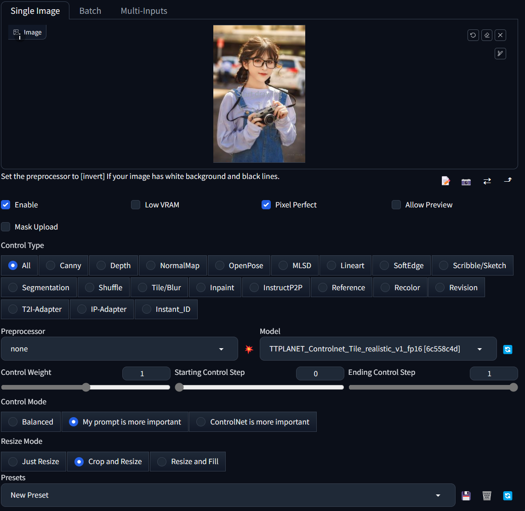 :
:type in the prompts in positive and negative text box, gen the image as you wish. if you want to change the cloth, type like a woman dressed in yellow T-shirt, and change the background like in a shopping mall,
Hires fix is supported!!!
You will get the result as below:
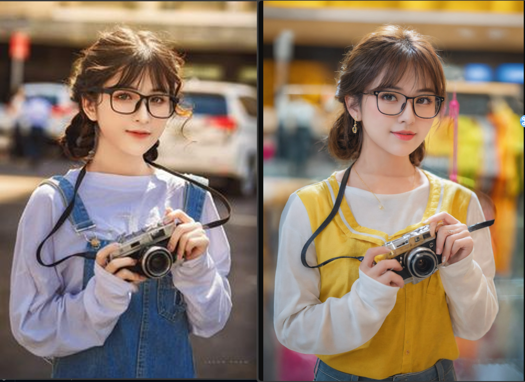
Part2 for ultimate sd upscale application
Here is the simplified workflow just for ultimate upscale, you can modify and add pre process for your image based on the real condition. In my case, I usually make a image to image with 0.1 denoise rate for the real low quality image such as 600*400 to 1200*800 before I through it into this ultimate upscale process.
Please add IPA process if you need the face likes identical, please also add IPA in the raw pre process for low quality image i2i. Remember, over resolution than downscale is always the best way to boost the quality from low resolution image.
https://civarchive.com/models/333060/simplified-workflow-for-ultimate-sd-upscale
This is a SDXL based controlnet Tile model, trained with huggingface diffusers sets, fit for Stable diffusion SDXL controlnet.
It is original trained for my own realistic model used for Ultimate upscale process to boost the picture details. with a proper workflow, it can provide a good result for high detailed, high resolution image fix.
As there is no SDXL Tile available from the most open source, I decide to share this one out.


Developed by: TTPlanet
Model type: Controlnet Tile
Language(s) (NLP): No language limitation
Uses
Important: Tile model is not a upscale model!!! it enhance or change the detail of the original size image, remember this before you use it!
This model will not significant change the base model style. it only adding the features to the upscaled pixel blocks....
--Just use a regular controlnet model in Webui by select as tile model and use tile_resample for Ultimate Upscale script.
--Just use load controlnet model in comfyui and apply to control net condition.
--if you try to use it in webui t2i, need proper prompt setup, otherwise it will significant modify the original image color. I don't know the reason, as I don't really use this function.
--it do perform much better with the image from the datasets. However, everything works fine for the i2i model and what is the place usually the ultimate upscale is applied!!
--Please also notice this is a realistic training set, so no comic, animation application are promised.
--For tile upscale, set the denoise around 0.3-0.4 to get good result.
--For controlnet strength, set to 0.9 will be better choice
--For human image fix, IPA and early stop on controlnet will provide better reslut
--Pickup a good realistic base model is important!
blurry recovery:


cloth change but keep the pose and person:
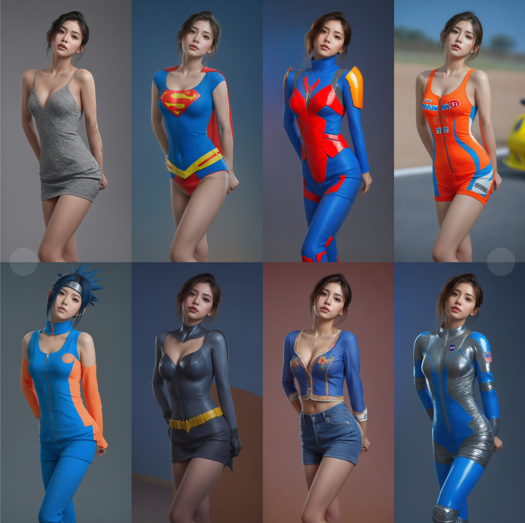
Besides the basic function, Tile can also change the picture style based on you model, please select the preprocessor as None(not resample!!!!) you can build different style from one single picture with great control!

Bias, Risks, and Limitations
No commercial USE!!!! Do not use it for adult content
Recommendations
Use comfyui to build your own Upscale process, it works fine!!!
Special thanks to the Controlnet builder lllyasviel Lvmin Zhang (Lyumin Zhang) who bring so much fun to us, and thanks huggingface make the training set to make the training so smooth.
Model Card Contact
contact me if you want, discord with "ttplanet", Civitai with "ttplanet"
Description
Here's a refined version of the update notes for the Tile V2:
-Introducing the new Tile V2, enhanced with a vastly improved training dataset and more extensive training steps.
-The Tile V2 now automatically recognizes a wider range of objects without needing explicit prompts.
-I've made significant improvements to the color offset issue. if you are still seeing the significant offset, it's normal, just adding the prompt or use a color fix node.
-The control strength is more robust, allowing it to replace canny+openpose in some conditions.
If you encounter the edge halo issue with t2i or i2i, particularly with i2i, ensure that the preprocessing provides the controlnet image with sufficient blurring. If the output is too sharp, it may result in a 'halo'—a pronounced shape around the edges with high contrast. In such cases, apply some blur before sending it to the controlnet. If the output is too blurry, this could be due to excessive blurring during preprocessing, or the original picture may be too small.
Enjoy the enhanced capabilities of Tile V2!

![Q5A0[{{0{]I~`KJFCZJ7`}4.jpg](https://cdn-uploads.huggingface.co/production/uploads/641edd91eefe94aff6de024c/HMGmYz7IiLSqfoiMgcmgU.jpeg)
FAQ
Comments (59)
牛牛牛
伟大的工作
Thank for you this tile ControlNet. I can not tell the difference between the 1st and 2nd version, sometimes 1st version looks better particularly with faces/eyes. What is the suggested applied strength and time steps for tiled upscaling?
v1 and v2 has different parameters, if setup correctly V2 will show much better result. V2 has much less error on material texture, and has the nsfw capabilities.
请问是否可以用diffusers加载呢?
放大是怎么使用呢?
Hello Trainer! Most of the time V1 gives much better results! I am using GaussianBlur at radius 3 in Comfy for comparison. TileV2 is stronger, so might be just a change of weights that are needed. Will explore more! Thank you for all your hard work! <3
Thanks I noticed too. because the weight are different, and I modified the sample dataset, so now it will need more accurate adjustment on image preprocess, most blur node in comfyui can’t do it! so I am trying to build a node to do it. Current tile preprocess in comfyui is terrible.
@ttplanet what is the preprocess in A1111? I thought it was only gaussian blur as well? Thanks for looking into it! <3
@olivetty Not really, but similar
can someone please explain how to use this in comfyui?
Would you like provide how to construct the train data, condition is the blur or the small size image of the target image?
不会用,也没更详细的说明
what a wonderful gift. This model is just awesome. It works beautifully with high noise samplers to make even more details and keeping the picture composition and format much better than Controlnet CANNY or DEPTH. thank you!
I still don't understand how it works
Just like regular tile for 1.5 ? Just it needs a gaussian blurred image going in, so either preprocess in A1111 or use blur node in comfy? :)
@olivetty slightly different logic on preprocessor, I built a comyui node. For now you can use regular blur
@ttplanet Nice, where can we find the node?
@olivetty I get a full prompt image in each tile. Always! SD upscale/Ultimate SD upscale/ControlNet Tile - useless nonsense.
@kiryanton930 That's not how this works, if you push the denoise to much it'll give you full prompt for each, it's better to just have detail and style tokens when doing upscales and keep the denoise between 0.2-0.4 depending on the scene, it should work! @ttplanet we would love that node you built!
@olivetty At 0.2-0.4 there is no effect. If more, then the effect appears in the form of additional faces, but this is not the effect that I expect
@olivetty At denoise 0.25 it creates ghost images. Setting the denoise any lower entirely defeats the purpose of using a controlnet tile model when upscaling: to introduce further details as the resolution increases.
@MysticDaedra controlnet can provide the possibility to set high denoise to adding detail or change the content. you are tight
@MysticDaedra Weird, mine works perfectly, and trust me, I know what this is for :) I can go as high as 0.6-7 if I want and it does a good job still. Depends on my needs.
i find the model can't follow canny and openpose. why?
for "cloth change but keep the pose and person". did you use IPA?
and while doing blurry recovery, i find it can't recover so well like you post above
like this image : https://imgur.com/a/9emyUEj
use your model and workflow, i can only get this result: https://imgur.com/a/srMRERF
that does not seem to work. your output image looks like an upscale only. i tried and got a better result tho not vey convincing. https://imgur.com/VOFVALG
no, all the samples are without IPA
for the picture you posted with not enough effective pixels can't be recovered.
"no, all the samples are without IPA". I find it hard to reproduce your work on "cloth change but keep the pose and person". that means most of results i got using your workflow can't keep the pose and person
@greasebig refer to the review pic below, you will see the test with different cloth, face, hair color, race.....
根本不会用,不知道如何安装到sd UI当中
这个只能在comfy上用吧
放進Controlnet照作者的截圖指示一樣跑就好了 不用預處理器 就那張"1.Open a A1111 webui." 下面那張截圖
@hjwnbshen 作者有給Web UI的指示 我也實際改提示詞跑一堆結果出來了
will you publish your PVC models soon?
not yet...:)
It's amazing for portraits. Great work!
One quick question: does it work with non-portrait images?
不知道什么原因,无法运行,在使用这个contronet模型后,总是在采样器报错。是我2070 8g显卡带不动吗?
看看你是不是中文路径了
@ttplanet 好的 我再试试 谢谢回复
@ttplanet 我成功了,不是中文路径的问题,是内存不够的问题,我把虚拟内存搞到40g就可以运行了了,显存刚刚够,流程参考了你的,但有些不一样,你流程里的一些面板我的confyui加载不出来。
8G带不动的,因为sdxl大模型6.3+cn2.4
@ttplanet 我成功了,哈哈,能搞,webui开fp8的精度就行,我不知道confyui怎么生效的,但是也能跑成功,刚开始运行大模型的时候内存会要求很高,16g不够,把虚拟内存加上一共开到40g才不爆内存,后面KS采样器渲染用了6.8g+的显存,时间要一两分钟。
很好,目前比较下来我感觉质量比sd1.5那个官方模型更好
有个建议,能否给这个tile模型加两个滑块,1滑块是形状的权重,2滑块是颜色的权重(如果允许用户上传自定义色彩图那就更牛逼啦)
Is there any suggestions about How to use in Invokai?
You say to use tile_resample... any clue where this can be downloaded?
webui, tile_resample, for comfyui, I thought my preprocessor is combined in advanced contorlnet node
Details
Files
ttplanetSDXLControlnet_v20Fp16.safetensors
Mirrors
ttplanetSDXLControlnet_v20Fp16.safetensors
ttplanetSDXLControlnet_v20Fp16.safetensors
TTPLANET_Controlnet_Tile_realistic_v2_fp16.safetensors
ttp_xl_tile_fullv2.safetensors
TTPLANET_Controlnet_Tile_realistic_v2_fp16.safetensors
diffusion_pytorch_model.fp16.safetensors
diffusion_pytorch_model.safetensors
controlnet-Tile-sdxl_v2_fp16.safetensors
diffusion_pytorch_model.safetensors
TTPLANET_Controlnet_Tile_realistic_v2_fp16.safetensors
TTPLANET_Controlnet_Tile_realistic_v2_fp16.safetensors
TTPLANET_Controlnet_Tile_realistic_v2_fp16.safetensors
TTPLANET_Controlnet_Tile_realistic_v2_fp16.safetensors
TTPLANET_Controlnet_Tile_realistic_v2_fp16.safetensors
TTPLANET_Controlnet_Tile_realistic_v2_fp16.safetensors
controlnet_ttplanetSDXLControlnet_v20Fp16.safetensors
Available On (1 platform)
Same model published on other platforms. May have additional downloads or version variants.