


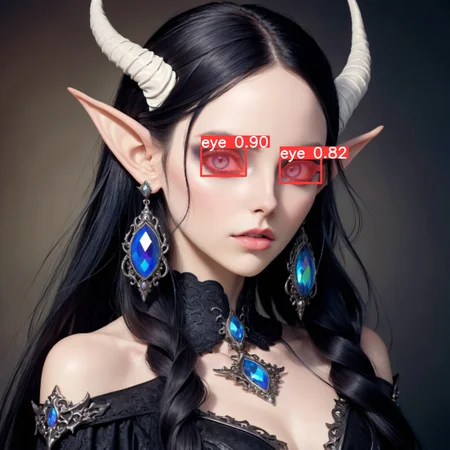


Eye Segmentation for ADetailer
Credits to mnemic for this article and Anzhc for this ADetailer model (see for more information)
Installation:
Download the zip archive
Extract the model into your ADetailer model folder
For the WebUIs like Auto1111, Forge and SD.next it should be in models/adetailer
For ComfyUI it should be in models/ultralytics/segm
Start it up (full restart if already had it open) and select the model from the ADetailer tab/node
Tip for WebUI: you can go to WebUI Settings→Adetailer and change the number of models that can be used up to 10, very useful if you want to use more than 2 ADetailer models
If you want to do both eyes in one pass (so you keep consistency in the eyes). In your ADetailer tab, go to Mask preprocessing → Mask merge mode → and select 'Merge'. This will merge the masks and do the inpaint as if it's one mask. Keep in mind this might not be ideal if there are 2 subjects and say 4 eyes. You can mess with settings and maybe do it in some way™️. You'll have to figure that on your own.
Make sure to have correct Detection thresholds/inpaint strength and so on for your images
Generate them eyes!
It detects eyes pretty well. I might work more on this in the future. Please tell me what you think. Thanks! 😊
Description
Version 2
Cleaned dataset a bit
Increased Accuracy
Less false positives (in case you enjoyed that you can use v1)
FAQ
Comments (35)
Great model! I'm curious, do you know if I followed mnemic's article/method if I would be able to create a similar model for something with less defined edges? Ex: a bare stomach section or a bare lower back.
Using those examples, I wasn't sure if it's possible because sometimes it may have clearly defined edges (say if crop top & shorts), sometimes no edges (if in the buff), and sometimes wouldn't exist at all (if long shirt/clothed). Don't want to put the effort in if I already know it won't work out the way I want it to. Thanks for any insight!
@kipdastardly Thanks! Yes, if you follow the guide you should have all you need, the hardest part is making a dataset. It might be possible but will likely require a lot of effort. If you create a dataset where you only have the area you want and no edges, it should stick to that. That's what I think, but it will require allot more training than usual (probably) and will not be very flexible. I might give it a try eventually™️
@Pitpe11 thanks!
Thanks! I'm not sure about its performance versus the mediapipe eyes only model yet, but I've been using it and it does the job!
Great ADetailer models from the looks of images... but even though I've loaded all of them, they don't show up in WebUI when using ADetailer in 1.5 or Pony, (at least for me). Any thoughts?
@UlyssesHeart Read the instructions again and make sure you have the ADetailer extension loaded, enabled and updated to the latest. Also make sure your WebUI is updated. Make sure you put them in this folder: 'models/adetailer' and FULLY RESTART YOUR WEBUI (close the terminal and restart). After that, you should see them in the dropdown of the ADetailer extension. If not, there's something wrong with your install in general or some other setting. The base model you use has no effect on ADetailer models or the extension, it is its own thing.
@Pitpe11 Thanks – I just fixed it, by rebooting webui. Appreciate it. Great work!
Using this in comfyui and it keeps putting the face in the left eye. Pretty sure this is something I am doing wrong but I have no clue.
@Bornbeefy I think this means your denoise is way too high? If you are using custom prompts for the detailer, maybe that can also happen? I can't say for certain without more info. Wild guess.
@Pitpe11 Yup that seems to be it. Was at .5 and lowered to .2 and the issue went away. Thanks
Hey thanks so much for this :) I was wondering if it's possible to merge the two eyes with the mask preprocessing setting you mentioned in comfyui? I can't find a setting like that anywhere in the adetailer node! - thank you again !
@MelodyXO Use the SEGS Merge node from ComfyUI-Impact-Pack. You may need to redo your workflow depending on how it's setup to add it. I can maybe make a basic workflow if you need it (haven't used comfy in months, lol).
@Pitpe11 Okay ! thank you for the tip!! I'll look into it soon :)
@Pitpe11 Im also trying to figure out how to do this. Since the detection and inpainting is done as part of the adetailer node, how would you handle merging eyes? Wouldnt you have to detect first, then get each eye, then create a mask for inpainting? Wouldnt that essentially make the adetailer node pointless in the workflow?
@singularity42 Here are some steps that should help you:
nodes: UtralyticsDetectorProvider (with the segm output and a segm model selected) → SEGM Detector (SEGS) → SEGS Merge → Detailer (SEGS) → Done
Never done inpaint in comfy, but I guess you can use the above to inpaint as well
From:
(SEGM Detector (Detailer) that I mention in the post was probably renamed at some point, so make sure you have the latest nodes)
hello happy new year i am using comfyui
you mentioned correct Detection thresholds/inpaint strength,, somehow the eyes get better but still not good enough i dont know what kind of denoise or threshold values i need to input to get high resolution eyes
@sonic4life170 Hello and Happy New Year. Yes, the settings are all dependent on your image/checkpoint/lots of other stuff, if you want to get high resolution eyes then you must play with a lot of settings/nodes. I am not familiar enough with comfyui, so I can't really help you there. You will likely need to make a workflow for that, or find one that someone else made.
Love it, worked really well for me with illustrious model.
Thanks for this. Would you be open to making a mouth segmenter / detailer as well? I've seen a few models for eyes and face, of course, but nothing for the mouth itself. Thank you.
sorry im new to this, how do you use this? what node should i use to use this adetailer?
@hanada_civitai https://github.com/ltdrdata/ComfyUI-Impact-Pack and https://github.com/ltdrdata/ComfyUI-Impact-Subpack
Make sure to read the instructions!
Nodes: UltralyticsNetworkProvider → BBOX Detector (SEGS)/SEGM Detector (SEGS) → Detailer (SEGS)/FaceDetailer
there are more nodes, but this should get you started. You can learn on the way, read the comments others have left on the detailer models I have, there's more info there.
@Pitpe11 thanks i'll read it
Where can I find the paired version of this in segmentation? ( not the box one )
@aersel999 Not sure what you mean. This is a segmentation model. If you mean both eyes in one go, then you can change your settings to do it Adetailer tab → mask preprocessing → Mask merge mode → Merge. SEGS Merge node too for comfy.
@Pitpe11 no way smh lol
Its deemed unsafe now?
@binauralhealing100139 Always was and always will be “unsafe”, it's just that now Civ is flagging it due to a recent change on their end. That's the nature of .pt files, unfortunately. Best advice is to always download from here and NOWHERE else (at least for my stuff), and make sure your adetailer extensions/nodepacks are not infected with malicious dependencies (get them from the source and always check their code). Ideally we would have these in .safetensors, but I'm not seeing it happening soon, if ever. If a way to do it exists in the future, ill change them to that.
@Pitpe11 alright, thanks for the clarification
I have tried using this adetailer on a checkpoint for anime models, and it is amazing for the irises, but it isn't great for the pupils; instead of black pupils, I get other colors, and I am lost as to how to fix this. Is there anything you suggest I do to get black pupils without having to use inpaint?
Keegan267 This happens because you have a colorful main prompt, and it goes and uses it when doing the adetailer pass, mistaking the pupils as part of the full image and ruining it, my advice is to use a prompt for the adetailer pass, in the adetailer prompt box, increase/decrease the inpaint strength. There are lots of options to mess with, but that's the main ones that should fix your problem. Assuming there's no pupil issue with your checkpoint (like inability to do black pupils because of training data bias or something), you should get way with just adding “black pupil” in the adetailer prompt box and done.
May I ask a general recommended confidence threshold? One that you use?
I use whatever the default is, I think it's 0.35. I almost never change it. Maybe only if there's a lot more than 2 eyes with multiple subjects and only wanting to keep the main.
@Pitpe11 ic. Thanks
How do you open the detailer tab to mask merge in comfyui? Cant find it.
@dankeusmemeus1337195 There's no such option in ComfyUI; you have to use merge mask nodes. Use something like 'SEGM Detector (combined)' from impact pack and then mask to segs node and then your detailer node
Details
Available On (1 platform)
Same model published on other platforms. May have additional downloads or version variants.