

Update: tiny bugfix, always trying to incorporate some new Civitai-Outputs and less error prone handling of de-published models...
Purpose: I like to save AI-images, to drop them later into A1111 and play with the used Loras/Styles. However, the Civitai-Generator doesn't offer Meta-Data in the format A1111 is used to, so it's quite a effort to set everything up. With help of Civitai-API I wrote a little extension, that helps with that.
Usage: Unzip the extension into your Extensions folder and restart the UI. A new Button appears. Drop an image into the prompt-area. Hit the new button (1) under "Generate". Wait a little until the prompt gets an update. Hit the good old apply-button (2), hit Generate and see (or read) what happens.

What happens:
Let's take for example: https://civarchive.com/images/8010475 (and leave a thumbs up, while you're there). If you'd save it and drop it into the prompt area, you can see, it has the following info...
[{"type":"checkpoint","modelVersionId":290640},{"type":"lora","weight":1,"modelVersionId":349887},{"type":"embed","weight":1,"modelVersionId":5637}]
... which A1111 and Forge totally ignore. The overall Prompt is used, but the Checkpoint and the Loras are lost, even if they are installed. Hitting the new translate [↔] button, my script asks the Civitai-Api for Info and converts it to a format the "Apply" button understands and adds some further infos after the #
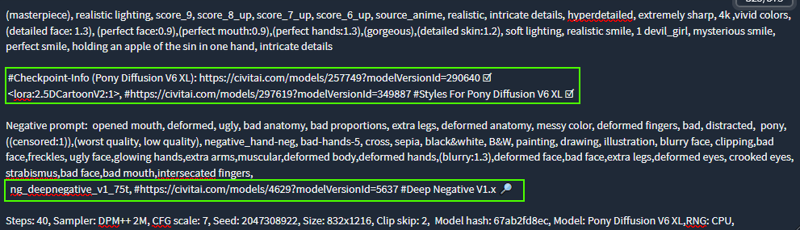 By default A1111 ignores everything in a line after a "#" when it comes to generation, so you can just ignore the following if you don't like that info.
After the # you get a "ready to paste" URL to open the models on Civitai, in case you don't have the model installed. If my extension doesn't find the file, it puts 🔎 to the end of the line, otherwise you get an ☑(icons might look slightly differently on your computer). If it doesn't find the models, despite them being in your folders, check if the filename is correct in the <angle brackets:1>. Sometimes files get renamed and that's enough for A1111 and Forge to skip over them (sometimes this makes them ignoring all loras, even found one's).
On top it adds "RNG:CPU", to the end which seems to be what Civitai is using (this setting will appear in the overrides).
After this, hit "Apply" like usual ,and "Generate" now has a chance to find the the correct loras/models.
Limitations:
A) Sometimes, (especially if the Picture was an "inbetween" of an on-site upscale), the extension doesn't get the right size. That is indicated by a new part between negative prompt and general config "⚠ Size guessed AFTER upscale ⚠". If all guesses fail, you'll get 1024x1024, which should be enough to run a test.
B) You will not get the exact same picture, just pretty close. Differences in Hardware and Software-versions as well as Civitai's "behind the scenes magic/optimizations" will always make at least a tiny difference (You can experiment to with CFG/GFG-fix - in my experiments +1.5 or +2.5 get the results often a little closer, but that seems to be random as well, and not worth the time). However for me the important thing, is to use pictures as an archive for interesting styles, so this is only making sure, that I have the right ingredients together.
C) It will only work for Images created with the Civitai-Generator.
D) Updates/Changes in the Api might break this little script in no time.
E) If a resource is gone from Civitai, my script and the Api will be of no use.
F) If your Web UI is set to remove styles on "apply", the whole procedure will probably be useless.
Description
Another Bugfix -> This time for Images created during upscale
FAQ
Comments (14)
Thank you so much for your work! It has helped so much generating images in a1111. Wish there was more "official" support for this.
Thanks for the kind words (and the buzz). Wished there was official support for this, too.
OTOH, at least I learned a little bit of Python 😋
Great extension! Please, update!
Still works for me. For example with: https://civitai.com/images/64957680
Give me a link, to a picture no longer working, please. Also, paste a copy the last line of the WebGui, you're using, and paste it here. It should look like:
version: v1.10.1-72-g021154d8 • python: 3.10.11 • ... and so on.
@ragnaroook
Hi! Many thanx for answering!
It's e.g.: https://civitai.com/images/64722518
version: f1.7.0-v1.10.1RC-latest-2165-g25dcc6be • python: 3.10.11 • torch: 2.1.2+cu121 • xformers: 0.0.23.post1 • gradio: 3.41.2
Your example link works on my system just fine
@NikPureSilver I'll look into it. Can't promise to get it done before sunday, though.
@ragnaroook It's totally no hurry at all! And many thanx!
@NikPureSilver give the new version a try. (found an easy workaround)
@ragnaroook THANK YOU! IT WORKS PERFECTLY!
@NikPureSilver Glad to hear, it works for you. Thanks for the kind words and the buzz .
@ragnaroook Hi! If you are interested, the extension doesn't work with this one https://civitai.com/images/67627323
It seems to me it, it doesn't know what to do if one of lora's is missing on civit.
@NikPureSilver I botched the error message, so it crashed the plugin.... The new version should fix it,
@ragnaroook U R THE BEST!!!
@NikPureSilver Thank you (but mostly sorry for botching it in the first place)