Instant LoRA
Legacy Lore (for the Original Revamp Version):
Original Concept by AloeVera_Purple
(No longer on CivitAI, good luck wherever the winds of change may take you!)
In the words of its original creator: "This workflow will take your input images, distribute them into the two different IPAdapter models, [Edit: Only one for Flux.1 because there is no Face IPAdapter yet that works on Flux.] with different timesteps (distribution in time basically), and shift your results, like a LORA would... but in this case, you don't have to train anything. It has likeness scores up to 95%. + With the right settings, it can be incredibly accurate. Unfortunately, there are no "Golden" settings that work for all. You'll have to tweak things a little bit, up and down. See what works best for you."
Information:
From now on all information pertaining to the versions can be found in the version history section at the right side of the screen (Just below the download section). This will contain a list of changes and/or Installation Steps for the Workflow and the Files (If you downloaded those).
How to use:
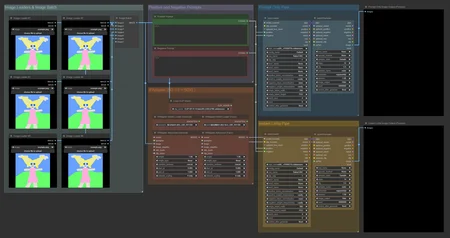
The general usage of the workflow is pretty simple. Just add up to 6 images of your choice to the Image Loaders (Bypass the ones you want to leave empty), type up your prompt and send it to "Generate". The IPAdapter will combine the Images into a makeshift LoRA and use the style and overall color scheme on the new generation.
The Batch Maker Node scales with additional Images so feel free to add as many as you want. Keep in mind that more Images means longer wait time for IPAdapter to process the images into the Makeshift LoRA.
Works in Progress and Suggestions
Work is being done to add Regional Prompting to the Workflow. At the moment I'm figuring out how to do add this function into my "Negative Prompt & HiRes.Fix" workflow. once this all works accordingly it'll be added to the Instant LoRA workflow as well!
Found Issue: Tying in the Regional Prompting is not a problem but it seems the IPadapter for Flux doesn't like playing together with it. The Workflow seems to work (no errors during execution of the workflow) but the output doesn't adhere to the regional mask prompts. Will investigate further. There are no errors thus in theory it should work.
Adding a Weight or Ratio system to the Images so you can choose how much it'll influence the generated picture.
~ Suggested by angryskyFound Issue: While it is possible to tie weight markers to each image this will at the moment require the Batch Loader to be turned into a Model > Model Feed system and for Flux.1 this will result into an extreme long generation time even on higher end Consumer GPUs. (I will do some more research but at the moment while possible the extended generation time makes this practically non-viable.)
Description
Revamp Info:
Greetings everyone, quick word as to the why I created and uploaded this. Recently IPAdapter's Developers released v2 material and it broke some of AloeVera's original nodes. I took it upon myself to patch up and while I was at it implement newer files to his/her Workflow. So, it's up-to-date and working better than ever.
Changes:
Better Batch Loader
It now allows for easy addition of more pictures should you want to do that
Upgraded Nodes from some of the permanent Broken ones
In AloeVera's latest Workflow this pertains to the Adapter#1 and Adapter#2 Nodes. (These have been replaced with Advanced Nodes that came with the Updates)
File Updates
clip_vision_1.5.safetensors --> CLIP-ViT-H-14-laion2B-s32B-b79K.safetensors
ip-adapter-plus_sd15.bin --> Latest Update
ip-adapter-plus-face_sd15.bin --> Latest Update
File Additions
Added ip-adapter-plus_sdxl_vit-h.bin --> SDXL Specific Compatibility
Added ip-adapter-plus-face_sdxl_vit-h.bin --> SDXL Specific Compatibility
Setup:
Install ComfyUI Manager by ltdrdata ( https://github.com/ltdrdata/ComfyUI-Manager )
This will make sure you can easily install the missing nodes you'll need for this Workflow to function.
Download the *.zip file containing the Workflow and all the extra files you'll need.
Launch ComfyUI and Load the Workflow
Use Manager to install the Missing Nodes and then restart ComfyUI (there should be no Red Colored Nodes after this step)
Put the Extra Files into the Correct Folders
CLIP-ViT-H-14-laion2B-s32B-b79K.safetensors --> Copy this into your ComfyUI\models\clip_vision Folder
The 4 *.bin Files --> Copy these into your ComfyUI\models\ipadapter Folder
If at this point you don't have these folders in the Model folder it's perfectly okay to create them.
FAQ
Comments (3)
Thank you for sharing.
Thank you for updating and sharing :)
Hello, the zip file does not contain the files mentioned in the installation instructions, I am referring to these:
Put the Extra Files into the Correct Folders
CLIP-ViT-H-14-laion2B-s32B-b79K.safetensors --> Copy this into your ComfyUI\models\clip_vision Folder
The 4 *.bin Files --> Copy these into your ComfyUI\models\ipadapter Folder
If at this point you don't have these folders in the Model folder it's perfectly okay to create them.
Nevermind,
new to civitai, found the Workflow + Files Tab at the top,
thanks for the work.
Looks like we don't have an active mirror for this file right now.
CivArchive is a community-maintained index — we catalog mirrors that volunteers upload to HuggingFace, torrents, and other public hosts. Looks like no one has uploaded a copy of this file yet.
Some files do get recovered over time through contributions. If you're looking for this one, feel free to ask in Discord, or help preserve it if you have a copy.