PLEASE READ DESCRIPTION
Deprecated model, consider updating to: https://civarchive.com/models/5935/liberty it is also licenseless
Very NSFW biased model!!
FINAL UPDATE - Two files added:
-aErosNoVAE: It is the exact same file as aEros prunned but without the VAE requirement, which also means that you can now train embeddings succesfully with aEros. (VAE would still be recommended for normal use).
-aErosNoVAE-inpainting: An inpainting focused version fo the model mixing it with SD 1.5 inpainting model.
UPDATE: This model has experimented a restrictive change of license ONLY because it inherited it from some of it's building models.
Until further notice, I am not developing it anymore.
https://huggingface.co/dreamlike-art/dreamlike-photoreal-2.0/blob/main/LICENSE.md
https://huggingface.co/dreamlike-art/dreamlike-photoreal-2.0
Check any info or questions at our private Discord here: https://discord.gg/z88HpDwbGq
it needs vae-ft-mse-840000-ema-pruned (or another one if you want to get experimental) or it will output broken images.
Art&Eros is out!!! This is my second model. It is similar to REA (my previous model) in it's concept, and many of it's building materials are the same, so most that worked for REA works for aEros, but it is not an evolution of it. It has been rebuild from the ground to be 'better, faster, stronger'.
My thanks to everybody who made it possible, because I if there's anything good on it is because the source material was great too. In no particular order to Hassan, AloeVera, the CivitAI Team, Izuek, Someone88, wavymulder, UnstableDiffusion Team, justmaier, moist, sviasem, kavellion and any other creator I might not have been able to cite.
The main download is the PRUNED safetensors NoVAE version. You have the unpruned ckpt as an optional download.
ABOUT:
First it may not be the best begginer checkpoint out there. I consider myself experienced at prompting so I haven't tried much basic prompts, however I doubt that a plain "pretty naked woman, big boobs" is going to take you very far with it. However, although I prompt a bit different than that I have tested that it understands the words from the language of PhotoReal v0.5 (it is contained within the merge), so if you are having troubles getting good outputs from it you can begin from there, but in general, try to use a more natural language than an array of commas: https://docs.google.com/document/d/1-DDIHVbsYfynTp_rsKLu4b2tSQgxtO5F6pNsNla12k0/edit
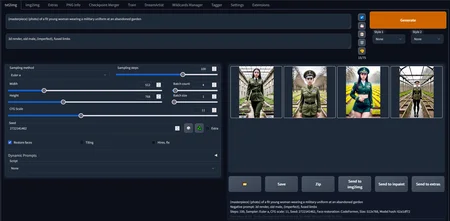
There's also one screenshot with a very basic example prompt for you to get the idea.
According to my testing it is a very powerful model for it's purpose, but it is a project I made for myself which means that depending on what you want it may or may not lack certain areas. It has been intensively tested to generate photorealistic(ish) images of different types of girls in different poses in different places wearing different things with different artistic moods. Nothing more, nothing less. From hardcore, to to group, to drawing, are out of the scope uses that may or may not work (But have improved since REA). It's community report that it is very good at fantasy and landscapes/interiors too.
List of keywords known: 'elden ring style', 'postapocalypse', 'knollingcase', 'cyborgdiffusion', 'analog style', 'swpunk', 'synthwave', 'dreamlikeart', 'modelshoot style'
'bf' is no longer a trigger word, nor part of the model.
HOW TO USE IT:
You MUST USE vae-ft-mse-840000-ema-pruned (or experimentally other VAEs). Otherwise it breaks.
Some users report having problems using something different than Automatic1111webui. Cannot troubleshoot that myself.
This model DOES NOT REQUIRE TO USE TRIGGER WORDS.
Trigger words are general style or composition modifiers. They can be used alone or in combination and will give an special mood (or mix) to the image.
Trigger words have only been tested using them at the beggining of the prompt.
There is no longer a proper order to mix trigger words between them, needs experimenting for your desired outputs.
Works for a wide variety of steps from 20 to 130 tested. I use 66 Euler A + hires fix.
It works on it's own without triggers at making general or NSFW images of ladies of high quality.
Resolutions tested are 512x512, 384x704, 512x768 and 768x768.
MERGED:
I haven't kept track of all the steps done in the merge (I used a weird methodology), but this is what's inside in different proportions:
PhotoReal v0.5: https://docs.google.com/document/d/1-DDIHVbsYfynTp_rsKLu4b2tSQgxtO5F6pNsNla12k0/edit
Elden Ring Style: https://civarchive.com/models/5/elden-ring-style
Postapocalypse: https://civarchive.com/models/1136/postapocalypse
Analog Diffusion: https://civarchive.com/models/1265/analog-diffusion
Knollingcase: https://civarchive.com/models/1092/knollingcase
Hassan's 1.4 and CandyBerry: https://civarchive.com/models/1173/hassanblend-all-versions
PurePornPlus: https://civarchive.com/models/1235/purepornplus-merge
SimpMaker 3K1: https://civarchive.com/models/1258/aloeveras-simpmaker-3k-series
Modelshoot style: https://civarchive.com/models/2147/modelshoot-style
SynthPunk Search: https://civarchive.com/models/2856/synthpunk-search
Dreamlike Diffusion: https://civarchive.com/models/1274/dreamlike-diffusion-10
Cyborg Diffusion: https://civarchive.com/models/1365/cyborg-diffusion
It also works GREAT as an extra style modifier with this hypernetwork for extra artistic outputs: https://civarchive.com/models/1141/mjv4-hypernetwork
Honorable mention tu Uber, whose model is not part of the merge, but helped me imrprove general hardcore capacity of aEros: https://civarchive.com/models/2661/uber-realistic-porn-merge-urpm
TROUBLESHOOT:
Images are a chaotic trip of LSD colors: You are not using the VAE.
I promiss that I have the VAE!!!: If you swear over the grave of Chanquete, then another user of Discord found the solution, but please, BE SURE THAT YOU HAVE THE VAE WORKING FOR OTHER MODELS:
xtrebel - "In case anyone else is still having trouble with LSD colors, despite having the correct VAE loaded like me... I discovered this checkbox in settings has to be off/unchecked for it to properly load the VAE:
[ ] ignore selected VAE for stable diffusion checkpoints that have their own .vae.pt next to them"Images seem like real images but are a mess of body horror and whatnot: You need to keep working in your prompt. This is NOT an easy to use model (not rocket science either).
FUTURE:
This project is considered finished. From now on it is going to become my base model. I may start to train it as the big kids do. But I am more likely gonna try to update it with the updates some of the building materials have experimented. Be it aEros v2 or a totally new thing... Who knows? The sky is the limit!!! Stay tuned on:
Description
Pruned
FAQ
Comments (28)
To author: Heh we are both Aines
Issue, not sure why, I am using the vae but still acid trip
An user stated that if youhave also VAE in auto detect in the setting tabs or something like this it could still give acid trip. Does REA work for you and this model doesn't?
Nadda REA doesnt work, tried it as just the ckpt as well. tried even reinstalling the vae, nope.
An user reported that there is a setting in Automatic that may load or onload vaes that have matching names or something like that, it is on the discord tab of the model. This is what he said:
"In case anyone else is still having trouble with LSD colors, despite having the correct VAE loaded like me... I discovered this checkbox in settings has to be off/unchecked for it to properly load the VAE:
[ ] ignore selected VAE for stable diffusion checkpoints that have their own .vae.pt next to them".
Hope that helps.
Well shit, deactivating that fixed it, what a weird little error thing
I laughed because you gave one star inmediatly instead of asking for help. It did happen me already with REA, lots of people gave one star without even doing the VAE fix posting "model is trash".
You have a problem and I want to help you, but if you enter the room downvoting the model don't complain of beeing downvoted ;)
I've tried every suggestion and still getting LSD colors. I have my VAE in the VAE folder located with all my other model folders, I unchecked the box to ignore selected vae that have their own .vae.pt. but still get the same LSD colors. I'm not one to give up so I'll try adding a new vae and run everything from scratch. If anyone one has any other pointers, i'd gladly repay them with a fist bump and a firm handshake.
I'm a noob in this field and after a long LSD journey, here is what I done. I change VAE extension from .ckpt to .vae.pt and put it in the same folder as model, it's still not work then I found that above this "[ ] ignore selected VAE for stable diffusion checkpoints that have their own .vae.pt next to them" checkbox, it's already uncheck and above it there is this box called "SD VAE" it is set to none. When I clicked it, I found my upload VAE there, I selected it, apply change, then all LSD just gone.
Aine, you wrote that this is the final version.
You do know that Hassan has just released 1.5 while you still have 1.4? :-)
"But I am more likely gonna try to update it with the updates some of the building materials have experimented." ;)
Looks like both downloads are Safetensors. Is there a Github link for the ckpt?
I have double checked, second download is ckpt...
you can convert it easily, for example in automatic1111 (checkpoints merge)
**** Sorry for my idiocy, I didn't realize there was a Version section below. My apologies :(
Hey! This model is INSANE.
Would you be willing to share your prompt for the third example image?
Thank you very much!! My prompts are my little secret sorry. I will however make a Patreon post explaining the way I prompt with tips and tricks I use.
That is a lot of trigger words. It seems your list of trigger words are longer than most of my prompts, but will give it a try.
If you manage to use them all at once and still get something pleasant to the eye you'll have my respects ;)
an analog style picture of a postapocalypse swpunk synthwave style female cyborgdiffusion killing machine posed in a modelshoot style, all enclosed in a large elden ring style, dreamlikeart knollingcase, see my review for pics,, great model
How can I use this model with DreamBooth? I always get an error when converting to diffusers
Model seems broken?
I get this, repeating similar:
RuntimeError: Error(s) in loading state_dict for LatentDiffusion:
size mismatch for model.diffusion_model.input_blocks.1.1.proj_in.weight: copying a param with shape torch.Size([320, 320, 1, 1]) from checkpoint, the shape in current model is torch.Size([320, 320]).
Hello. Tell me, please, do I understand correctly (I am noob): it is impossible to get nudity images in the SafeTensor version of the file?
Or is it possible to get nude images in SafeTensor versions too?
Where are SafeTensor versions installed? Also in the models folder?
How are SafeTensor versions connected?
If you are using Automatic webui you can just drop safetensor files the same place you'd drop ckpt files. If you are not using Automatic webui I cannot help you. Model is selected the same way as any other you jus chose it from the list at the top left corner.
Safetensor files are the same functionality as ckpt so they make the same images, nudes or not. Censorship is not in the model but other tools.
Finally if you have problems I have also provided the ckpt file, look for the versions of the model, there are 2: safetensors and ckpt
Thank you very much for the answer.
How do I use SafeTensors files in DreamBooth through Colab? Every time I try to load the model through the link it gives an error in diffuser conversion...
Unfortunately, I dont know about this (Colab)
I use webui version.
It's cold. 🥶
Details
Files
Available On (1 platform)
Same model published on other platforms. May have additional downloads or version variants.