


ArtiWaifu Diffusion
We have released the ArtiWaifu Diffusion model, designed to generate aesthetically pleasing and faithfully restored anime-style illustrations.
The AWA Diffusion is an iteration of the Stable Diffusion XL model, mastering over 9000 artistic styles and more than 6000 anime characters (version 2.0), generating images through trigger words.
As a specialized image generation model for anime, it excels in producing high-quality anime images, especially in generating images with highly recognizable styles and characters while maintaining a consistently high-quality aesthetic expression.
News
2024/08/31: 📢 Announcement: Trigger words list of each version is now moved to the About This Version panel, which is on the right hand side of the model page.
2024/08/30: ArtiWaifu Diffusion 2.0 version is released on CivitAI, HuggingFace, LiblibAI (ShakkerAI) and TensorArt.
Model Details
The AWA Diffusion model is fine-tuned from Stable Diffusion XL, with a selected dataset of 2.5M (version 2.0) high-quality anime images, covering a wide range of both popular and niche anime concepts. AWA Diffusion employs our most advanced training strategies, enabling users to easily induce the model to generate images of specific characters or styles while maintaining high image quality and aesthetic expression.
Usage Guide
This guide will (i) introduce the model's recommended usage methods and prompt writing strategies, aiming to provide suggestions for generation, and (ii) serve as a reference document for model usage, detailing the writing patterns and strategies for trigger words, quality tags, rating tags, style tags, and character tags.
Basic Usage
CFG scale: 5-11. Recommended is 7.5.
Resolution: Area (= width x height) around 1024x1024. Not lower than 256x256, and resolutions where both length and width are multiples of 32.
Sampling method: Euler A (20+ steps) or DPM++ 2M Karras (~35 steps)
Due to the special training method, AWA's optimal inference step count are higher than regular values. As the inference steps increase, the quality of the generated images can continue to improve...
❓ Question: Why not use the standard SDXL resolution?
💡 Answer: Because the bucketing algorithm used in training does not adhere to a fixed set of buckets. Although this does not conform to positional encoding, we have not observed any adverse effects.
Prompting Strategies
All text-to-image diffusion models have a notoriously high sensitivity to prompt, and AWA Diffusion is no exception. Even a misspelling in the prompt, or even replacing spaces with underscores, can affect the generated results. AWA Diffusion encourages users to write prompt in tags separated by comma + space ( ,). Although the model also supports natural language descriptions as prompt, or an intermix of both, the tag-by-tag format is more stable and user-friendly.
When describing a specific ACG concept, such as a character, style, or scene, we recommend users choose tags from the Danbooru tags and replace underscores in the Danbooru tags with spaces to ensure the model accurately understands your needs. For example, bishop_(chess) should be written as bishop (chess), and in inference tools like AUTOMATIC1111 WebUI that use parentheses to weight prompt, all parentheses within the tags should be escaped, i.e., bishop \(chess\).
Tag Ordering
Including AWA Diffusion, most diffusion models better understand logically ordered tags. While tag ordering is not mandatory, it can help the model better understand your needs. Generally, the earlier the tag in the order, the greater its impact on generation.
Below is an example of tag ordering. The example organizes the order of tags, prepends art style tags and character tags because style and subject are the most important to the image. Subsequently, other tags are added in order of importance. Lastly, aesthetic tags and quality tags are positioned at the end to further emphasize the aesthetics of the image:
art style (by xxx) -> character (1 frieren (sousou no frieren)) -> race (elf) -> composition (cowboy shot) -> painting style (impasto) -> theme (fantasy theme) -> main environment (in the forest, at day) -> background (gradient background) -> action (sitting on ground) -> expression (expressionless) -> main characteristics (white hair) -> other characteristics (twintails, green eyes, parted lip) -> clothing (wearing a white dress) -> clothing accessories (frills) -> other items (holding a magic wand) -> secondary environment (grass, sunshine) -> aesthetics (beautiful color, detailed) -> quality (best quality) -> secondary description (birds, cloud, butterfly)
Tag order is not set in stone. Flexibility in writing prompt can yield better results. For example, if the effect of a concept (such as style) is too strong and detracts from the aesthetic appeal of the image, you can move it to a later position to reduce its impact.
Negative Prompt
Negative prompt are not necessary for AWA Diffusion. If you use negative prompt, it is not the case that the more negative prompt, the better. They should be as concise as possible and easily recognizable by the model. Too many negative words may lead to poorer generation results. Here are some recommended scenarios for using negative prompt:
Watermark:
signature,logo,artist name;Quality:
worst quality,lowres,ugly,abstract;Style:
real life,3d,celluloid,sketch,draft;Human anatomy:
deformed hand,fused fingers,extra limbs,extra arms,missing arm,extra legs,missing leg,extra digits,fewer digits.
Trigger Words
Add trigger words to your prompts to inform the model about the concept you want to generate. Trigger words can include character names, artistic styles, scenes, actions, quality, etc.
Attention: See the Model Details of each version for full lists of trigger words.
Tips for Trigger Word
Typos: The model is very sensitive to the spelling of trigger words. Even a single letter difference can cause a trigger to fail or lead to unexpected results.
Bracket Escaping: Pay attention when using inference tools that rely on parentheses for weighting prompt, such as AUTOMATIC1111 WebUI, to escape parentheses in trigger words, e.g.,
1lucy(cyberpunk)->1lucy \(cyberpunk\).Triggering Effect Preview:Through searching tags on Danbooru to preview the tag and better understand the tag's meaning and usage.
Style Tags
Style tags are divided into two types: Painting Style Tags and Artistic Style Tags. Painting Style Tags describe the painting techniques or media used in the image, such as oil painting, watercolor, flat color, and impasto. Artistic Style Tags represent the artistic style of the artist behind the image.
AWA Diffusion supports the following Painting Style Tags:
Painting style tags available in the Danbooru tags, such as
oil painting,watercolor,flat color, etc.;All painting style tags supported by AID XL 0.8, such as
flat-pasto, etc.;All style tags supported by Neta Art XL 1.0, such as
gufeng, etc.;Other tags, such as
by trickortreat, etc.;
AWA Diffusion supports the following Artistic Style Tags:
Artistic style tags available in the Danbooru tags, such as
byyoneyama mai,bywlop, etc.;All artistic style tags supported by AID XL 0.8, such as
byantifreeze3,by7thknights, etc.;
The higher the tag count in the tag repository, the more thoroughly the artistic style has been trained, and the higher the fidelity in generation. Typically, artistic style tags with a count higher than 50 yield better generation results.
Tips for Style Tag
Intensity Adjustment: You can adjust the intensity of a style by altering the order or weighting of style tags in your prompt. Frontloading a style tag enhances its effect, while placing it later reduces its effect.
❓ Question: Why include the prefix by in artistic style tags?
💡 Answer: To clearly inform the model that you want to generate a specific artistic style rather than something else, we recommend including the prefix by in artistic style tags. This differentiates byxxx from xxx, especially when xxx itself carries other meanings, such as dino which could represent either a dinosaur or an artist's identifier. Similarly, when triggering characters, add a 1 as a prefix to the character trigger word.
Character Tags
Character tags describe the character IP in the generated image. Using character tags will guide the model to generate the appearance features of the character.
Character tags also need to be sourced from the Character Tag List. To generate a specific character, first find the corresponding trigger word in the tag repository, replace all underscores _ in the trigger word with spaces , and prepend 1 to the character name. For example, 1ayanami rei triggers the model to generate the character Rei Ayanami from the anime "EVA," corresponding to the Danbooru tag ayanami_rei; 1asuna(sao) triggers the model to generate the character Asuna from "Sword Art Online," corresponding to the Danbooru tag asuna_(sao).
The higher the tag count in the tag repository, the more thoroughly the character has been trained, and the higher the fidelity in generation. Typically, character tags with a count higher than 100 yield better generation results.
Tips for Character Tag
Character Costuming: To achieve more flexible character costuming, character tags DO NOT deliberately guide the model to draw the official attire of the character. To generate a character in a specific official outfit, besides the trigger word, you should also include a description of the attire in the prompt, e.g., "1 lucy (cyberpunk), wearing a white cropped jacket, underneath bodysuit, shorts, thighhighs, hip vent".
Series Annotations: Some character tags include additional parentheses annotations after the character name. The parentheses and the annotations within cannot be omitted, e.g.,
1 lucy (cyberpunk)cannot be written as1 lucy. Other than that, you don't need to add any additional annotations, for example, you DO NOT need to add the series tag to which the character belongs after the character tag.Known Issue 1: When generating certain characters, mysterious feature deformations may occur, e.g.,
1 asui tsuyutriggering the character Tsuyu Asui from "My Hero Academia" may result in an extra black line between the eyes. This is because the model incorrectly interprets the large round eyes as glasses, thusglassesshould be included in the negative prompt to avoid this issue.Known Issue 2: When generating less popular characters, AWA Diffusion might produce images with incomplete feature restoration due to insufficient data/training. In such cases, we recommend that you extend the character description in your prompt beyond just the character name, detailing the character's origin, race, hair color, attire, etc.
Known Issue 3: Some character tags will carries style. And some are too heavy to overlap. Lower the weight of character tag to alleviate the problem. For example,
frieren->(frieren:0.8).
Character Tag Trigger Examples
1 lucy (cyberpunk)✅ Correct character tag1 lucy❌ Missing bracket annotation1 lucy (cyber)❌ Incorrect bracket annotationlucy (cyberpunk)❌ Missing prefix11 lucy cyberpunk❌ Missing brackets1 lucy (cyberpunk❌ Bracket not closed1 lucky (cyberpunk)❌ Spelling error1 lucy (cyberpunk: edgerunners)❌ Bracket annotation not following the required character tag
❓ Question: Why do some character tags contain bracket annotations, e.g., lucy (cyberpunk), while others do not, e.g., frieren?
💡 Answer: In different works, there may be characters with the same name, such as Asuna from "Sword Art Online" and "Blue Archive". To distinguish these characters with the same name, it is necessary to annotate the character's name with the work's name, abbreviated if the name is too long. For characters with unique names that currently have no duplicates, like frieren, no special annotations are required.
Quality Tags & Aesthetic Tags
For AWA Diffusion, including quality descriptors in your positive prompt is very important. Quality descriptions relate to quality tags and aesthetic tags.
Quality tags directly describe the aesthetic quality of the generated image, impacting the detail, texture, human anatomy, lighting, color, etc. Adding quality tags helps the model generate higher quality images. Quality tags are ranked from highest to lowest as follows:
amazing quality -> best quality -> high quality -> normal quality -> low quality -> worst quality
Aesthetic tags describe the aesthetic features of the generated image, aiding the model in producing artistically appealing images. In addition to typical aesthetic words like perspective, lighting and shadow, AWA Diffusion has been specially trained to respond effectively to aesthetic trigger words such as beautiful color, detailed, and aesthetic, which respectively express appealing colors, details, and overall beauty.
The recommended generic way to describe quality is: <your prompt>, beautiful color, detailed, amazing quality
Tips for Quality and Aesthetic Tags
Tag Quantity: Only one quality tag is needed; multiple aesthetic tags can be added.
Tag Position: The position of quality and aesthetic tags is not fixed, but they are typically placed at the end of the prompt.
Relative Quality: There is no absolute hierarchy of quality; the implied quality aligns with general aesthetic standards, and different users may have different perceptions of quality.
Rating Tags
Rating tags describe the level of exposure in the content of the generated image. Rating tags are ranked from highest to lowest as follows:
rating: general (or safe) -> rating: suggestive -> rating: questionable -> rating: explicit (or nsfw)
Prompt Word Examples
Example 1
A
by yoneyama mai, 1 frieren, 1girl, solo, fantasy theme, smile, holding a magic wand, beautiful color, amazing quality
by yoneyama mai triggers the artistic style of Yoneyama Mai, placed at the front to enhance the effect.
1 frieren triggers the character Frieren from the series "Frieren at the Funeral."
beautiful color describes the beautiful colors in the generated image.
amazing quality describes the stunning quality of the generated image.
B
by nixeu, 1 lucy (cyberpunk), 1girl, solo, cowboy shot, gradient background, white cropped jacket, underneath bodysuit, shorts, thighhighs, hip vent, detailed, best quality
Example 2: Style Mixing
By layering multiple different style tags, you can generate images with features of multiple styles.
A Simple Mixing
by ningen mame, by ciloranko, by sho (sho lwlw), 1girl, 1 hatsune miku, sitting, arm support, smile, detailed, amazing quality
B Weighted Mixing
Using AUTOMATIC1111 WebUI prompt weighting syntax (parentheses weighting), weight different style tags to better control the generated image's style.
(by ningen mame:0.8), (by ciloranko:1.1), (by sho (sho lwlw):1.2), 1girl, 1 hatsune miku, sitting, arm support, smile, detailed, amazing quality
C Advanced Mixing
Using AUTOMATIC1111 WebUI prompt weighting syntax (parentheses weighting), | symbol can be used to directly mix two words.
(by trickortreat|by shiroski|by wlop|by baihuahua|by as109), 1girl, 1 hatsune miku, sitting, arm support, smile, detailed, amazing quality
Example 3: Multi-Character Scenes
By adding multiple character tags to your prompts, you can generate images with multiple characters in the same frame. Compared to other similar models, AWA performs better in multi-character scenes but remains unstable.
A Mixed Gender Scene
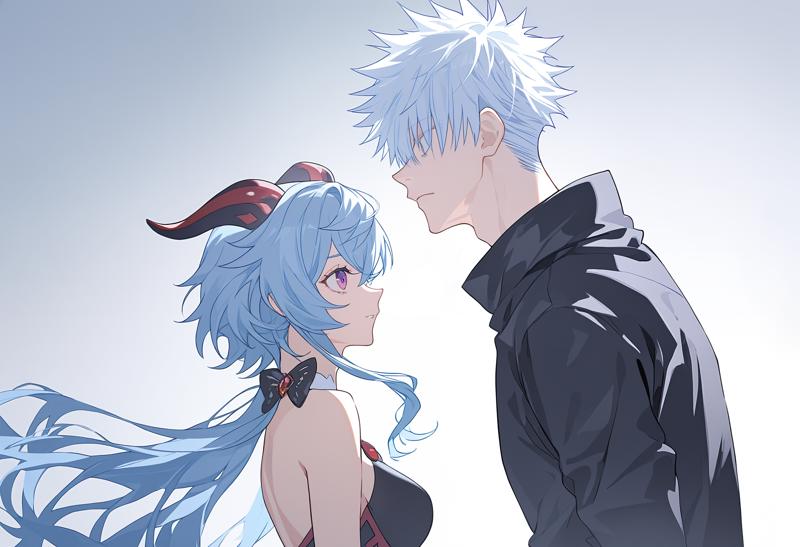 1girl and 1boy, 1 ganyu girl, 1 gojou satoru boy, beautiful color, amazing quality
B Same Gender Scene
 2girls, 1 ganyu girl, 1 yoimiya girl, beautiful color, amazing quality
Future Work
AWA Diffusion is expected to combine high-level aesthetics with comprehensive knowledge. It should neither have the traditional AI's greasy feel nor become a knowledge-deficient vase. We will continue to explore more advanced training techniques and strategies, consistently improving the model's quality.
Support Us
Training AWA Diffusion incurs substantial costs. If you appreciate our work, please consider supporting us through Ko-fi, to aid our research and development efforts. Thank you for your like and support!
Description
Although this is the first version of ArtiWaifu Diffusion, it serves as a powerful successor to the Anime Illust Diffusion XL (AIDXL) series of models. Rather than marking the conclusion of the AIDXL series, it represents a significant step forward, advancing the series to become even more robust and capable.
🏷 Model Information 🏷
Developed by: Euge
Funded by: Neta.art
Model type: Generative text-to-image model
Finetuned from model: SDXL 1.0 Base
License: Fair AI Public License 1.0-SD
Support a lot of painting styles, art styles (9000+) and characters (6000+)
Can accurately identify specific quality level, safety level, age of drawing, vintage of drawing and some aesthetic concepts.
🚀 Dataset Source 🚀
Subset of Danbooru (1.3M). Selected by aesthetic score using Waifu Scorer V3.
Subset of Pixiv (0.1M). Hand-selected.
Others (0.1M).
👀 Future Plan 👀
Apply stronger training strategies.
Continue adding more and more high-quality data.
FAQ
Comments (83)
We are continually working to improve our models. If you have any more questions or suggestions, please FEEL FREE to share~
What's 1 in the character prompts and the girl/boy after the character name? Is it specifically added so you have an easier time prompting multiple characters? And how did you test if it actually helps or was it just an idea and it seems to work better than the normal way of prompting?
1 ganyu girl, 1 yoimiya girl
@illyaeater Thanks for these valuable questions.
First, about the prefix of trigger words. The prefix 1 of the character trigger word is used to tell the model "this is a character", not something else. This is useful to avoid semantic conflicts between trigger words and their original meanings. e.g. character Fern from Sousou No Frieren series with fern (plant). The same is true for artists.
We found that this way of writing data caption & text prompt helps the model learn and generate new concepts.
Regarding the way of prompting multiple characters in the same scene. I am also wondering whether I should explain it in the model introduction, but I don’t want to mislead you all. Because this is just my personal opinion and adding or not is not necessary.
I think adding "girl/boy" after the character tag helps the model understand (i) generating multiple characters and (ii) the generated characters should be different, so as to match 1girl/1boy with the character tags. Academically, I think repeated reminding helps CLIP's attention associate, for example, 1girl to 1 ganyu instead of 1 gojou satoru.
I hope these answers can help you~ If I misunderstood you or my explanation was not clear, please feel free to ask.
@Euge_ I think I also found luck when I appended relevant descriptions after the tags of each character when trying to do multiple character gens, so your idea with char girl/boy makes sense. I never really tested it though. I'm interested in seeing how it works, but it also makes me wonder how it will affect the outcome of merges.
Also one more thing, this is separate from your AID models right? You're still continuing with that as well? That looks more personal whereas this seems like you guys are working together with multiple people.
@illyaeater Thanks for your concerning about AIDXL.
Regarding the relationship between AWA and AIDXL. They are the same. Also, I am the only one in the production team and did all the works, so "we" = "I" and "our" = "my". I write this way just out of personal habit (it looks more official :D). The reason why it is not AIDXL is that:
(i) My training strategy iterates very quickly. I accumulate technologies and experience through training AIDXL. As you can see, the version of AIDXL is always 0.x, which means it is a small model.
(ii) AWA is too big. Considering the differences with previous AIDXL versions and compatibility issues with model documents, I can't start a new version of AIDXL. The dataset of AWA is 15 times greater than AIDXLv0.8. And I applied many new technologies on AIDXLv0.8 to get AWA. The old docs is messy, unclear and incomplete, and thus is not compatible with AWA.
(iii) AWA is called AIDXL before releasing, just as you can see the model name in the generation info of model covers. Because AIDXL is a random name...
中文版本:
感谢您对 AIDXL 的关注。 关于 AWA 和 AIDXL 之间的关系。它们是相同的。另外,整个团队只有我一个人,所以“我们”=“我”,“我们的”=“我的”。我这样写只是出于个人习惯(看起来更正式):D。
它不叫 AIDXL,也不发布在同一模型页的原因是:
(i)我训练策略迭代速度很快。我通过训练 AIDXL 积累技术和经验。如你所见,AIDXL 的版本始终为 0.x,这意味着它是一个小模型。
(ii)AWA 太大,考虑到与前代模型的差异和模型文档的兼容问题,我不能用它作为一个新版本的 AIDXL。AWA 的数据集是 AIDXLv0.8 的 15 倍。我在 AIDXLv0.8 的基础上应用了许多新技术来获得 AWA。旧文档杂乱、不清楚且不完整,因此与 AWA 不兼容。
(iii)AWA 在发布之前被称为 AIDXL。AIDXL 是一个随机名称...
Good job Eugeミ(・・)ミ
good work !
Best model
That's insane😮🔥🔥
cant recreate the sample images like the bocchi slime girl one. any reason for that?
@Euge_ ok so youre saying i have to gen with euler a then img2img upscale with a dpm sampler? for the bocchi slime prompt im getting this https://i.imgur.com/nKvnQV2.png i dont think upscaling will solve this one

@usrnmer Sorry for the misleading.
You are right. The cover bocchi slime is generated using the semi-finished model, not the released one which weights tag "slime girl" heavier. So weighting it lighter may help to produce a similar one (https://civitai.com/posts/2555056).
For the reason of non-reproducibility (as referred) of other cover images, it's because that the generation information (seed, sampler, steps etc.) shown in the cover image is inconsistent with the original image.
If the explanation is unclear or you have any other question, please continue to ask.
@Euge_ I don't think that's the case, model simply produce awful results for some reason, no matter the prompt. I've encountered the same issue, uploaded my generation result to the gallery. Maybe you could replace sample images for us to troubleshoot the problem easier?
@Euge_ can you please generate one on the finished model that's very similar to the one on the cover image and post it and make sure it includes all the gen information? thanks
@usrnmer Thanks for the question.
For your request, I don't want to disappoint you. As you can see, most of the covers are generated by simple prompts in order to demonstrate the model's usage intuitively. It's a matter of luck to reproduce them accurately.
For the reproducing, please refer to this post: https://civitai.com/posts/2556916, where I didn't do any post-processing like highfix, so the shown generation info should be correct and you should theoretically be able to reproduce them in the AUTOMATIC 1111 WebUI.
To avoid further misleading, I will take @herkerp123759's advice and replace them. Sorry for the inconvenience.
If you have any other question, please continue to ask.
the best open model for anime, i saw this model earlier and scrolled past it this is how silently these people dropped this great model.
edit i tested it deeply and yeah it breaks but it will be a great base.
Have to say from initial testing, this model seems way overcooked. The syntax used in the description is inconsistent with the tagging guidelines, and half the artists I tested either look nothing like the artist, or are massively overbaked. Simplistic concepts also seem to morph characters into one another. This model is either not very good, or we need some actually consistent and foolproof tagging guidelines.
The preview images are also not generated on the final model, and the gens themselves are inconsistent in terms of posing and concepts...
It's working fine for me using the Animagine format and 896x1152 pixels:
1girl, komeiji koishi, touhou, by zunusama, bags under eyes, buttons, closed mouth, coffee, collared sweater, cup, diamond button, exhausted, green eyes, green hair, grey background, hair between eyes, holding, holding cup, long hair, looking at viewer, red eyes, simple background, solo, sweater, third eye, upper body, wavy mouth, yellow sweater, beautiful color, amazing quality
Negative: worst quality, low quality, lowres
But you're right the model feels a bit overfitted.
i agree this model is a bit overcooked
I see. Thanks for the feedback.
Could we get a previous epoch uploaded to test? I cannot replicate the images from the previews because I'm assuming it's a lower epoch. I can see the potential and appreciate the vast variety of characters etc. but yeah it's overfit.
@LazyTrainer I've replaced previews from previous versions. Could you tell me which preview image you found difficult to replicate?
@Euge_ You've used an upscaler for your preview images. Unsure what 'SD Upscale Overlap' is, but I'm assuming it's img2img upscaling? Regardless, the preview images have some denoising. I can't actually replicate the preview images.
@LazyTrainer Yes. i2i with R-ESRGAN 4x+ Anime6B upscaler. Original generation params are placed in the post, using which you should be able to replicate.
1024 x 1024 -> OK
1152 x 896 -> OK
896 x 1152 -> OK
1216 x 832 -> OK
832 x 1216 -> OK
1344 x 768 -> OK
768 x 1344 -> OK
The checkpoint is pretty overcooked and some images (when Tifa is prompted) looks 3d-ish even with all the negatives. I wouldn't get out of pony to switch to this tbh. Also the fact that futa doesn't almost work is a drawback for me :)
Thanks for the feedback. You are right. Some character tags carries their own style, and some are too strong. This is a flaw.
Take the time to do your own tests.
Don't run high CFGs, 5-7* is plenty. Don't use samplers and schedulers that are going to fry the results, or if you do keep the number of steps in check. Euler a 28 is more than enough, hires fix that with 14 steps. Don't assume every model can use the same settings and prompting, and behave the same as another.
In addition, I have completed examples for the top 7500 artist tags from ArtiWaifu. These examples are available at https://mega.nz/folder/ZE8mRTTS#2eYeNYNSYe_b25NJgL4oCw
您好,请问AWA跟AIDXL的关系是怎样的,AWA是AIDXL的后继者吗?还是另一个分支?
好的,谢谢
ANNOUNCEMENT (2024/05/06)
First of all, I want to thank everyone who has experienced, tested, and provided feedback on AWA Diffusion. Whether the feedback is positive or negative, it helps us do better.
Below is a summary and response to the most common feedback questions received on the first day of release, some of which have been updated to the model introduction document.
1. The model is overfitted: Yes. Whether it is good or bad depends on you.
2. What is the relationship between AWA and AIDXL: AWAv1.0 is AIDXLv1.0
3. Unable to reproduce the cover image: The correct generation parameters of the cover image have been placed in the comments section of each cover image.
Btw, we noticed some prompting habits inherited from other models, which are inconsistent with AWA.
It is highly recommended to read the model documentation. The prompting method of AWA Diffusion is very different from other models (for example, AWA use less negative prompt but more quality descriptions), and it is very sensitive to prompt. Incorrect use will make the generated results very very poor and greatly affects your experience.
well your model is too broken on many styles, i tried popular ones and its good like better than nai at some points but as soon the prompts get big it just struggles, anyway i suggest training it on bad quality images a bit so it understands negative prompt and train it further on artists with low intensity cus i am getting very fried stuff when prompting certain artist, ofcource its the best one out so far way better than aidxl previous versions.
@EBIX Thanks for the testing. May I have your generation information of failed/broken ones?
@Euge_
so the images are not that broken but they are in terms of background and anatomy
prompt : 1girl, solo, amiya_/(arknights/), bikini, outdoors, navel, standing, facing viewer, looking at viewer, cowboy shot, [ask, ciloranko] beautiful colors, amazing quality
negs : low quality, worst quality, deformed, bad anatomy, glitch, abstract, simple background, wide shot, lowres, realistic, 3d
cfg : 7
sampler : euler a
steps : 40
these break anatomy for some reason also during tests i found something that using mimic cfg to 4 get rids of artifacts somewhet and its character recognition is amazing i just what you to make model understand what bad anatomy because i cant get anatomy right when i pose something like sitting....
my artist knowledge is basically capped at 4-5 artist i know they seem to work well and for good images artist tags are must as of my tests... but please look into why its giving broken anatomy
个人觉得新版本的优点有:更多可生成的角色,表现更好的肢体,这些让这个模型有了更高的上限。比之前更清爽的画面表现。还有人设识别多元化,比如类似脏辫这种二次元少见的人设,都可以生成出来。
缺点包括:比较可惜的是画风表现上部分画风不如V0.8时的鲜明。角色和画风tag同时使用,可能导致角色出现问题,部分角色存在过拟合。
注意使用时cfg必须位于特定数值,哪怕是1的偏差都会极大地影响画面,tags的排列顺序会影响出图质量
Have you considered baking in the lightning xl lora, for faster outputs?
No disney princess
以以前AIDXL习惯试用了一下,就跟前面网友说的,更好的肢体,跟贴合原艺术家风格,但AI的味精味比AIDXL强,抱歉我没有什么美术基础,也没什么训练模型的经验,无法准确表达个中的差异,可能是训练数据集增大,拟合度降低,或者应用了新技术,又或者强烈的构图跟对应的画师绑定度更高,更容易控制导致结果更加一致等.但我喜欢AIDXL的一点是较少的AI味精味,时不时产生的惊艳感觉.当然在这点上,AWA还是比其他模型强得非常多,作者的努力和付出也非常值得尊敬,AIDXL和AWA仍然是我最喜欢的模型,希望作者继续再接再厉.
Due to this model seems way overcooked, it’s difficult to generate good images with a simple ‘1girl’ concept. When combined with simple concepts like ‘body’, it often generates a lump of flesh.
According to my experience and tests, it’s best to use this model in conjunction with action and background prompts for characters, which can greatly increase the probability of generating normal images.
Aesthetic tags like ‘perspective’, ‘lighting and shadow’ will have a decisive impact on the composition. ‘Perspective’ will make the image generated different from the general AI, and the composition will be more aggressive than the ‘aid’ model.
If you want to generate normal images, like most AI, typical ‘1girl’ front view, don’t use it. If you want a different feeling from other models, like ‘aidv0.8’, please use it
its similar with naiv3 in the sense you need artist knowledge for genning this model can improve if euge just makes the model recognize what bad thing is like negative prompts dont have much effect like lowres, bad quality dont work neither bad anatomy does much improvement.
@EBIX It's a good idea and I actually have tried that before. Maybe it's my problem, but I find it hard to control what the model should learn and what should not.
When I added a very few amount of bad images with tags like lowres, bad anatomy, watermark, etc., the model quickly learned how to generate bad things no matter what prompt/tags I use. I personally think that it's because the semantics of negative concepts leaks. They pollutes general tags and corrupts unet. In my tests, introducing negative data has negative effect. I am not yet able to fully master this way of learning, but I still think it has potential in the future.
In this model, you don't need to add ANY negative prompt in most cases. I suggested some TRAINED negative tags in the model introduction for your usage.
I believe it could be a good idea to train it similarly to Animagine.
The cagliostrolab team has done aesthetic finetunes on top of the main finetune to negate these issues.
@Euge_ oh yeah i forgot about the leak problem, maybe training it further on aesthetics and more artist images will help, i believe you have used danbooru dataset which have removed quite some many artist works and many were put to premium like rei , fang and many works of wlop aswell
@EBIX You're right. I should consider that later...
なかなか思い通りの動作をしてくれないが辛抱強く生成していると思わぬ傑作を出してくれるギャンブル性が強いモデルです
まだまたリリースされてから時間が経過していないのでもっとより良い使い方が発見されるかもしれません
悪い結果でもCFGを上下させると良い結果が生まれることがあります
Great model there! The characters, composition, style and artists knowledge is really impressive.
I don't think the model is severely overcooked, it works just right for stuff it knows but sometimes it can't get the prompt the first try.
The main issues I've encountered in general so far are:
- jpeg artifacts
- there are some really weird, barely visible artifacts that are not jpeg-like, likely introduced by glazed images. SOMETIMES they appear on solid backgrounds, but I haven't figured why and what's the trigger
- fingers and anatomy are still a struggle, even if you use the artists that work great on this model, especially compared to pdv6
- very precise and descriptive prompting is required for stuff that are not characters or styles, otherwise things tend to collapse
- some artists appear to be pruned due to danbooru locking stuff behind gold accounts
- some characters copyright appears to be tagged incorrectly ("firefly (honkai:star rail)" has "blue_archive" copyright in the character .csv)
All in all I'd suggest looking into using gelbooru instead of danbooru as the image source, as well as expanding beyond just anime.
Very detailed suggestions. Thank you! Btw:
abstract tag may be useful to eliminate artifacts.
Some copyrights in the character tag list are not correct. It's my clustering algorithm's fault.
I'll add getting gelbooru into my TODO list.
@Euge_ glad to hear all that! Abstract tag indeed removes the artifacts I was talking about on the images that had this issue, but so does any change to the prompt however small it may be. Furthermore, I found another seed that has this weird artifact, but this time it was using abstract in negatives, here's how the artifact looks like if you're curious https://files.catbox.moe/pp1t5i.png

Anyways it just sounds like a nitpick honestly, it's probably due to prompt (or glaze) bleeding with this specific artist trained on 14 images. I never had such artifacts with other artists (yet).
@poefgwjorh Thanks for sharing your findings! It sounds like it could indeed be related to how the specific artist interacts with the prompt nuances. I'll check the dataset later.
清单的10000角色和count>20的14000风格简单测试。
A simple test of 10,000 roles in the list and 14,000 styles with count greater than 20.
Amazing work! Thanks for the sharing~
神
Do you have any simple explanation for what the tags "beautiful color, aesthetic" do?
As the name suggests.
"beautiful color": The color in the image is subtle and attractive.
"aesthetic": The image is aesthetic (with a little bit abstract).
@Euge_ Thank you, I've found that high weights for beautiful color tends to have the whole image have strong influence by one color if not specifically prompted. Example is "bikini" and a character with "blue hair" tends to have the image mostly be blue.
@Euge_ Also, is there any resource online that this model can be run?
Oh no... Kromer... spare me
A wildcard for the artist styles will be great.
I Cherry picked 422 art styles from 7000+ artist style.
I only pick the one I like or interesting to me. I skip all 3D, real, not anime like stlyes
b74444/ArtiWaifu_artist_style · Hugging Face
从7000+个画师画风里选出来的422个我喜欢或者我觉得有意思的画风。
is there any significant difference between this model and https://civitai.com/models/124189/anime-illust-diffusion-xl ?
- Larger dataset (10x bigger);
- More styles & characters;
- Richer knowledge;
- ...
很棒的模型~可以完美兼容我的人物Lora,(SDXL: Kohaku)MIHOYO Collection 米家全家桶,甚至可以区分多个角色玩贴贴~
Great model~ It can perfectly integrate with my character Lora,(SDXL: Kohaku)MIHOYO Collection 米家全家桶, and even can better differentiate multiple roles
It's a good start, this model shows great potential. But it's understanding of prompts and the order you have to stick them is too rigid. It's very easy to completely mangle an image by just sticking a tag in the wrong place.
Consider randomizing the order of tags in the dataset so that a specific order isn't required. That way the model becomes more flexible, and fries output less often
Thanks for the comment~ As you said, excessive sensitivity is indeed problematic. We are trying to find better algorithms to improve that.
Btw, some experiments suggest that increasing the variance among captions and overly randomizing captions is not good for training. But some more fine-grained strategies may be useful.
这是我目前用过最好的sdxl模型,没有之一,我用来做自己画风的角色原画设计的时候,发现他比其他的XL二次元模型设计都要高级和丰富,不死板,太可怕了这个实力
再说我就要飘了 :D
Hi,
Really great model, it's truly in my opinion the best at the moment in a lot of ways.
That being said, apologies if this was documented somewhere and I've missed, but are there any details on how it was trained?
I'm particularily interested in how and why the tags were ordered in this way, and if you are willing to share, the training details such as repo used and configs.
I want to start training LoRAs on this model and maybe even finetune on my 10k NAI dataset (with due credit), so this would be helpful for me to understand.
Thanks again and great job with this!
Yes, I haven't released any document on training strategies. I'll share the training details later. There are lots of tricks and some of them are a little bit complicated.
For the tag ordering, I think it's better to train by sorting tags in logical order than in random order.
For your LoRA training, that sounds great. I recommend training with captions in the same format as AWA, i.e., logical tag order, words separated by spaces rather than underlines, etc. Hope you can get satisfactory results~
@Euge_ Sounds good! Thanks a lot!
Hello, a quick question. Have you already looked at cosxl https://huggingface.co/stabilityai/cosxl which fixes color dynamic range issues SDXL has? Do you possibly plan to use it as a base for your next model?
Thanks for your advice~ cosxl uses v-prediction that allow it to generate very light/dark images. AWA uses noise-prediction, but I applied noise offset. So you should be able to do that as well.
@Euge_ I wish that noise offset was enough to fix color range issues, but it's unfortunately not. Noise offset allows moving "mean" average of pixels up or down, but it does not respect the original image "mean" during training, which results in some parts of the generated image being too dark and other parts too bright, giving overall "mushed" colors. You can not fix this issue if the model uses epsilon prediction like vanilla SDXL does, but you can if it uses V-prediction (cosxl uses EDM prediction, actually). Playground v2.5 blog/technical report https://playground.com/blog/playground-v2-5 has some interesting comparisons with EDM prediction against epsilon with noise offset, you should look into it if you have time.
@poefgwjorh I really appreciate your advice, I learn from such good advice. The main reason I use noise offset is that it's cheap but useful.
Here is a simple explanation how the color issue happens and why noise offset works. The problem is caused by a flaw of noise prediction - it's unable to add noise to pure Gaussian because at the final timestep, mathematical calculations will encounter division by 0. To avoid this, it adds noise before the final timestep and unfortunately leads a approximate Gaussian noise. The incomplete noise addition retains the information of the original image. The model thus learned to use this residual information (such as average brightness, saturation, etc. of the image) to restore the image. However, what we provide in the generation stage is pure Gaussian noise, but the model incorrectly tries to use the residual information in the pure noise to correspond to an image. The information in a pure Gaussian noise means like "average lightness, average color, etc.", so the model generates a image with these features.
Noise offset is used to disturb the residual information to prevent the model learns the relationship between the residual information and the image. So a very small value of noise offset like 0.02~0.04 and a short fine-tuning is completely enough.
As you said, some other technologies like v-prediction are able to do better. But changing the model structure and retraining is a considerable workload (I'm waiting for SD3...)
Hello, I'm a user who is using this model well. I'm just leaving a comment because of the minor issue. I didn't do that before, but now whenever I pull out a picture, the phrase "SEE MODEL INTRODUCTION" comes up at the beginning of the prompt. I checked it on the model page and found out that it's a trigger word. Is this coming out of a warning? (This happened after I recently added an extension called Dynamic Thresholding, is this a problem?) I also made a WEBUI file that was not expanded as a backup, but this error doesn't happen in that backup file, so I'm asking because it bothers me.
Been using these models since AID 0.3 and your models are easily my favourite.
This is the closest thing we have to local NAI v3 in terms of flexibility with style and concepts.
Don't understand how it's not more popular.
flux出来了,大佬能不能搞个flux的模型
Details
Files
Available On (2 platforms)
Same model published on other platforms. May have additional downloads or version variants.