


ArtiWaifu Diffusion
We have released the ArtiWaifu Diffusion model, designed to generate aesthetically pleasing and faithfully restored anime-style illustrations.
The AWA Diffusion is an iteration of the Stable Diffusion XL model, mastering over 9000 artistic styles and more than 6000 anime characters (version 2.0), generating images through trigger words.
As a specialized image generation model for anime, it excels in producing high-quality anime images, especially in generating images with highly recognizable styles and characters while maintaining a consistently high-quality aesthetic expression.
News
2024/08/31: 📢 Announcement: Trigger words list of each version is now moved to the About This Version panel, which is on the right hand side of the model page.
2024/08/30: ArtiWaifu Diffusion 2.0 version is released on CivitAI, HuggingFace, LiblibAI (ShakkerAI) and TensorArt.
Model Details
The AWA Diffusion model is fine-tuned from Stable Diffusion XL, with a selected dataset of 2.5M (version 2.0) high-quality anime images, covering a wide range of both popular and niche anime concepts. AWA Diffusion employs our most advanced training strategies, enabling users to easily induce the model to generate images of specific characters or styles while maintaining high image quality and aesthetic expression.
Usage Guide
This guide will (i) introduce the model's recommended usage methods and prompt writing strategies, aiming to provide suggestions for generation, and (ii) serve as a reference document for model usage, detailing the writing patterns and strategies for trigger words, quality tags, rating tags, style tags, and character tags.
Basic Usage
CFG scale: 5-11. Recommended is 7.5.
Resolution: Area (= width x height) around 1024x1024. Not lower than 256x256, and resolutions where both length and width are multiples of 32.
Sampling method: Euler A (20+ steps) or DPM++ 2M Karras (~35 steps)
Due to the special training method, AWA's optimal inference step count are higher than regular values. As the inference steps increase, the quality of the generated images can continue to improve...
❓ Question: Why not use the standard SDXL resolution?
💡 Answer: Because the bucketing algorithm used in training does not adhere to a fixed set of buckets. Although this does not conform to positional encoding, we have not observed any adverse effects.
Prompting Strategies
All text-to-image diffusion models have a notoriously high sensitivity to prompt, and AWA Diffusion is no exception. Even a misspelling in the prompt, or even replacing spaces with underscores, can affect the generated results. AWA Diffusion encourages users to write prompt in tags separated by comma + space ( ,). Although the model also supports natural language descriptions as prompt, or an intermix of both, the tag-by-tag format is more stable and user-friendly.
When describing a specific ACG concept, such as a character, style, or scene, we recommend users choose tags from the Danbooru tags and replace underscores in the Danbooru tags with spaces to ensure the model accurately understands your needs. For example, bishop_(chess) should be written as bishop (chess), and in inference tools like AUTOMATIC1111 WebUI that use parentheses to weight prompt, all parentheses within the tags should be escaped, i.e., bishop \(chess\).
Tag Ordering
Including AWA Diffusion, most diffusion models better understand logically ordered tags. While tag ordering is not mandatory, it can help the model better understand your needs. Generally, the earlier the tag in the order, the greater its impact on generation.
Below is an example of tag ordering. The example organizes the order of tags, prepends art style tags and character tags because style and subject are the most important to the image. Subsequently, other tags are added in order of importance. Lastly, aesthetic tags and quality tags are positioned at the end to further emphasize the aesthetics of the image:
art style (by xxx) -> character (1 frieren (sousou no frieren)) -> race (elf) -> composition (cowboy shot) -> painting style (impasto) -> theme (fantasy theme) -> main environment (in the forest, at day) -> background (gradient background) -> action (sitting on ground) -> expression (expressionless) -> main characteristics (white hair) -> other characteristics (twintails, green eyes, parted lip) -> clothing (wearing a white dress) -> clothing accessories (frills) -> other items (holding a magic wand) -> secondary environment (grass, sunshine) -> aesthetics (beautiful color, detailed) -> quality (best quality) -> secondary description (birds, cloud, butterfly)
Tag order is not set in stone. Flexibility in writing prompt can yield better results. For example, if the effect of a concept (such as style) is too strong and detracts from the aesthetic appeal of the image, you can move it to a later position to reduce its impact.
Negative Prompt
Negative prompt are not necessary for AWA Diffusion. If you use negative prompt, it is not the case that the more negative prompt, the better. They should be as concise as possible and easily recognizable by the model. Too many negative words may lead to poorer generation results. Here are some recommended scenarios for using negative prompt:
Watermark:
signature,logo,artist name;Quality:
worst quality,lowres,ugly,abstract;Style:
real life,3d,celluloid,sketch,draft;Human anatomy:
deformed hand,fused fingers,extra limbs,extra arms,missing arm,extra legs,missing leg,extra digits,fewer digits.
Trigger Words
Add trigger words to your prompts to inform the model about the concept you want to generate. Trigger words can include character names, artistic styles, scenes, actions, quality, etc.
Attention: See the Model Details of each version for full lists of trigger words.
Tips for Trigger Word
Typos: The model is very sensitive to the spelling of trigger words. Even a single letter difference can cause a trigger to fail or lead to unexpected results.
Bracket Escaping: Pay attention when using inference tools that rely on parentheses for weighting prompt, such as AUTOMATIC1111 WebUI, to escape parentheses in trigger words, e.g.,
1lucy(cyberpunk)->1lucy \(cyberpunk\).Triggering Effect Preview:Through searching tags on Danbooru to preview the tag and better understand the tag's meaning and usage.
Style Tags
Style tags are divided into two types: Painting Style Tags and Artistic Style Tags. Painting Style Tags describe the painting techniques or media used in the image, such as oil painting, watercolor, flat color, and impasto. Artistic Style Tags represent the artistic style of the artist behind the image.
AWA Diffusion supports the following Painting Style Tags:
Painting style tags available in the Danbooru tags, such as
oil painting,watercolor,flat color, etc.;All painting style tags supported by AID XL 0.8, such as
flat-pasto, etc.;All style tags supported by Neta Art XL 1.0, such as
gufeng, etc.;Other tags, such as
by trickortreat, etc.;
AWA Diffusion supports the following Artistic Style Tags:
Artistic style tags available in the Danbooru tags, such as
byyoneyama mai,bywlop, etc.;All artistic style tags supported by AID XL 0.8, such as
byantifreeze3,by7thknights, etc.;
The higher the tag count in the tag repository, the more thoroughly the artistic style has been trained, and the higher the fidelity in generation. Typically, artistic style tags with a count higher than 50 yield better generation results.
Tips for Style Tag
Intensity Adjustment: You can adjust the intensity of a style by altering the order or weighting of style tags in your prompt. Frontloading a style tag enhances its effect, while placing it later reduces its effect.
❓ Question: Why include the prefix by in artistic style tags?
💡 Answer: To clearly inform the model that you want to generate a specific artistic style rather than something else, we recommend including the prefix by in artistic style tags. This differentiates byxxx from xxx, especially when xxx itself carries other meanings, such as dino which could represent either a dinosaur or an artist's identifier. Similarly, when triggering characters, add a 1 as a prefix to the character trigger word.
Character Tags
Character tags describe the character IP in the generated image. Using character tags will guide the model to generate the appearance features of the character.
Character tags also need to be sourced from the Character Tag List. To generate a specific character, first find the corresponding trigger word in the tag repository, replace all underscores _ in the trigger word with spaces , and prepend 1 to the character name. For example, 1ayanami rei triggers the model to generate the character Rei Ayanami from the anime "EVA," corresponding to the Danbooru tag ayanami_rei; 1asuna(sao) triggers the model to generate the character Asuna from "Sword Art Online," corresponding to the Danbooru tag asuna_(sao).
The higher the tag count in the tag repository, the more thoroughly the character has been trained, and the higher the fidelity in generation. Typically, character tags with a count higher than 100 yield better generation results.
Tips for Character Tag
Character Costuming: To achieve more flexible character costuming, character tags DO NOT deliberately guide the model to draw the official attire of the character. To generate a character in a specific official outfit, besides the trigger word, you should also include a description of the attire in the prompt, e.g., "1 lucy (cyberpunk), wearing a white cropped jacket, underneath bodysuit, shorts, thighhighs, hip vent".
Series Annotations: Some character tags include additional parentheses annotations after the character name. The parentheses and the annotations within cannot be omitted, e.g.,
1 lucy (cyberpunk)cannot be written as1 lucy. Other than that, you don't need to add any additional annotations, for example, you DO NOT need to add the series tag to which the character belongs after the character tag.Known Issue 1: When generating certain characters, mysterious feature deformations may occur, e.g.,
1 asui tsuyutriggering the character Tsuyu Asui from "My Hero Academia" may result in an extra black line between the eyes. This is because the model incorrectly interprets the large round eyes as glasses, thusglassesshould be included in the negative prompt to avoid this issue.Known Issue 2: When generating less popular characters, AWA Diffusion might produce images with incomplete feature restoration due to insufficient data/training. In such cases, we recommend that you extend the character description in your prompt beyond just the character name, detailing the character's origin, race, hair color, attire, etc.
Known Issue 3: Some character tags will carries style. And some are too heavy to overlap. Lower the weight of character tag to alleviate the problem. For example,
frieren->(frieren:0.8).
Character Tag Trigger Examples
1 lucy (cyberpunk)✅ Correct character tag1 lucy❌ Missing bracket annotation1 lucy (cyber)❌ Incorrect bracket annotationlucy (cyberpunk)❌ Missing prefix11 lucy cyberpunk❌ Missing brackets1 lucy (cyberpunk❌ Bracket not closed1 lucky (cyberpunk)❌ Spelling error1 lucy (cyberpunk: edgerunners)❌ Bracket annotation not following the required character tag
❓ Question: Why do some character tags contain bracket annotations, e.g., lucy (cyberpunk), while others do not, e.g., frieren?
💡 Answer: In different works, there may be characters with the same name, such as Asuna from "Sword Art Online" and "Blue Archive". To distinguish these characters with the same name, it is necessary to annotate the character's name with the work's name, abbreviated if the name is too long. For characters with unique names that currently have no duplicates, like frieren, no special annotations are required.
Quality Tags & Aesthetic Tags
For AWA Diffusion, including quality descriptors in your positive prompt is very important. Quality descriptions relate to quality tags and aesthetic tags.
Quality tags directly describe the aesthetic quality of the generated image, impacting the detail, texture, human anatomy, lighting, color, etc. Adding quality tags helps the model generate higher quality images. Quality tags are ranked from highest to lowest as follows:
amazing quality -> best quality -> high quality -> normal quality -> low quality -> worst quality
Aesthetic tags describe the aesthetic features of the generated image, aiding the model in producing artistically appealing images. In addition to typical aesthetic words like perspective, lighting and shadow, AWA Diffusion has been specially trained to respond effectively to aesthetic trigger words such as beautiful color, detailed, and aesthetic, which respectively express appealing colors, details, and overall beauty.
The recommended generic way to describe quality is: <your prompt>, beautiful color, detailed, amazing quality
Tips for Quality and Aesthetic Tags
Tag Quantity: Only one quality tag is needed; multiple aesthetic tags can be added.
Tag Position: The position of quality and aesthetic tags is not fixed, but they are typically placed at the end of the prompt.
Relative Quality: There is no absolute hierarchy of quality; the implied quality aligns with general aesthetic standards, and different users may have different perceptions of quality.
Rating Tags
Rating tags describe the level of exposure in the content of the generated image. Rating tags are ranked from highest to lowest as follows:
rating: general (or safe) -> rating: suggestive -> rating: questionable -> rating: explicit (or nsfw)
Prompt Word Examples
Example 1
A
by yoneyama mai, 1 frieren, 1girl, solo, fantasy theme, smile, holding a magic wand, beautiful color, amazing quality
by yoneyama mai triggers the artistic style of Yoneyama Mai, placed at the front to enhance the effect.
1 frieren triggers the character Frieren from the series "Frieren at the Funeral."
beautiful color describes the beautiful colors in the generated image.
amazing quality describes the stunning quality of the generated image.
B
by nixeu, 1 lucy (cyberpunk), 1girl, solo, cowboy shot, gradient background, white cropped jacket, underneath bodysuit, shorts, thighhighs, hip vent, detailed, best quality
Example 2: Style Mixing
By layering multiple different style tags, you can generate images with features of multiple styles.
A Simple Mixing
by ningen mame, by ciloranko, by sho (sho lwlw), 1girl, 1 hatsune miku, sitting, arm support, smile, detailed, amazing quality
B Weighted Mixing
Using AUTOMATIC1111 WebUI prompt weighting syntax (parentheses weighting), weight different style tags to better control the generated image's style.
(by ningen mame:0.8), (by ciloranko:1.1), (by sho (sho lwlw):1.2), 1girl, 1 hatsune miku, sitting, arm support, smile, detailed, amazing quality
C Advanced Mixing
Using AUTOMATIC1111 WebUI prompt weighting syntax (parentheses weighting), | symbol can be used to directly mix two words.
(by trickortreat|by shiroski|by wlop|by baihuahua|by as109), 1girl, 1 hatsune miku, sitting, arm support, smile, detailed, amazing quality
Example 3: Multi-Character Scenes
By adding multiple character tags to your prompts, you can generate images with multiple characters in the same frame. Compared to other similar models, AWA performs better in multi-character scenes but remains unstable.
A Mixed Gender Scene
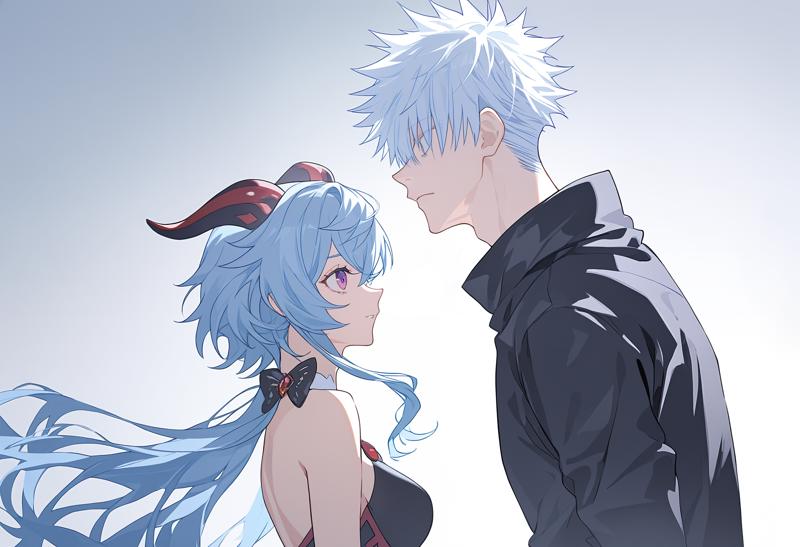 1girl and 1boy, 1 ganyu girl, 1 gojou satoru boy, beautiful color, amazing quality
B Same Gender Scene
 2girls, 1 ganyu girl, 1 yoimiya girl, beautiful color, amazing quality
Future Work
AWA Diffusion is expected to combine high-level aesthetics with comprehensive knowledge. It should neither have the traditional AI's greasy feel nor become a knowledge-deficient vase. We will continue to explore more advanced training techniques and strategies, consistently improving the model's quality.
Support Us
Training AWA Diffusion incurs substantial costs. If you appreciate our work, please consider supporting us through Ko-fi, to aid our research and development efforts. Thank you for your like and support!
Description
🏷 Model Information 🏷
Developed by: Euge
Funded by: Neta.art
Model type: Generative text-to-image model
Finetuned from model: ArtiWaifu Diffusion 1.0
License: Fair AI Public License 1.0-SD
More art styles (9000+) and characters (6000+), ~1.5x than 1.0.
More stable anatomy
More data support for painting styles
Experimentally added some amazing AI artist styles:
by shiroski,by trickortreat,by nyalia,by pasota,by xerganea, andby yandantui.
🚀 Dataset Source 🚀
Subset of Danbooru (2.3M). Selected by aesthetic score using Waifu Scorer V3.
Subset of Pixiv (0.1M). Hand-selected.
Others (0.1M).
👀 Future Plan 👀
Apply stronger training strategies.
Continue adding more and more high-quality data.
FAQ
Comments (53)
It's the best aesthetic anime model at the moment.
Thank you, Euge
I'm glad you enjoyed it!
Ohhh!! I can't wait to play around 2.0! Is there a updated list with characters and styles available by any chance?
@Hannibal_Lector Thank you!
Made a study list with some artists for myself. Maybe someone will find it useful.
PART 1 - PART 2 - PART 3 - PART 4 - PART 5
UPD:
PART 6 - PART 7 - PART 8 - PART 9 - PART 10
~10400 artists
Additional:
Fantastic work, thank you for your support!
awesome! Thank you very much! hope you like tips.
compressed your work to a pdf. https://pan.baidu.com/s/11H_CQpmKGU88jE0SMarjpw?pwd=19n2
怎么大的事情 ,怎么不早说(狗头)
My favorite XL anime base model has been updated! ミ(・・)ミ
I'm thrilled that you like it XD!
感谢Hannibal_Lector的风格评测和dotapickban的进一步整理,我们将所有评测图像整理为了PDF,有需要的朋友可以通过链接获取~Thanks to Hannibal_Lector for the style review and dotapickban for further organization. We have compiled all the review images into a PDF. Those who need it can access it through the provided link.
https://drive.google.com/file/d/1xcxXEmsv4swqLw8Z_nRE5gQdteoi97Vr/view?usp=sharing
That's amazing! Thank you!!!
直观好用,十分感谢
@dotapickban 好好好,如果可以的话,建议你单独发一条评论可以让大家都看到,最好是能发谷歌或者微软的网盘,方便所有人都能下载~
@dotapickban 若有不便我也可以代劳~
辛苦了,1000闪电奉上
@645ddd 感谢支持
@dotapickban 我已经将旧的谷歌链接更新为了你的新版本并且添加了对应署名
The aesthetic is great, but this model requires a lot of luck to use.
Any reasons to not attempt finetuning from another model (e.g. KohakuXL Animagine) and replace the "by artist" tag to just "artist"?
Don't get me wrong I think this model is great, but I think using a more consistent base could get an even better model using your dataset.
ps: I'm suggesting removing the by tag because it doesn't seem to improve clip's understanding of artist tags
Hi! Thanks for your suggestions and feedbacks!
I'm trying my best to align it with the community, such as merging models & using the same concept identifiers.
For the reason why I add prefix/suffix to trigger words, you may refer to the model introduction (just below Tips for Style Tags). If I use artist only, then artist names with semantics like dino will be ambiguous to clips.
its an obvious improvement from v1 but it needs more training on the artists it has and even more training on nsfw. the model still behaves undertrained.
Thanks for your feedback! I'll make it better.
@Euge_ we reaching naiv3 with this one!!
@Euge_ hey man, if you are still gonna improve this, then please take a look at the arts, when using artist combos, generally arts have really, really sharp lines or edges which should be smooth. like, even with the smooth artist styles. it does recognize the artist styles, but it makes it a bit too sharp arts and not smooth. I hope you will take a look. btw, m using ComfyUI with Euler A and normal scheduler with 5 CFG. hope that helps. and great model. I like it.
It's a noticeable improvement from V1, but there is an issue with "artifacts" that happens with certain artists. It seems that some artists don't have this issue, hopefully it can be eliminated with future versions. Looking forward to future models, you are definitely the best baker :)
Thanks! btw, which artists are they? Could you give me some examples. I'll do a test.
@Euge_ This issue caught up here too, and the affected ones that I'm aware of are:
fuumi \(radial engine\), ktr \(tpun2553\), kabu usagi,
@Tugl Hi, could you share your prompt and sampling method?
@Euge_ Euler a & auto scheduler, 32 steps at circa 7 cfg; prompt was 1girl, by [any forementioned artist], appended with bunch of staple quality tags, no style/TI/lora or extensions involved.
There are too many conditions and rules of use.
@Hannibal_Lector thank you for sharing your results. it's really frustrating trying out different artist one by one. I can't imagine how much time it would have to take for you to try out so many artist styles. so thanks bud. and @tanger thank you for combing all the results into a PDF. makes it so much easier to take a look. thanks a bunch.
hello guys, I was wondering if someone could help me out a bit. whenever I'm trying out different artist combos, the generated arts are mostly having really sharp lines and not smooth. even with smooth artist styles. IDK if m the only one facing this issue. if someone has any solution regarding this, please do help. or maybe it might bec m using ComfyUI. the arts should be smooth, like Novel AI. that's the only complaint I have.
I don't know if it would help, but you could try this lora with negative values from -0.5 to -2.0. It sometimes helps me to remove particularly bold and sharp lines on some art styles. But it's not a panacea, alas.
https://civitai.com/models/383129?modelVersionId=427633
cfg scale https://civitai.com/images/28704434, or try lower down tags weight (by artist:0.5)
Hi. So glad that you are willing to try my model! I'm curious about this situation. Could you tell me more about this in my discord channel? Thanks!
https://discord.gg/xTRrf9zWQ2
@Hannibal_Lector yoo thats crazyy. that lora has almost everything I need. m 100% gonna try that out. thanks a lot man.
@Y_X yo hey Y_X, sadly I dont have god mode++ in comfy since m using another website. m still new to comfy ui so m just using the euler a with normal schedule. I did try dpm adaptive and dpmpp 2m with karras. but still m a newbie so idk which one would give the best outcome. if you got any suggesstion please do lemme know. and as for cfg, m using 4.5 to 5. I dont go above 5.
Hi guys! I really appreciate you guys liking ArtiWaifu. I'm very very happy to see your heated discussions.
I just created a discord channel for everyone to discuss everything about ArtiWaifu. Welcome to join! https://discord.gg/WyDYGFtuBE
The only model is the reason I'm not switching to Pony. the style and aesthetics are just what I am looking for creating pretty illustrations. The only annoying thing is no one creates specific character Loras for SDXL let alone Artiwaifu :(
also sad that this artist wasn't included in the dataset even though they have over 100 images.
https://danbooru.donmai.us/posts?tags=lin_qing_%28phosphorus_1104%29&z=2
Hey friend, you can come and check out my models. Most of the character models I've trained include multiple versions (Pony, Artiwaifu-compatible XL version, and SD15). Based on my experience, LoRA models based on Animagine XL V3, Kohaku, and Artiwaifu are interchangeable.
@tanger Will you ever make loras for male characters of hoyoverse games?
@juuzou_ I personally wouldn't take the initiative to train male character models, but if someone provides a training dataset and commissions it, I would also train male characters.
@tanger do you need pictures of the character in the game like the 3d model or official drawn art of the character
@juuzou_ simple background game screenshots combined with high-quality fan art can achieve better training results.
v2.0加了1girl之后会使图片线条变得没那么流畅,所以建议别加
i still confuse how to use SDXL properly, my img appears to be low resolution using hires or IMG2img, i followed the resolution guide by 32, also happen when inpainting, i use ForgeUi
NoobAI的very awa<->worst aesthetic就是基於Eugeoter的評分模型,屬於OG中的OG了,難怪出圖美觀無AI味
要知道nai_vpred打遍天下的一招就是提示詞寫1girl, very awa,其餘留白連masterpiece都不寫讓模型隨機發揮創意,放著過夜,隔天睡醒抽卡,每一張都能作桌布,神仙美感,評分打標搭配vpred獨有的動態光影,這招沒有任何阿貓阿狗模型能這樣搞
靠的就是Eugeoter的審美評分模型去對訓練素材進行篩選打標,果然是OG
Details
Available On (1 platform)
Same model published on other platforms. May have additional downloads or version variants.