


I found a new AI tool Shakker, a best image to image tool. You can try it via https://www.shakker.ai
You can run XXMix_9realistic on sinkin.ai: https://sinkin.ai/m/Y99mNKb
feel free to buy me a coffee ☕
XXMixunreal:我的2.5D新模型,一个极具特色的模型,可以根据关键词进行变种,创造属于自己的风格化图片。A highly distinctive model that can generate variations based on keywords, creating personalized, stylized images.
XXMix_Petrichor:这是我新的系列模型,比较偏网红图片质感一些,希望大家可以支持下载尝试一下
XXMix_Petrichor:This is my new series of models, which are more focused on the aesthetic of internet celebrity images. I hope everyone can support and download them to give them a try
可以尝试下这个高清修复的算法,我认为在某些图片里用这个放大算法的效果要更好,画面也更风格化一些,hf地址在下面,喜欢的朋友可以尝试一下。
You can try this high-definition restoration algorithm. I believe that in some pictures, the effect of using this magnification algorithm is better, and the picture is more stylized. The link to the high-frequency (hf) is below, and those who are interested can give it a try.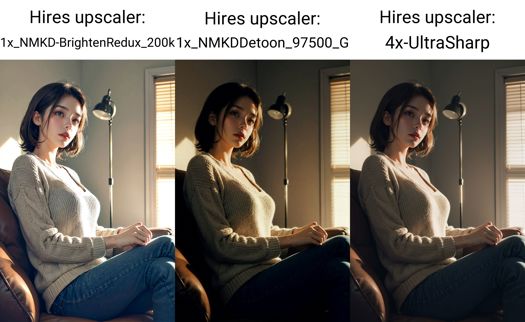
1x_NMKDDetoon_97500_G
https://huggingface.co/utnah/esrgan/tree/main
------------------------------------------------------------------------------------------------------
v4.0
最近热情有所下降,喜欢图例的直接copy吧,没有特别的版本说明。
------------------------------------------------------------------------------------------------------
我认为修手最好的是Detail Tweaker LoRA (细节调整LoRA),其他都是垃圾0 0
v3.0版本说明:
图片信息里的XXMix_4_v2893模型就是v30版本,图片是在模型改名前生成的
1.很高兴向大家介绍XXMix_9系列的3.0版本。这个版本在泛用性和对LORA的支持上都有明显的加强,并且手部的表现要明显好于之前的版本。3.0版本是由v2.5、v2.6和XXMix_4这三个版本Mix而来。生成的图片我尽量没有用任何Embedding模型,因为我发现有些Embedding模型比较隐晦,你不知道哪些Embedding模型起了作用哪些没起作用,从而不能还原图例。
2.如果你想还原图例,请先安装以下扩展:
Adetailer:建议在生成图片时始终开启(如果你想90%以上还原图例,那么建议你在图片信息内查看adetailer是否已开启)。
注意:Adetailer需要下载一些模型https://huggingface.co/Bingsu/adetailer/tree/main,这里是模型地址。模型存放路径:webui/models/adetailer。没有找到adetailer文件夹自己建一个即可。
Adetailer视频教程,这里我就贴娜乌斯嘉的教程喽https://www.bilibili.com/video/BV13s4y197cK/?spm_id_from=333.337.search-card.all.click&vd_source=8c2a86ab53df9752cdd75679f58834a6
CFG Scale Fix:有需求的时候开启,会提高画面的质感。我用的默认数值7左右,如果是白天CFG数值可以稍微大一些,晚上数值要小一些。
(经过我的测试,在第二台电脑上没有办法100%还原图例,我现在还不知道是什么原因,有可能是CFG Scale Fix这个扩展的问题,也有可能是分块VAE的问题,不过基本上你可以还原到90%-95%左右,对画面的影响不是很大。)
3.对于生成图片,个人的小心得:如果你得到了一张非常喜欢的图片,但是手部或其他部位的问题很严重,如果你不想用局部重绘修改的话,那么建议你在固定好seed之后,微调CFG的数值(每次调整0.2-0.3这种幅度来尝试),这样你就有可能在保持原图的基础上得到一张完美的图片。
4.在这里,我还想分享一个我喜欢的后缀句子,它可以让画面的表现力更强。当然,你可以根据需要修改句子中的单词来微调画面风格。这些单词包括:fantasy, high contrast, ink strokes, explosions, over exposure, purple and red tone impression , abstract, ((watercolor painting by John Berkey and Jeremy Mann )) brush strokes, negative space,
5.最后,如果你喜欢这次模型的更新,希望你可以把生成的好看图片分享出来。
Version 3.0 Description:
The XXMix_4_v2893 model in the image information is actually the v3.0 version, but the images were generated before the model was renamed.
Pleased to introduce the 3.0 version of the XXMix_9 series. This version has significantly improved in versatility and support for LORA, and the hand performance is significantly better than the previous versions. The 3.0 version is a mix of v2.5, v2.6, and XXMix_4. When generating images, I try not to use any Embedding models as much as possible because I have found that some Embedding models are more obscure, and you don't know which ones are working and which ones are not, which makes it difficult to restore the example.
If you want to restore the example, please install the following extensions first:
Adetailer: It is recommended to always enable it when generating images. If you want to restore the example by more than 90%, it is recommended to check whether Adetailer is enabled in the image information.
Note: Adetailer requires downloading some models from https://huggingface.co/Bingsu/adetailer/tree/main. Here is the model address. The model should be stored in the path: webui/models/adetailer. If you cannot find the adetailer folder, please create one yourself.
Adetailer Chinese Video Tutorial,这里我就贴娜乌斯嘉的教程喽https://www.bilibili.com/video/BV13s4y197cK/?spm_id_from=333.337.search-card.all.click&vd_source=8c2a86ab53df9752cdd75679f58834a6
CFG Scale Fix: Enable it when needed, it will improve the quality of the image. I use the default value of about 7. If it is daytime, the CFG value can be slightly larger, and at night, the value should be smaller. (After my test, I cannot restore the example 100% on the second computer. I still don't know the reason. It may be a problem with the CFG Scale Fix extension or the Tiled VAE. However, you can basically restore it to about 90%-95%, and the impact on the image is not significant.)
For generating images, here is my personal experience: If you get a picture that you really like, but there are serious problems with the hands or other parts, and you don't want to use local redraw to modify it, then it is recommended to adjust the CFG value slightly (0.2-0.3 range) after fixing the seed. This way, you may get a perfect picture while keeping the original image.
Here, I would like to share a suffix sentence that I like, which can make the image more expressive. Of course, you can modify the words in the sentence to fine-tune the image style. These words include: fantasy, high contrast, ink strokes, explosions, overexposure, purple and red tone impression, abstract, brush strokes ((watercolor painting by John Berkey and Jeremy Mann)), negative space.
Finally, if you like the updates of this model, we hope you can share the beautiful images you generated.
------------------------------------------------------------------------------------------------------
v26-fp16-no-ema update
------------------------------------------------------------------------------------------------------
v2.6版本说明:
这版算小更新,优化了脸型,手的问题有优化,不过主要还是抽卡。大问题下个版本解决。
Version 2.6 release notes:
This version is a minor update that optimizes the face and hand issues. However, the main focus is still on the gacha system. The major issues will be addressed in the next version.
------------------------------------------------------------------------------------------------------
有人留言说模型基本不能用,麻烦新朋友看下自己的设置是否和图例的设置一样,除了全身图会有IMG2IMG放大的操作,其他图都是直出的。请一定先确定自己设置是否和图里一样哈!!!
V2.5版本的光影效果表现更好,支持更多幻想内容,调整了基础脸型,场景方面的表现更好。
V2.5 version has better lighting effects and supports more fantasy content. The basic face shape has been adjusted, and the performance in scenes has been improved.
------------------------------------------------------------------------------------------------------
适当调小(CFG Scale)的数值,可以得到与众不同的效果。
V2版本说明:
1.更换了默认脸。
2.更好的光影表现。
3.融合了更多模型,后面还会继续迭代。
4.如果想得到更好的皮肤质感,那么生成图片的时候不要开启高清修复,而是将生成的图片传入图生图模式,启用Tiled Diffusion,来进行放大,从而得到更真实的皮肤质感。
5.我会继续更新迭代这个大模型,希望能不断填充内容,让模型更具趣味性。
谢谢您的支持!
Version 2 Release Notes:
Changed the default face.
Improved lighting and shadow effects.
Added more models and will continue to iterate in the future.
For better skin texture, do not enable Hires Fix when generating images. Instead, use the "Tiled Diffusion" mode to enlarge the generated image and achieve a more realistic skin texture.
I will continue to update and iterate on this large model, hoping to add more content and make it more interesting.
Thank you for your support!
------------------------------------------------------------------------------------------------------
推荐参数
Recommended Parameters:
Sampler: DPM++ 2M Karras alt Karras or DPM++ SDE Karras
Steps: 20~40
Hires upscaler:4x-UltraSharp
Hires upscale: 2
Hires steps: 15
Denoising strength: 0.2~0.5
CFG scale: 6-8
clip skip 2
Description
v2.5版本的光影效果表现更好,支持更多幻想内容,调整了基础脸型,场景方面的表现更好。
v2.5 version has better lighting effects and supports more fantasy content. The basic face shape has been adjusted, and the performance in scenes has been improved.
FAQ
Comments (39)
基本没有办法使用。是否是为了超级显卡准备的?我看图片使用都是超大分辨率。使用512x768出图全是乱码。
我出的图大部分都是直出+高清修复,除了全身放大了下没有特别的啊,半身像甚至不需要高清修复,不知道你什么操作。。。
基本没办法使用这种不负责任的话最好考虑一下再说哦
看看是不是你不会操作呢~
@Zyx_xx A punctuation is suggested, even though I can understand Chinese but I still can't understand what you say...
@hasgmcc Most of the images I produce are straight from TEXT2IMG with Hires Fix , except for full-body images that require enlargement. Even half-body portraits do not require high-definition restoration. I'm not sure what your process is.
可以正常出图。 高清修复本身跟是不是超级显卡没有关系,差点的显卡只是修复的时间长点而已
不是我的意思是。很多人实际上是使用低分辨率出图。然后高清化。我看了你的图。图像信息读取到的是基础分辨率是2048x3072 然后高清化。除了第一张图片是512x768,后面的都是如此。也许我表述不够严谨。
第三页照片基本都是高分辨率出。所以我不知道为啥是这样。有所冒犯请勿怪。没有指责你的意思。
各位的界面能显示图片吗?为什么我这里显示不了图片?Can your interface display images? Why can't I see images on my end?
手指 关节 皮肤 能更自然些就好了
在身體的部分表現很糟,只適合畫臉。
我的情况好像和他们都不一样,我是从始至终没生出一张正常的图,最后显示的全是噪点图。不管是选什么采样模式,步数都不行。退一万步讲,再怎么设置有问题,随便输个1 girl那也总得出张能认出来的图吧,我是一张都没有啊。
这种就和模型没关系了吧0 0
要按照作者的説明操作,我完全空白的prompt都可以生圖,效果出奇的好!
还有一个就是DPM++ 2M alt Karras和原本DPM++ 2M Karras采样方法有本质区别吗,看网上的教程都是需要进行替换,我不是很确定这个
我也是很奇怪的只能生成噪点图,我的采样里没有alt karras,所以也用的是2M karras
@akizwei alt karras在C站可以搜索到文件下载,感觉这个采样器区别不大
@zhangyinqi533402 我的问题解决了,不是采样器的问题,是lora不兼容的问题,我关掉了lora,vae之后就全部正常了
直接复制他的参数可以出一样的图,这个模型对其他lora支持不太友好,一叠画质就下降,就本体跑跑效果还蛮好的
@liu304658759858 我测试了一圈下来,LORA兼容性来看1.0>2.6>2.0和2.5,2.0和2.5风格化提升泛用性下降,2.6虽然好了一些但是可控性有点差不知道过拟合的点在哪里但就是不太听话,如果选一个用我还是会用1.0
@liu304658759858 确实是,同感,不能叠LORA,更佳的是直接使用大模型
为啥出来的图片都是强侧光, 而且衣服以黑色等深色调为主。 想搞些彩色服装的都很难
tag权重加一加。
sampler (DMP++ 2M alt Karras) 和 upscaler (4x-UltraSharp) 都没有,直接 copy prompts 到 auto1111 里面 parse 得到的是这两个值
你现在用这个模型产出新图了吗
面是很不错,但手80%会出现3-4根手指的畸形手,生成全身部半身时手会出问题,这个问题怎么解决在?
很棒的模型,谢谢大佬分享
总感觉所有的图中,头都大大的,很不协调,有点违和感
那你可以加个 宽肩
加个lora模型试试
出图经常少一个手指,希望能改进