Introduction
This workflow allows you to segment up to 8 different elements from an input image, or video, into colored masks for IPA to stylize and animate each element with.
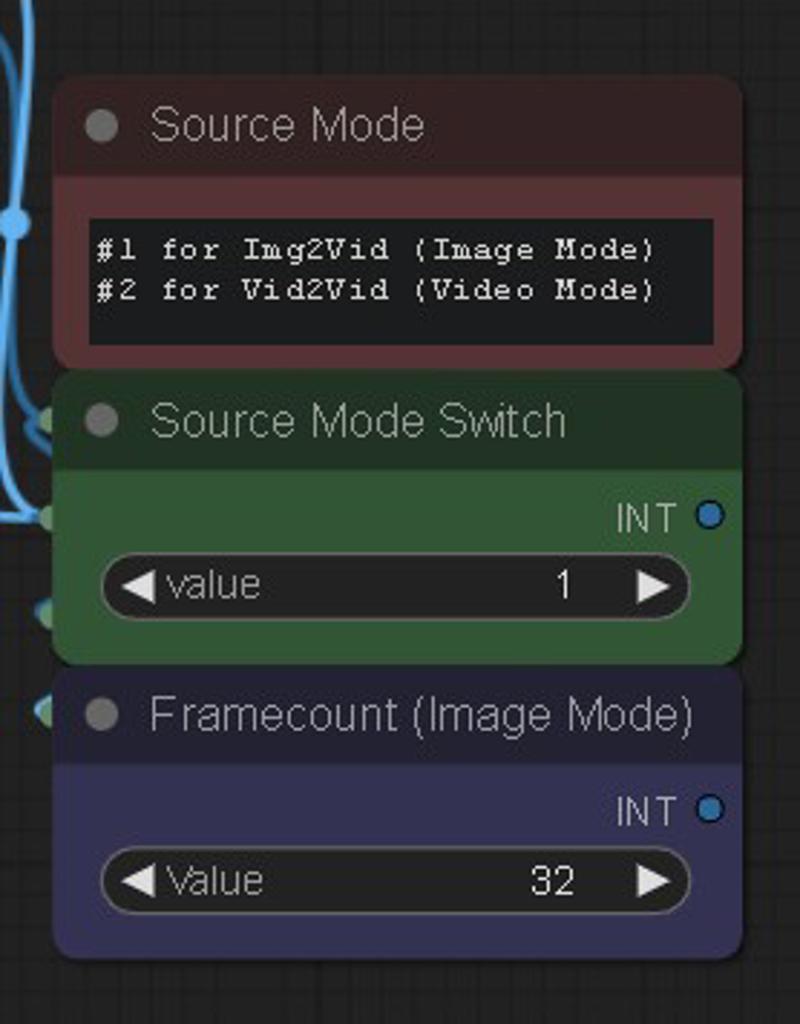
First, select your source input mode in the middle with the switch. 1 is Image Mode, 2 is Video Mode.
At the top of each colored layer is a GDINO-SAM node and a prompt field to type in which element to isolate from your input. The black group is your background and anything that isn't masked. The prompt fields are filled with some basic examples, but you can change them into whatever you want related to your input, like objects, landscape stuff, or even colors.
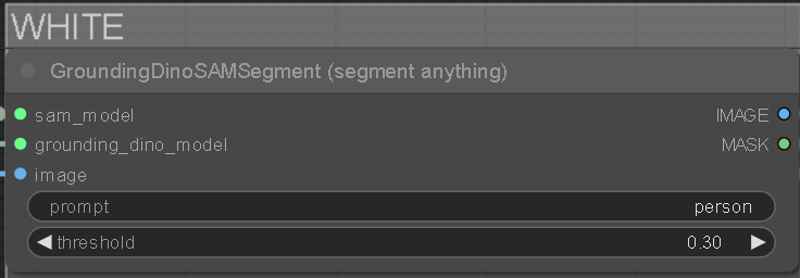 You can increase the threshold under the prompt to affect how strong it tries to isolate the keyword. Lower threshold is weaker and will mask bleed into other things, too high and it won't mask anything. A good spot is around 0.30.
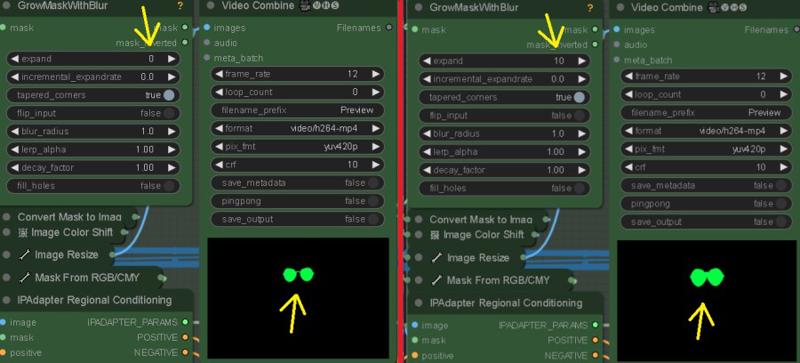
On the "GrowMaskWithBlur" node, you can customize the mask using the expand and blur radius settings.
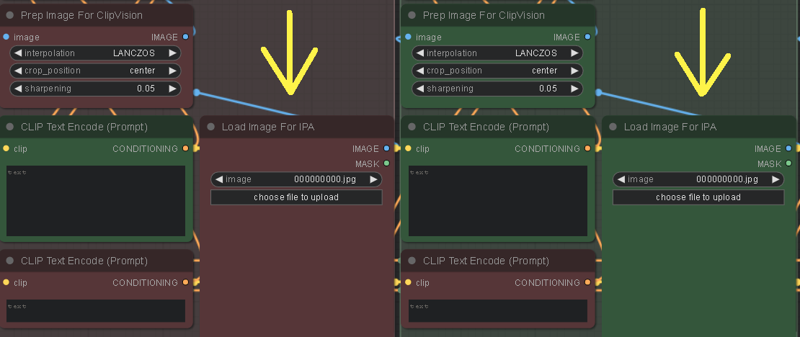
You also need to load up some images into the "Load Image For IPA" Nodes for each colored mask group you're using. These will style your masks.
Customizing the "weight" in the "IPAdapter Advanced" node, can increase how much the image is stylized into the mask. Also, "weight_type" can also have an affect. "Ease In-Out" and "Linear" are good to play around with.

The Black mask will stylize everything that isn't masked, and creates the mask for the Source Input Background Mode if chosen. The colored masks are merged together and saved for visual/editing purposes only. Disable their "save output" if you wish. To save VRAM, it's recommended to let the Black mask be the last and most behind element in the scene, like a sky.
Colored masks stack as followed: far (White) to near (Yellow). If creating a custom stack, order the colors accordingly to the distance of scene elements..
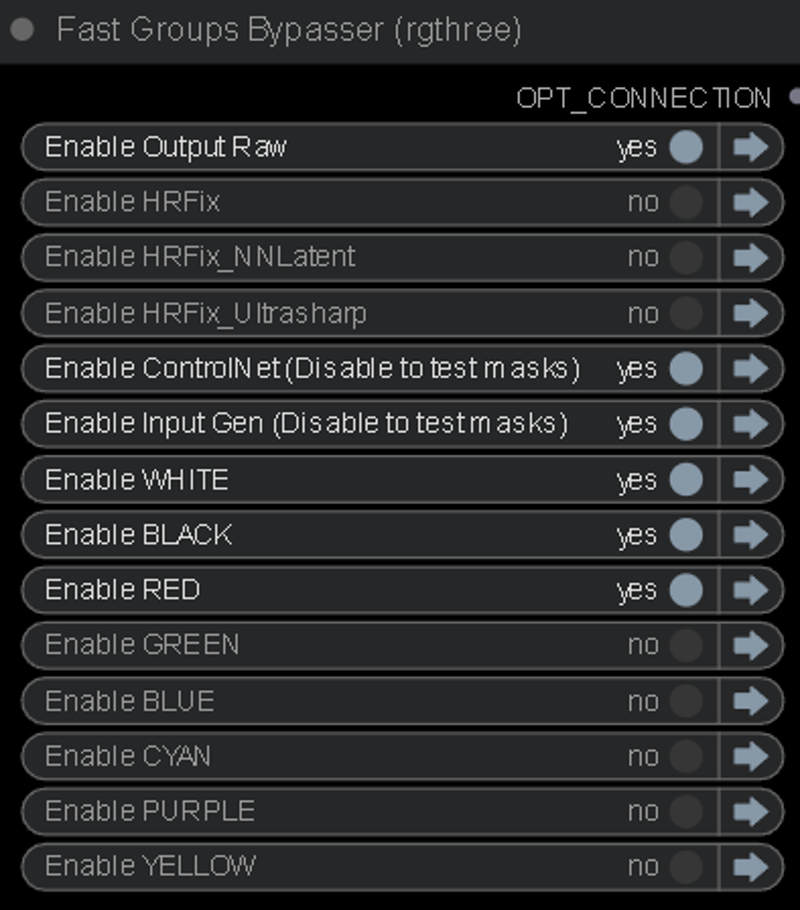
Colored mask layers not being used should be bypassed with the "Fast Groups Bypasser" node. You can also bypass the "Input Gen & ControlNet" so you can fine-tune your masks before going into the KSampler.
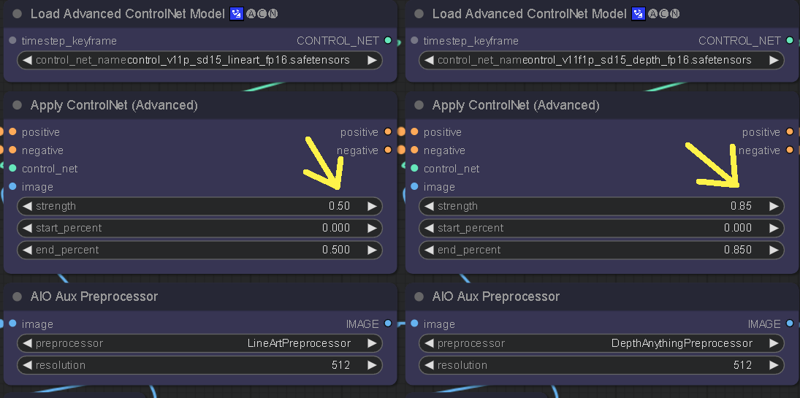
The ControlNet weights can be adjusted to control how delineated the IPA stylization is. Lower weight on the CN will give more freedom to the masks and retain less of the Source Input edges, causing mask bleed. Higher CN weight will produce more of the Source Input structure, but less quality on the stylization.
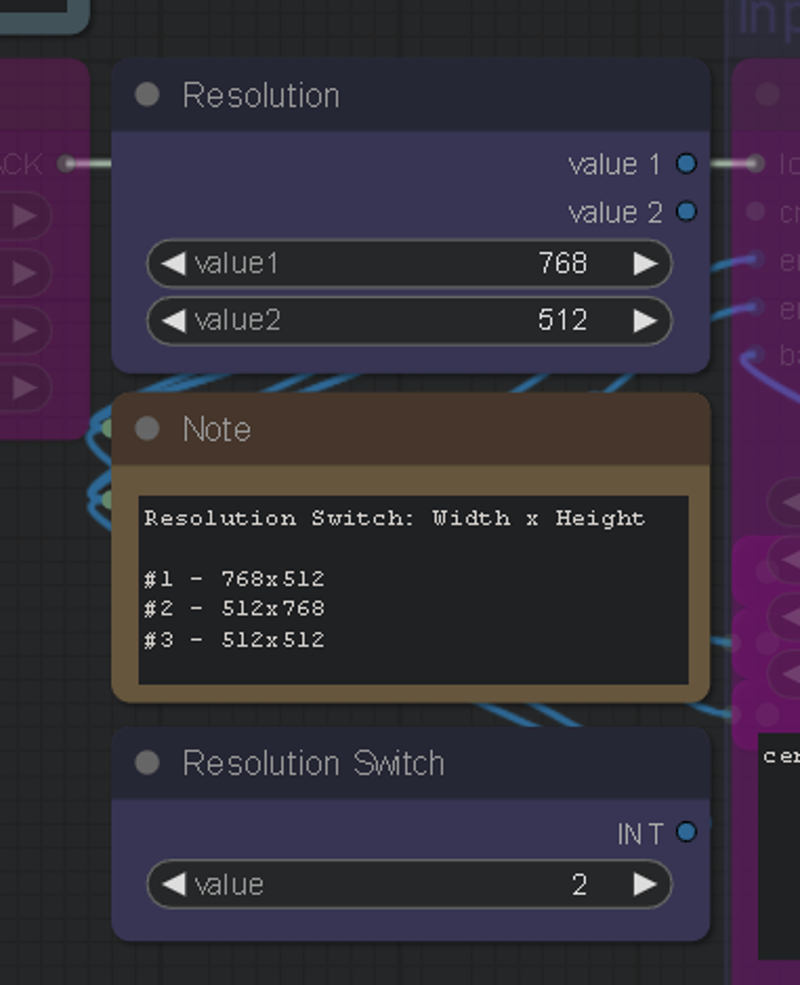
There's also a resolution switch to quickly change your aspect ratio, you can edit the resolution to your liking as well.
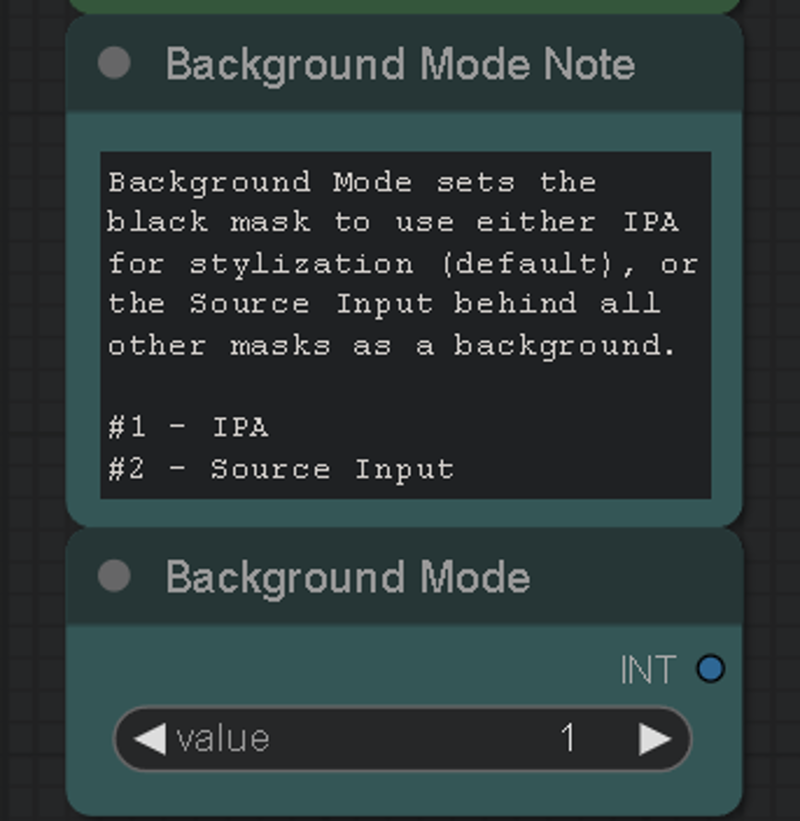
May 24th, version 4 update, Background Mode was also added. This lets you stylize your masks while using your source input as the background, instead of the background mask being stylized by IPA.
Requirements
The "Segmenty Anything SAM model (ViT-H)" model is required for this, to get it: Go to manager > Install Models > Type "sam" > Install: sam_vit_h_4b8939.pth
GroundingDino is also required, but should automatically download on first use. If it doesn't, you can grab it from here: https://github.com/IDEA-Research/GroundingDINO/releases/download/v0.1.0-alpha2/groundingdino_swinb_cogcoor.pth
Or here: https://huggingface.co/ShilongLiu/GroundingDINO/tree/main
If you need ControlNet models, you can get them here: https://huggingface.co/webui/ControlNet-modules-safetensors/tree/main
This workflow is in LCM mode by default. You can browse CivitAI and choose your favorite LCM checkpoint. My favorites are PhotonLCM and DelusionsLCM. You can also just use any 1.5 checkpoint and activate the LCM LoRA in the "LoRA stacker" to the far left of the "Efficient Loader".
You can download the LCM LoRA here: https://huggingface.co/wangfuyun/AnimateLCM/blob/main/AnimateLCM_sd15_t2v_lora.safetensors (Install into your SD LoRAs folder)
And the LCM AnimateDiff Model here: https://huggingface.co/wangfuyun/AnimateLCM/blob/main/AnimateLCM_sd15_t2v.ckpt (Install into: "ComfyUI\custom_nodes\ComfyUI-AnimateDiff-Evolved\models")
I also really enjoy using the Shatter LCM AnimateDiff motion LoRA by PxlPshr. You can find it here on CivitAI.
Special thanks to
@matt3o for the awesome IPA updates, and everyone else who contributes to the community and all the tools we use. A big shoutout to @Purz from whom I've learned so much, and this workflow was inspired from, and @AndyXR for beta testing.
If you like my work, you can find my channels at: https://linktr.ee/artontap
Description
June 18th, v4.1:
Fixed the random Image Resize error that was happening after latest ComfyUI updates.
May 24th, v4:
I've cleaned up a few things, and all mask groups and CN can now be disabled without errors. Regional prompting doesn't work with LCM and has been removed to free up clutter/errors.
White and Black are in the front now. Black has been slightly overhauled and is now a proper background/multi-function group.
Background Mode has been added, allowing you to stylize masks and merge with the source input behind them.
Colored mask merging has been added, for visual/editing purposes. (BG Mode and Colored mask merging are controlled by the black group)
You can now apply mask colors in a custom order for more control over stacking (eg. shirt/head on top of body mask)
April 28th, v3:
Fixed the "size of tensor" error when a GDINO mask fails to fully track something and doesn't create enough frames to match the input batch size. Now when it happens, the rest of the batch size for that mask is filled in with background frames after the mask frames.
FAQ
Comments (36)
Never tried a Vid2Vid before. Works pretty damn good, thanks!
Hey got this error cant figure out :(
Error occurred when executing SeargeIntegerPair: SeargeIntegerPair.get_value() missing 1 required positional argument: 'value2' File "E:\Ai\pinokio\api\comfyui.git\app\execution.py", line 151, in recursive_execute output_data, output_ui = get_output_data(obj, input_data_all) File "E:\Ai\pinokio\api\comfyui.git\app\execution.py", line 81, in get_output_data return_values = map_node_over_list(obj, input_data_all, obj.FUNCTION, allow_interrupt=True) File "E:\Ai\pinokio\api\comfyui.git\app\execution.py", line 74, in map_node_over_list results.append(getattr(obj, func)(**slice_dict(input_data_all, i)))
Make sure to use the ComfyUI manager to install missing node packs.
Error occurred when executing ImageResize+: 'bool' object has no attribute 'startswith' File "H:\ComfyUI-aki-v1.37\execution.py", line 151, in recursive_execute output_data, output_ui = get_output_data(obj, input_data_all) File "H:\ComfyUI-aki-v1.37\execution.py", line 81, in get_output_data return_values = map_node_over_list(obj, input_data_all, obj.FUNCTION, allow_interrupt=True) File "H:\ComfyUI-aki-v1.37\execution.py", line 74, in map_node_over_list results.append(getattr(obj, func)(**slice_dict(input_data_all, i))) File "H:\ComfyUI-aki-v1.37\custom_nodes\ComfyUI_essentials-main\image.py", line 288, in execute elif method.startswith('fill'):
Make sure to use the manager to update and install missing node packs.
In HRFix_NNLatent, the Source Input is not maintained as the background behind all other masks. it is kept in HRFIX and Ultrsharp but with added blur, which is undesirable if you want to retain clarity, especially for a person or face.
Yeah the source input background mode doesn't play well with upscaling groups, you can still do it though and use the saved masks retroactively if you'd like. When I have more time, I'll look into making the source input background work automatically with the upscalers.
Can't find solution
ImageResize+: - Value not in list: method: 'False' not in ['stretch', 'keep proportion', 'fill / crop', 'pad'] ImageResize+: - Value not in list: method: 'False' not in ['stretch', 'keep proportion', 'fill / crop', 'pad']
Make sure to use the ComfyUI manager to update and install missing node packs.
try double clicking node and selecting the method then rerun
tnx a lot )) problem solves somehow by itself
@diadelosmisery905 I've fixed the Image Resize error caused by a ComfyUI/Node updates, you can re-download the workflow to get the latest version.
If anyone is getting an "Image Resize" error on the latest ComfyUI/Node updates, you can re-download the workflow to get v4.1, which fixes the issue.
How to install or load the control net sorry i am completely new & trying to understand the workflow
I recommend checking out some online tutorials on setting up ComfyUI and ControlNet. The guides have in-depth details on getting it all working smoothly.
@ArtOnTap I am able to convert a image to 3d using sv3d, simple image. Still learning phase, but quite amazed with the quality of videos created by all artist here. Thank you to all :)
cant get the sampler to load the mask images. After making the combined image, it just completes the workflow. If i turn off "con" and "Input gen", the LCM model won't load. (Model turns red on "AnimateDiff Loader".. Have a 4090 so not worried about time, but doesn't complete the workflow with them all turned on. What am I doing wrong? (No errors, just acts like its completed yet nothing goes to sampler). I can get the sampler to run if I save and load images in each the colors manually, but that means no vid2vid. and its quite a pain loading for 8 layers. (yes, I hit the boolean switch)
Latest ComfyUI updates caused a little bug that I fixed in the workflow recently, if you redownload it you'll get the 4.1 version which might help the empty run problem. The KSampler not running when Input Gen & ControlNet groups are disabled, is intended. It's so you can test the masks.
Ill check in the morn 🥱 .. But yeah, I got it to run vid2vid simply by loading any random image in the "load image" spots for the groundingDINO IPA nodes. Im thinking 3gthree may have to fix a bug as well. If I bypass or mute any nodes they dont pass any data through them, so have to keep all "colors" open and just crank the threshold. Other workflows I've had to completely rebuild. Haven't produced any great outputs yet... not sure if it's because they all open, and some just producing all black vid... ?? I feel like the controlnets are doing all the heavy lifting and groundingDINO isn't doing anything..
Thank you for the amazing workflow! Is it possible to use batch prompt scheduling or to use an IP adapter after a certain step? For example, in a 30-frame video, can I use a separate IP adapter for every 10 frames or use 3 different prompts? This way, there would be 3 styles in the 3-second video. I hope I explained myself properly.
This workflow mostly uses IPAdapter for stylization, instead of prompts, but I think there's some new stuff out recently that allows weighted IPA control. I don't have a lot of time to check out the latest progress since I'm working 2 jobs atm, but eventually I'll see about it. If you join the Banodoco Discord server, you can get a lot of the latest stuff there.
I am currently facing an issue and I am very certain that I have downloaded the "sam_vit_h_4b8939. pth" model. The storage path is: \ ComfyUI \ models \ sams. However, during operation, the following errors occurred:model_path is D:\ComfyUI_windows_portable\ComfyUI\custom_nodes\comfyui_controlnet_aux\ckpts\LiheYoung/Depth-Anything\checkpoints\depth_anything_vitl14.pth
using MLP layer as FFN
model_path is D:\ComfyUI_windows_portable\ComfyUI\custom_nodes\comfyui_controlnet_aux\ckpts\lllyasviel/Annotators\sk_model.pth
model_path is D:\ComfyUI_windows_portable\ComfyUI\custom_nodes\comfyui_controlnet_aux\ckpts\lllyasviel/Annotators\sk_model2.pth
Exception in callback ProactorBasePipeTransport.call_connection_lost(None)
handle: <Handle ProactorBasePipeTransport.call_connection_lost(None)>
Traceback (most recent call last):
File "asyncio\events.py", line 84, in _run
File "asyncio\proactor_events.py", line 165, in callconnection_lost
ConnectionResetError: [WinError 10054] 远程主机强迫关闭了一个现有的连接。
Downloading model sam_vit_h_4b8939.pth...
!!! Exception during processing!!! 404 Client Error: Not Found for url: https://github.com/ultralytics/assets/releases/download/v8.2.0/sam_vit_h_4b8939.pth
Traceback (most recent call last):
File "D:\ComfyUI_windows_portable\ComfyUI\execution.py", line 151, in recursive_execute
output_data, output_ui = get_output_data(obj, input_data_all)
^^^^^^^^^^^^^^^^^^^^^^^^^^^^^^^^^^^^
File "D:\ComfyUI_windows_portable\ComfyUI\execution.py", line 81, in get_output_data
return_values = map_node_over_list(obj, input_data_all, obj.FUNCTION, allow_interrupt=True)
^^^^^^^^^^^^^^^^^^^^^^^^^^^^^^^^^^^^^^^^^^^^^^^^^^^^^^^^^^^^^^^^^^^^^^^^^^^
File "D:\ComfyUI_windows_portable\ComfyUI\execution.py", line 74, in map_node_over_list
results.append(getattr(obj, func)(**slice_dict(input_data_all, i)))
^^^^^^^^^^^^^^^^^^^^^^^^^^^^^^^^^^^^^^^^^^^^^^^^^^^
File "D:\ComfyUI_windows_portable\ComfyUI\custom_nodes\ComfyUI-YOLO\nodes.py", line 296, in load_model
response.raise_for_status() # Raise an exception if the download fails
^^^^^^^^^^^^^^^^^^^^^^^^^^^
File "D:\ComfyUI_windows_portable\python_embeded\Lib\site-packages\requests\models.py", line 1024, in raise_for_status raise HTTPError(http_error_msg, response=self)
requests.exceptions.HTTPError: 404 Client Error: Not Found for url: https://github.com/ultralytics/assets/releases/download/v8.2.0/sam_vit_h_4b8939.pth
how could I fix it? thank you very much!!!
same error here, please help
I'm not sure what the problem is. The workflow is still working for me after an "Update All" on the ComfyUI Manager, and I can only fix the problems that I can reproduce. It's possible the sam model is corrupted and needs to be re-downloaded, make sure to do it through the Manager. It could also be a pathing problem if you use non-standard letters in system directories, or maybe even on a non-system drive. Stuff like that has caused problems for some.
C:\ComfyUI_windows_portable\ComfyUI\models\sams
the model is not available, even after downloading and being in the correct location.
the model is inside sams folder "sam_vit_h_4b8939.pth"
the model is inside the folder "sam_vit_h_4b8939.pth"
I uploaded a new confyiui in my C folder with everything updated and only with the nodes of this workflow. But it still doesn't work.
ConnectionResetError: [WinError 10054] Foi forçado o cancelamento de uma conexão existente pelo host remoto
Downloading model sam_vit_h_4b8939.pth...
!!! Exception during processing!!! 404 Client Error: Not Found for url: https://github.com/ultralytics/assets/releases/download/v8.2.0/sam_vit_h_4b8939.pth
Traceback (most recent call last):
File "C:\ComfyUI_windows_portable\ComfyUI\execution.py", line 151, in recursive_execute
output_data, output_ui = get_output_data(obj, input_data_all)
^^^^^^^^^^^^^^^^^^^^^^^^^^^^^^^^^^^^
File "C:\ComfyUI_windows_portable\ComfyUI\execution.py", line 81, in get_output_data
return_values = map_node_over_list(obj, input_data_all, obj.FUNCTION, allow_interrupt=True)
^^^^^^^^^^^^^^^^^^^^^^^^^^^^^^^^^^^^^^^^^^^^^^^^^^^^^^^^^^^^^^^^^^^^^^^^^^^
I managed to find the problem. I installed the nodes one by one, and restarted the server and this unlocked the model path. S2
Error occurred when executing Efficient Loader: '_io.StringIO' object has no attribute 'sync_write'
Help, ImageExpandBatch, Here's the problem
Error occurred when executing ImageExpandBatch+: '<=' not supported between instances of 'NoneType' and 'int' File
why does it only render 1 frame of a masked element and the rest are frames from source vid? The frame rate was set to 8 fps, not 1 fps... And I set the source vid as background...
Pretty promising workflow but did anyone succeded having result like his examples? The regional mask doesn't seem to work or im missing something?
An error occurred.
Which node should the input of Node 611 be connected to?
ImpactSwitch
Node 611 says it needs input input1, but there is no input to that node at all.