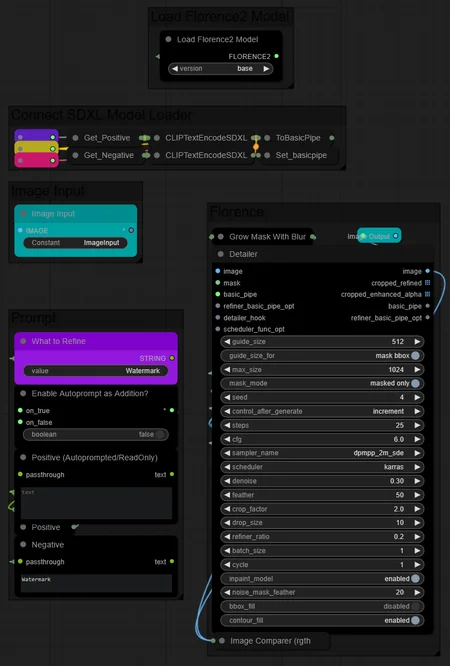
Simple Workflow that uses the new Florence Nodes to "replace" older detection techniques that requires many specific models, (Ultralytics YOLO's)
Now you can just have one single model to detect pretty much anything with more details and accuracy, (face, eye, mouth, hairs, watermark removing, inpainting tools to change colors or shapes) Alot of usages possible,
DINO is a also a good alternative but I think Florence is better, have to do some tests
Here you can see how it works
I recommend using an Inpaint model for strong changes, (above 0.4 denoise value)
You can use a classic SDXL model for "details" (under 0.4 denoise value)
Description
This is a template for quickly copying/pasting into your own workflow.
Everything is already connected.
You will need to connect the image input and your SDXL model loader to the corresponding colors.
I recommend using an Inpaint model for strong changes (above 0.4 denoise value).
You can use a classic SDXL model for details (under 0.4 denoise value).
Set the Inpaint model to Enabled/Disabled in the Detailer Node.
FAQ
Comments (2)
Florence was super good but when you get multiples of things needing to be segmented and re generated it really falls apart. (Example, a bunch of faces.)
Super good for one thing at a time though or portraits.
oh man, it's really good workflow. much better then inpainting with grounddino
Looks like we don't have an active mirror for this file right now.
CivArchive is a community-maintained index — we catalog mirrors that volunteers upload to HuggingFace, torrents, and other public hosts. Looks like no one has uploaded a copy of this file yet.
Some files do get recovered over time through contributions. If you're looking for this one, feel free to ask in Discord, or help preserve it if you have a copy.