







Hello there and thanks for checking out this workflow!
—Intro—
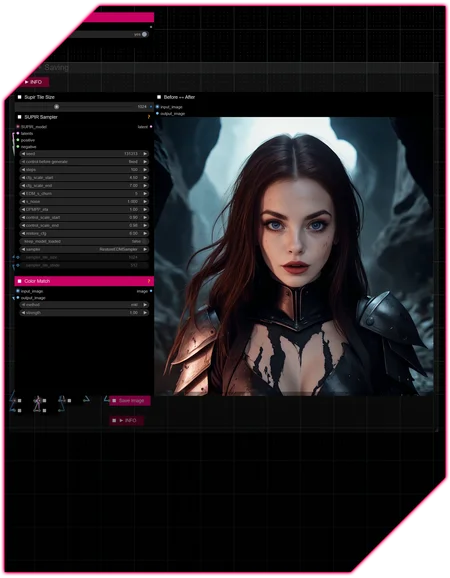
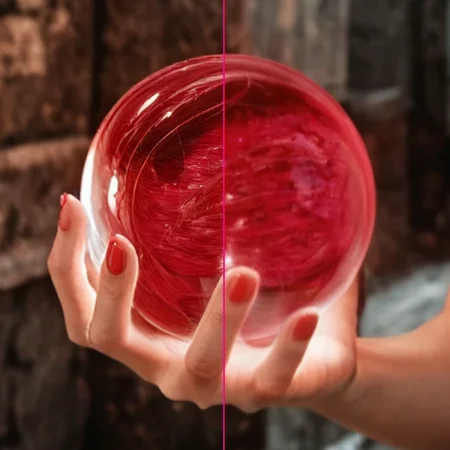
SUPIR is a very powerful detailing/image-restoration model, capable of producing mind-blowing results, but usually requires some tweaking to do so,...
unless you have a setup that just works™, no matter the input.
Use-cases :
• (Hyper-)detailing generated images, even if they already are of high resolution and quality
• Photo-restoration tasks to get low-res and blurry content up to scratch again.
—Features—
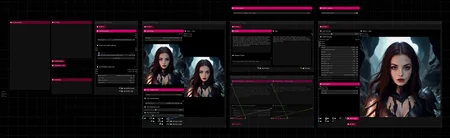
Installation and download guide for models and nodes
►INFO guides explaining various settings
Upscaling
Florence 2 + WD14 prompting assistance
100 Steps to SUPIR — Journey to become a better image
—Custom Nodes used—
All of which can be installed through the ComfyUI-Manager
—Troubleshooting—
If nodes show up red (failing to load), check the 'Install Missing Custom Nodes' tab of the ComfyUI Manager for the missing node packs and install them.
Please check if all custom node packs load properly after installing, i.e. no
(IMPORT FAILED)messages next to any of them in the console upon ComfyUI startup.Always reload/drag'n'drop the original, downloaded workflow file into ComfyUI to reload an intact version of the workflow.
→ The last opened workflow that appears on startup shows a cached version of the workflow, "remembering" group nodes that failed due to missing nodes as failed, keeping them broken even after having everything installed correctly.
—Thanks—
The workflow would not be possible as is without these custom node packs. If you want to support the custom node creators, give them a ⭐ on their github repos! Thank you!
Feel free to ask any questions, share improvements or suggestions in the comment section!
Also let me know if you encounter any confusing points I can elaborate on and focus on improving for the next update!
Description
v4
- many changes to provide an efficient structure without the use of group nodes
v4.1
- updated Downloads + Info guide
FAQ
Comments (14)
now I have to try this WF
Sorry to bother yet again, I'm trying the update and am having little trouble with it.
I'm getting error:
"SUPIR_model_loader_v2
No module named 'comfyui-supir'"
I'm wondering if it's because of some custom module problem, or could it related to the supir model, in your workflow it lists 2 different models to download, 2.6gb size, but when I go to those links it's closer to 6 gb download and the names are different too, they are ending with ckpt instead safetensor.
I fixed it by changing the folder name to ComfyUI-SUPIR (in custom nodes) and manually copying it to the /ComfyUI/venv/lib/python3.12/site-packages folder (some other people had same problem and they came up with this solution)
But now another problem came up right at the end of process:
ColorMatch
stack expects a non-empty TensorList
Managed to fix that too, by googling and downloading the same safetensor version of the supir model, I think the cpkt one had problems with the vae or something and resulted black images and thus gave the color error or something, everything seems to work now properly, thanks!
Hey there, thank you very much for pointing that out. Some changes on the github page made the model download a little ambiguous, but luckily the ComfyUI Manager has the models needed in store, so I changed the guide in v4.1 to get it directly through the Manager instead, which is also more convenient at the same time 👌
That should also prevent running into that "Color Match" node issue.
The folder name issue is curious however, since the repository is named ComfyUI-SUPIR, so that should be the name the manager picks up on when looking for missing nodes. At least I never had to rename it on my end.
When in doubt you can always double-check if the github link I put in the workflow as well as on this page matches the one ComfyUI suggests to download as "missing node pack".
My links are 100% leading to the packs I use, making the lists I provide a little more reliable than the auto-detection by ComfyUI, which did make a few mistakes before in some cases.
Either way, glad it works on your end now! And I hope no one has to jump through any of those hoops mentioned here to get it to run now 😄
Hi, where is the Installation and download guide please? I dont see it on the workflow?
I'm having trouble finding the correct models so the output doesnt look very good.
Also is it possible to put a batch load node on this please so we can batch upscale a bunch of images?
In the Workflow there is a minimized textbox ("Downloads + Info"). Expand it with a single mouse-click below the square Symbol.
RamblingJoe Hey there, excuse the delay, I did not get/see the notification.
1. The guide as mmajk75 pointed out, it's right there 😄
2. About the batch processing. Yes it's possible, but it would require relying on the generated captions and tags without editing them to fix potential mistakes, which shouldn't be a great issue considering how SUPIR is only filling in details and not generating a whole new image.
I would however build a variation of the workflow to streamline the batch version and include it alongside the regular one.
Not sure when I'll get to it though.
Great Workflow + Great Results
Supir has no blackwell kernel support it seems so it crashes comfyui when i run this.
Thanks for the info. You could open an issue on ComfyUI-SUPIR for a potential solution