
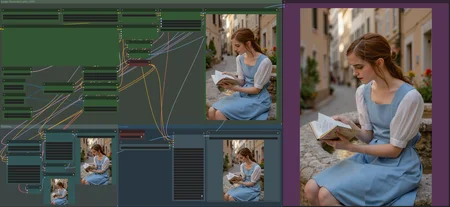

UPDATE: All GGUF workflows have been recreated to work with the new version of ComfyUI. Not sure what broke the old workflows.
GGUF Prompt Upscale For use with GGUF Models. Workflow to fine-tune and upscale with lora support.
GGUF Image Upscale For use with GGUF Models. Workflow to fine-tune and upscale an image with lora and prompt support
GGUF Searge Upscale This was a request. For use with GGUF Models. Workflow to fine-tune and upscale with lora support. Adds an LLM to help with prompting.
--
UPDATE: These workflows no longer work with the newest version of ComfyUI, I am working on getting new gguf workflows out that work with the latest version.
Bad-Flux GGUF Image Upscale For use with GGUF Models. Workflow to fine-tune and upscale an image with lora and prompt support.
Bad-Flux GGUF Prompt Upscale For use with GGUF Models. Workflow to fine-tune and upscale with lora support.
Bad-GGUF Upscale + Searge This was a request. For use with GGUF Models. Workflow to fine-tune and upscale with lora support. Adds an LLM to help with prompting.
Bad-Flux Image Upscale (Discontinued) Workflow to fine-tune and upscale an image with lora and prompt support.
Bad-Flux Prompt Upscale (Discontinued) Workflow to fine-tune and upscale with lora support.
--
All these workflows had slight flaws with missing buttons or misplaced elements. The workflows above fix this.
OLD-Image GGUF Workflow to fine-tune and upscale an image with lora and prompt support.
OLD-Final GGUF Updated the workflow for GGUF models
OLD-Final Rev A Same as the Final workflow, but adds a button to disable fine-tune and both fine-tune and upscaling are off.
OLD-Final Combines both finetune and the 4x Upscaler (which can be turned off).
Version 1.5 Streamlines the workflow by introducing a multi-LoRA picker, eliminating separate nodes for each LoRA. Adds a button to disable the upscale workflow and removes the "Save to webp" node.
Version 1.4 This version fixes the faint lines that appeared in upscaled images with the previous method.
Version 1.3 adds support for multiple loras.
Version 1.2 cleans up the workflow and removes the 4x upscaler.
Version 1.1 modifies the Lora connection to strengthen its weight and also updates the upscale method.
A lot of peole seem to be asking for a workflow to load LoRAs with flux in ComfyUI.
Description
FAQ
Comments (21)
i cannot find the nodes for "save_as_webp", can you share the node with me? Many thanks!
Nice and simple workflow. Thanks
What are minimum requirements for using this workflow, asking because my comfyui crashes right after I hit queue prompt T^T
Using this workflow i am getting horizontal lines on the up-scaled image. Do you know what might be causing this? Im using all of the same prompts and settings as the example images...
Hi, Thanks for the workflow !
It took 2h05 on my good old 2080 RTX.
8Go VRAM and 32Go RAM
GPU-Z shows very high "Bus Interface Load", 30-50% most of the time, and low power consumption as both CPU and GPU are mainly waiting for PCI express 3.0 x16.
But it is doable !
your finetune is amazing! Is there anyway to just use the finetune group with an original image? and finetune it with flux and a LoRA? I mean, just to skip the text2image part and the upscaller?
Can you add a toggle to stop the latent upscaling? With the simple model usage i can generate in 14 seconds. With this it takes me 144
Can you make a version compatible with GGUF version of the model?
On RTX 3060 (12GB), this one runs flux1-dev-fp8 on average 25 minutes for one image with 2 loras without upscale or finetune.
It would be nice to be able to include an image loader to process the image directly for fine-tuning.
In Rev A how do you enable upscale? or does finetune whatever that is for need to be enabled?
Can you build Flux + Reactor?
FINAL GGUF send a error "Prompt outputs failed validation FluxGuidance: - Required input is missing: conditioning"
Hello,
can use use your workflow also for Flux Schnell?
For some reason I get better results with Old workflows for Emma Watson's lora.
I am using your Flux GGUF prompt upscale workflow and then it says:
Warning: Missing Node Types
When loading the graph, the following node types were not found:
workflow/Image Settings 2
No selected item
Nodes that have failed to load will show as red on the graph.
Cannot execute because a node is missing the class_type property.: Node ID '#91'.
How do I fix this?
Since we're using Flux shouldn't the Upscale tiles be 1024x1024 and not 512x512 like comes loaded by default? Thanks
downloaded your Flux GGUF Prompt Upscale, and when i press "queue prompt" nothing happens? i tried other workflows and they work fine so not sure what the issue is. there is no error, just nothing happens. i tried the workflow a couple of days ago and it worked fine, but not now
What do you use to create your prompt ?
Please, can you add inpainting and outpainting workflow for Flux GGUF?
Looks like we don't have an active mirror for this file right now.
CivArchive is a community-maintained index — we catalog mirrors that volunteers upload to HuggingFace, torrents, and other public hosts. Looks like no one has uploaded a copy of this file yet.
Some files do get recovered over time through contributions. If you're looking for this one, feel free to ask in Discord, or help preserve it if you have a copy.