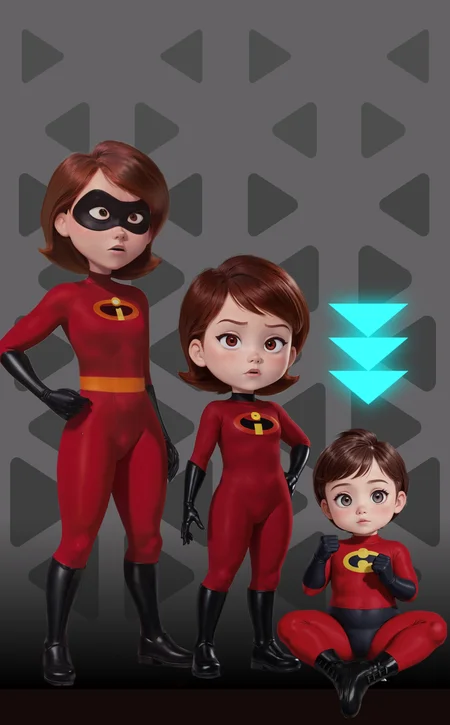
Update June 13th adding updated Young Versions... V2
I developed this age slider to work with my Children's Stories model. Some Stable Diffusion models have difficulty generating younger people. This embedding will fix that for you. It can make anyone, in any Lora, on any model, younger. Even animals and fantasy creatures.
Follow me to make sure you see new styles, poses and Nobodys when I post them. Things move fast on this site, it's easy to miss.
How to use:
Just use one of the positive prompts listed to get the desired results. Use them at strength of 1. That means to put them at the beginning of your prompt or make sure they have the appropriate modifier brackets. Example, for automatic1111 it would be (AS-YoungerV2) or (AS-YoungerV2:1.0), the parenthesis are required. They are stackable, so you can combine them together to help with stubborn models. A negative embedding is also included for extra brute force if needed. There are 4 files to download for younger, and 4 for older, check the version tabs at the top.
These embeddings make people/creatures/characters younger.
AS-YoungV2-Neg: Place in your negative prompt at strength of 1.0 to 1.3, generally removes adults from the scene.
AS-YoungV2: Place at the beginning of your positive prompt at strength of 1.0 to 1.3. Conceptually teenager, may vary by model, lora, or prompts.
AS-YoungerV2: Place at the beginning of your positive prompt at strength of 1.0 to 1.3. Conceptually child, may vary by model, lora, or prompts.
AS-YoungestV2: Place at the beginning of your positive prompt at strength of 1.0 to 1.3. Conceptually toddler/baby, may vary by model, lora, or prompts
These embeddings make people/creatures/characters adult or older.
AS-Adult-Neg: Place in your negative prompt at strength of 1.0 to 1.3. This will remove any young people and/or youth from the scene.
AS-Adult: Place at the beginning of your positive prompt at strength of 1.0 to 1.3. Conceptually fully matured adult 20s to 30s, may vary by model, lora, or prompts.
AS-MidAged: Place at the beginning of your positive prompt at strength of 1.0 to 1.3. Conceptually middle-aged adult 40s to 60s, may vary by model, lora, or prompts.
AS-Elderly: Place at the beginning of your positive prompt at strength of 1.0 to 1.3. Conceptually elderly adult 70s +, may vary by model, lora, or prompts.
These are the concepts for the embeddings. Some models, character LoRAs, or embeddings might be too rigid, so increase strength or stack on multiple to get the desired result. Additional prompts may help as well.
Do you have requests? I've been putting in many more hours lately with this. That's my problem, not yours. But if you'd like to tip me, buy me a beer. Beer encourages me to ignore work and make AI models instead. Tip and make a request. I'll give it a shot if I can. Here at Ko-Fi
Description
FAQ
Comments (144)
Works perfectly
great tools, i try youngv2 but sometime add some strange hair ornaments, how can i avoid them?
all models have certain biases to prompts. it may think young girls like to wear hair ornaments. put that in your negative prompt and should help to remove them.
@Zovya it's very strange only youngv2 make these ornaments, other younger and youngest no, i post some one image to show you difference.
@registrazionesiti937 yeah, each of them are different. there's a specific token in youngv2 that the model associates with hair ornaments. not much you nor I can do about it other than use a different model or prompt it out.
Works, but not perfectly.
The effect of the slider vary so much, even vary according to seed. seed1 give my required age with AS-prompt weight = 1.1, in seed2 it can give age with 2 tiers younger even though the prompt are all the same.
Is there a way we can make it more consistent?
that's the fun of stable diffusion. roll the dice and get a different result each time
Great job on these :) did a amazing job. I have a request if you read this and need ideas. Any way you could make one that just shrinks the person instead of being younger so can make very small people with large people? like child size adult or something like that . just a idea :)
yeah that's tough. I've seen other people try it but it's hard
By comparing high weight of Young/Younger V1 and V2 prompt, i find that V2 will try to skew toward male.
imo, V1 is more robust.
interesting. there aren't any tokens in the TI regarding gender. but that's why I never delete the older models
Tech question from a newbie: Once I dl this app, where do I place it? (Easy Diff. 2.5.22, fwiw.)
I'm not familiar with that program. maybe someone will be able to help. if not, try the civitai discord
Since these Age Slider files are ".pt", I was led to believe they go in the "embeddings" file. Problem is, Easy Diffusion doesn't have one. :/ Do I make that folder and put the files there, or what? (Told you I'm a newbie... ;) )
Hi!
I just can't seem to figure out how to format this correctly on Mage.Space. Tried all variations of brackets <>() and strength numbers. Mage puts the <ti:AS-Young-neg> in positive prompt. So I've tried that, and tried moving it to neg-prompt, no difference. Tried with various base models. <3
Yeah, I'm encountering the same issue. It simply does nothing no matter what I change in the prompt. Removing bracketing, changing to parentheses, adding strength, removing "ti:", adding V2 to the auto generated prompt; nothing seems to make this work as it is implemented on Mage.
This entire set is fantastic. I'd advise working out a NSFW slider to go with this adult and midaged. They are fantastic.
thanks. good idea
Maybe Im fool but.... where are the sliders?????
Will this work with other models? Or just with your's - which is gorgeous by the way.
Also: Are longer prompts supposed to ruin the effect? For me longer prompts tend to overwrite the effect a little (say I want to create a 8 year old Black Widow (Marvel) with a long series of prompts about pose, clothing, details etc.) and I get a teenager?
works on all models. Thanks. If you're not familiar with prompt weights and strength, you might check a tutorial about that. longer prompts can dilute all the prompts, so weights are important.
@Zovya Thanks for your answer. Any suggestions for a truly good prompting tutorial? I've watched some on Youtube and I've also red some, still not sure how it all truly works and how people come up with their prompts (except trial and error)
Can we please get a zip file will all of them together?
Working like a charm.Many people have problem with this so i would just explain some stuff.
AS-YoungV2 is for teenage characters so if you use this keyword best way to use is apropriate age prompt that come with it 10-17yo,and you would get exactly what you want.
for AS-YoungerV2 use 5-9yo age prompt and finally for AS-YoungestV2 1-3yo.
This is really flawless textual inversion but you need some time to get use to it.Biggest advantage when you are using this you would get body that fits in that age while without it in most cases model would stick big breasts and large legs on young females.
If you render younger people this inversion is must have.
i don't even get a versions tab on your project, iv only been able to download the negative prompt
same here. have you found the solution yet.
the tabs aren't there, it's above the preview images
not seeing the version tab. can someone point me? I can only download the neg
omg - am idiot.
where should i put the file into?
your embeddings folder. depending on which program you're using.
Works great!.Thanx for the upload.
hey great embeds tyvm, tho pls can you make embeds like this but for realistic models? like for your amazing a-zovya 2.0, pls pls pls
im asking only because using these on realistic models often cause characters to become anime-ish and thats hitting realism
it works with photoreal models too. these imbeddings only touch the age tokens, there's no anime in it to inject. check your prompts
I'm using Anythign V5 and it isn't making the youngest ones look their age. Their waists look too curvy despite their age, and also trying to spawn in a baby doesn't work. It just makes weird abominations appear in the background that resemble a baby staring into your soul. And the character in the foreground's face still looks more like they're 12-14. Any tips would be appreciated.
try some prompts, (wide hips narrow waist) in the negative. tell the model what you want.... or don't want.
@Zovya I'll do my best!
I sometimes get the character as an adult carrying her child instead of the character herself being young. Does anyone know how to avoid that?
negative: multiple characters (with a weight accordingly). And positive: solo (also with weight accordingly)
@InoSim Thank you.
Another slight issue, I constantly get these creepy smiling faces scattered all over the background, like teddy bears or dogs or other "cute" creatures. Not really sure how to deal with them lol
@WaifuRegressor they're watching you
@WaifuRegressor I think you need to specify the background in the positive prompt.
hi, i'ven trying the tool today, but it generates a blur imagen with no content or shape, i'm usin automatic 1111, this was the promp and the configuration: positive: AS-YoungerV2 hair band white shirt pants blue apron sitting on a park bench (masterpiece:1.2) bright morning light (photorealistic:1.2) (best quality) (intricate details) (cinematic lighting) (sharp focus)
Negative prompt: (monochrome) (bad hands) (disfigured) (grain) (Deformed) (poorly drawn) (mutilated) (lowres) (deformed) (dark) (lowpoly) (CG) (3d) (blurry) (duplicate) (watermark) (label) (signature) (frames) (text)
Steps: 20, Sampler: DPM++ 2S a Karras, CFG scale: 7, Seed: 3088185019, Size: 800x800, Model hash: c0954aa7a0, Model: childrensStories_v13D
Used embeddings: AS-YoungerV2 [42e5]
i'll apreciate any help
wow that's a new one. the blurred image is a problem somewhere with your setup or configuration. it's nothing an embedding could do. check on the discord to get some help.
@Zovya thanks, i'll be looking at discord. i was trying another models and the result is the same, when i take off the embendding, the result are good, if i find more info i'll be sharing it here.
Hello. I have the same problem - it generates gray textures instead of a picture. Also, I have an AMD graphics card. Did you manage to understand the cause of these problems?
does anyone made a video tutorial or something , i dont even know where to put how to use this properly.
try copying the prompts used in the preview images as examples and go from there.
@Zovya thanks for answer i used this in the models , and i thought the names are not prompts . so sadly i am thaaat new to all these stuff. now i finally managed to understand what is lora , now scratching my head about what is inpaint , or how could i rework only partial points of the image instead of all .. and things like that. this is quite hard to be honest.
@eibonspr enjoy your travels down the rabbit hole
Okay i went through your post and i'm interested but first i have some questions.
I already use the weight to make this aging theory i was working on for 3-4 months now, here is the link of my first attempt: https://civitai.com/images/177444?postId=95782 the only problem i went to (until now) is the gap between them. i can goes from adult to teen easily, but going from eldery to adult, or from teen to chibi or baby i have a lot of issue finding the exact results which takes specific weights that goes like 1.232879 of the sort to get a right between and then goes forward.
Is your age slider able to change a seed accordingly or do i need to do the same even with it ?
you can use multiple embeddings to mix their effect if you like. alternately, if you're using auto1111 you can mix prompts and the generated result would be an average of the two. Examples [dog|cow] or [adult|elderly]
Okay i'll give it a shot then. Thank you
Incredibly great work, really grateful.
This thing is amazing!! Thank you!
Don't work. When i put any of these keywords into my prompt, it generates something grey, looks like wood bark or concrete textures. Even with Children's Stories model
found working solution for my AMD videocard here: https://www.reddit.com/r/StableDiffusion/comments/11zzplp/stable_diffusion_inpainting_not_working_at_all/?rdt=59894
Zovya, I love your age slider tools, they've been a fantastic add-on so far. But they no longer work in any SDXL model, and most of those so far don't do teenagers well. Any chance of getting these updated for SDXL models?
Does anyone know how to use it in Automatic1111? I added this file into embeddings folder, but I don't understand how to use it :(
I'm adding "(AS-YoungerV2:1.3)" as the prompt in img2img and selecting the following model: https://civitai.com/models/38551/squeezer-experimental
That said, I think I'm doing something wrong because it doesn't work as expected :/
try in txt2img, it's work. change the weight 1, 1.2 or 1.3 not more
I truly hope to see these excellent utilities implemented for SDXL! They're game changers when fine tuning for Old or young characters!
does not work for males
Fantastic resource, I've only used MidAged and Elderly, but they work amazingly and have very little impact on the existing style in my experience. Thank you!
I wish I could review all of these at once, but these are super useful for keeping characters on-model with very little effort. Now I don't have worry about stable diffusion ignoring my prompt.
Hi, an SDXL version would be great!!!
Thanks
Please let us know what changed in V2
After making a set of wildcards using these, my hard drive has declared you its sworn enemy.
Can you share your wildcards with me? i still trying to figure out how to make this work
Amazon has a Seagate BarraCuda 8TB for $100 right now. I just got a 4TB for $74, not a bad deal lol
Does anyone have an issue with this model including a child along with an adult when using Younger/Youngest? I basically end up with an adult woman holding a toddler, or baby. Said kid is always blur/badly detail.
i have the same problem but shes not holding a baby its always a adult
@LouDastar Oh thank goodness I'm not alone in this. I tried to put toddler in the negs, and sometimes it works, but while you get an adult I constantly get a woman holding a blur baby. Not sure what causes that.
hi,zovya! i'm japanese. so sorry to my english may be bad.
you say "put 4 files", but I can't find only 1file in this page.
please tell me other files?
check up. there are other variants of this
@Osangni I could find those!! Thanks!!
don't put togher ,choose one of them as you need
Hells yes! This embed is awesome!👌😎
This doesn't work for me every time i use it it gives me a adult.
make sure put it in embeddings folder, maybe give weight such as :(AS-YoungestV2:1.5),it works for me,
i had the same problem too at first. make sure you choose correct embedding at top. you're probably downloading the negative prompt since its automatically chosen at 1st.
Has anyone had success using the age slider to age up anime character to middle age or elderly?
it works
Hello,
Can solebody please explain how to use these slider's in general, I don't know how to work them. I understand you have to add lora to prompt, but do you use xyz plots, and if so, what type of variable do you plot to get a range? Thank you in advanced!! Any article/tutorials would be much appreciated
pretty comprehensive instructions in the description, check those out. click "show more" at the bottom.
Hello, fairly new to SD. I think I understood that explanation, this is using the wording and strength in the prompt, but how can I make it 'slide'. I would like to do a series of basically the same character just with different age/gender/weight,..and compare, as you see in some examples, i just dont understand how can I do that please, i imagine this is a xyz plot, but how can I relate a parameter value the lora there. Thanks in advanced.
@Lilrascal1 their use of "slider" isn't really accurate. Just use the same seed and use AS-YoungerV2 along with the age afterwards.
this is no lora,it's embedding,put in embeddings folder of the sd,
Will there be an age slider for sdxl 1.0?
SDXL please
Check this ;) Embedding Converter - a Hugging Face Space by FoodDesert
@Z1os its working, tnx!
I love it. One problem, though. The elderly one seems to want to add male genitals to characters.
Seriously. I'm trying for wholesome pictures. Regional prompt with two characters. One side is fine. Put the elderly tag on one of them and there's a little something extra peaking out from around their waist.
@oiuhdoifuhsdofgh there's so much porn trained into the models now, it's hard to avoid it. You'll probably need to inpaint the area in question. these embeddings don't add or take away like a Lora does. it utilizes the tokens already in the model. you could try a different model and see if that helps. maybe even try the gender slider I created. there's an embedding that removes everything male related
@Zovya Good to know. I wouldn't be surprised if it had more to do with the model. I'll check out the other slider. I suppose I could apply the gender slider to the offending region if all else fails.
I just found it interesting that I could have two characters in a picture, Everything was fine except one wasn't old. I add the elderly slider to a portion and then... boing! Really disturbing especially when you are trying to make one a grandmother character in a wholesome cartoon picture.
well done! amazing results.....tip time!
were these embeddings trained on images? or just pure text?
they were training using tokens so it doesn't affect style
How do I use this with Fooocus ? It doesn't seem to work. Adding "AS-YoungV2" at the beginning of my positive prompts window still gives faces in their 30s, I also tried putting "(AS-YoungV2:1.2)" but still doesn't really change anything
Download ALL 4 FILES!
Where does the slider appear? Does it only work with a specific UI? I see nothing on Easy Diffusion.
It doesn't appear anywhere. Go to your textual inversion folder, and select one of the age sliders you wish to use. After that you may want to increase the strength of it up to 1.3 in order to get around to the correct age you want.
Example: (AS-YoungestV2:1.3)
Thanks for the reply - I can use it but I was expecting to see a physical slider.@Ande85
Its not supporting multi character , Only 1 person in a frame is working or I am making a mistake here
Could you make for sdxl lcm turbo
I bet no one told you this before but can you maybe try to make this for SDXL and Pony
Using this --» https://huggingface.co/spaces/FoodDesert/Embedding_Converter
To convert the file to SDXL/Pony (since SDXL lora's and embeddings works on pony) seems to work for me, so gives a try.
@aubepinvial634 what is this magic :D ??? wow!!
@aubepinvial634 so I've tried these, normal xl they don't seem to have an influence on the images but other embedings appear to work. Ive had one with people covered in mud and that worked. Which embeding from this page you have tried and with what model?
@dilectiogames I use young, younger, youngest, V2 variants with the young negativ, seems to work better when the negativ is enabled.
As for the chekpoint/model i use a pony variant, this one--» https://civitai.com/models/341433?modelVersionId=399640
Actually this is the best realistic Pony variant out there available.
Have fun.
I really love using the "Age Slider" embedding - it's super helpful! I definitely suggest giving it a try.
This is SD 1.5. Isn't it SDXL that needs this?
This turns everyone Asian for me...
surely this will never be used for nefarious purposes
I tired converting these to SDXL with the online converter on huggingface but they dont really have the same effect on XL at all unfortunately. As-Elderly, for example, makes the person look pretty much the same age regardless of strength (and not at all elderly)
Why does it often strip my character naked when I use Younger? Granted it doesn't always happen but it's annoying, especially around Younger forcing me to abort the generation. Also Loras I use almost never uses nsfw images or has them fully exposed.
it might be the model you are using. I don't have this issue
This happen to work quite well, thanks. May I ask for an example of "stacking"? Just because "Young" or "Young-neg" generate people, well, very... young. Thanks again.
We need this for Pony.
these for pony?
A pony version would be nice !
Can you guys please add a how-to-install option? I just started using this and its a pain when I'm expected to just know how to do everything
It's a textual inversion, an embedding. Usually in PT format. You put these on the Embeddings folder in your a1111. To use it, go to your Textual Inversion tab and click it or type the filename as a prompt. Be sure to check the author's instruction if it should be on a positive/negative prompt.
@jcatsuki I put in that folder but nothing comes up
@Yushio If you put it while the a1111 is running you need to refresh/reload it like the loras.
Any possible chance for a Pony version? Almost every embedding I have downloaded this year isn't compatible with the version of SD Forge I am using.
I was gonna gonna ask the same thing
How do I use this?!
what program and model are you using?
Pony and citivtai
@da_master these are older models, long before Pony or the on-site generator. They work with SD1 models, try it on that. Also, the civitai generator doesn't use negative embeddings, so you'll only be able to use the positive one.
downloaded all the files and tried using both positive and negative prompts together but it still doesn't work very well especially with loras
It only works with SD1.5 models, anything modern, it doesn't work
How do you 'stack' 'em when models or lora's are stubborn?
Some of you guys are absolute degenerates
why I use this embedding is generate a naked girl
Illustrious version please
SD 1.5 is surpassed now... any chance for Illustrious version?
We need an SDXL/ILL version of this, pretty please. What would it take? coffee? commission?
Details
Files
Available On (2 platforms)
Same model published on other platforms. May have additional downloads or version variants.