


Summary
by TheMisto.ai @Shenzhen, China
This is a ControlNet network designed for any lineart or outline sketches, compatible with Flux1.dev. The ControlNet model parameters are approximately 1.4B.
This model is not compatible with XLabs loaders and samplers. Please use TheMisto.ai Flux ControlNet ComfyUI suite. This is a Flow matching structure Flux-dev model, utilizing a scalable Transformer module as the backbone of this ControlNet.
We've implemented a dual-stream Transformer structure, which enhances alignment and expressiveness for various types of lineart and outline conditions without increasing inference time. The model has also been trained for alignment with both T5 and clip-l TextEncoders, ensuring balanced performance between conditioning images and text prompts.
For more details on the Flux.dev model structure, visit: https://huggingface.co/black-forest-labs/FLUX.1-dev
This ControlNet is compatible with Flux1.dev's fp16/fp8 and other models quantized with Flux1.dev. ByteDance 8/16-step distilled models have not been tested.
The example workflow uses the flux1-dev-Q4_K_S.gguf quantized model.
Generation quality: Flux1.dev(fp16)>>Flux1.dev(fp8)>>Other quantized models
Generation speed: Flux1.dev(fp16)<<< Flux1.dev(fp8) <<< Other quantized models
Performance
Performance Across Different Sizes and Scenarios
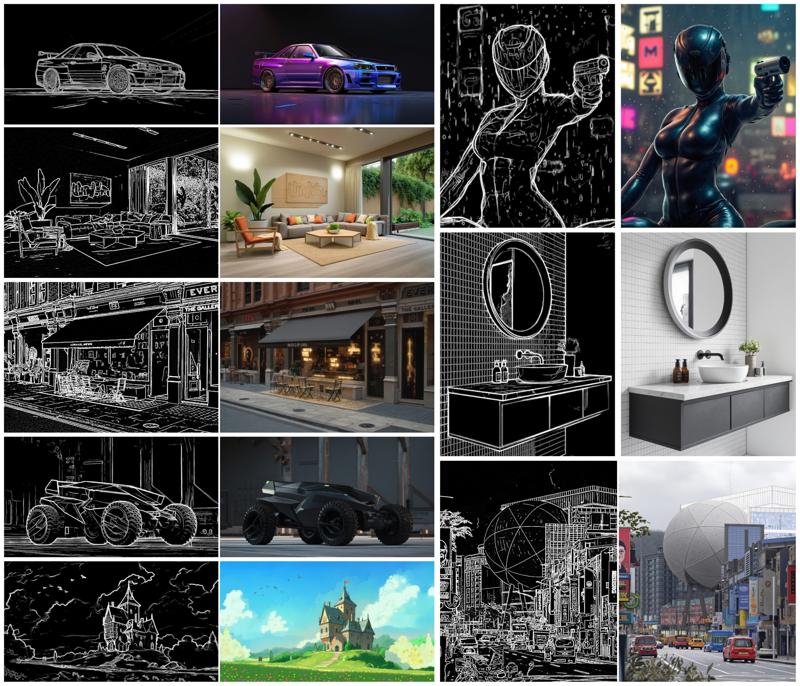
Tested in various common scenarios such as industrial design, architecture, interior design, animation, games, and photography.
Make sure to craft your prompts well—precision is more important than length!
Performance examples are shown below:
 Recommended Settings
Image resolution: 720px or above on the short edge
controlnet strength: 0.6~0.85 (adjust as needed)
guidance: 3.0~5.0 (adjust as needed)
steps: 30 or more
Usage
Download the model from MistoLine_Flux.dev_v1
Place the model in the ComfyUI\models\TheMisto_model\ directory
The directory will be automatically created the first time you run the ComfyUI's TheMisto.ai Flux ControlNet ComfyUI suite
Run using ComfyUI; an example workflow can be found in the workflow folder
Note: The length and width of the conditioning image must be divisible by 16, or an error will occur.
License
Align to the FLUX.1 [dev] Non-Commercial License
This ComfyUI node falls under ComfyUI
This model is for research and educational purposes only and may not be used for any form of commercial purposes.
Business Cooperation
For any custom model training, commercial cooperation, AI application development, or other business collaboration matters, please contact us.
Business: [email protected]
Investment: [email protected] We also welcome investors to inquire for more information.
Media
International:
Website: https://themisto.ai/
Discord: https://discord.gg/fTyDB2CU
X: https://x.com/AiThemisto79359
Mainland China (中国大陆):
Website: https://themisto.ai/
WeChat Official Account: TheMisto AI (Shenzhen Mixed Tuple Technology Co., Ltd.)
Xiaohongshu: TheMisto.ai (Xiaohongshu ID: 4211745997)
Description
FAQ
Comments (5)
What's the difference between this version and the checkpoint one?
Does it work in forge?
I am getting an Error about missing Nodes
LoadTheMistoFluxControlNet
ApplyTheMistoFluxControlNet
KSamplerTheMisto
How do i solve this?
I also got the same error. Do you have any solution?
Did you find a solution? I can't find those nodes anywhere :/