
Warning: I just remembered something, the scripts are recursive so you can just drop your images folder inside and it will process them. On the other hand do not just drop it anywhere and run it, if you were to just drop it at c: and run it, it will look for images EVERYWHERE, It won't damage anything but will create a lot of trash. So remember to run it in it's own folder.
I posted a lora making guide i made a while ago. I normally use a couple of powershell scripts to some common tasks. Be mindful some require image magic installed, I dumped the windows installer in the zip file If you don't trust it simply get the original from github
Included files:
90percentsimilar.ps1: Poorman's image duplication finder. First you need to autotag your images. It Checks PNG/TXT file pairs against others in the folder if the tags are over 90% similar they are bundled together in a subfolder
avifdec.exe: Just the run of the mill avif decoded from github required for topng.ps1
cleanExtraTxt.ps1: Check IMG/TXT file pairs and moves orphaned text files into a subfolder supports png, jpg, jpeg, bmp, webp, gif and avif
dwebp.exe: just the run of the mill webp decoder required for topng.ps1
ffmpeg.exe: run of the mill video decoder it is needed for .MP4 and .gif required for topng.ps1
gifSplitter.ps1: simply extracts the frames of .gif can use topng.ps1 instead.
ImageMagick.Q16-HDRI.msixbundle: the image magic windows installer needed for some stuff.
PNGresizer.ps1: Makes things square. This is no longer useful as bucketing is ubiquitous and works fine.
PNGresizerToBucket.ps1: This is my other script to validate images needing upscaling, sorting by bucket and some primitive downscaling and or cropping.
RemoveAlpha.ps1: this one need image magic it does as stated in the can removes and disables the alpha channel or transparency in PNG files. Unless your training script supports transparency it can either screw things up or cause it to fail so unless you are explicitly using transparency training use this to remove it.
removeBorder.ps1: This one also needs image magic. It checks the borders of PNG files and removes rows and columns from the sides that fall within tolerance limits. I normally use it with 20% tolerance. BEWARE This edits your images so make a copy before running. This is normally very reliable except with anime screencaps from night scenes, somehow it always want to eat those. This one is great to remove white or black borders to get those sweet yet marginal resolution gains when training.
renamePadnumeric.ps1: this one is a bit of a dumb one, it will pad numeric PNG/TXT files pairs so if they 1.png and 1.txt they will become 000001.png and 000001.txt
RenamePairs.Ps1: slightly less dumb version of the one above will simply rename PNG/TXT files pairs numerically and in sequence.
tograyscale.ps1: this one need image magic, as stated in the can will create a grayscale copy of a PNG image. This is useful on already grayscale images. You are probably thinking that's absurd! But nope, a lot of grayscale images are full color and only appear grey, if you zoom in they look like a damn rainbow. So just run it over your grayscale images and use the converted ones if they were already true grayscale nothing will change if they weren't it will prevent the rainbow effect from being trained.
tomono.ps1: This one needs image magic. This one requires a cut threshold percentage and will turn PNG images into strict monochrome, it is good for lineart that looks grey and washed out. normally works fine between 40 and 60.
topng.ps1: This will check all the images in a folder and will create their png counterpart with the name "_fromJPEG" or whatever they were it also splits gifs and mp4.
Here's how to run it.
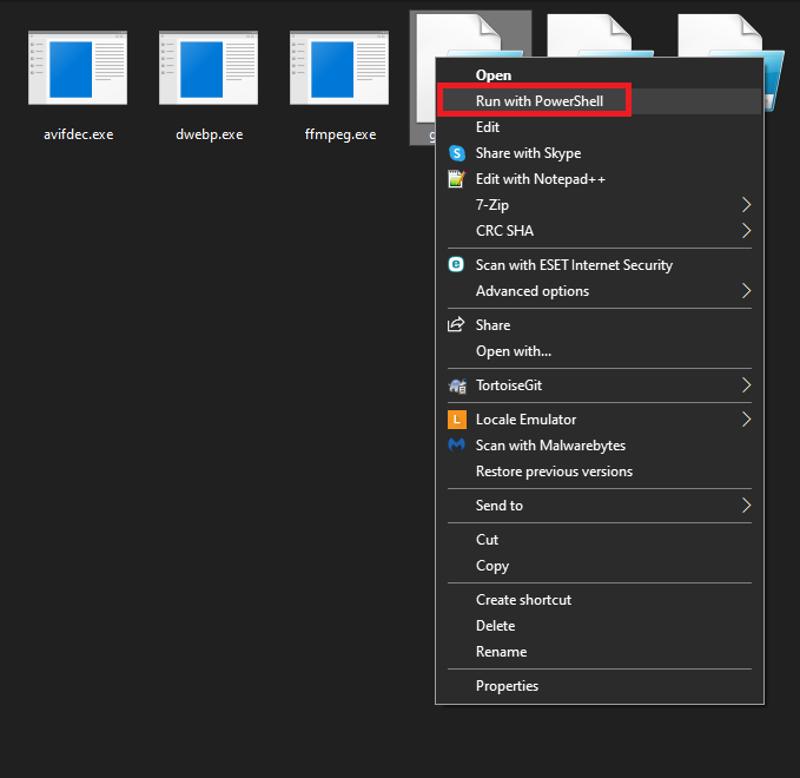
Description
FAQ
Comments (12)
But we don't have to resize images any more in order to train LORAs.
*shrugs* the training scripts won't complain anymore is what you mean. As far as i know for whatever might pass as consensus or rather grapevine, bucketing is fine as long as you don't have too many buckets. I don't think we have someone who has done a definite test on quality vs number of buckets. So at least for the time being until we get some solid evidence I will stick to what works for me, after all it only requires to run a couple of scripts.
Thanks. This will be useful. I still prefer training TI's for people, and this will save time. A+
Don't reencode a jpeg, avif, or webp to PNG file format. Every time you do that you created a lie for yourself and anyone consuming that file. Once an image has been compressed to one of those other formats it is now irreversibly degraded to that specific format's artifacts, and re-saving to png is just perfectly preserving those compression artifacts.
Yup. Sadly in the real world we don't have access to the originals in a lossless format. This is mostly for ease in processing and cleaning of watermarks and other crap in an accessible loseless format without further degradation. So while technically correct your comment really doesn't bring any sort of solution to the problem. So I will take it as it is, a complaint and raging against the unfairness of the world.
@knxo It's not raging against unfairness of the world, it's pointing out the fact you have invented for yourself and are now trying to propagate to others, a duplicitous process that is not only not helping yourself but leaving your data in a worse, mis-identifiable state on a website filled with people of limited technical experience to know this is a bad idea. If someone sends you a .wav file that started as a .wav, was saved to .mp3, and then re-converted to .wav, to another person, or even your future self the file format is now a lie. And you did it.
This is a self induced problem by not leaving the file in its original format as much as possible. A double problem is if you have done this process, and re-save it again to jpeg in another separate software, if that software uses a different jpeg encoder, now you are double dipping on compression artifacts, two layers of them. Great, even worse.
The way to keep your files lossless is to preserve their original format.
@32Bitshifter I am not quite sure if you are trolling but I would take your comments as a yes seeing that I don't see any model upload in your profile. When collecting a dataset we often require to do some image cleaning. Most images are low res crap in gif or jpeg scraped from someones boot. We require the images to be as uniform as possible to do batch edits and transformation often passing them through Ai filters to denoise, deartifact and de dither. The final outcome of the individual images is trivial and at most they will be stored as a reference dataset to retrain in the future. If you somehow manage to get me high res high quality PNGs I would thank you a lot.
@knxo You gave up any and all credibility by consistently questioning motives and addressing 0% of the raised points, this is adolescent banter cruft. "No you're trolling!". Absolutely stupid. You don't like the message and so you cry foul.
I try to explain inducing double compression artifacts, try to simply explain how not everything uses libjpegturbo and so pixelwise you can be making downhill training tasks worse by doing so, while avoiding the technical aspects of that because you don't seem to be a programmer based on your very own scripts. Yet you try to question false credentials that don't matter (Oh no where model!?), despite me obviously having experience in dataset integrity and image encoding, and then try to gaslight the rest of the comment like you have a point.
Call me a troll again, prove your points are meritless inexperience, masquerading as knowledge.
To passers by, just don't listen to this ignorant person.
@32Bitshifter I see many complaints and no solutions. This scripts only attend the issue of a heterogeneous low quality dataset. They are not for the general public to go around gallivanting and compressing and decompressing stuff willy-nilly. Now get to the damn point if you have one. Are you bringing something to the table a tangible solution to already compressed low quality heterogeneous datasets?
@32Bitshifter So you want me to reply to your points fair enough
If someone sends you a .wav file --Imposible wenever we collect a dataset we scrape boorus and dig for images from wherever we don't get any first generation media most stuff that exists is already in a degraded form. DO you think we wouldn't be using high rez pngs if we had a choice?
that started as a .wav, was saved to .mp3, and then re-converted to .wav, -- We don't do re conversion we just turn everything to PNG and from there we process the images
to another person, or even your future self the file format is now a lie. And you did it. --Thank god i cleaned that awful mess i started with, future me will thank me i denoised the original images.
This is a self induced problem by not leaving the file in its original format as much as possible. --Where should i get this mythical original file? oh wise one.
A double problem is if you have done this process, and re-save it again to jpeg in another separate software, -- Why would i do that? That's stupid
if that software uses a different jpeg encoder, now you are double dipping on compression artifacts, two layers of them. Great, even worse. --Why would someone do that?
Looks to me you haven't the faintest idea of the use case and simply wanted to rant because you hate people using lossy compression multiple times which is perfectly reasonable. I will also admit i have never formally used powershell, as my background is in java and .net. I just needed a quick and dirty way to get my files to png for further processing. I then decided to share it and it does exactly what it says in the can.
I agree with everything said here. You will loose quality when converting compressed files. But I can tell you it doesnt matter most of the time. I havent got a lot of technical experience in training ai things, but I have made a few lora's. Setting up the data is super annoying. If I can automate even just a little, I am super grateful. Some images I have used were of exceptionally low quality, some were also very high. Im not worried about compression conversion quality when I take a 1500x1500 image and make it 768x768. I done lost that quality myself. And for the ones that are low already so i have to stretch them up to 512 or something, well, I expect them to be shit and hope for the best. Im willing to bet most lora's were trained on imperfect converted images.
That being said, I do appretiate the comment. Thank you for the reminder.
@superskirv I have had good luck upscaling from basically crap to 512x512 using https://github.com/lltcggie/waifu2x-caffe/releases It gives me less artifacts when up scaling very low rez images when compared with esrgan and real esrgan(it is not that good for high rez upscaling though). I recommend denoise and magnify level 3 and "Photography Anime" model. I think there's a newer version but you have to install the venv and everything by hand so i haven't tested it. The windows version I linked while old works good enough. https://github.com/xinntao/Real-ESRGAN/blob/master/docs/anime_model.md This one for real esrgan seems to also work ok for low res crap.