


Hi everyone, i know one of the problem of everybody with their art is the SKIN !
Airbrushed skins, plastic skins etc..... Annoying, i know, so i made THE solution !!!
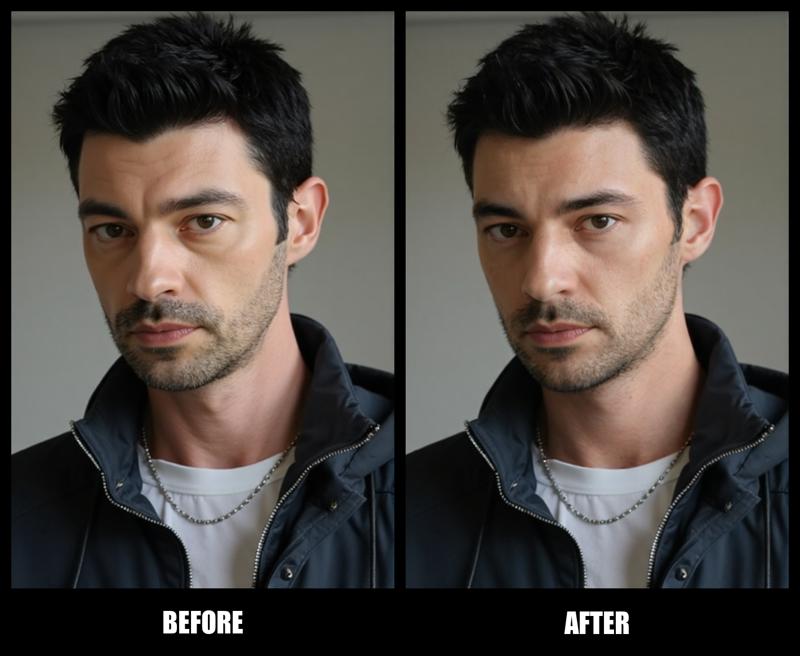
REAL SKIN FINAL !
Screenshots below !
Key Features:
Realistic Skin Generation: Produces human-like skin textures with imperfections.
Multi-Lora Support: Works seamlessly with various Lora models to enhance realism.
Florence-2 Integration for Auto Captioning: Automatically generates captions based on the visual content of your images.
Watermark System: Protects your creations with a watermark system that leaves a signature on all outputs.
Specificities:
Detailed Skin Imperfections: Includes texture detail such as pores and subsurface scattering.
Captions with Florence-2: Provides detailed, context-aware captions for your images.
Subtle Watermarking: Your work will include a visible watermark, ensuring your images are properly attributed.
Nodes Description:
LoadImage: Loads target images for further processing.
URL: LoadImage
Florence2Run: Adds context-aware captions using the Florence-2 model.
URL: Florence2Run
Power Lora Loader: Applies specific Lora models to add skin texture detail.
URL: Power Lora Loader
Watermark Node: Automatically adds a visible watermark to the final image.
CR Combine Prompt: Combines multiple prompts into a single description for image generation.
URL: CR Combine Prompt
PreviewImage: Real-time previews of your image as it's being generated.
URL: PreviewImage
How to Use:
Import your base image using LoadImage.
Fine-tune skin textures using the Power Lora Loader.
Automatically generate detailed captions using Florence2Run.
Apply the visible watermark to protect your creations.
Easy to Use:
This workflow is designed to simplify the process of realistic image generation. The watermark system ensures your work remains protected while still delivering high-quality results.
Quick Tips:
Install ComfyUI Manager to automate the installation of missing nodes. This tool ensures all required components are managed effectively.
THE BEAST :
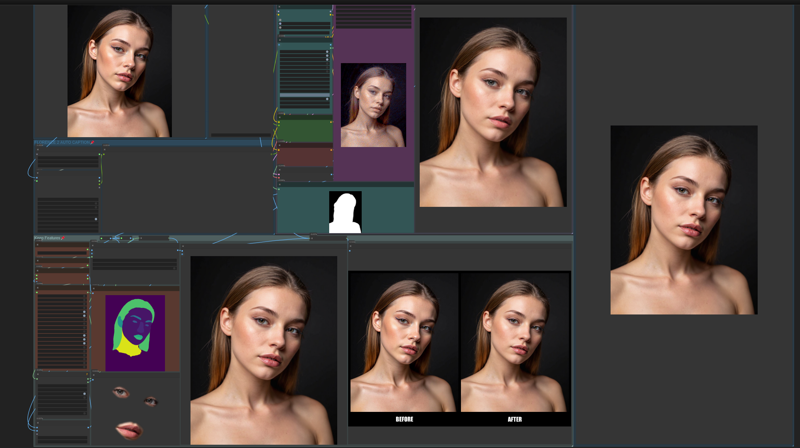
ScreenShots :
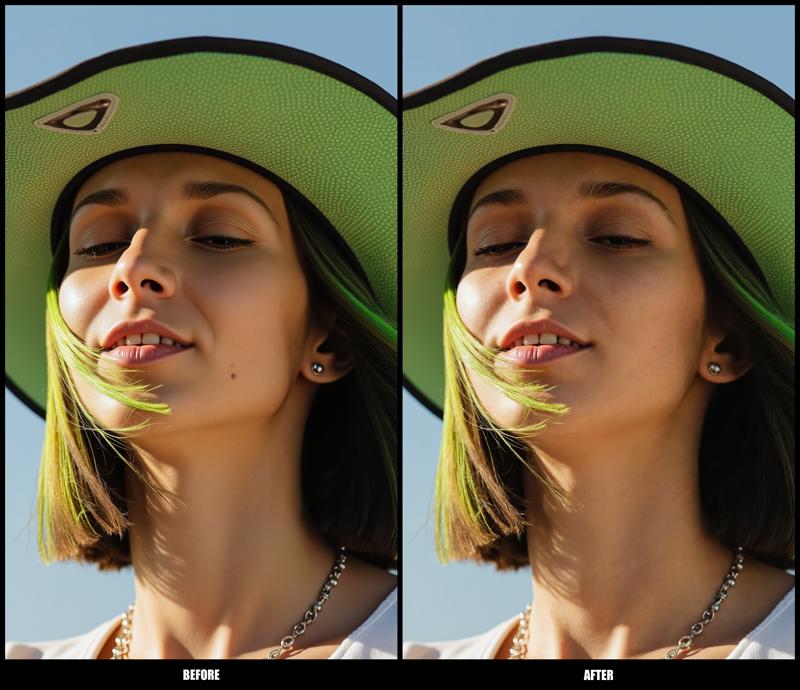
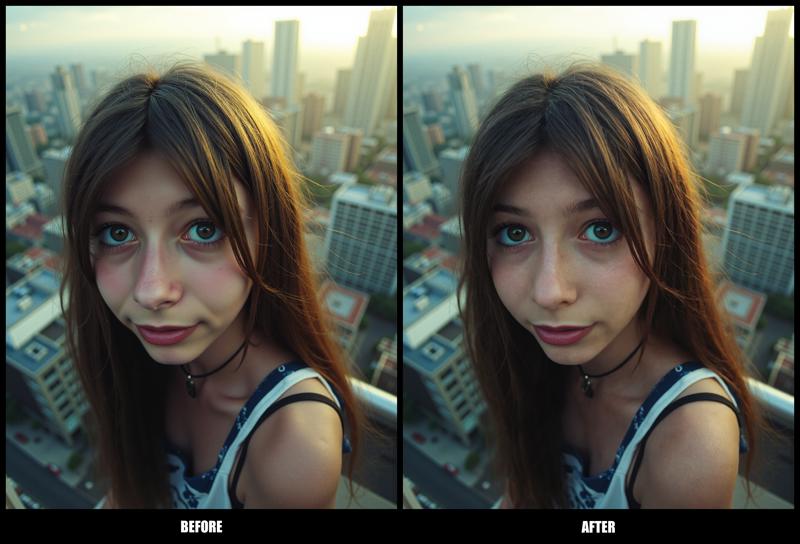
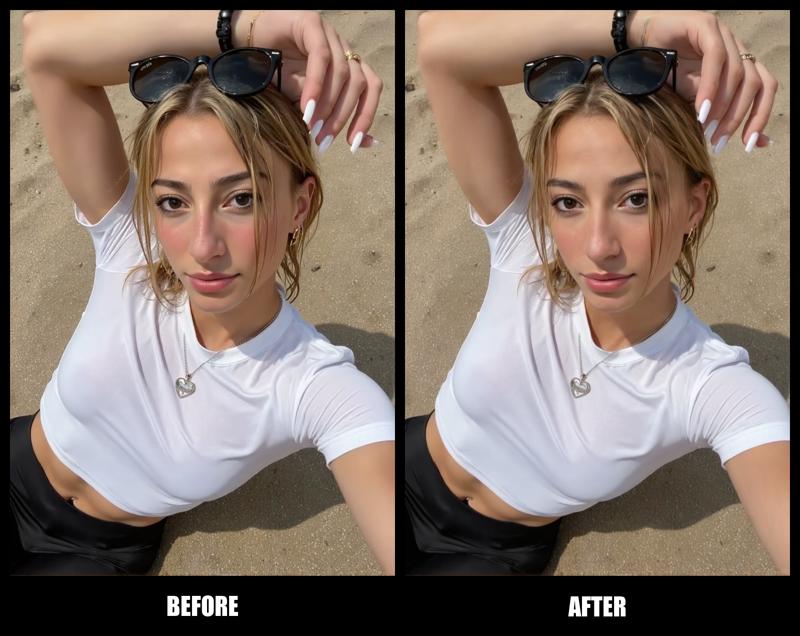
Advice:
To fully utilize this workflow, it is highly recommended that you have ComfyUI Manager installed. This will ensure seamless integration and operation of all features included in the EKKIVOK - SPECTRAL CLONE V1 workflow.
Final Thoughts:
Thank you for exploring this workflow! If you appreciate the hard work and features that went into EKKIVOK - SPECTRAL CLONE V1, please consider subscribing to my Civitai page. If you’re happy with my work, I would greatly appreciate any buzz, likes, and comments you can share! Your support helps motivate me to create even more innovative tools in the future.
Connect with Me on Instagram!
Curious about my latest workflows, LoRA models, and the creative process behind the scenes? 📸 Follow me on Instagram @ekkiv0k for updates, tips, and a glimpse into the world of AI art creation! Join the community and let’s inspire each other!
Note: I kindly request that my work is not stolen. Please respect my efforts and the time invested in creating this workflow.
Description
Nothing. Sorry it's a one shot :)
FAQ
Comments (31)
What does the "detail_erode", "detail_dilate", and "confidence" settings do?
"Erode" Mean it shrink the mask, in fact it make the masked area by cutting of finer details at the edges.
"Dilate" it expand the mask, you can enlarge the masked area to include more details (Default Value is great).
"Confidence" it control the sharpness on the mask higher confidence mean "more sharper details" try to keep it soft for smoother details :)
Hi, I'm getting this error in LayerMask:
[Errno 13] Permission denied: 'L:\\ComfyUI_windows_portable_nvidia\\ComfyUI_windows_portable\\ComfyUI\\models\\mediapipe\\selfie_multiclass_256x256.tflite'
The model is in the foler.
the model is a set of files in a folder and that foilder must be in that path.
if you did that, did you try to see in custom node if the nodes requires the model be inside this folder instead of /Models ?
@EKKIVOK I fixed that. I loaded and image and queued it, and the workflow errored in the following groups:
1- Combined Prompt Group: The "Anything Everywhere" node is errored with a circle on the Anything.
2- Skin Enhancer Group: VAE Encode errored, and LayerMask: PersonalMaskUltra V2 errored with a red circle around the "images"
3- Keep Features Group: ImageCompsiteMasked errored with a circle on "source"
@Learning2023 i tried to reproduce your error, but was a fail.
So i assume something went wrong on your installation. For me, it a Models missing problem.
Do you have MixLab Nodes and Comfyui Manager installed on your local installation ?
If yes, it will be more easier to target and fix the problem :)
@EKKIVOK All good man, it worked. Thanks. I just didn't expect it to give me a different face than the image I uploaded.
@Learning2023 it's normal you need to decrease the denoise strenght to get your face back :)
Are the weights supposed to auto-download after you install the correct nodes? I'm getting an error on the Personmaskultrav2: OSError: Incorrect path_or_model_id: Error no file named pytorch_model.bin, model.safetensors, tf_model.h5, model.ckpt.index or flax_model.msgpack found in directory C:\Ai_Root\ComfyUI\models\vitmatte.
I suppose the components are not downloaded 😄
no you need to download that from vitmatt repository ;)
the models can be found here :
https://huggingface.co/hustvl/vitmatte-base-composition-1k/tree/main
create a "vitmatte" folder into your comfyui/models
@EKKIVOK Thanks, appreciate it! Got it to work, although it made my 4070 ti super cry lol 😄
Curiously, the results I got was worse than the input image 🤔 I'll play around with it a bit
@Hunt3rseeker it should not happens basicaly 😂
@EKKIVOK From what I noticed, it improved the skin my FLUX-generated images, but when I used real images that had been upscaled, the skin texture got worse for the most part. Just an observation. Anyway thanks for helping me and for a cool workflow!
@Hunt3rseeker you need to lower the denoising strength ;)
Hello, even if I change the lora value to 2, the effect is minimal. It does not generate more delicate skin like the picture you showed. Is there something wrong? I posted a comparison picture in the picture area,currently under review,. Please take a look and give me a reply if it is convenient. Thank you very much!
In addition, I chose vitmatte on the character mask node instead of vitmatte local in your workflow, because I can't use local and will report an error. Is it because of this reason?
pictures showed are the result of the default settings i made, don't touch it :) for better result just choose the right models i used on this workflow :)
raise the denoise!
Hi, I really love your workflow, just a thing, sometimes it can't find the eyes, if not a very close-up photo, is there a way to correct this?
Thanks!
with AI model especially sdxl is a kind of guessing game ^^ sometime it work sometime not ^^
But well in most of the cases it work ^^ here the probleme come from your photo i made this workflow for particular purpose, and it will not working great for subject into distance ^^
@EKKIVOK Oh ok, thanks for replying, I wondered if I could adjust some parameters for not close-up image, thanks anyway!
@giusparsifal it's not really possible considering that if you want to that it will not have any ressemblance with original character. i don't ad to do that :)
Hello, since I've updated ComfyUI, the workflow gives me some error, as it losts some connection bewteeen nodes. These are the problem:
* VAEEncode 37:
- Required input is missing: pixels
* LayerMask: PersonMaskUltra V2 28:
- Required input is missing: images
* ImageCompositeMasked 86:
- Required input is missing: source
Would you please tell me how to fix it as I can't see on the original workflow (that is perfect)?
I mean I don't know how to connect the nodes above, hope you can tell me.
Thank you!
A bit late but have you figured out a fix for this? still now some connections are missing and when i try to attach them myself, the mask filter is ignored so eyecolor and hair color change
Guys, anythouths on this error?
LayerMask: PersonMaskUltra V2
Repo id must use alphanumeric chars or '-', '_', '.', '--' and '..' are forbidden, '-' and '.' cannot start or end the name, max length is 96: 'C:\pinokio\api\comfy.git\app\models\vitmatte'.
Looks like you have to install https://github.com/chflame163/ComfyUI_LayerStyle_Advance It works for me.
Why would you pin every single node together with groups holy. Also there's lora used. Don't see any mention of it in description.
SO whats the lora used?
@Thatonecreator no idea
when loading the json 3 errors/missing connections show up: source from ImageCompositeMasked, images from LayerMask: PersonMaskUltra V2(Advance) and pixels from VAE Encode
For anyone searching a solution for this, i have found it but also tweaked the workflow to my personal liking (while still keeping the skin refining mechanism ofcourse) so dm if interested and i will provide my personalised wf
time wasted, dont try this, will just give you headache