Important information:
This model already includes the Lightning LoRAs. Do not use them, or the quality will be degraded.
🟣 Lightning Edition – NSFW I2V V2
⚡ Model Presentation (2 new versions available)
I originally planned to release only one V2, but some people preferred the NSFW V1 over the Fast Move V1 version, so depending on what you’re looking for, one version may suit you better than the other.
For these V2 versions, I tried a new approach:
✔ I made sure that most sexual poses work, while the model is also good for SFW content
✔ More flexible for general use
🔥 NSFW Fast Move V2
Improvements included in this version:
Better prompt understanding
Better camera understanding
Reduced unnecessary back-and-forth movements outside sexual poses
(cannot be completely removed, but strongly reduced)Improved bounce effect on the buttocks
If a man appears, he will no longer automatically attempt to penetrate the woman when she is nude
This version is designed for those who want more dynamic scenes with more movement.
💜 NSFW V2
The difference between this version and NSFW Fast Move V2:
Less camera control
Less camera understanding
But body movements are less pronounced (breasts and buttocks)
Some preferred V1 NSFW to V1 NSFW Fast Move, and this version keeps that spirit
For varied sexual poses, check the previews — there are many.
You can use the shown prompts and adapt them to your images, but of course, other prompts will work as well.
Don’t hesitate to use other LoRAs for creating specific concepts.
🔧 Recommended Settings
Steps: 2+2
(Jellai recommends 2+3 for even better results, and I agree)Sampler: Euler simple
CFG: 1
This model already includes the Lightning LoRAs, don’t use them, or the quality will be degraded
🔞 LoRA Examples (with links and recommended weights)
LoRA: Penis Insert WAN 2.2
LoRA weight: 1
Face → Doggy
https://civarchive.com/images/112864483Face → Missionary
https://civarchive.com/images/112864718
https://civarchive.com/images/112864835Face → Doggy (leg aside)
https://civarchive.com/images/112864885Another example
https://civarchive.com/images/112864972
Other examples with different LoRAs
Face → Reverse Cowgirl — LoRA weight: 0.7
https://civarchive.com/images/112865189Face → Missionary — LoRA weight: 0.3
https://civarchive.com/images/112865381Face → Doggy leg aside — LoRA weight: 0.6
https://civarchive.com/images/112865551Face → Doggy — LoRA weight: 0.7
https://civarchive.com/images/112865696Face → Spoon — LoRA weight: 0.7
https://civarchive.com/images/112868124
📷 Dynamic prompt example with different camera angles:
(at 0 seconds: wide shot showing the woman standing in the snowy plain, a massive giant dragon emerging behind her, snow cracking and dust rising).
(at 1 second: the woman jumps backward onto the dragon’s back as it bursts fully from the sky, camera tracking the motion from a side angle, debris and snow flying).
(at 2 seconds: medium shot from the side, the woman balances heroically on the dragon’s back as it begins to run forward across the snowy plain, slow-motion on her posture).
(at 3 seconds: close-up on the woman’s determined face, camera slightly low-angle to emphasize her heroic stance, snow and debris flying around).
(at 4 seconds: dynamic travelling shot alongside the dragon, showing the snowy plain, scattered debris and ice fragments flying everywhere as it gains speed).
(at 5 seconds: wide cinematic shot pulling back, showing the dragon taking off with the woman riding on its back, soaring above the snowy plain, epic perspective with snow, wind, and scale emphasizing the drama).
For available camera angles, check further down in the “cam V2” model description.
🔞 Normal Clip vs NSFW Clip:
You can also use the NSFW version for your clip.
It can bring positive effects for sexual scenes, but it can also cause issues, as in this example:
NSFW Clip:
https://civarchive.com/images/112864204Normal Clip (same seed):
https://civarchive.com/images/112864295
Here are the links to NSFW clips (thanks to zoot_allure855 for correcting the BF16 version):
BF16 fixed version:
https://huggingface.co/zootkitty/nsfw_wan_umt5-xxl_bf16_fixed/tree/mainFP8 version:
https://huggingface.co/NSFW-API/NSFW-Wan-UMT5-XXL/tree/main?not-for-all-audiences=true
❓ If you have any questions, don’t hesitate to ask!
🟣 Lightning Edition – NSFW I2V
⚡ Model Presentation (2 versions available)
I decided to release 2 versions. Both can produce different results, as you can see in the previews (the seed was the same).
Fast Move Version: provides more movement, and the movements will be faster, with better prompt understanding and camera handling
(you can see it in the 4th preview "fast move high" where the man slaps the woman)Natural Motion Version: offers more natural breast movements depending on the situation and produces slower scenes.
👉 Check both and choose the one that works best for you.
This NSFW edition is, of course, focused on sexual poses.
You should achieve very good results.
To create specific concepts, feel free to use specific LoRAs — they work very well with this model.
🔧 Recommended Settings
Steps: 2+2
(Jellai recommends 2+3 for even better results, and I agree)Sampler: Euler simple
CFG: 1
This model already includes the Lightning LoRAs, don’t use them, or the quality will be degraded
You can also use this T5, which may improve understanding:
https://huggingface.co/NSFW-API/NSFW-Wan-UMT5-XXL/tree/main?not-for-all-audiences=true
📝 Usage Tips
Start with a clean, high-resolution image for better results.
The model will not change the face; if it does, increase the resolution.
Also adjust your prompt if you are not getting what you want.
Wan understands some terms well, but not all.
For prompts, check the video previews: adapt them to your image.
Other prompts will work too.
🎥 Training
I trained 2 LoRAs:
The first one using several videos and images of different sexual positions.
The second one to bring more dynamic motion.
Respect to everyone who creates this type of LoRA — it requires a lot of work.
🙏 Credits
This model wouldn’t exist without the incredible work of these creators:
alcaitiff : https://civarchive.com/models/1295758/nsfw-fluxorwan-22orqwen-mystic-xxx?modelVersionId=2300332
Sweet_Pixeline : https://civarchive.com/models/1844313/penis-play-wan-22
anonimoose : https://civarchive.com/models/2008663/slop-twerk-wan-22-i2v
A special thanks to Alcaitiff and CubeyAI, two very kind and humble people.
🔔 Important
Please don’t support my work with buzzes here, I don’t need it.
If you want to support someone, support the creators listed above — they truly deserve it.
💬 Feedback
Feel free to give me feedback, positive or negative, to help improve future updates.
Update WAN 2.2 V2 CAM I2V – NEW feature Camera & Prompt Improvements
This custom version of WAN 2.2 I2V has been updated to deliver better prompt comprehension and improved handling of camera angles and cinematic movements. It provides more accurate scene interpretation, smoother transitions, and enhanced control over dynamic.
Key Features:
Excellent understanding of prompts and scene composition.
Supports various camera angles and movements, including zoom, dolly, pan, tilt, orbit, tracking, and handheld shots.
Ideal for cinematic storytelling, animated sequences, and creative video-to-image projects.
Flexible multi-step prompts, standard 4 steps (2+2), can be increased for higher fidelity.
Recommended sampler: Euler simple.
You can, of course, use your usual prompts; this is just one example among many.
Example Prompt with Different Camera Angles
(at 0 seconds: wide frontal shot of a man standing in front of an open fridge, cinematic lighting, subtle ambient kitchen reflections, the fridge contents visible, camera static).
(at 1 second: medium shot from the front as he opens the fridge fully, reaches for a can, slight zoom-in to emphasize the action, cinematic framing).
(at 2 seconds: camera shifts to a side medium shot, tracking him as he lifts the can to his mouth, fluid movement, maintaining lighting and reflections).
(at 3 seconds: camera starts a smooth 360-degree orbit around the man, following him as he drinks from the can, motion fluid, background slightly blurred for cinematic effect).
(at 4 seconds: close-up on his face and upper body while drinking, orbit continues subtly, fridge reflections accentuating realism, cinematic polish).
(at 5 seconds: final wide shot as he lowers the can, camera completes orbit to original angle, showcasing the kitchen space, lighting, and dynamic movement).
Available Camera Movements
Zoom / Dolly
zoom in
zoom out
camera zooms in on subject
camera zooms out gradually
dolly in
dolly out
camera dollies in slowly
camera dollies out steadily
crash zoom
Pan
pan left
pan right
camera pans across the scene
gentle pan left
sweeping pan right
Tilt
tilt up
tilt down
camera tilts up to reveal…
camera tilts down from…
Orbital / Tracking / Arc / Rotation
orbit around subject
360° orbit
camera circles around
tracking shot
camera tracks alongside subject
arc shot
curved camera movement
Other Movements & Styles
static camera / static shot
handheld shot
camera roll
Note:
LoRAs work perfectly with this model, offering full compatibility and consistent results across styles and concepts.
# SUPPLEMENTARY ADVICE
Don’t hesitate to use negative prompts. This is very important on WAN, it can greatly improve your videos or remove elements you don’t want to see. Use negatives!
Here, the model should be used with CFG set to 1, so negatives won’t work by default, but there is a node that enables them. It’s very simple: open the manager, type kjnode, download it, and in your workflow type WAN Nag. That’s how to use it. Connect the node after your LoRA loader, condition it on the negative, and finally place it in your first kSampler (high).
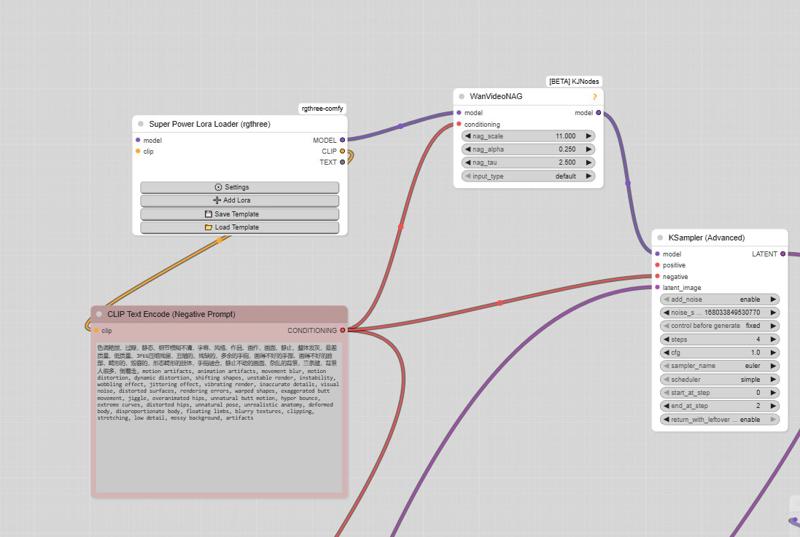
And here is the negative prompt for unwanted movements:motion artifacts, animation artifacts, movement blur, motion distortion, dynamic distortion, shifting shapes, unstable render, instability, wobbling effect, jittering effect, vibrating render, inaccurate details, visual noise, distorted surfaces, rendering errors, warped shapes, exaggerated butt movement, jiggle, overanimated hips, unnatural butt motion, hyper bounce, extreme curves, distorted hips, unnatural pose, unrealistic anatomy, deformed body, disproportionate body, floating limbs, blurry textures, clipping, stretching, low detail, messy background, artifacts, butt bounce, moving hips, swinging hips, shaking butt, wiggling butt, moving lower body, moving pelvis, jiggling buttocks, bouncing butt, unstable stance, unnatural hip motion, exaggerated hip movement, hip sway, hip rotation, bottom motion, pelvis motion, wobbling hips, fidgeting lower body, dancing hips, pelvic movement, motion blur, unnatural movement
And here is the negative prompt from the official ComfyUI workflow:色调艳丽,过曝,静态,细节模糊不清,字幕,风格,作品,画作,画面,静止,整体发灰,最差质量,低质量,JPEG压缩残留,丑陋的,残缺的,多余的手指,画得不好的手部,画得不好的脸部,畸形的,毁容的,形态畸形的肢体,手指融合,静止不动的画面,杂乱的背景,三条腿,背景人很多,倒着走
Note: If you use the default workflow without the node, this negative prompt will not work.
UPTDATE: Lightning Edition – T2V
I’m not really experienced with T2V myself, but a colleague who works with it a lot tested this version and confirmed that it performs very well. From the few tests I managed to do on my side, I got the same impression, although I haven’t compared it directly with the base version yet.
The settings are the same as in the image-to-video version: 2+2 steps or more if you prefer, CFG at 1, and Euler simple (though other samplers also work great).
I don’t plan to make an NSFW version for the T2V release,
but for the I2V version, I’m already quite happy with the first results.
Update WAN 2.2 V1.1 I2V
Updated version of the original Lightning merge — same settings 2+2 steps or more, featuring more movement and smoother flow (depending on the prompt).
The model already works very well in NSFW. Just use the right LoRAs, and the movement will improve.
WAN 2.2 V1 I2V
This checkpoint is based on the original WAN 2.2, with the Lightning WAN 2.2 and Lightning WAN 2.1 LoRAs already integrated. This improves image quality, makes motion smoother and more dynamic, and removes the slow-motion effect that can occur with the Lightning models.
A common setup is to use 2 steps on the high model and 2 steps on the low model, though other settings may work as well. Do not apply the Lightning LoRAs manually — they’re already included in this checkpoint.
My workflow
https://civarchive.com/models/2079192/wan-22-i2v-native-enhanced-lightning-edition