


Originally Posted to Hugging Face and shared here with permission from Stability AI.
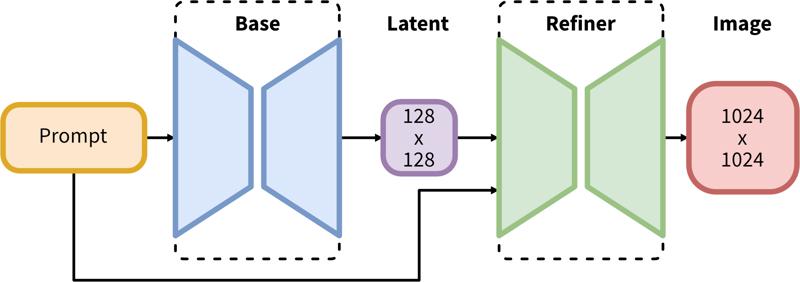
SDXL consists of a two-step pipeline for latent diffusion: First, we use a base model to generate latents of the desired output size. In the second step, we use a specialized high-resolution model and apply a technique called SDEdit (https://arxiv.org/abs/2108.01073, also known as "img2img") to the latents generated in the first step, using the same prompt.
Model Description
Developed by: Stability AI
Model type: Diffusion-based text-to-image generative model
Model Description: This is a model that can be used to generate and modify images based on text prompts. It is a Latent Diffusion Model that uses two fixed, pretrained text encoders (OpenCLIP-ViT/G and CLIP-ViT/L).
Resources for more information: GitHub Repository.
Model Sources
Repository: https://github.com/Stability-AI/generative-models
Demo [optional]: https://clipdrop.co/stable-diffusion
Uses
Direct Use
The model is intended for research purposes only. Possible research areas and tasks include
Generation of artworks and use in design and other artistic processes.
Applications in educational or creative tools.
Research on generative models.
Safe deployment of models which have the potential to generate harmful content.
Probing and understanding the limitations and biases of generative models.
Excluded uses are described below.
Out-of-Scope Use
The model was not trained to be factual or true representations of people or events, and therefore using the model to generate such content is out-of-scope for the abilities of this model.
Limitations and Bias
Limitations
The model does not achieve perfect photorealism
The model cannot render legible text
The model struggles with more difficult tasks which involve compositionality, such as rendering an image corresponding to “A red cube on top of a blue sphere”
Faces and people in general may not be generated properly.
The autoencoding part of the model is lossy.
Bias
While the capabilities of image generation models are impressive, they can also reinforce or exacerbate social biases.
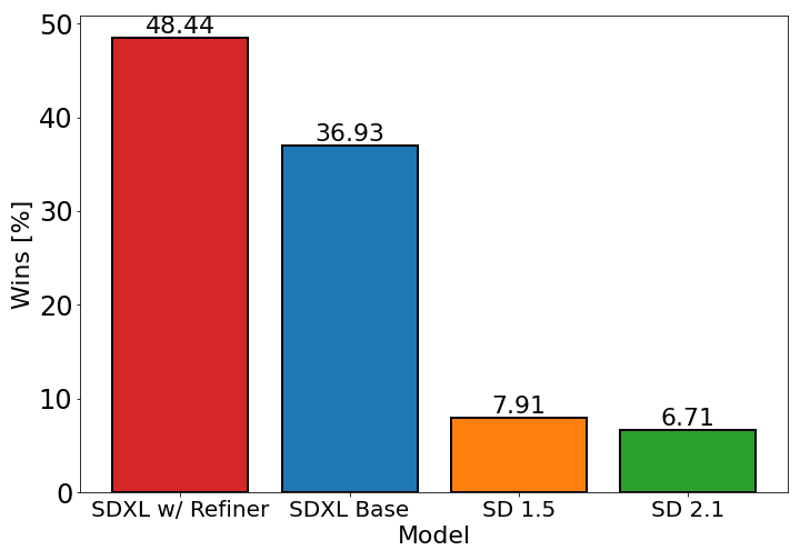
The chart above evaluates user preference for SDXL (with and without refinement) over Stable Diffusion 1.5 and 2.1. The SDXL base model performs significantly better than the previous variants, and the model combined with the refinement module achieves the best overall performance.
Description
FAQ
Comments (30)
Fix the nipples with aesthetic-portrait-xl
Could someone share some details of how this new architecture works?
1) As far as I understand it, the refiner model is a diffusion-based model that replaces the traditional VAE model. But the description implies that the refiner is optional. What happens to the latents without the refiner?
2) The description says the model uses OpenCLIP-ViT/G and CLIP-ViT/L. Is that for the base model and refiner respectively, or are the outputs of those two models concatenated or something?
3) How many parameters do the models have? The announcement says the base model has 3.5b parameters and the refiner presumably has 3.1b (6.6b-3.5b) parameters, but I'm not sure that fits with the file sizes shown here.
4) How does such a big model work with just 8 GB of VRAM??
I can answer 1 and sorta answer 4.
1) The refiner does not replace a VAE. Latents made by either the base model or the refiner must still be decoded with a VAE. The refiner is fed the latent of the base model. If you don't want to use the refiner you just decode the latent of the base model with a VAE instead of passing it to the refiner. In ComfyUI you can easily do both at the same time. From my experience, the refiner improves some things and makes others worse. You can just see the refiner as a different checkpoint, rather than part of SDXL.
4) Personally it was using around 11GB of VRAM for 1024x1024 images, but I'm assuming the answer is with the same tricks that allow people to run the 1.5 models on 2GB currently (a moment of silence for my friend generating with a 750TI).
@poiGenAI Thanks, that clears some things up. I got kind of confused by the VAE not being mentioned in the flowchart.
1.) I use the refiner model in img2img as a checkpoint with the SD Upscale script and .25-.35 denoising and seems to work fine.
2.) Can't Answer 3.) can't answer.
3.) I used about 10GB VRAM with generation then about 14GB-16GB VRAM when upscaling/refining. I only have a Quadro P4000 8GB and it didn't crash. Took forever to render (about 25 minutes for 2048x2048). But it got there in the end without crashing.
How much VRAM is needed to fine-tune the SDXL base model?
From what I read on kohya's github, it's nearing 16 for LORA and still in the 40s for fine-tuned models.
Not avialable for download. What happened?
issues of rights...
Also non official ones were fake.
Stability have an embargo on release until the 18th July. And even then, what's officially released might not be these models. We'll put out updates!
At 12Gig, per model and not 100Gig, I imagine this will catch on quickly.
Iafk
Assuming it will be possible to fine-tune it on consumer cards...
LoRA training is possible though.
smh give rivals catalyst to push the baseline consumer VRAM say 16 to 20 gigs in the future... maybe
13gb IMO is overkill when most models are 1gb to 2gb and models geared toward celebrity are only like 150mb.
This model was released official today, but behind a non-commercial agreement you have to submit through HuggingFace.
https://huggingface.co/stabilityai/stable-diffusion-xl-base-0.9
There are two YouTube videos explaining how to (legally) get the model and use it on either Comfy-UI or Vlad Diffusion (aka SD Next)
Comfy UI and instructions on downloading the safetensor versions.
https://www.youtube.com/watch?v=Q8eG6lG4eGw
Vlad Diffussion
which is the correct vae? i have downloaded all 100gB
我可以在这个基础上训练新的lora了吗
It's sad that this model struggles with nsfw
I thought that the devs changed their mind about nsfw.
Don't forget that 0.9 is supposed to be mostly for testing. It's 1.0 that I'm waiting on.
@olternaut latest I've heard (7/17ish) is that it isn't trained for nsfw stuff. but honestly it doesn't matter. just look at all the sd15 based models that have new data trained into them. training new nsfw data into the sdxl model won't be difficult and we'll be seeing a ton of nsfw model versions soon after release.
@rjox I don't think so, otherwise nsfw content would already be present on version 2 of SD
This is what happens when Open Source community starts virtue signaling so much to avoid the fake backlash started by large companies.
While the open source community self-censors, removes copyrighted materials from the training, avoids NSFW, censors any "offensive" speech, etc. making open source AI (from LLM to AI Art) move backwards, large companies like Open(Close)AI, Google, Adobe, Meta, etc. are ingesting copyrighted materials by the billions, allowing all kind of kinkiest NSFW (as long as it's real, because it becomes "empowerment"), and make their solutions the defacto standard while profiting from both the monopoly and exclusives rights to monetize their solutions at ripoff prices.
It's sad, because SD started as an awesome idea, we could have had some awesome solutions with SD2 and more recent. Now we're just asking "how bad" are the new models compared to the previous ones, smh.
@rjox but does that making the improvement going nowhere? if you trained using old, lesser quality from 1.5 synthetic data, then expect the negative impact even dubbed as latest version, its generating ability would be stuck in the past
I was able to use this model with an AMD card (RX 6750XT) on ComfyUI. The only problem that I've encountered is that I get RAM (not vram) memory leaks
why i cann't download this file?
7 More Suggested Resources for SDXL:
[1] First Ever SDXL Training With Kohya LoRA - Stable Diffusion XL Training Will Replace Older Models
[2] How To Use SDXL in Automatic1111 Web UI - SD Web UI vs ComfyUI - Easy Local Install Tutorial / Guide
[3] ComfyUI Master Tutorial - Stable Diffusion XL (SDXL) - Install On PC, Google Colab (Free) & RunPod
[4] Stable Diffusion XL (SDXL) Locally On Your PC - 8GB VRAM - Easy Tutorial With Automatic Installer
[5] How to use Stable Diffusion X-Large (SDXL) with Automatic1111 Web UI on RunPod - Easy Tutorial
[6] How To Use SDXL On RunPod Tutorial. Auto Installer & Refiner & Amazing Native Diffusers Based Gradio
[7] How To Use Stable Diffusion XL (SDXL 0.9) On Google Colab For Free
can't load vae model.
ONLY SDXL VAE CAN BE USED
Details
Files
sdXL_09.safetensors
Mirrors
sdXL_09.safetensors
merge_1120.safetensors
xl09.safetensors
sd_xl_base_0.9.safetensors
sd_xl_base_0.9.safetensors
sd_xl_base_0.9.safetensors
sd_xl_base_0.9.safetensors
sd_xl_0.9.safetensors
sd_xl_base_0.9.safetensors
sd_xl_base.safetensors
sd_xl_base_0.9.safetensors
sd_xl_base_0.9.safetensors
sd_xl_base_0.9.safetensors
sd_xl_base_0.9.safetensors
sd_xl_base_0.9 (3).safetensors
test3.safetensors
sdxl_0.9.safetensors
sd16b.safetensors
sd_xl_base_0.9.safetensors