


This workflow is now discontinued as I will focus on Qwen Edit 2509 model and the workflow I did for these kind of generations.
With this workflow you will be able to generate a 3x3 grid with the same character face in 9 different poses and with small expression differences.
The workflow will output an upscaled image that can then be split in 9 different square image for LoRA training.
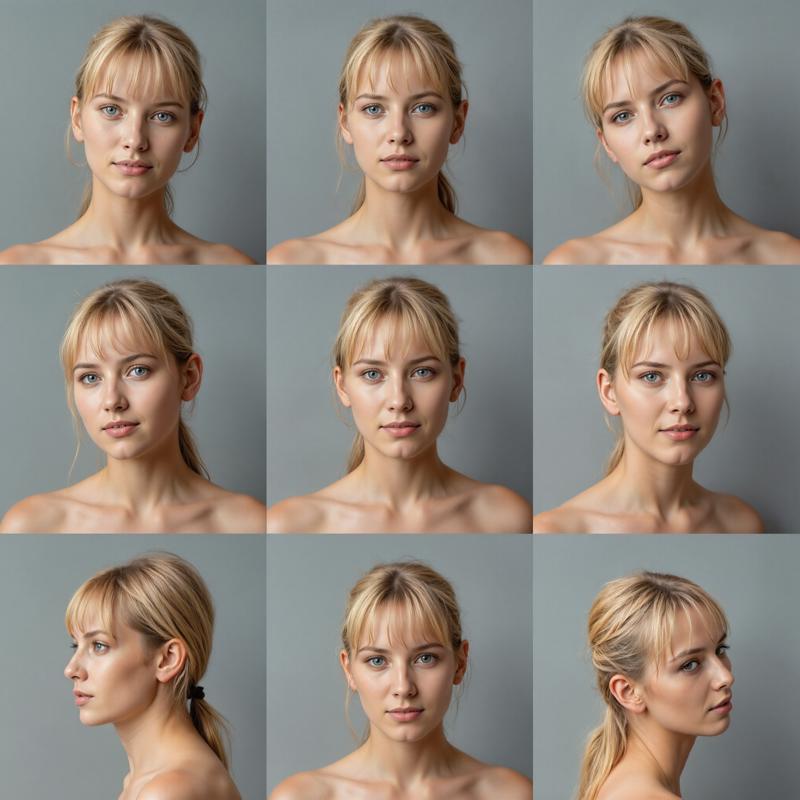 The workflow needs a reference image for the 9 poses in the 3x3 grid.
You can use the one I made for the workflow, but you can make up your and use that instead. Here is mine:
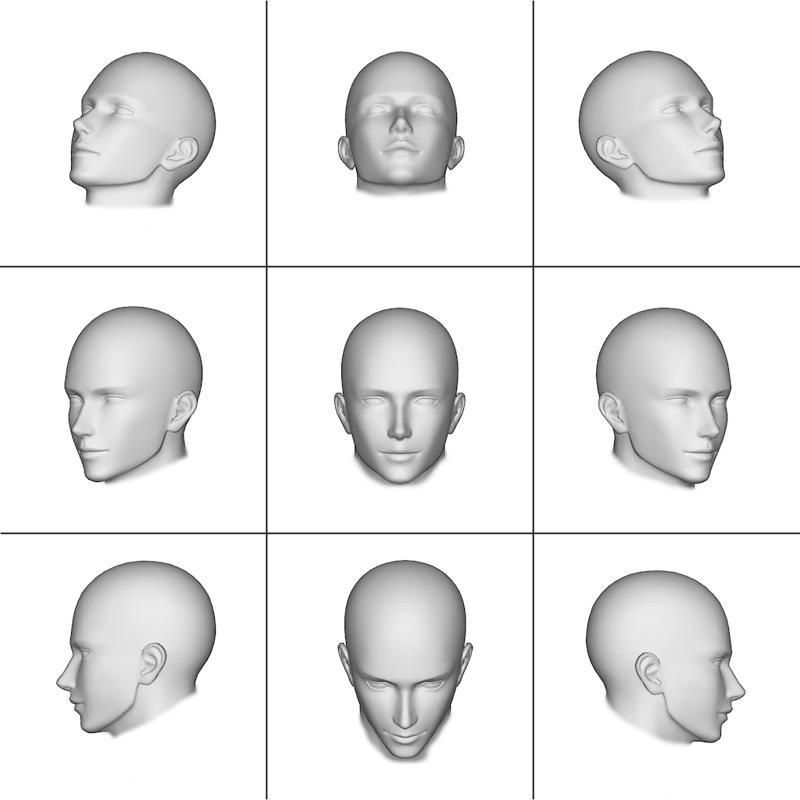 Please, use this link to download the above image in the correct resolution (1024x1024): Reference-Grid.png
I suggest not to change too much the prompt, just modify the description of the subject you want to be portraied (age, skin, physique, face, hair and eyes).
The workflow uses the FLUX.1 depth LoRA from Black Forest Labs:
https://huggingface.co/black-forest-labs/FLUX.1-Depth-dev-lora
Set the LoRA strength to 0.75, the FluxGuidance to 10.00. You can use also additional LoRAs' (for better skin details for example, or to obtain more faces from a previous character LoRA you trained)
If you have less that 24Gb Vram, it is suggested to use the GGUF Q8 model in place of the original Flux.1 Dev, as the workflow need a lot of Vram during the Adetailer part of the generation.
Enjoy!
Important: please, make sure you update ComfyUI, the Python dependencies and all the Custom Nodes before using the workflow.
P.S.
Please be advised that the Adetailer part of the workflow will take very long to complete the generation as it has to work on 9 faces and then again on 9 pairs of eyes. Also, the Upscaler may be slow if you want to use an upscale ratio of 2.0 or above.
Description
FAQ
Comments (63)
Thank you for creating and sharing this. I will definitley try this today. :) /Bow
What a cool idea! Thanks!
This is just what my lazy ass needed!
I receive an error when at the Face Detailer part:
RuntimeError: mat1 and mat2 shapes cannot be multiplied (3008x64 and 128x3072)
any idea how to solve this ?
Check if you have the models and bbox files needed.
@Tenofas Yeah, I've checked them, they are all there.
@CornmeisterNL and the LoRA? "flux1-depth-dev-lora.safetensor" is loaded correctly?
@Tenofas yep. I can see the 9 poses being created
@CornmeisterNL I would try to update ComfyUI and all the custom nodes... No other idea about this error.
same error with adetailer part here.
everything updated and in its folders. :(
@kettava I have no idea how to fix this. There must be something wrong with the node. Try to check in the node author github page if there is anyone else with that problem: https://github.com/ltdrdata/ComfyUI-Impact-Pack/issues?page=1
Everything was working fine, I hadn't touched anything and yet I had this error in the facedetailer:
mat1 and mat2 shapes cannot be multiplied (2560x64 and 128x3072)
I re-downloaded the WF and reconfigured from scratch and it's working again !
Nice :)
@zedish usually that error is due to an update of the custom node, so you just need to update it through ComfyUI Manager
@Tenofas Okay, I've got it. Thanks for your feedback and your work. :)
this error is for controlnet ,change model ,i change for flux union here,https://huggingface.co/InstantX/FLUX.1-dev-Controlnet-Union
Thank you so much for sharing, it works like a charm!
Thank you :)
I got all faces to be frontal with the same/very similar expression. This can't be used for LORA. Any idea?
cant find the eye bbox can you post a link please
How can we create different poses if we have an image of the character and not by generating from the prompt???
Not sure I understand your question. There is a reference image with 9 3d faces in different poses. The workflow, as the prompt instruct, generates the same character face in the 9 poses (more or less...).
Now, if you are asking if it is possible to force the workflow to use another image as reference for the face to be generated in the 3x3 grid... well, this is a completely different workflow and I am working on it. Not easy as it would involve Redux, Inpaint and Depth... and they can't work all three together, at least I haven't found a way yet. But I am trying...
Thanks for the prompt reply, my question was if it's possible to generate a 9 pose character sheet for a face we already have as an image, could it be possible through this workflow, right now this takes the pose file and generates a random face in 9 different poses.
@torc007689 ok, no. Right now this workflow can work only with random faces. I am working on the next version trying to see if it is possible, somehow, to do what you asked: starting from a picture we already have, generate the 3x3 grid with that face and not with a random one. In theory it should be possible, but I am facing some problems that need a workaround... it's not easy. But I am trying.
@Tenofas can't wait for the next version it sounds amazing. thanks for this one
@AIforALL I am still not sure it can be done... it's much harder than I thought... but I am still working.
@Tenofas I just watched this "https://www.youtube.com/watch?v=r5YTu9TvEro"...this is what I was talking about, but this works with stable diffusion.
@torc007689 Unfortunately IPadapter and Controlnet in FLUX work a little differently... The example in the video is one of the way I am trying to modify the workflow... but I need to understand how to connect the FLUX nodes for IPAdapter (Redux) and Controlnet (Canny or Depth). Thanks for the link!
Create the mask and after a few seconds it was without activity
@luciasanchber265 what mask?
@Tenofas I mean that it creates the first depth mask and stops the process automatically. I don't know if I need to do something else?
@luciasanchber265 no, it should just continue to generate without any stop. try to update everything (ComfyUI, custom nodes and python dependencies).
@Tenofas great the workflow now works
I can't fix the issue "Missing node types" on SetNode and GetNode link to node "InstructPixToPixConditionning". Any idea ?
I don't see any missing custom nodes in manager.
Did you try to update ComfyUI and also all the Custom nodes?
The same question
i have the same problem - and yes, all is up to date ;)
@SW84 I guess I will have to modify the wf and remove those nodes as they give a lot of trouble. Stay tuned for an update.
I got the same white reference image but the face changed a little bit, why !!
first of all try to update everything (ComfyUI, Python dependencies and all the custom nodes). Then check if you have changed anything in the standard settings and all the models are loaded.
I am having the same issue. I have assured everything is up to date. re-dragged and dropped the workflow. didnt change anything. In the preview the face is always forward with very small difference in expressions.
@markpacini1700 try with different settings: change the depth lora strength, change the steps... or try to use a different 3x3 reference image.
The following error text: "Cannot execute because the node does not have a class_type property.: Node ID '#255'" I installed the node under ID 255, but the error remains. And all nodes with the prefixes "Set" and "Get" are circled in red. At the same time, I completely updated Conf and there are no lost nodes.
hello agai i need face yolo and eyes.pt and where put in ? for flux and confyUI
Face: https://huggingface.co/Bingsu/adetailer/tree/main
Eyes: https://huggingface.co/ddoc/adtmo/blob/main/Eyes.pt
They both go in this folder: /models/ultralytics/bbox/
something like that with my photo and make me 9 poses to clone a Lora?
RuntimeError: mat1 and mat2 shapes cannot be multiplied (3584x64 and 128x3072)
Please, give me more details... on what node did you get that error?
I'm getting the same error. It's happening with the Eye-Detailer. It errors for me when starting the fifth pass.
RuntimeError: mat1 and mat2 shapes cannot be multiplied (3072x64 and 128x3072)
@AI_Bug maybe the problem could be related to the ultralytics detector model Eyes.pt... I can't replicate the error... Could you try to change the detector model for eyes and check if you still get the same error? You could try with this: https://civitai.com/models/330727/full-eyes-detection-adetailer
@Tenofas Hi. I swapped out the model with the one you linked but unfortunately it still crashed. Anyway, thanks for trying but don't worry about it; I'm sure it's some weird hiccup in my local comfy install.
@Tenofas Just an update. I deleted the Eye Detailer node and replaced it with a clone of the Face Detailer and it worked. There might be something in the json for that node that is not playing nicely with the latest comfy. I'll run it a few more times to see if I just got lucky.
@Tenofas Another update. I tried again and it crashed. Could it have something to do with the detailer having trouble recognizing the eyes correctly when one eye is mostly obscured in profile shots?
@AI_Bug it may be that ComfyUI updates broke the node, so you may have to update it too or to reinstall again. Usually if the eye are not easily detectable, it just ignore them, but it never happened to me that it crashed the node. Try with different images... sometimes the image is not correctly saved and it may create problems. Try also to use png images or jpg and see if the problem is still there for both format.
Ok, I am going to upload a new version of the workflow with some changes that may fix the problem. Just give me one or two days max.
This showed me which angles my char lora were weak in. A couple of the side poses were jacked up, so I'm inferring that means my LoRa doesn't have enough data for those poses. If that is the correct way to interpret, this could be a useful tool to check the robustness of the char lora
I am having issues with the SAM model, it requires a custom node that will downgrade my python?
what python version do you have?
unable to download model
Error:
"Check if there is a typo in civitai-delivery-worker-prod.5ac0637cfd0766c97916cefa3764fbdf.r2.cloudflarestorage.com.
If spelling is correct, try running windows network Diagnostics.
DNS_PROBE_FINISHED_NXDOMAIN"
It looks like a CivitAI problem...