
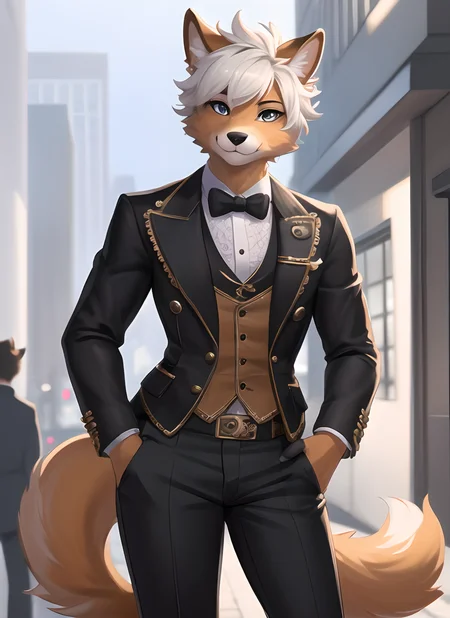
Disclaimer: Despite the name "Yiffymix", this model is not associated with Yiffymix itself.
Note: All example images are raw results, upscaled without the use of inpainting.
▼About
Hello and welcome. This model is an upgrade from my previous model Lawlasmix. It was developed using AOM3 and various other models, so be sure to check those out.
It's capable of generating both SFW and NSFW furry artworks with consistent quality showing decent level of detail in hands, clothing, backgrounds and so on (for a SD 1.5 based model mind you). Compared to its predecessor, this model leans more towards the anime style and doesn't always require artist tags (it can still adapt styles if you do use them). Writing prompts for this model can be tricky for newcomers, so please read the tips carefully!
▼Tips
Personally I use it with these settings:
Batch count: 6
Clip skip: 1 or 2 (for different styles)
CFG: 6-8
steps: 40-150
Size: 512 x 704 or 512 x 780 .etc (then use hiresfix, or SD upscale in img2img )
Sampler: DPM++ 2M Karras or Euler a
Prompting
The model can make amazing results with very simple prompts so long as you use it right. It uses both danbooru and e621 tags, like 1boy, 1girl, solo_focus. It's recommended to start the positive prompt with "(furry art, uploaded on e621:1.4)" and negative prompt with "(worst quality, low quality:1.4)". Since the merge has significant amont of anime models in it, you need to give more weight to furry related tags. Use tags like (anthro furry:1.6) in the positive prompts and (human:1.6) in order to get it to make furry art. The model performs rather well when you specify the color of the fur. For instance, (detailed red scales:1.5), (detailed blue fluffy fur:1.5). Feel free to check out the example images for their prompts to help you write your own.
VAE
Without using a VAE, the model’s outputs may suffer from color loss. Consider using anythingv3 VAE or orangemix VAE. The default option that comes with this model is orangemix VAE. If you prefer not to use any VAEs or encounter issues, use versions with a VAE baked into the model.
Embedding
Feel free to use other textual inversions, but I strongly recommend boring_e621. It's trained specifically on furry artworks and works great in this case. EasyNegative is another decent option.
Known problem(s):
Since the has AOM3 mixed in it, it's very common for it to generate results in which characters have "M" shaped hair. Consider using tags like (unique hairstyle, unique fringe, unique bangs:1.6) or using img2img to generate alternative images to help you mitigate it.
The model has reported to be temperamental so to speak. I suggest setting batch count to more than 2 so you have more results to choose from.
▼Credits:
Models used (as far as I remember):
Apologies for not keeping a detailed record of all models used. Without their amazing work, this model wouldn’t exist. Kudos to every creator on this site!
Description
Original version with VAE baked in. The results generated should be the same as the original version. You don't need any other VAEs now.
FAQ
Comments (50)
Kinda odd to merge in both AOM and DivineElegance, since DE is an AOM-based model anyway. If you're getting a bit too much of the AOM hair, that's probably contributing to that.
I also used add difference tho. I had many trails and errors before I get this model so in the end, I'm not sure if they are both in the merge or I just briefly used it
For some reason, I keep getting human skin in some complex outfit cases? Anyone has any idea? https://imgur.com/a/wl7zAzV
and here are my promps:
(furry art, uploaded on e621:1.4), (anthro furry:1.4), masterpiece, best quality, hd, high detail, a lot of small details, white cat, (detailed white fur), full body, teasing, (breast grab), highly detailed furry face, (office dress:1.5), (unzipped), sexy, pinup, erotic,
Negative prompt: (worst quality, low quality:1.4), (human:1.6), boring_e621, ((human skin)), art by bad-artist, lowres, text, error, cropped, worst quality, low quality, too many hands, too many legs,
Steps: 35, Sampler: Euler a, CFG scale: 10, Seed: 2974251645, Size: 560x872, Model hash: af19b898c5, Model: lawlassYiffymix20Furry_lawlasmixWithBakedIn
Used embeddings: boring_e621 [7b59]
((human:1.4)), (human face). also try specifying body fur color like (white breast) or smth
Great model. :) My favorite furry model. I've been able to get some great images.
I did notice though when trying to make a female feline with white fur, I had to use (((white fur covering body))) or else she would get like a furry face, and a skin tone human body even with (human:1.6), (smooth skin:1.6) in the negative prompt.
Just wanted to throw that out in case anyone else had the trouble. ;)
Thank you for the great work! Love the model!
Здарова братан,у меня проблемы с стейблом у меня не так он рендерит можешь помочь? Dio_BlessedYou#1533
@HeZxc Привет, мой брат! В чем проблема?
что ты хочешь сделать?
@SlavaSobov У меня проблема с самим рендером,абсолютно не то получается,в дс сможешь перейти?Dio_BlessedYou#1533
@SlavaSobov Ну короче результат вообще не тот получается,да и бывает человеская кожа.
@HeZxc Я думаю, что большая часть проблем с человеческой кожей связана с акцентом на аниме в тренировочной модели.
Белый кот со светлыми волосами, попробуйте настройки, которые я использую для них. Вы можете отредактировать их, это может вам помочь.
@SlavaSobov У меня в общем стиль вообще не тот получается,даже на примерах,абсолютно другой чекал у других и копировал тоже самое,опять другой стиль.
@HeZxc Ваш CLIP установлен на >1? Это влияет на стиль. Также метод образца, может быть, какая-то LORA или инверсия текста все испортили?
@SlavaSobov Боринг и чистай у меня стабле,1 клип всегда.Больше нечего не менял,я рендерю работы предоставлены автором,они абсолютно различаются,модель таже самая которая указана,вот у других беру меняется лицо только.
@HeZxc Мне жаль, мой брат. Мои изображения никогда не бывают на 100% одинаковыми, но это близко. Я не уверен, почему возникает ваша проблема. :/ Похоже у вас все настройки правильные. Когда я не могу получить хороший результат, я возюсь с методом выборки, CFG и просто начинаю рендерить 3-5 изображений за раз, пока не дойду до конца путем итераций/проб и ошибок.
There were nice NSFW examples here and now they're gone... what happened?
I think you need to update your account settings, I was in the same situation and it turns out that civitai implemented a new beta* content filter....
Civitai is trippin', man. some of these gens are flagged for review for no reason
I have uploaded all of them on to my google drive
@aiurstr I have changed it already, since first I set up the account, but I can find other's post but this one had a blue dragon as well, and now there's no more.
@ad_Marzzel You probably had misremembered. There's no blue dragon
@Lawlas Nope, I am super sure there was one, very uh... nsfw one, showing off. The details were impressive enough to convince me this was the model I was looking for to download this model and try out that one to get that result back in then with my own creature.
@ad_Marzzel Let me see if I can find it
@ad_Marzzel you probably mean this one. It's from another user
@Lawlas nope. I meant this one: https://civitai.com/gallery/296948 , it was gone for a while, like a day or two ago it reappeared again. I was searching for this because it was the first example I saw for highly detailed scales and properly rendered face. Thanks anyway. :)
just go to your settings and turn on the nsfw button took me a little bit to notice that too -w-
@Brokencreation I have had the NSFW filter Off all the time, but thanks x3
I cannot, for the life of me, get good results with this sadly. Even when I do not try to make something original and literally copy the creation details from one of the provided images, the results are vastly different and include extra limbs, different poses and a noticeably different quality.
(The blue fox and the dragon lady for example always appear as human for me)
I would love to like this, and I'm convinced the problem is on my end -either user error or a bad install on my part. Either way, it does not work for me at all.
I'm sorry to hear that. With these infomation from you I can't really provide much solution here. Please check the dimensions of the images you are intended to generate and the weighting of furry related tags. Also try out those embeddings I recommended
Yeah same. I'm using InvokeAI for my tool and I converted it into a diffuse model. Always creates a human anthro hybrid (cat girl) for all the prompts based on your example pictures, I negative promt to try to remove it like human, kemono, hybrid, human skin. but it seems like theres no change, what Tool do you use for generation?
@Visayas it might just not work on invoke ai. I use stable diffusion webui
I'm having the same issue with Automatic1111 unfortunately. I went ahead and literally dragged one of the pngs in the Google Drive link (thank you!), so that parameters are guaranteed to be same. But results are still completely off. I downloaded the bad_e621 embedding as well.
Where I wonder, was maybe anything else used? Like any other embeddings or things that are not included in the png chunk info? Thank you in advance!
+1, always produces anime-like humans.
I understand you uploaded the photos that Civit flagged to a Google Drive, but are you able to also upload the prompts as well, or at least list them somewhere? There's a few in particular I'd really like to use, specifically the three that have "gay twink" as tags in their filename. I was looking to see if I could fiddle about with those tags (as I'm not very good at generating my own, but have had some success editing other existing tags) to create a base from which I could get commissions done rather than having to describe a character with no character sheet.
Nice model, but when I create a dragon image, the head often ends up outside the canvas and instead, there are close-ups of the limbs, even though I added "missing head" in the negative prompt. Additionally, when creating a dragon image, no matter how much I emphasize that I need a dragon's face, the head often turns out to be a human or wolf head. Out of hundreds of images, less than 15 actually match the description.
use negatives like "cropped" "off screen character"
I have a question probably someone asked already but I cannot find it. Is it possible to render two characters of totally different species and colors in the same picture? Somehow?
Inpainting
@Lawlas Hmm interesting, thanks :D
BREAK
@FreezingCircles Break?
Try the RegionalPrompter extension if you have Automatic1111. It was a bit of mindblow at first, but gets easier if you reference the guide on their GitHub often.
@Solence wouldn't latent couple + composable lora work better for this?
@Razgrits
Possibly. I'm not versed in latent coupling nor composable Loras, but I'll look into them now! Thanks.
use regional prompts (feature on automatic1111's SD webui, and yes I know I'm very late)
Can i get a list of the basic prompts to start? I'm confused with these numbers.
Someone please upload this model to Tensor Art
Details
Files
lawlassYiffymix20Furry_lawlasmixWithBakedIn.safetensors
Mirrors
lawlassYiffymix20Furry_lawlasmixWithBakedIn.safetensors
lawlassYiffymix20Furry_lawlasmixWithBakedIn.safetensors
lawlassYiffymix20Furry_lawlasmixWithBakedIn.safetensors
lawlassYiffymix20Furry_lawlasmixWithBakedIn.safetensors
lawlassYiffymix20Furry_lawlasmixWithBakedIn.safetensors
lawlassYiffymix20Furry_lawlasmixWithBakedIn.safetensors
lawlassYiffymix20Furry_lawlasmixWithBakedIn.safetensors
lawlassYiffymix20Furry_lawlasmixWithBakedIn.safetensors
lawlassYiffymix20Furry_lawlasmixWithBakedIn.safetensors
Available On (1 platform)
Same model published on other platforms. May have additional downloads or version variants.