
NEW 2vXpSwA7: anytest-v4 | openpose-v2_1 || abovzv: segment || bdsqlsz: canny | depth | lineart-anime | mlsdv2 | normal | normal-dsine | openpose | recolor | segment | segmentv2 | sketch | softedge | t2i-color-shuffle | tile-anime-α | tile-anime-β | tile-real || BRIA AI: bg-gen | canny | colorgrid | depth | NEW fill | openpose | recolor || CVL-Heidelberg: canny | depth || destitech: inpaint | inpaintv2 || diffusers: canny small | mid | full | depth small | mid | full | zoe || EcomXL: inpaint | softedge || Eugeoter: NEW noobai canny | depth | lineart-anime | lineart-real | mangaline | normal | scribble-pidi | scribble-hed | softedge-hed | tile | sdxl anime-canny | vidit-depth || h94: ip-adapter | ipa-vith | ipa+ | ipa+face || Hetaneko: pony canny | cannyv2 | color | depth | replicate | replicatev2 || HighCWu: canny-v3 || huchenlei: PuLID || Kataragi: canny | flatline | flatline-lora | inpaint | NEW ipa | line2color | line2color-lora | lineart | lineart-lora | NEW noob-ipa | recolor | recolor-lora | NEW rough-coating | tori29-blur | xdog-sketch || kohya-ss: real blur | canny | depth | anime blur | blur-beta | canny | depth | openpose | openposev2 | replicate | replicatev2 | scribble || PromeAI: lineart || ShermanG lineart || Stability.ai: canny | depth | recolor | revision | sketch || SargeZT: depth-16b-zoe | depth-faid-vidit | depth-zeed | depth-zoe | softedge | t2i-adapters binary | canny | color | depth | segmentation | softedge || TencentARC: canny | depth-midas | depth-zoe | lineart | openpose | recolor | sketch || TheMistoAI: mistoline | mistoline-lora || thibaud: openpose | openpose-lora || ttplanet: tile-real | tile-realv2 || NEW windsingai: pose | tile | tile-10w || xinsir: canny | cannyv2 | depth | openpose | openpose-twins | scribble | scribble-anime | tile | union | union-promax
ControlNetXL (CNXL) - A collection of Controlnet models for SDXL
(13.01.2025 - First NoobAI controlnets uploaded by Eugeoter)
(12.01.2025 - First Illustrious controlnets uploaded: windsingai-pose & -tile)
This collection strives to create a convenient download location of all currently available Controlnet models for SDXL. Please do read the version info for model specific instructions and further resources. If you are the author of one of these models and don't want it to appear here, please contact me to sort this out. The naming scheme of the files follows lllyasviel's from here https://huggingface.co/lllyasviel/sd_control_collection/tree/main.
CAUTION: The variants of controlnet models are marked as checkpoints only to make it possible to upload them all under one version, otherwise the already huge list would be even bigger. If you use downloading helpers the correct target folders are extensions/sd-webui-controlnet/models for automatic1111 and models/controlnet for forge/comfyui.
Requirements for Automatic1111: at least version 1.5.0, better upgrade to the latest version of 1.6.0. + sd-webui-controlnet extension v0.400+. Bugs or weird behaviour might occur. If you encounter any irregularities you can join us on our discord and ask for support or get in contact with the developers of Automatic1111/Controlnet via github/huggingface.
A huge thanks to all the authors, devs and contributors including but not limited to: abovzv, bdsqlsz, BRIA AI, CVL-Heidelberg, destitech, the diffusers institution, Eugeoter, h94, Hetaneko, HighCWu, huchenlei, lllyasviel, kataragi, kohya-ss, Mikubill, PromeAI, SargeZT, ShermanG, Stability.ai, TencentARC, TheMistoAI, thibaud, ttplanet, windsingai and xinsir.
Description
Tile-Realistic model released by bdsqlsz on huggingface
FAQ
Comments (54)
Very good! Can you do it with the a-detailer models?
oh, they are already available on civitai, so probably better to just create a collection of them then, wouldn't want to create so many duplicate model uploads
Can I just give a HUGE shoutout to ttplanet's Tile-real!! It is simply incredible at 1.5 upscale for adding detail and really seeming to understand a scene!!
yeah, i can only recommend everyone to go https://civitai.com/user/ttplanet and leave a buzz tip and/or some thumbs ups! to the other model authors where possible of course, too :)
How do you use it as an upscaler?
What folder do we put these in/how to install and use?
Hello, if u use automatic1111 or forge need to put models in webui\models\ControlNet
doesn't seem to be working on sdxl?
me too the segmentation is not working
[IP-adapter & yaml file]
I am using Easy diffusion v3.0.7. I'd like to use controlnetxlCNXL_h94IpAdapterPlus, but the error Reason: Can't find a yaml config file for the ControlNet! emerged. Does IP-adapter does not require a yaml file ? I just want to make both text and image prompt available.
Are you planning on doing some kind of compilation of the models by something like type or creators?
well, a list sorted by creators is at the top of my description. probably won't change much here until model pages and collections are overhauled.
@eurotaku sorry, I meant larger files containing each creator, for example, so it's easer to download, like done with "Openpose SDXL".
A smal question: are the models to be downloaded to "...\models\Stable-diffusion" or "...\models\Controlnet"?
for auto1111 it should be the models folder of the controlnet extension, for forge the controlnet folder under models. i think comfyui uses that folder for its controlnet models, too
If loaded with the civitai+ extension, everything goes automatically to the loacation ".../stable-diffusion-webui/models/Stable-diffusion/".
@dschonich yep, you have to remember to edit the path for the".../models/controlnet/".
I think you put the wrong category, it's controlnet, not base model/checkerpoint.
the model type is set to checkpoint only as a workaround, because we don't support the upload of several variants like fp16/32/bf16 or full/pruned for controlnet models, yet. otherwise each individual model file would need to be put into its own version, resulting in an even longer list than it already is. i hope we manage to overhaul the model pages in the near future, though :)
If loaded with the civitai+ extension, everithing goes to the ".../stable-diffusion-webui/models/Stable-diffusion/" folder. Is this intended?
does not work on PonyXL. people should know.
tried openpose+ip-adapter, worked like a charm. any specific model you tried that didn't work for you?
@eurotaku tried depth and it doesn't function.
@eurotaku What is that both you used? are they extensions for controlnet?
@chrisss1 both are controlnet models to guide the image generation, openpose uses poses of these colorful stick figures, ip-adapter transfers styles from one image to another
@eurotaku Thanks, i will look into it.
@eurotaku which ones please?
I came from the future to say that it now seems (I haven't fully tested it) like ControlNet models support pony: NEW: Hetaneko (Pony): canny | cannyv2 | color | depth | replicate | replicatev2
@thiagojramos thanks il ltry it
@thiagojramos Appreciate it for telling us. Will try those
Is there a place where it is explained what each of these does? And when do you use one over another? I've looked at the huggingface page with the examples but they are not very self explanatory for a beginner like me.
i dont know which web ui u use , but usuallythis file goes inside to the controlnet folder or any directory that webui is readind and loading the model (this is not a checkpoint but a model to guide the stance so you have to use it WITH a checkpoint) then you have to apply your pose to your image from any image. this is an sdxl checkpoints compatible. i.e. for comfyui goes to comfyui/models/controlnet/thisfile.
then load it in your webui with load controlnet node and apply it with apply controlnet node.
I'm just only confused. Is there any tutorial, explaining how to set up and how to use?
How to make this working with all that stuff in the default download folder ".../stable-diffusion-webui/models/Stable-diffusion/"?
(The civitai+ extension loads it to this destination.)
If I'm selecting one of these checkpoints, I've got nothing, just a gray field.
@dschonich should be something more like this
...\stable-diffusion-webui\extensions\sd-webui-controlnet\models
@dschonich i dont know for every ui but for comfy u need lllite loader , then navigate to the directory comfyui/custom nodes/lllite/models and put those files there. hope it helps.
I'm very late to the party but the following link might help someone understand it in the future. It explains each "control type" (canny, depth, openpose, etc) and what they do.
https://stable-diffusion-art.com/controlnet/
The only shortcoming I see in the guide above is the fact that it was made for 1.5, when we only had one model for each control type (one model for canny, one for depth, etc), while now in SDXL we have several models for each control type, so it's up to you to test which model better fits your needs. If you're using a Pony model, you can take a look at my comment where I talk about my impressions on which model is best for each control type.
https://civitai.com/models/136070?commentId=443624&dialog=commentThread
Another thing to note is that you gotta put these models on a specific path for them to work.
If you're using Forge, it's: models\ControlNet
If you're using Auto1111, then I think (can't remember exactly) it's: extensions\sd-webui-controlnet\models
If you're using ComfyUI, then I have no idea.
@dschonich you may want to take a look if you're still struggling with ControlNet.
what is the correct preprocessor for controlnetxlCNXL_bdsqlszLineart.safetensors? :-)
it seems came up error on my end as well, I used tencentARC-lineart instead.
thx ;-) am i right - https://huggingface.co/TencentARC/t2i-adapter-lineart-sdxl-1.0/tree/main and rename it?
no, i am not... failed again ;-)
@slartibart353 Nah, no need to change the name, but it's up to you. Just make sure your workflow or UI is selected as the chosen names for a process or interface. If this continues to fail, IDK what to do next but wait.
@slartibart353 PS, there is tencentARC-lineart file on this page.
@midnight1111 i found it already... thank you :-) but it does not work with ForgeUi i guess :/
“When I use ControlNet inpaint, the redrawn part always turns into meaningless black. Does anyone know how to fix it?”
i have no idea honestly, maybe you can join our discord to ask our community for help?
@eurotaku okay
I found some CN models trained specifically for Pony Diffusion, haven't tested them yet
https://huggingface.co/Hetaneko
uploaded :)
Yes... But how do you use them? In ComfyUI, loading one of these models and then applying it with Apply Controlnet causes an error. Any help would be appreciated.
@cosmogonaut you need to use the controlnet lllite node https://github.com/kohya-ss/ControlNet-LLLite-ComfyUI
I can't seem to make the t2i-color-shuffle work. It gives me a "'NoneType' object has no attribute 'copy' " error all the time. Anyone managed to make it work?
are you on comfyui? if so, did you use the correct nodes to load the t2i-adapter? you can find an example workflow here: https://comfyanonymous.github.io/ComfyUI_examples/controlnet/depth_t2i_adapter.png
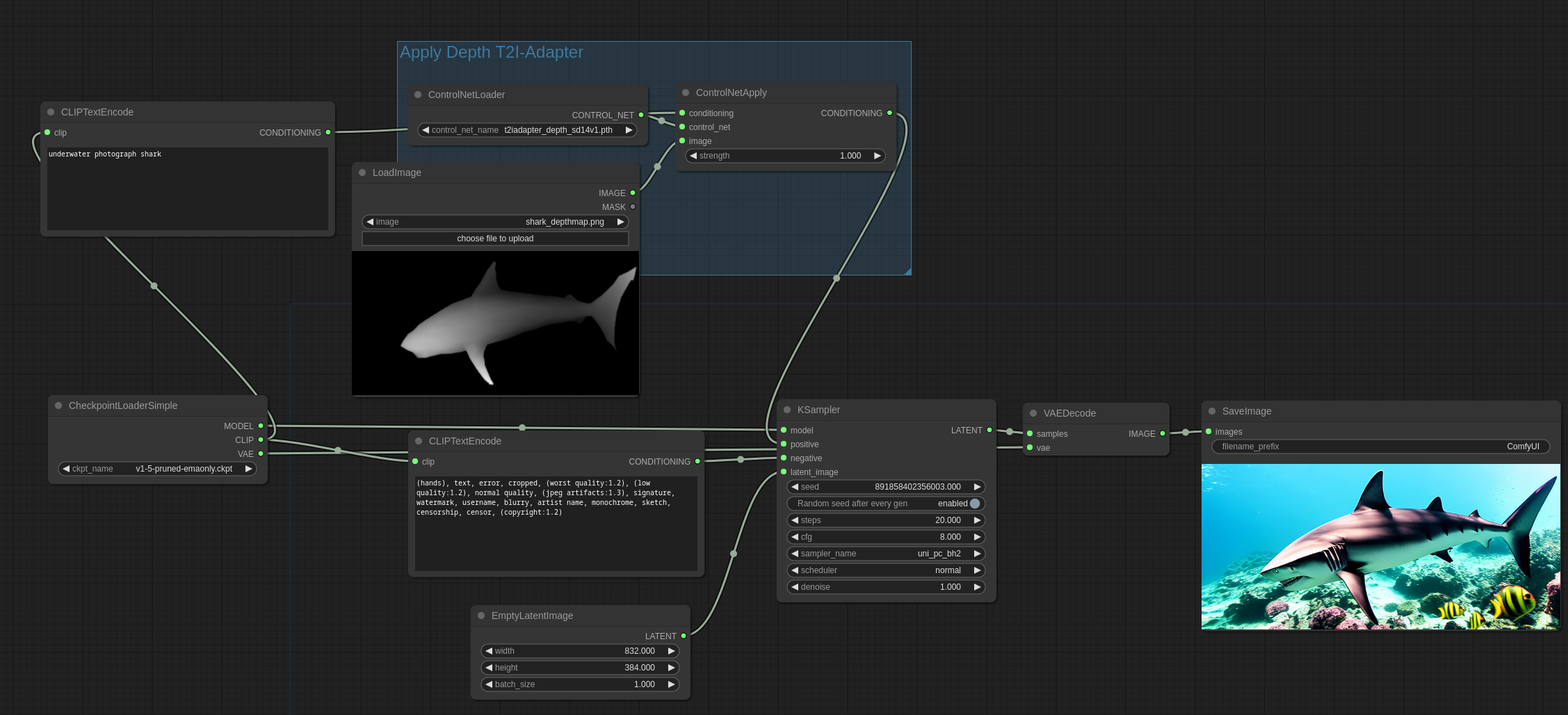
@eurotaku I'm in Comfy, yes, the only difference with my node tree are that I'm using Apply ControlNet (Advanced).
@MacabreGinger hm, no idea then. can only invite you to join our discord for more in depth support by our community then. will be way easier to troubleshoot your issue with more info, log files, full workflow you are using etc. there are quite a few comfy cracks over there :)