


Workflow for XL/Illustrious/NoobAI Models
Any feedback would be appreciated.
See the Article for a Guide:
https://civarchive.com/articles/17339
https://civarchive.com/articles/17339
Key Features:
LoRA
TIPO Prompting
Detail Enhancers
ControlNet Upscale
IPAdapter
HiresFix
OpenPose
Wildcards
ControlNET
Color Match
FBCNN
Regional Prompting
Inpaint
Outpaint
Workflows included:
🟥Advanced: comprehensive text to image workflow
🟨Basic: more basic version of the Standard workflow
🟦Standard: more basic version of the Advanced workflow
🟩Detailer: detailing previously generated or existing images
Experiment and enjoy!
Description
Update from V25→V26
(This is not an exhaustive changelog)
General:
General improvements and bug fixes
Changed Group Bypasser sorting to position
Adjusted default values
T2I:
Updated Regional Prompting
Changed Refiner with 2nd KSampler
Basic:
CFGZeroStar added
Epsilon Scaling added
FAQ
Comments (20)
Why did you exchange refiner from T2I?
Since it is better at preserving the overall style of the image.
@Legendaer, I noticed that usually an upscaler's job spoils the picture the most, no matter what settings I set. Especially perfect at cancelling adetailers' job. Is it really worth it to partially redraw the image with second KSampler?
@alishaaryni Is it worth it? Probably not, but my aim with this workflow is to offer a degree of flexibility. Since it's disabled by default and doesn’t impose any additional requirements, it's essentially just a freebie.
After using 2nd Sampler, the color of the image will be seriously shifted! And it couldn't be fixed by color match.The color of the entire picture will be reddish or purple, but the 2nd Sampler I built myself will not cause color shift problems. I hope you can improve this in V27.Thanks!
I couldn't reproduce an image with a strong color shift on my end. I ran some tests and only noticed a slightly lower average luminance with darker blacks and higher contrast, not a red/purple hue shift. Could you provide the settings you were using?
Here is a summary of my test results: https://i.postimg.cc/QM356QXg/ALLREPORT.png
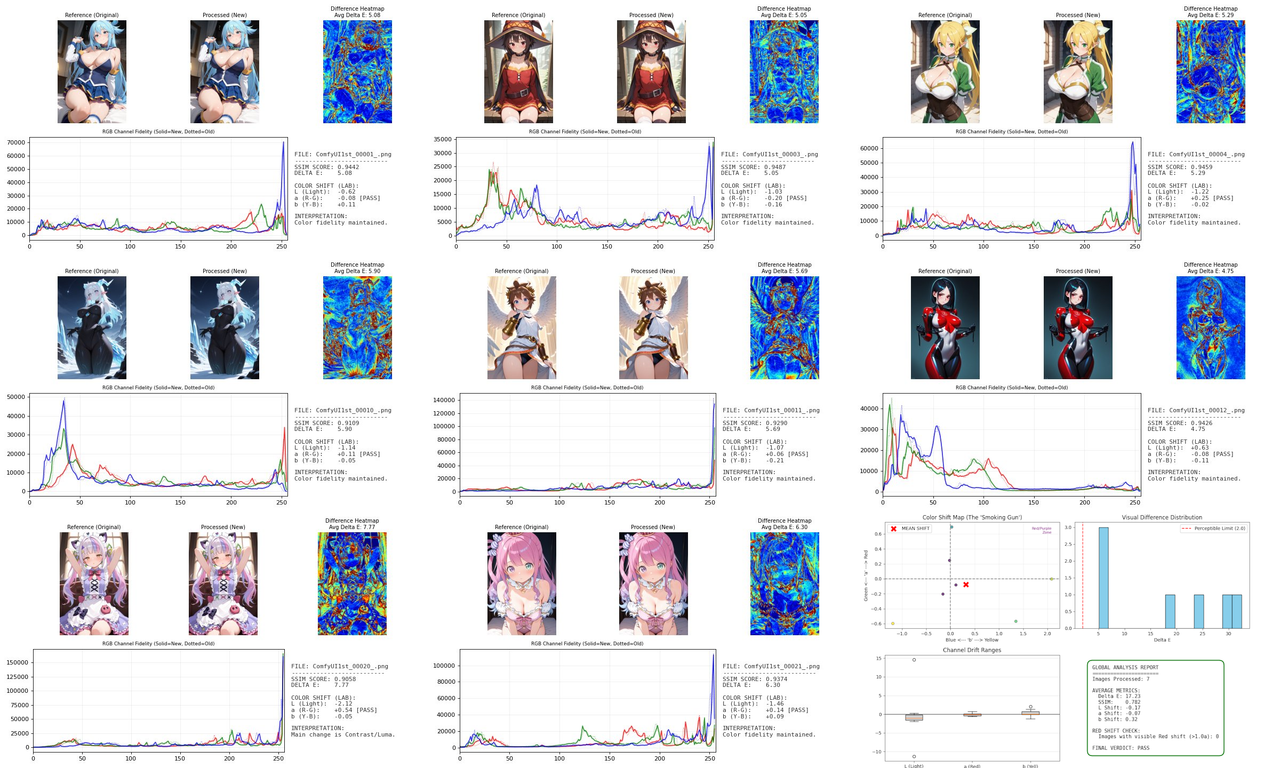
Appears to be a problem with Z-TIPO in version 26 based on toggling all the groups on and off.
I'm getting AttentionCouplePPM 'cond_4' error as of today even after reinstalling comfy and everything from scratch
It seems like downgrading ComfyUI-ppm to the previous version resolved this
@somethingforsaya Yeah, I encountered the same error after doing some testing on the most recent ComfyUI-ppm version (1.1.0). Downgrading to version 1.0.48 works for me, while version 1.1.0 seems to have the issue.
Using v26 and so far they're all working great and I'm loving it as a newbie. By the way, is it possible to add background remover for Detailer workflow too? I noticed background remover exists in T2I but not Detailer. Since Outpaint only exists in Detailer, it's kinda bummer that it doesn't also have background remover. Please consider for future version!
Thank you for the feedback! I will definitely consider adding it to the Detailer workflow in the next iteration
First off. Amazing kit, this has been my one and only suite of workflows for months at this point. So thanks a lot for making it.
Do you think it's possible to work in Regional prompting into the Detailer workflow? I tried wiring the regional prompt setup model output into the detailer pipeline but it didn't really react.
I assume since each detailer is working with the bbox image, it doesn't really care which part of the image is defined as red by the regional mask and thus only applies the main prompt + the specific detailer prompt.
Is this topic something you've thought about before, or just what are your thoughts on it in general?
Thank you!
It's definitely possible (I mean, the regional prompt in the T2I workflow does affect the detailer pipeline), but I am not sure if it would really be worth the effort to use it in the dedicated detailer workflow.
I love the workflow but I'm having a few issues. The regional prompter works fine if I create a colored mask in photoshop but using the inbuilt mask editor doesn't. I've tried paining normal masks, using the paintbrush, various blending options etc. Is there any benefit to the whole color scheme rather than just having 3 normal masks?
All of my attempts at using the IP-adapter features throws the following error:
KSampler
shape '[5, -1, 10, 64]' is invalid for input of size 40960
I've tried all the clip vision and IP adapters I can find but can't get it to work. I assume it's related to me running a SDXL model but I'm a total newbie and have no idea.
Hi! Make sure you are using the color brush and not the mask brush when editing the image directly in the inbuilt mask editor and save it. There isn't really a huge benefit to using the color scheme instead of normal masks. It's just that it's easier to load previously created maskings this way. As for the issues with the IP-Adapter, I would need to know what models you are using. But try using either ip-adapter-plus_sdxl_vit-h with CLIP-ViT-H-14-laion2B-s32B-b79K (for SDXL, I would suggest this), or noobIPAMARK1_mark1 with CLIP-ViT-bigG-14-laion2B-39B-b160k (for NoobAI/Illustrious). If those don't work either, make sure to double check if you downloaded the correct model file.
I just redownloaded the workflow and tried again but editing the mask with the paintbrush and RGB of 255,0,0 etc shows up fine in the previews but has no affect. The same mask when created in photoshop and loaded directly works fine so it isn't a huge issue.
I'm using waiIllustriousSDXL_v150 so attempted to download CLIP-ViT-bigG-14-laion2B-39B-b160k. This is probably a dumb question but specifically which do I download from https://huggingface.co/laion/CLIP-ViT-bigG-14-laion2B-39B-b160k/tree/main
I only started using comfy/AI in general a few days ago so there is a fair chance it's user error.
@somethingforsaya You need to download the open_clip_model.safetensors file and rename it.
Hey friend. been loving the new release. I was reading the documentation and noticed there was no body detailer model linked to download. Which one would you recommend? I'm using everything listed in the article.
Hey! Here is a list of some models of varying sizes: https://docs.ultralytics.com/tasks/segment/#models. I would recommend YOLOv11m-seg since it should suffice for most cases.