


Workflow for XL/Illustrious/NoobAI Models
Any feedback would be appreciated.
See the Article for a Guide:
https://civarchive.com/articles/17339
https://civarchive.com/articles/17339
Key Features:
LoRA
TIPO Prompting
Detail Enhancers
ControlNet Upscale
IPAdapter
HiresFix
OpenPose
Wildcards
ControlNET
Color Match
FBCNN
Regional Prompting
Inpaint
Outpaint
Workflows included:
🟥Advanced: comprehensive text to image workflow
🟨Basic: more basic version of the Standard workflow
🟦Standard: more basic version of the Advanced workflow
🟩Detailer: detailing previously generated or existing images
Experiment and enjoy!

Description
Update from V28→V29
(This is not an exhaustive changelog)
General:
General improvements and bug fixes
Adjusted default values
Expanded the Detailer Nodes and some other stuff
Changed Resize nodes
Advanced:
Changed Name T2I → Advanced
Added Z-TIPO Alternative using QwenVL instead
Added simple I2I with Load Image
Basic
Changed Name BasicT2I → Basic
Added simple I2I with Load Image
FAQ
Comments (15)
Is there any way to get this to be a SafeTensor version?
does it work well on a cloud hosted Comfy like for google colab? if yes, do you have a colab notebook you recommend?
I don't see a reason why it wouldn't, but i haven't used one in a while so i can't really recommend a specific one.
BE CAREFUL - If you have troubleshoot in UltralyticsDetectorProvider, then try reinstall numpy, opencv-python, scikit-learn. Module versions in requirement.txt in each github are old.
Has anyone used both Z tipo and qwen? How is it? Ive never used it.
just very interesting)
What sociable people, Im amazedXD
love this workflow but more often than not the hand/body/nsfw detailer just ruins the image for me
yes,this true,but you can block them manually,or you can just reduce noise,i think this is enough for generate
one of the best workflow on the site imo, the downside is sometimes when adding multiple lora the lora become undetected and need to re add it again, but with lora manager we can just add it with one click on the flying paper button, but kinda annoying it happens really often
any idea why this happening ?
i'm grateful for the workflow tho, thank you
I like the detailer option. I can run the detailer only on the images I like after running a batch of 400+, etc.
Is there one that can fix the number of toes, fingers, after generation?
I'm fairly clueless but v29 seems to have some issues? The first ksampler fails by default because of the denoise connection (it's connected to scheduler on the input parameters) . The detailer pipeline also seems to fail for similar reasons with "invalid scheduler" due to a similar connection to input parameters.
Maybe it's just my setup somehow but v30 seems to have the same problem for me
https://files.catbox.moe/5gpteg.png
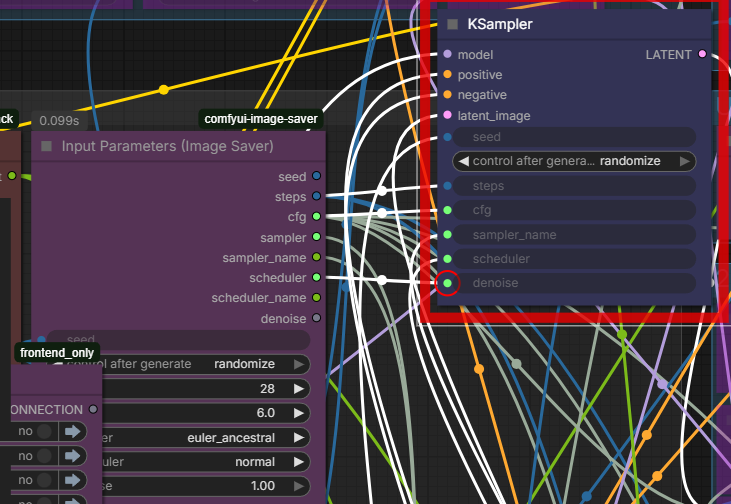
You're right. I fixed it myself
Weird... are your comfyui and nodes up to date? It's supposed to look like this: https://imgur.com/JLcfZcc. Also, I checked the .json file itself (https://imgur.com/kKOkhJw), and the link is correct in there, so there is some kind of issue during the import. My guess from the image you provided is that there is a conflict or something with the "Input Parameters (Image Saver)" node, since the outputs differ in the image.
@Legendaer My Image Saver is version 1.16.0 if that helps. I was able to manually reroute them and get it all working so I won't mess around with any versions etc for now
Thanks for the workflow and replies though; it's really good.