


These workflows can be used as standalone utilities or the nodes can be inserted in your workflows
Multi-Upscale Nodes - Demo Workflows
The upscale nodes and templates were designed by the Comfyroll Team based on requirements provided by THM and other users on the AI Revolution discord sever.
The templates have the following use cases:
Batch upscaling, resizing and sharpening of images in a folder
Fine tuning upscaling using multiple upscalers
Hires Fix
List of Templates
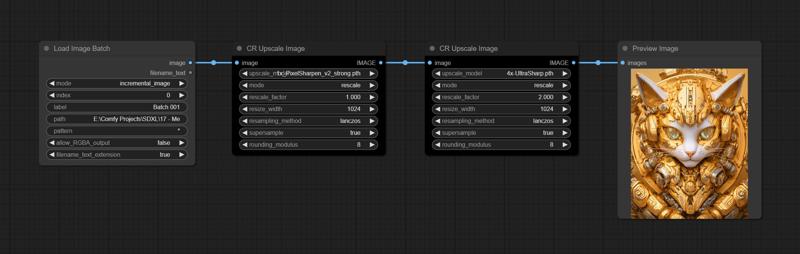
Simple Batch Upscaling Demo
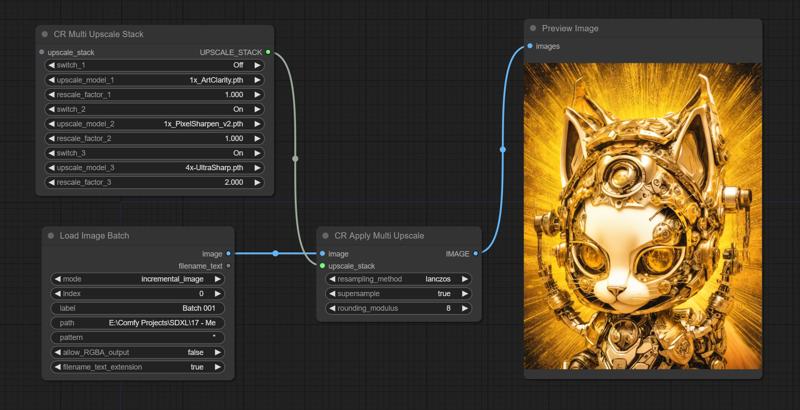
Multi Upscale Stack Demo
Both templates can be used with SDXL or SD1.5
Upscale Methods
Rescale method
This is the default method
The rescale factor is based on the size of the input image
e.g. a 512 x 512 image with rescale factor 2.0 will be rescaled to 1024 x 1024 after upscale models have been applied
Resize Method
With this method the aspect ratio is retained and the image is resized based on the resize_width
Example 1 - Multi-Upscale
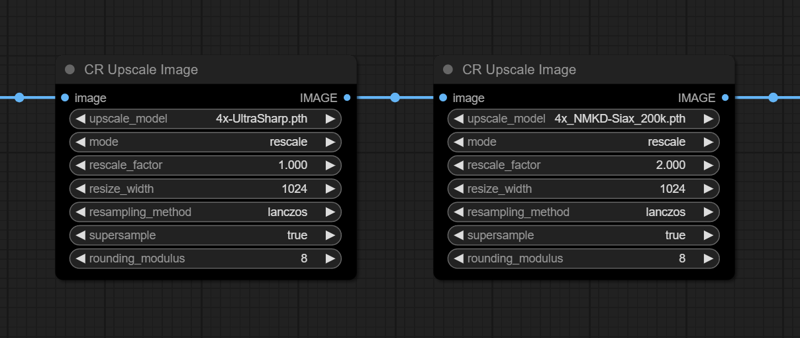
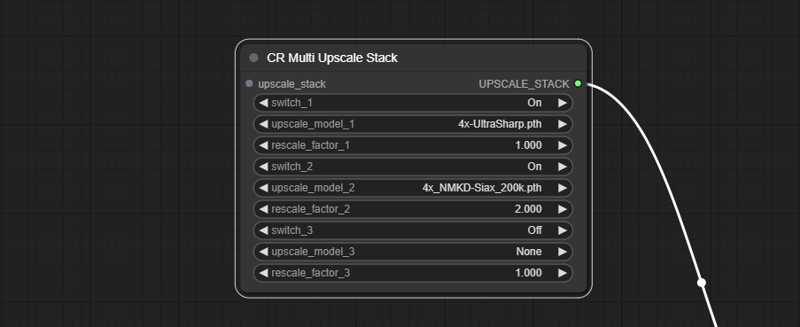
Starting with a 512 x 512 image, if you do two 4x upscales with a 1.0 factor after the first upscale and 2.0 factor after the second upscale, then
the image size will upscale from 512 x 512 to 2048 x 2048
then rescale to 512 x 512
then upscale to 2048 x 2048
and then rescale to 1024 x 1024
Example using Upscale Image nodes:
Example using Upscale Stack nodes:
Example 2 - Replacing Existing Nodes
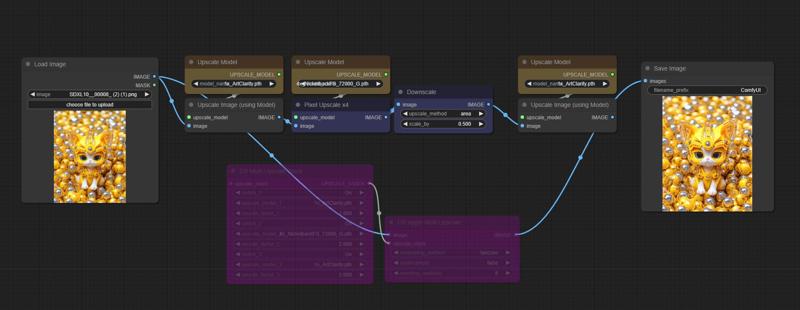
In this example upscale nodes in an existing workflow are replaced with the new nodes.
This is the before:
This is the after:
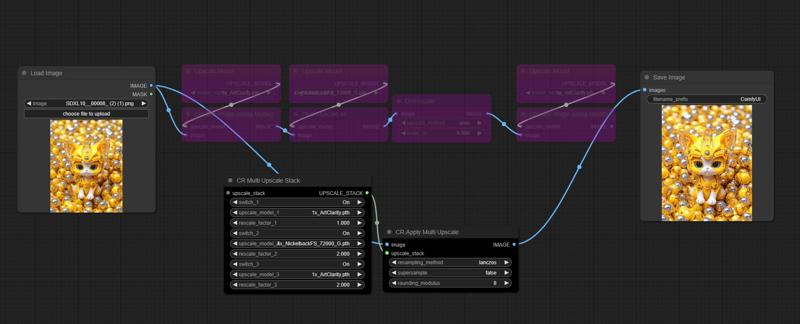
The rescale factors are always relative to the original image size.
After the first 1x upscale the rescale is set to 1.0 because no rescale is needed. After the second 4x upscale the recsale is set to 2.0. This is equivant to downsizing by 0.5 in the 'before' nodes. After the third x1 upscale there is no change in the size, but the final output needs to be 2x the original size, so the rescale factor is set to 2.0.
Nodes
CR Upscale Image
this node combines several existing nodes and adds some new features
supports both rescale and resize methods
CR Multi Upscale Stack
this is a data node that lists the upscale models and rescale factors that will be applied by CR Apply Multi Upscale
additional stacks can be chained together
a rescale factor can be configured for each upscale, these will be applied to the image size after each upscale
the last rescale_factor will determine the final size of the image
all rescale factors should normally be set to 1.0 excepting for the last one
advanced users can experiment with different values for the interim rescale factors
CR Apply Multi Upscale
a recursive loop applies each upscale and rescale based on the connected stack
this node uses the rescale method only
Templates
Simple Batch Upscaling Demo
simple design
SDXL or SD1.5
additional upscale nodes can be chained together
Multi Upscale Stack Demo
SDXL or SD1.5
the last rescale_factor in the stack will determine the final size of the image
the other factors determine the interim sizes between each upscale
additional stack nodes can be chained together if you need more than three upscales
Tips
You can add the image upscale nodes in any template
The nodes are particuarly good for hires fix
Upscale model stacks can be extended by adding more stacknodes chained to the first stack node.
Installation
Download the workflows
Install or update the following custom nodes
for Load Image Batch node
for the upscale nodes
Download some upscale models to get started, for example
You can find many more upscale models at these links
On first use
Select the upscale models
Place the images that you want to upload in a folder
Add the path to the folder in the Load Image Batch node
e.g. E:\Comfy Projects\image batch
it should contain at least one image file
Do a test run
Save a copy to use as your template
Troubleshooting
Please see our CivitAI article
Credits
LucianoCirino - for the original stack concept
THM - for assisting with requirements, testing the nodes, and for the cover picture
WAS - for the Image Resize code
Description
FAQ
Comments (14)
super wonderful use case and nice addon to the repository of nodes making upscale a ziffy ! thanks a ton
Thank you very much for creating this. Do you have any slider comparison between normal upscale and this workflow?
Hi, this workflow is actually using core comfy code under the skin, so it should produce the same results as existing nodes and offer similar performance. Where it differs is the ability to stack upscalers in an easy way without having a large number of nodes. This allows fine tuning your upscaling by combining different upscalers, particuarly with 1x upscalers. In testing have found that the CR Upscale Image can replace up to five separate nodes. For example, it can do hires fix using a single node between two Ksamplers. I hope this reply helps.
@Akatsuzi Thank you again for your clear explanation. It's really helpful.
Nice. Is there a way to somehow retain and transfer the filename of the loaded image to the processed image?
Hi, a simple but slightly messy way is to convert filename_prefix to input on Save Image, then connect filename_txt to filename_prefix, and then switch fielname_text_extension to false. You will get a filename that looks like SDXL_00008_00001_.png where SDXL_00008.png was the original filename.
@Akatsuzi Oh..well I could live with that, let me try this, thanks a lot! : D I tried messing around with the WAS Batch node but..I failed.
@jmueller I have been meaning to write a guide for the batch node, i'll get round to it soon. If you need help you can DM me on AI Revolution discord.
is the point of upscaling and rescaling to clean up the file?
its to produce a larger, highres image, or to add sharpness to an image
there are 100s or maybe 1000s of upscalers you can try
take a look at https://openmodeldb.info/
@Akatsuzi I've tried about 35 of them actually and did a study with different types of input images.
Also I'm regularly using a deblur model midstream before upscaling. I prefer to upscale using diffusion so that I get more real details, so use one of the tiled upscale. What I haven't been doing is upscaling and then rescaling with a model. I normally use Lanzcos to downsample if the upscale model I used is 4x or something that is too much. I have read that people use an upscale and downsample to reduce noise in photography so was wondering if you were doing something similar in SD? or had a different purpose.
Hi, the multi upscale nodes are intended for the types of upscale and downsampling that you describe above. This was a node I made on request from people who know a lot more about upscaling than me. If you would like to deep dive into these questions then I recommned joining a discord like AI Revolution where there will be many people who would just love to get into the details.