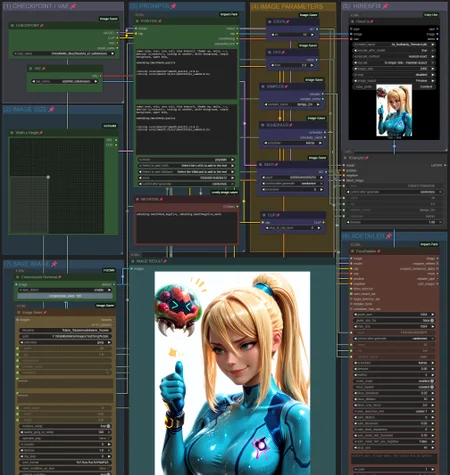














SMOOTH WORKFLOW
UPDATE: Smooth Workflow v.4!
With support for ZImage! Choose between a a workflow for ZImage or Illustrious/Pony generations.
Made it very simple to use. ^^
Both Workflows have to option to save with or without Adetailer/Face Detailer.
All images on the Showcase used the new SmoothMix Ultimate ZImage Turbo model!
ZImage parameters are very different for the Illustrious/Pony models. Make sure to not confuse them.
ComfyUI updates can be very frustating as they can make many extension incompatible/stop working - So I tried to use as little extensions as possible on v.4.
Shout out to Martin Rizzo (@Photographer) for making probably the best 'Save Image' Node compatible with CivitAI. It just works! =D
Used extensions on v.4:
ComfyUI-Impact-Pack and ComfyUI-Impact-Subpack
Small UPDATE: Smooth Workflow v3.1!
Facedetailer should work much better.
Used extensions:
Save image with generation metadata
ComfyUI-Impact-Pack and ComfyUI-Impact-Subpack
Advanced CLIP Text Encode (needed for workflow v.2 and v.3)
ComfyUI-FBCNN (Flexible Blind JPEG Artifacts Removal) (needed for workflow v.3)
UPDATE: Smooth Workflow v3!
Changed the node used for Positive Prompts: and ComfyUI-Impact-Subpack
The image results should propely show the effect of adding weights to LoRAs now!
The Positive Node is now divide 2 areas. Your Positive Prompt goes on the top one!
Use "Select to add LoRA" to open a list of all LoRAs you have installed!
Lets say you select "Smooth Booster v.3" on your list. It will show up on the prompt as <your_Loras_path\Smooth_Booster_v3>.
Remember to set the Weight you want on the end!! <your_Loras_path\Smooth_Booster_v3:0.5> Like so!
Check the showcase image for an example!
The bottom area is used to show the prompt that was executed. Its used for adding Wildcards and see the prompt used in the execution. If you don't use Wildcards don't worry about it. For more info check its Github on the Wildcards Nodes section.
Added extension: Flexible Blind JPEG Artifacts Removal
Added Compression Removal to the "(7) SAVE IMAGE" section.
This is a JPEG artifact/compression removal tool to help clean up the image a little. Its set to "auto detect - enable" by default!
More advanced users can disable it an modify the compression level as they wish.
For an indepth look at it check this Github!
For a even more indepth look check the Paper on Cornell Unniversity.
===========================================================
UPDATE: Smooth Workflow v2!
Added extension: Advanced CLIP Text Encode
Added CLIP to the "(4) IMAGE PARAMETERS" section.
If you are having dificulties recreating images from CivitAI or tools using A1111, like Forge, selecting "stop_at_clip_layer" to -2 will help to recreate images similar to those more easily.
For more advanced users the Advanced CLIP Text Encode was added to the "(3) PROMPTS" section
With these you can change both "weight_interpretation" between A1111, ComfyUI and others. For more info check the GitHub.
==========================================================
Its divided in sections to make it easy for begginers to navigate.
(1) CHECKPOINT / VAE
Very straight foward. Just choose your Checkpoint and VAE.
(2) IMAGE SIZE
Select your image size. I can freely adjust it. By default its set at 832x1216 since its the one used by CivitAI.
(3) PROMPTS
Type your positive and negative promtps here.
To use embeddings use this format: embedding:your_embedding_here
Example: embedding:SmoothNoob_Quality
To use Loras, use this format: <lora:you_lora_here:weight_number_here>
Example: <lora:Smooth_Booster:0.5>
Doing so will make sure CivitAI can detect your embeddings and loras propely.
(4) IMAGE PARAMETERS
Set the number of STEPS and CFG. By default its set as STEPS: 30 and CFG: 5.0.
Choose the Sampler and the Scheduler. By default its set as Sampler: DpmPP2M and Scheduler: Karras
You can also set the SEED in this section.
(5) HIRESFIX
Here the HiresFix will Rescale your image. You can choose the method: "by percentage", "set Width/Weight" or "to longer side - maintaing aspect". By default its set "By percentage" at 40. This will upscale your image to 1328x1944 if you set image size as 832x1216. Choose your favorite method.
Make sure to set your favorite upscaler model as well. By default its set to REMACRI.
(6) ADETAILER
Here you can adjust the face detailer. The default settings work really well already but feel free to make any adjustments.
(7) SAVE IMAGE
Here you can choose the path your images will be saved.
I installed ComfyUI using StabilityMatrix, so I set my path to F:\StabilityMatrix\Images\Text2Img\%date.
Remember to change this in accordance to your PC settings. I recommend leaving the %date since it create a folder with the date the images were created. It helps keeping everything in order.
=======================================================
Other recommend extensions:
Description
FAQ
Comments (28)
any idea why it seems to always give my character a flower hair ornament
Are you using any Lora/Embedding with the word Illustrious on it? ComyUI will think you are trying to make the character "Illustrious" from "Azur Lane". She has those flower hair ornaments. Just rename the Lora/Embedding to something else and it should be fine.
@Qvoheu youre absolutely right, the generated pics look like the character, thanks
V3 is giving me a virus warning when I download
Huh!? o.O
@Qvoheu if it helps, I'm on chrome.
same
I don't know why it would do that. Its just a zip with the .json workflow file in it. I installed Chrome on another pc and downloaded it to test and I got no warning.
For me, with BitDefender as my anti-virus, it doesn't say anything but the file is zero bytes when downloaded.
Jesus Wept.
My workflow stop at hirex fix, didn't continue to adetailer
This workflow isn't complicated enough. It needs another kitchen sink...
This workflow is great! It's so much faster than single shot runs.
The only question I have is that it seems to prefer to generate people and especially female faces when I am not necessarily trying to generate human features. This might be due to the models/loras I was using and not the detailer. I will keep using it though; it's outstanding!
Amazing. Installed the extension dependencies and it worked fflawlessly out of the box. Thanks, mate
hello it's stop at level 5 for me and the image is not really good ( i can see only on the feed bar ) noting on the big display ( saving image ) but i can't find why ! any idea ?
When i upload the image it says "made on-site". How do you do that? Is there a way to edit it?
btw it's download_civit_data in the image saver node
As someone who's new to ComfyUI, it's so clear that I'm missing something that it's starting to physically hurt - specifically, I can't get the Adetailer to behave as it should. It's weird, too - using the imputs from your images, I can replicate them fairly well, but the faces remain extremely smudged. I'll keep tinkering with it for now, but I'd definitely appreciate some guidance if you get a chance.
Don't worry that issue is gone on the next version. Adetailer just needed another Node. Should be up soon. =)
This wonderful for beginners. I wish every beginner to one day create their own main workflow with 500+ nodes. Or I'm just insane and not every experienced user does like I did.
For some reason, opening this workflow after installing a couple of custom nodes bricks Comfyui. I can't scroll, drag, or have any interaction at all. It was fine before I installed the nodes, but now it's just frozen. I can open the manager, and interact with everything save for the workflow itself...
Really? Super weird. All this nodes are pretty common. I will test things on my end.
@Qvoheu Indeed, and I'm probably scratching my head as much as you ;) Perhaps it's a cache issue on my end. However, I did a few reboots, and the issue persists. I've tested many other WF, and they're all fine...
@Qvoheu Nevermind. I started getting the same behavior with other workflows, and so I decided to do a fresh install. Appreciate your time.
@GordonShock I've been chasing a ComfyUI "UI" issue for months... some of my older "favorite" workflows have started behaving oddly... I have to zoom in and in and finally I can see the workflow elements, but as I zoom out to actually see the page, I can't see anything... super frustrating. I think it's related to a specific set of nodes, but I've just recreated some new WF's and that has helped. I also cannot use this workflow because of that issue. Let us know if the clean install clears your issue up!! Good luck!!
@GenoMachino I was running Comfy through Pinokio. I've done away with that, and now run the portable version of Comfy. The strange thing was that let's say I had two WF (tabs) open, the first was the one here, and the second was one of my own. If I closed mine and zoom in or out of the one here, the WF was frozen, BUT, I would see parts of nodes from the WF that I just closed zoom in or out. That's why I have a feeling it was a caching issue.
@GordonShock Cool, thanks for the update... Did you create a new install of Comfy? Did that resolve the issue?
@GenoMachino Running the portable version now, and it's much faster than using Pinokio. So far no glitch. 🤞