


In this workflow, I’ve built an intelligent ComfyUI setup that automatically improves user prompts to better suit the Flux1 Kontext-Dev editing system — a cutting-edge tool for image-to-image editing .
📘 Reference: Flux1 Kontext-Dev Official Guide
🎯 Goal
Flux1 Kontext-Dev relies heavily on clear, rich, and well-structured prompts to guide the editing process. However, many users provide short or vague prompts, leading to poor results.
This workflow solves that by integrating a local large language model (LLM) using Ollama, which rewrites simple prompts into descriptive, detailed prompts tailored for effective image editing.
⚙️ How the Workflow Works
User Inputs:
An image for editing.
A simple or vague text prompt describing the desired change.
Ollama Integration (LLM for Prompt Enhancement):
The prompt is passed to Gemma-3, a vision-enabled LLM running locally via Ollama.
The model rewrites the prompt into a more expressive and visually descriptive version.
Enhanced Prompt → Flux1:
The improved prompt is fed into the Flux1 Kontext-Dev nodes along with the input image.
Flux1 then performs context-aware image editing based on this high-quality prompt.
📦 Requirements
To run this workflow, you need the following components:
✅ 1. Ollama
A powerful local runtime for LLMs and vision models.
🔗 Download and install Ollama:
https://ollama.com/download
✅ 2. Vision Model: gemma3
Use a multimodal (vision + language) version of Gemma 3 depending on your system’s VRAM:
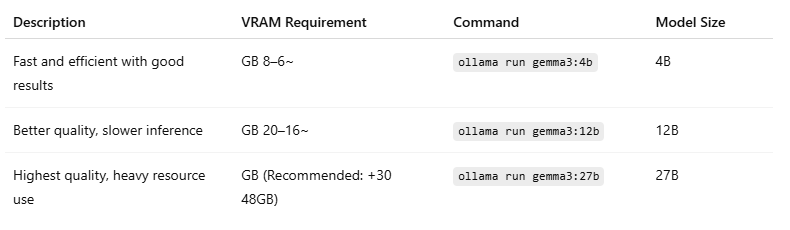
👉 Model Page:
https://ollama.com/library/gemma3
ollama run gemma3🔥Uncensored Model:
https://ollama.com/huihui_ai/gemma3-abliterated
ollama run huihui_ai/gemma3-abliterated⚠️ Make sure you're using the multimodal (vision) variant of Gemma 3 to ensure it can process image-based prompts in ComfyUI.
✅ Key Benefits
Improved editing accuracy from even simple input prompts.
Local-first, privacy-safe setup using Ollama and ComfyUI.
Flexible model choices depending on your hardware.
💡 Example
Input prompt:
"change the style to realistic"
Enhanced prompt via Gemma-3:
"Change the image to a photorealistic rendering, with accurate lighting, textures, and details, while preserving the subject’s facial features, pose, and the existing composition."
🌍 Multilingual Prompt Support
This workflow supports prompts in any language, including Arabic, and automatically translates them into expressive English prompts that Flux1 can interpret.
💬 Example:
Input (Arabic):
"حول الستايل إلى حقيقي"
Enhanced Output (English):
"Change the image to a photorealistic rendering, with accurate lighting, textures, and details, while preserving the subject’s facial features, pose, and the existing composition."
This makes the workflow highly accessible to non-English speakers while still benefiting from professional-grade prompt enhancement.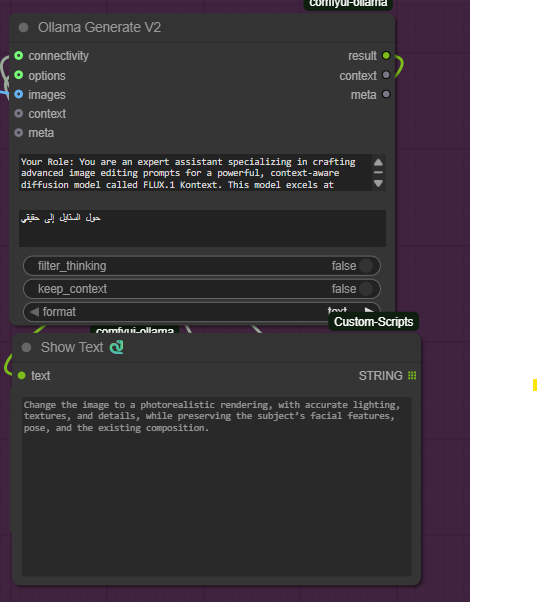
🧩 Workflow Versions
There are two versions of this workflow available:
🔹 Basic Version
Designed for ease of use.
Supports 1–2 input images.
🔸 Advanced Version
Supports up to 4 input images.
Includes upscaling at the end of the pipeline.
Built for professional-quality outputs.
Based on a modified version of this original workflow from Civitai:
👉 https://civarchive.com/models/618578?modelVersionId=1956938
Description
4 images + Upscale
FAQ
Comments (18)
Thanks, I don't use your workflow due to lack of vram to use the LLM but I took your instructions that I use with grok and it works well. Do you have instructions for flux dev?
You can run 4b on just 6GB of VRAM, which is enough to give you excellent results. GROK works well for uncensored images.
For FLUX DEV, you can find them in my app:
https://civitai.com/articles/15662/uncensored-free-app-to-convert-images-into-prompts-for-wan21-sdxl-flux1-and-more
or directly from this link:
https://github.com/rorsaeed/image-to-prompt/blob/main/data/system_prompts.json
@jorgmikel76648 Thanks for your reply and the links, I'll try that with my meager 8GB. Yes, that's why I use Grok ;). Aside from generating prompts, have you tried Grok's unhinged voice mode? Very fun.
Does not work. Keeps erroring with this message:
1 validation error for GenerateRequest model String should have at least 1 character [type=string_too_short, input_value='', input_type=str] For further information visit https://errors.pydantic.dev/2.11/v/string_too_short
Because on OllamaGenerate, model is empty, and I have no downloaded model so it's undefined, and the workflow has no built-in mechanism to automatically download required model. Also on the model pages you linked in the guide, there's no download button anywhere.
You can download only via terminal. Execute this command via terminal:
ollama run gemma3
You're using a modified version of kontext in this workflow, right? "kontextNsfwFp8"?
Where can we download this model?
I'd image Google is your friend. This very important checkpoint was on this site for a surprising period, and it is excellent at fixing that one issue Kontext has!
@blobby99 and @lakdanan Thank you! I'll look into both options.
@foneckeckem813 Haha.. that model got deleted. I was late. Thank you though. :)
@nymical Same here ugh, was hoping on snagging this model! Did a google search but nothing popped up
@luisx123 Check out this comment on a reddit thread.
https://www.reddit.com/r/StableDiffusion/comments/1lros7q/comment/n1chj4k/
My experience was not great, but ymmv.
@foneckeckem813 can you post a link to the file so that I can download it?
@nymical Much appreciated!
jorgmikel76648, I am interested in your work, thank you. There is NSFW on the examples. And in the workflow as well. Soft erotica is very beautiful and uplifting, although I'm not a fan of hard erotica.))
kontextNsfwFp8 - what to replace it with? Or is there a reference?
thnak you,
try this one:
https://civitai.com/models/958009?modelVersionId=1849802
but the original model give best result in most other cases